Pros
- Six manufacturer-listed DPI presets: 800 to 6,400
- Seven-button layout includes navigation and DPI controls
- Seven RGB backlight modes

All categories
 New condition
Computer Accessories
Onikuma · CW905
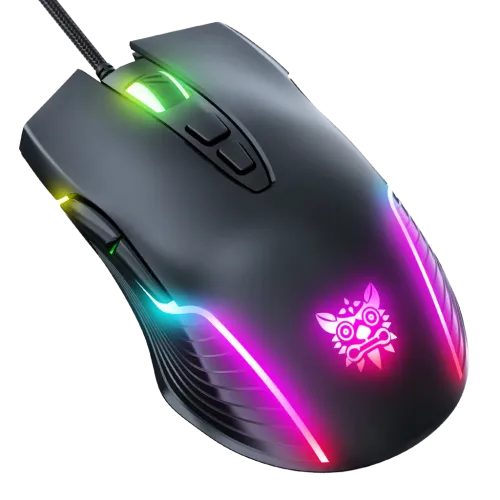
Onikuma CW905 wired USB optical mouse with seven buttons, six DPI presets up to 6,400 and seven RGB modes. Check the colour, current offer and written warranty before ordering.
Approximate Market Price
BDT 1,100
Informational market estimate only; this is not a current Store offer. Last checked Nov 13, 2026. Source
Compare store prices
No live offers for this variant
BDT 1,100
Approximate Market Price
Informational market estimate only; this is not a current Store offer. Last checked Nov 13, 2026. Source
Loading history…
Product story
The Onikuma CW905 is a wired USB optical mouse for gaming and everyday computer use. This page describes the wired CW905. Confirm the model and connection type on the box before ordering because similarly named CW905 products may have different configurations.
The manufacturer lists six sensitivity presets: 800, 1,600, 2,400, 3,200, 4,800 and 6,400 DPI. Use the dedicated DPI up/down buttons to cycle between the presets. The manufacturer also shows colour indicators for the selected DPI. DPI describes cursor sensitivity; actual tracking depends on your operating system settings, surface and personal preference.
The seven controls are left click, right click, middle/scroll click, forward, back, DPI increase and DPI decrease. Forward and back may support browser navigation in software that recognizes those controls. The manufacturer does not document a dedicated configuration utility or programmable macros for this listing, so do not assume those functions are available.
Onikuma describes seven RGB backlight modes. The symmetrical outer shape has a familiar left/right-button layout, but the listing does not establish that every grip style or hand size will find it comfortable. Lighting is a visual feature and does not change the mouse's tracking performance.
The CW905 connects through USB and does not need a wireless receiver or a separate mouse battery. Onikuma lists a cable of about 1.5 metres, so check that it can reach your computer from your intended setup. Plug it into a compatible USB port and allow your operating system to recognize the mouse.
Product imagery and retailer variants show different colours, while the manufacturer page identifies its own available colour variants separately. Image galleries can combine colour options. Confirm the exact colour and included items for the offer you select; the photos alone do not guarantee that each colour is in stock.
A Bangladesh retailer lists the black CW905 at BDT 1,100 and describes a one-year warranty in its summary, but the same retailer's detailed description says six months. That conflict is unresolved. Treat the warranty term as unconfirmed and ask the seller for the written coverage, claim process and required documents before buying. The retailer price is a reference, not a confirmed BiponiBD live offer; check the current price, stock and delivery terms on the offer page.
Verify that the offer is the wired CW905, confirm colour and warranty in writing, check the cable reach and USB compatibility, and review the seller's return and delivery conditions. Keep the mouse dry and use it on a suitable surface. Specifications can vary by seller listing or product revision; contact the seller if the delivered label differs from this description.
Helpful answers
Product-specific answers maintained with the catalog information.
Onikuma lists six selectable presets: 800, 1,600, 2,400, 3,200, 4,800 and 6,400 DPI. Use the DPI up and down controls to cycle through the listed levels.
This product is the wired USB CW905. It does not use a wireless receiver or a separate mouse battery. Confirm the model and connection on the offer before ordering, since similarly named models may differ.
It has seven buttons: left, right, middle/scroll, forward, back, DPI up and DPI down. Onikuma lists seven RGB backlight modes.
Onikuma's specification lists a cable of about 1.5 metres. Treat this as an approximate specification and check your desk layout for adequate reach.
A Bangladesh retailer lists the CW905 at approximately 127 × 71 × 40 mm and 132 g. These are seller-listed figures; confirm the package or seller details if exact measurements matter.
The source retailer is inconsistent: its summary says one year, while its detailed text says six months. The term is not verified. Ask the seller for written coverage and claim conditions before purchase.
The current variant and gallery may show multiple colours. Confirm the selected colour and its stock with the seller before ordering; a gallery image alone does not guarantee availability.
The cited manufacturer specification does not state a polling rate or a dedicated configuration utility for this CW905 listing. Confirm these details with the seller rather than assuming 1,000 Hz, macros or driver support.
Customer community
Become a merchant
Join BiponiBD, publish accurate offers and start free.