Pros
- Adds four USB-A ports
- Compact short-lead layout
- USB 2.0 peripherals supported

All categories
 New condition
Computer Accessories
Onten · OTN-5208
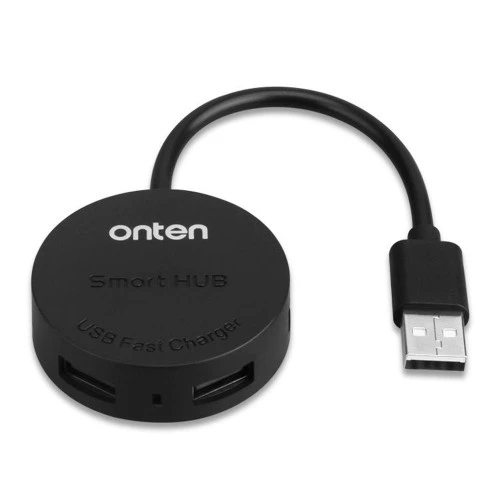
Onten OTN-5208 expands one USB-A 2.0 host port to four USB-A ports at up to 480Mbps shared bandwidth, with a listed 20cm cable.
Approximate Market Price
BDT 500
Informational market estimate only; this is not a current Store offer.
Compare store prices
No live offers for this variant
BDT 500
Approximate Market Price
Informational market estimate only; this is not a current Store offer.
Loading history…
Product story
Onten OTN-5208 is a compact USB 2.0 hub that expands one USB-A connection into four USB-A ports. Bangladesh retailer specifications list a 20cm cable and data signalling up to 480Mbps. It can provide additional ports for compatible low-power peripherals such as a keyboard, mouse or flash drive, subject to the host port’s power and bandwidth limits. Seller pages mention charging functionality and a Micro-USB power input, but exact current ratings and included power accessories are not consistently documented for the local offer.
The local OTN-5208 listings identify one USB-A male upstream plug and four USB-A female downstream ports. Connect the male input to a compatible host USB-A port, then attach peripherals to the hub outputs. The checked configuration does not establish a USB-C upstream connector. If the computer only has USB-C, a suitable adapter may be needed; confirm that it supports the intended USB data functions.
Star Tech and Ryans list up to 480Mbps, the nominal signalling rate associated with USB 2.0 High-Speed. This bandwidth is shared by devices using the hub rather than provided independently at full rate to each of the four outputs. Protocol overhead, host capabilities, storage-device performance, cable quality and simultaneous traffic reduce application-level transfer speeds. This is not a USB 3.x hub.
Four output ports can help connect accessories when a computer has limited ports. Keyboards, mice and other low-bandwidth devices may be convenient candidates, while multiple storage devices or high-traffic peripherals compete for the upstream link. Connected devices must be compatible with USB-A and the operating system. Avoid plugging in more devices than the hub or host can power reliably.
Ryans lists a smart fast-charging function, and other sellers describe a Micro-USB power input for the model family. However, the local listings checked do not establish a per-port current, aggregate output limit or guaranteed charging protocol for this product offer. The 480Mbps data rate says nothing about charging power. Use a dedicated charger for devices that require known fast-charge performance and verify the exact power input and accessory contents with the seller.
The listed upstream cable is 0.2m (20cm), which keeps the hub close to its host port but may limit placement on a desk or behind a computer. Measure the distance before purchase and avoid tension on the host connector. Do not use the cable as a handle or sharply bend it where it meets the hub body.
The listed upstream connector is USB-A male and the downstream ports are USB-A female. A laptop or tablet with only USB-C ports needs a compatible USB-C-to-USB-A adapter or another hub with a native USB-C input. The adapter must support data transfer and the devices connected; a charge-only adapter will not serve as a data connection. Verify the host port and peripheral requirements before ordering.
A 2.5-inch external drive, phone or other power-demanding device may need more current than a computer port or bus-powered hub can provide. Some product pages refer to an external Micro-USB supply, but exact rating and local package contents are not confirmed. Check the device manufacturer’s power needs and the exact hub revision. Do not assume every connected drive or phone will operate or charge reliably from this hub.
Star Tech and Ryans list a two-year warranty for their own offers. These terms are seller-specific. Before checkout, confirm the selected seller, coverage duration, claim process, return window and exact package contents, including whether a Micro-USB power lead or adapter is present. Confirm current price, stock and delivery terms separately; this product research does not verify a BiponiBD offer.
The OTN-5208 may suit a user needing four nearby USB 2.0 Type-A ports for compatible peripherals and accepting shared bandwidth and a short cable. Choose a higher-speed hub for large or simultaneous transfers, and a powered hub or dedicated charger where devices need more current. Confirm the host connector, power requirements, model revision and seller warranty before purchase.
It is a USB 2.0 hub with one USB-A male input and four USB-A female ports, according to Bangladesh retailer specifications.
Retailers list a maximum USB 2.0 rate of up to 480 Mbps. This is the standard’s theoretical link rate and is shared across active ports; actual file-transfer speeds are lower and depend on the host, devices and workload.
The hub provides four USB-A output ports. Whether four devices can operate together depends on available power, the host port and each device’s requirements.
Star Tech and Ryans list a 0.2 metre (20 cm) cable. Check that this short lead reaches comfortably from the computer port to the hub’s placement.
Ryans describes a smart fast-charging function, but the checked local specifications do not give a confirmed per-port current or total output budget. Do not assume this hub replaces a dedicated charger or can fast-charge every device.
Retail listings for this model family describe a Micro-USB power input, but local offer details do not consistently confirm whether a power adapter or cable is included. Check the exact unit and package contents with the seller before connecting power.
Star Tech lists storage drives, keyboards, mice and printers as example USB devices. High-power devices may require their own power source or a separately powered hub; verify the device requirement and hub’s confirmed power arrangement.
The hub input is listed as USB-A male. A USB-C-only host needs a compatible USB-C-to-USB-A adapter, which is not confirmed as included. Adapter capability and host support also matter.
Star Tech and Ryans list a two-year warranty for their respective offers. These seller terms do not automatically apply to another merchant; check the selected BiponiBD offer.
This review did not verify a live BiponiBD merchant offer, checkout price or inventory. Confirm current seller details before ordering.
Helpful answers
Product-specific answers maintained with the catalog information.
It is a USB 2.0 hub with one USB-A male input and four USB-A female ports, according to Bangladesh retailer specifications.
Retailers list a maximum USB 2.0 rate of up to 480 Mbps. This is the standard’s theoretical link rate and is shared across active ports; actual file-transfer speeds are lower and depend on the host, devices and workload.
The hub provides four USB-A output ports. Whether four devices can operate together depends on available power, the host port and each device’s requirements.
Star Tech and Ryans list a 0.2 metre (20 cm) cable. Check that this short lead reaches comfortably from the computer port to the hub’s placement.
Ryans describes a smart fast-charging function, but the checked local specifications do not give a confirmed per-port current or total output budget. Do not assume this hub replaces a dedicated charger or can fast-charge every device.
Retail listings for this model family describe a Micro-USB power input, but local offer details do not consistently confirm whether a power adapter or cable is included. Check the exact unit and package contents with the seller before connecting power.
Star Tech lists storage drives, keyboards, mice and printers as example USB devices. High-power devices may require their own power source or a separately powered hub; verify the device requirement and hub’s confirmed power arrangement.
The hub input is listed as USB-A male. A USB-C-only host needs a compatible USB-C-to-USB-A adapter, which is not confirmed as included. Adapter capability and host support also matter.
Star Tech and Ryans list a two-year warranty for their respective offers. These seller terms do not automatically apply to another merchant; check the selected BiponiBD offer.
This review did not verify a live BiponiBD merchant offer, checkout price or inventory. Confirm current seller details before ordering.
Customer community
Become a merchant
Join BiponiBD, publish accurate offers and start free.