Pros
- Adds four USB-A ports to a compatible USB-C host
- USB 3.0 data rate listed up to 5 Gbps

All categories
 New condition
Computer Accessories
Onten · OTN-9596
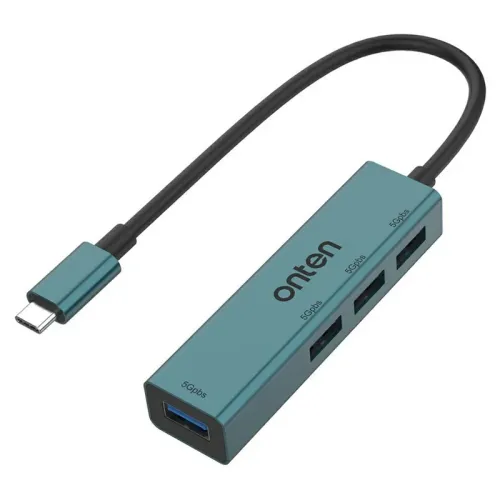
Onten OTN-9596 USB-C hub with four USB 3.0 Type-A ports, up to 5 Gbps data rate and an approximately 0.2 m cable.
Approximate Market Price
BDT 1,000
Informational market estimate only; this is not a current Store offer. Last checked Sep 14, 2026.
Compare store prices
No live offers for this variant
BDT 1,000
Approximate Market Price
Informational market estimate only; this is not a current Store offer. Last checked Sep 14, 2026.
Loading history…
Product story
The Onten OTN-9596 is a compact hub for adding four USB-A connections to a compatible USB-C host. It is useful when a laptop or other supported device has too few ports for a mouse, keyboard, flash drive or other USB accessories. The local retailer identifies the four downstream ports as USB 3.0.
Connect the hub’s USB-C plug to the host, then connect compatible USB-A peripherals to the four hub ports. The listed maximum data rate is 5 Gbps; this is an interface rating, not a guaranteed file-transfer speed. Actual performance depends on the host, connected device and workload, and connected devices share the upstream connection.
Check that the host USB-C port supports USB data and that the operating system supports the peripherals being attached. A USB-C connector alone does not guarantee every possible USB feature. The reviewed listing does not establish dedicated power delivery, video output or a separate power supply, so do not assume those functions. Several high-power devices may exceed the host’s available power; confirm power requirements before connecting them.
The attached cable is listed at approximately 0.2 m, so check whether it reaches comfortably from the host port. Connect it without bending the cable sharply and keep the hub dry. Safely eject storage devices before unplugging them to reduce the chance of data loss. If a device is not recognised, check the host port, peripheral and power requirements.
Confirm the exact OTN-9596 model, USB-C host compatibility, colour, package contents and warranty terms with the seller. A local retailer advertises two years of replacement warranty on its own listing; coverage can differ between offers. The product is a USB data hub, and its listed 5 Gbps maximum does not imply a separate full-speed link for every device simultaneously.
Helpful answers
Product-specific answers maintained with the catalog information.
The USB-C plug connects to a compatible host. The hub provides four USB-A ports for peripherals. Confirm that the host port supports USB data.
No. The listed 5 Gbps is a maximum interface rate. Connected devices share the upstream link, and actual speeds depend on the host and peripherals.
The reviewed listing identifies four USB-A data ports and does not establish HDMI or dedicated power-delivery support. Confirm required features before buying.
Customer community
Become a merchant
Join BiponiBD, publish accurate offers and start free.