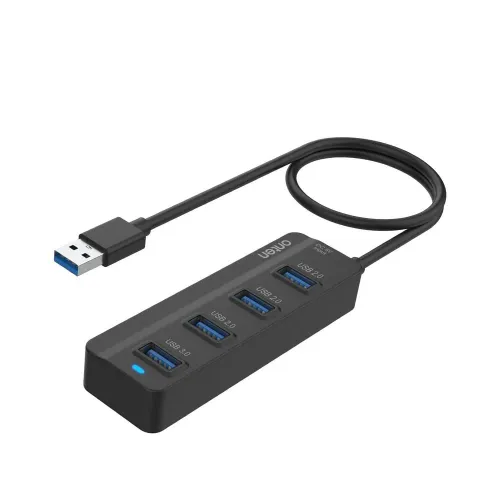
Onten OTN-2305 USB 3.0 4-Port Hub The Onten OTN-2305 expands one USB 3.0 Type-A host connection into four downstream USB-A ports. Product listings from Star Tech and Tech Land identify one USB 3.0 output and three USB 2.0 outputs, for four peripherals in total. This mixed-speed layout is useful when a computer has limited ports and the connected devices do not all need the same interface speed. The model is also listed as OTN-2305 and described as a 4-in-1 hub. Port layout Upstream connection: one USB 3.0 Type-A male plug for the computer or other compatible USB host. Downstream connections: one USB 3.0 Type-A port and three USB 2.0 Type-A ports. Total downstream ports: four. The USB 3.0 port is the high-speed choice for compatible storage and other devices that support USB 3.0. The three USB 2.0 ports suit common lower-bandwidth equipment such as keyboards, mice, printers and wireless receivers. Match the device plug to a USB-A socket and check the labels or product images to identify which output is USB 3.0. The hub does not turn a USB 2.0 peripheral into a USB 3.0 device. Transfer rates and practical use Retailer listings rate the USB 3.0 connection at up to 5 Gbps. This is the USB 3.0 link rate under supported conditions, not a guaranteed file-copy speed. Actual throughput depends on the host port, connected device, cable path, file workload and other parts of the system. The product information identifies the three remaining ports as USB 2.0; they have a lower interface ceiling than the USB 3.0 port. Using several devices at the same time also shares the available host connection bandwidth. A keyboard, mouse or wireless receiver can use a USB 2.0 port while a compatible external drive uses the USB 3.0 port. A printer, flash drive, webcam, phone cable or other accessory may be physically connectable when it has a suitable USB-A plug, but actual compatibility and performance depend on that device. Do not assume that every connected device receives enough power or that all four ports can sustain their maximum rates simultaneously. Compatibility and setup Star Tech and Tech Land list Windows, macOS and Linux compatibility and describe plug-and-play operation. Connect the integrated USB-A male host plug to a compatible computer port, then connect peripherals to the four downstream ports. No separate driver is listed for ordinary hub operation. Some devices may require their own software, direct host connection, or additional power. Confirm the device and host requirements when using external storage, cameras, phones or other power-demanding accessories. The available retailer information does not consistently specify the integrated cable length, body material, exact dimensions, included power adapter or a separate auxiliary power input. These details are not promised here. Check the product listing, physical packaging or seller before purchase if any of them matter to your desk layout or connected devices. Key specifications Brand: Onten (also styled ONTEN in listings) Model / MPN: OTN-2305 Product type: 4-port USB hub Upstream interface: 1 × USB 3.0 Type-A male Downstream ports: 1 × USB 3.0 Type-A; 3 × USB 2.0 Type-A Total downstream ports: 4 Listed maximum USB 3.0 link rate: up to 5 Gbps; actual transfer speed varies Compatibility stated by retailers: Windows, macOS and Linux Setup: Plug and play for compatible devices; no dedicated hub driver is listed Warranty: Bangladesh listings commonly show a 2-year replacement warranty; confirm the seller and supplied warranty card Benefits Four downstream ports add room for several USB-A peripherals from one host connection. The mixed USB 3.0 and USB 2.0 layout gives users a clearly faster port for compatible high-speed devices while retaining three ports for everyday accessories. The single host plug keeps the setup straightforward, and retailer listings identify broad desktop operating-system support. Limitations and buying checks This hub has one USB 3.0 downstream port; the other three are USB 2.0, so it is not a four-port USB 3.0 hub. All connected devices share the bandwidth and power available from the host connection. Power-hungry peripherals may need a separately powered solution, but the reviewed product listings do not consistently confirm an included adapter or auxiliary power input. The hub uses USB-A host and output connectors and will not directly connect to a USB-C-only computer without a compatible adapter. Cable length, casing material and physical dimensions are not consistently specified in the sources checked. Before ordering, confirm that the seller is supplying model OTN-2305, check the four-port configuration, and ask which port is USB 3.0 if identification is not clear in the package. Compare live stock, current price and delivery cost. Retail listings commonly describe a 2-year replacement warranty, but the warranty provider, coverage, exclusions and claim process can differ; retain the invoice and verify the terms printed on the supplied warranty card.