Pros
- Connects a DisplayPort PC output to an HDMI display
- Compact integrated lead design
- No driver installation described for basic setup

All categories
 New condition
Computer Accessories
Onten · OTN-5117
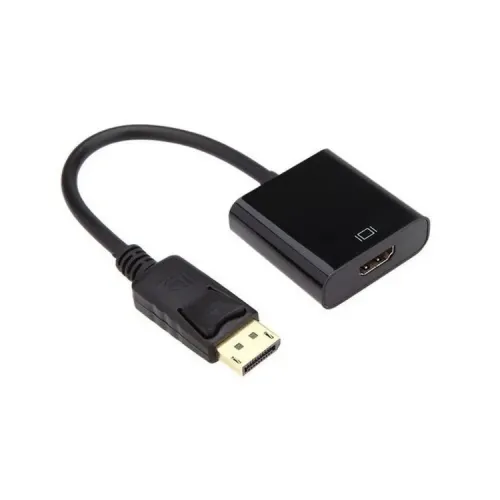
Onten OTN-5117 converts DisplayPort output to HDMI. Listings differ on resolution; verify the exact revision and display mode before purchase.
Approximate Market Price
BDT 546
Informational market estimate only; this is not a current Store offer.
Compare store prices
No live offers for this variant
BDT 546
Approximate Market Price
Informational market estimate only; this is not a current Store offer.
Loading history…
Product story
Onten OTN-5117 is a directional video adapter for connecting a computer or graphics card with a full-size DisplayPort output to an HDMI monitor, television or projector. IT Source Bangladesh and the Onten Pakistan page identify the model and list support up to 3840×2160 at 30Hz. Ryans Bangladesh lists 1920×1080 and a 0.2m lead. Because exact-model listings differ on supported resolution, check the adapter revision and the specific display mode required before buying.
The described configuration is DisplayPort male on the source side and HDMI Type-A female on the display side. The DisplayPort plug connects to a compatible PC, laptop or graphics card output. A separate HDMI cable connects the adapter to the monitor, television or projector. Signal conversion runs from DisplayPort to HDMI only; it does not work in reverse. This is not a USB-C, Mini DisplayPort or HDMI-input adapter.
Resolution claims vary across reviewed exact-model sources. IT Source and Onten Pakistan list up to 3840×2160 (4K) at 30Hz, while Ryans lists 1920×1080 and does not show the same 4K mode in its quick specification. The actual output depends on adapter revision, source DisplayPort capability, display HDMI input, cable quality and the mode negotiated by both devices. Treat 4K30 as the highest documented claim from two listings, not a guarantee for every OTN-5117 unit. Confirm whether your monitor can accept that signal over the chosen HDMI input.
The reviewed sources do not substantiate 4K at 60Hz. A listing that says 4K30 should not be interpreted as 4K60, HDR support, variable refresh rate or high refresh at lower resolutions unless those capabilities are separately confirmed for the exact hardware revision. For gaming or high-refresh desktop use, check the adapter’s exact bandwidth and the source/display timing requirements with the seller, or choose a product whose manufacturer specification explicitly lists the needed mode.
The adapter requires a DisplayPort video output on the source side and an HDMI input on the display. A computer’s USB-C connector is not automatically compatible: it must support DisplayPort Alt Mode and may need a separate USB-C video adapter. Operating-system compatibility alone does not guarantee a video signal if the port or graphics configuration lacks DisplayPort output. The sources list computers, graphics cards, monitors, televisions and projectors as intended device types.
The seller describes plug-and-play installation without additional driver software. Insert the DisplayPort plug into the source, connect a standard HDMI cable to the female output, then select the matching HDMI input on the screen. Ryans lists a 0.2m lead; IT Source calls it a short integrated cable. This compact reach may suit close connections but can limit placement behind a desk or projector. Cable length and the HDMI cable itself affect setup convenience.
The adapter is described as digital video equipment. The reviewed sources do not consistently state audio pass-through, external power requirements, exact chipset, connector plating or full material composition. Those properties are therefore not guaranteed here. Do not add an assumed external power input or audio capability to a purchase decision without checking the exact package. Onten Pakistan marketing mentions gold-plated connectors, but it is not corroborated across the local sources.
Warranty details differ or are incomplete across sellers: Ryans lists the product but the captured page does not confirm precise coverage, and IT Source points buyers to its warranty policy. Confirm seller, duration, replacement/repair terms, return window and proof-of-purchase requirements before ordering. Also verify the model label OTN-5117, DP male to HDMI female direction, exact supported resolution and refresh rate, and whether an HDMI cable is included. BiponiBD stock and checkout price were not verified.
This converter can suit a user who needs to connect a DisplayPort-equipped desktop or laptop to an HDMI display for office work, presentations or video, and whose target resolution is confirmed for the particular unit. It is not the right direction for an HDMI source, and users who require 4K60, HDR, gaming refresh rates or USB-C input should verify those capabilities separately. Check both ends of the signal chain before purchase.
It converts a DisplayPort source to an HDMI display. It does not convert HDMI output to DisplayPort.
The Bangladesh listing specifies a full-size DisplayPort male plug and HDMI Type-A female output. Connect a separate HDMI cable from the adapter to the display.
IT Source and Onten Pakistan list up to 3840×2160 at 30Hz, while Ryans specifies 1920×1080 and 60Hz. The exact mode may depend on adapter revision, source DP output, display, HDMI cable and EDID negotiation; verify your required mode with the seller.
The reviewed listings do not confirm 4K at 60Hz for this unit. One exact-model seller lists 4K at 30Hz. Do not assume 4K60 support.
This adapter’s upstream connector is full-size DisplayPort. A USB-C port only works if the device supports DisplayPort Alt Mode and an appropriate adapter is used; that extra setup is not included or guaranteed.
The seller describes plug-and-play use. The computer must still provide a compatible DisplayPort video signal and the display must accept the selected HDMI mode.
No; the output is HDMI female. It is intended for an HDMI display, such as a compatible monitor, television or projector.
The reviewed exact-model information confirms digital video conversion but does not clearly document audio-channel support. Check the specific source and display configuration before relying on audio.
Ryans lists warranty information, but the reviewed detail does not establish consistent coverage. IT Source says to see its policy. Confirm the selected seller’s written warranty and return terms.
This review did not verify a live BiponiBD offer, inventory or checkout price. Confirm exact revision, supported resolution and warranty before ordering.
Helpful answers
Product-specific answers maintained with the catalog information.
It converts a DisplayPort source to an HDMI display. It does not convert HDMI output to DisplayPort.
The Bangladesh listing specifies a full-size DisplayPort male plug and HDMI Type-A female output. Connect a separate HDMI cable from the adapter to the display.
IT Source and Onten Pakistan list up to 3840×2160 at 30Hz, while Ryans specifies 1920×1080 and 60Hz. The exact mode may depend on adapter revision, source DP output, display, HDMI cable and EDID negotiation; verify your required mode with the seller.
The reviewed listings do not confirm 4K at 60Hz for this unit. One exact-model seller lists 4K at 30Hz. Do not assume 4K60 support.
This adapter’s upstream connector is full-size DisplayPort. A USB-C port only works if the device supports DisplayPort Alt Mode and an appropriate adapter is used; that extra setup is not included or guaranteed.
The seller describes plug-and-play use. The computer must still provide a compatible DisplayPort video signal and the display must accept the selected HDMI mode.
No; the output is HDMI female. It is intended for an HDMI display, such as a compatible monitor, television or projector.
The reviewed exact-model information confirms digital video conversion but does not clearly document audio-channel support. Check the specific source and display configuration before relying on audio.
Ryans lists warranty information, but the reviewed detail does not establish consistent coverage. IT Source says to see its policy. Confirm the selected seller’s written warranty and return terms.
This review did not verify a live BiponiBD offer, inventory or checkout price. Confirm exact revision, supported resolution and warranty before ordering.
Customer community
Become a merchant
Join BiponiBD, publish accurate offers and start free.