Pros
- Connects compatible USB-A peripherals to a USB-C host.
- USB 3.0 and up to 5Gbps are listed.
- Compact aluminum-alloy adapter form is portable.

All categories
 New condition
Computer Accessories
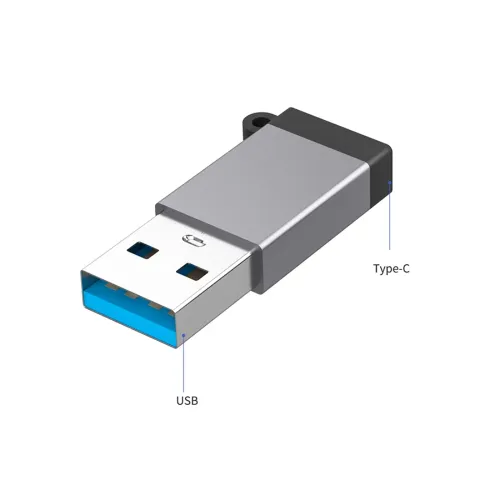
Onten · OTN-5311T Type-C to USB-A 3.0 OTG Adapter
ONTEN OTN-5311T USB 3.0 OTG adapter with up to 5Gbps listed. Most sellers describe Type-C to USB-A, but one conflicts on connector genders; verify plugs and host compatibility.
Approximate Market Price
BDT 300
Informational market estimate only; this is not a current Store offer.
Compare store prices
No live offers for this variant
BDT 300
Approximate Market Price
Informational market estimate only; this is not a current Store offer.
Loading history…
Product story
The ONTEN OTN-5311T is a compact Type-C/USB-A OTG adapter. Star Tech and Astrix list USB Type-C input, USB-A 3.0 output, aluminum-alloy construction and up to 5Gbps data transfer. These specifications describe the common USB-C male-to-USB-A female OTG configuration. A Ryans listing using the same model instead describes USB male-to-Type-C female, so connector orientation is not consistent across every seller source. Confirm the actual plug genders from the selected offer before purchase.
The exact model code is OTN-5311T. Most model-specific Bangladesh pages say Type-C to USB-A and identify a USB-A 3.0 output; a separate retailer record calls it USB male to Type-C female. For OTG use with a USB-C phone and USB-A peripheral, the required physical adapter is USB-C male to USB-A female. Check that the product photo and packaging show this configuration. Do not rely on interface wording alone, which may describe signal direction rather than plug genders.
Bangladesh sellers list USB 3.0 and up to 5Gbps for this adapter. 5Gbps is the theoretical maximum link rate for USB 3.0/USB 3.2 Gen 1, not guaranteed file-copy throughput. The USB-C host, adapter, peripheral and any connecting cable must all support SuperSpeed. USB 2.0 peripherals or host ports will negotiate at a lower speed. Check the link mode and device capability when transferring large files.
For a phone or tablet, USB-C host/OTG mode is required to operate USB peripherals. Some devices need an OTG setting enabled, an unlocked screen or permission approval. USB-C connector presence alone does not guarantee OTG support. A computer’s USB-C port can also connect a USB-A peripheral if the operating system supports it. Check the host manual and peripheral requirements, especially for external drives that draw power from the port.
A USB-A female socket can accept a flash drive, keyboard, mouse, game controller or other compatible USB-A plug. The adapter is not a multiport hub, Ethernet adapter, card reader or video converter. Specialized accessories may need a driver, application or additional power. A printer may not work with every phone even when the physical connection fits. Confirm the device’s USB host capability and operating-system support before relying on the adapter.
Retailers list charging as a function, but the inspected OTN-5311T listings do not establish a verified current rating, maximum wattage or USB Power Delivery profile. In OTG use, the host may supply power to the attached peripheral; availability depends on the device and adapter configuration. Do not assume the adapter is a phone charger or can power a high-current drive. Use a powered hub only when the host permits that setup.
Star Tech and other local sellers list an aluminum-alloy housing. Product descriptions emphasize a compact portable form, but the inspected exact-model pages do not provide independent durability, water-resistance or insertion-cycle test results. Support heavy peripherals so they do not lever against the host’s USB-C port. Insert and remove connectors straight, avoid sharp pressure on the shell and keep both ports dry and clear of debris.
Confirm the adapter’s connector genders before connecting. Insert the Type-C male plug into a compatible host, then attach a USB-A peripheral to the female port. Approve any OTG or file-access prompt. If the peripheral is not detected, check the host’s OTG setting, try a low-power accessory, test the peripheral elsewhere and inspect the ports. For slower-than-expected transfers, verify that the host and peripheral are USB 3.0 capable.
If a flash drive does not mount, confirm the file system is supported and the drive works on a computer. If the connection drops, reseat the adapter, test another port and check whether a case prevents full insertion. Disconnect storage with the operating system’s safe-eject option after writes finish. The adapter cannot recover corrupted files or make an unsupported device compatible. Keep backups of important data before transfers.
The adapter changes connector access; it cannot upgrade a USB 2.0 host, add OTG capability to an unsupported phone or provide a USB-C PD charging profile not documented for the model. No video output or independent power supply was listed. Confirm whether you need USB-C host to USB-A peripheral direction, the host’s available current and the peripheral’s power draw. Different connector-direction adapters may look similar but serve opposite roles.
Star Tech and other Bangladesh sellers list a two-year replacement warranty for the OTN-5311T, though terms can differ. Confirm the exact seller, warranty provider, replacement conditions, invoice requirement and return window. At delivery, verify model OTN-5311T, the USB-C/USB-A plug arrangement, USB 3.0 label and aluminum shell. Current price and stock are offer-specific and were not independently validated for the selected BiponiBD offer.
The OTN-5311T is listed as an aluminum USB 3.0 OTG adapter with up to 5Gbps, suitable for connecting compatible USB-A peripherals to a USB-C host. It is small and requires no software driver for ordinary USB devices in supported systems. Retail sources disagree on connector gender direction, and the exact power rating is not established. Verify the physical unit and host compatibility before ordering.
What is the model? ONTEN OTN-5311T. What connectors should the OTG version have? USB-C male to USB-A female, as listed by Star Tech/Astrix; a Ryans record conflicts, so verify the offer. What speed is listed? Up to 5Gbps for USB 3.0; actual speed depends on all connected devices. Does it support OTG? Sellers list OTG, but the host must support USB host mode. Can it connect a flash drive or keyboard? Yes, if host, operating system and accessory are compatible. Does it provide USB PD charging? No exact PD profile was established. Can it output video? Video was not listed. What is the housing material? Aluminum alloy is listed. What warranty is offered? Two years replacement is listed by some Bangladesh sellers; confirm the selected offer.
Helpful answers
Product-specific answers maintained with the catalog information.
The model is ONTEN OTN-5311T.
Most sources say Type-C to USB-A; a Ryans record says USB male to Type-C female, so verify exact plug genders.
Up to 5Gbps is listed for USB 3.0; real throughput varies by setup.
Retailers list OTG; the host must support USB host mode.
Yes, if the adapter has the expected USB-C male to USB-A female layout and the host supports OTG.
No, USB-C host/OTG support varies by device.
No exact PD profile was established in the inspected sources.
Video output was not listed for this adapter.
Aluminum alloy is listed by Bangladesh sellers.
Some local retailers list a two-year replacement warranty; confirm the selected seller’s terms.
Customer community
Become a merchant
Join BiponiBD, publish accurate offers and start free.