Pros
- Simple male-to-male VGA connection for legacy display devices
- 1.5m length suits nearby workstation or presentation setups
- No driver or external power is listed for the passive cable

All categories
 New condition
Computer Accessories
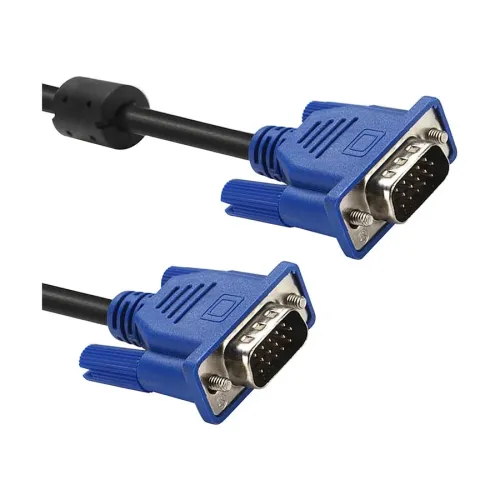
Onten · OTN-6301V 1.5M VGA Cable
ONTEN OTN-6301V 1.5m VGA cable with 15-pin male connectors at both ends. Check VGA port compatibility and source/display resolution; maximum mode is not specified.
Approximate Market Price
BDT 358
Informational market estimate only; this is not a current Store offer.
Compare store prices
No live offers for this variant
BDT 358
Approximate Market Price
Informational market estimate only; this is not a current Store offer.
Loading history…
Product story
The ONTEN OTN-6301V is a 1.5-meter VGA cable with a 15-pin male connector at each end, according to Star Tech and Techland listings. It connects compatible VGA output and VGA display input ports, such as a computer to a monitor or projector. VGA is an analog video interface, so image quality and supported display mode depend on the source, display, graphics hardware, cable condition and setup. The reviewed exact-model pages do not specify a maximum resolution or refresh rate for this cable.
Both ends are listed as 15-pin male, commonly called DE-15 or VGA male connectors. Connect a VGA output from a computer or laptop to a VGA input on a monitor or projector. A cable with matching plugs cannot connect two VGA outputs or two VGA inputs. Check the port labels and connector orientation before ordering. The OTN-6301V is not a VGA-to-HDMI, HDMI-to-VGA, DVI or USB-C converter, and it does not contain an active video conversion device in the reviewed specifications.
VGA transmits analog video rather than HDMI-style digital video. The OTN-6301V product listings identify its length and connector type but do not publish a tested maximum resolution, refresh rate, bandwidth or image-quality certification. Do not infer a specific 1080p or higher capability from the model name or a generic VGA connection. Set a resolution supported by both the computer and display, then adjust it in the operating system. Longer runs, interference and connector condition can affect analog image clarity.
VGA is a video connection and does not carry digital audio through this cable. If the setup needs sound, use a separate audio connection supported by the computer, monitor, projector or speakers. A projector may have its own audio input or speaker, but this VGA cable does not provide that signal. HDMI and DisplayPort carry audio differently; switching to those interfaces requires compatible ports and, where necessary, a suitable active adapter.
The listed length is 1.5 meters, appropriate for nearby desktop, classroom or presentation equipment when the source and display are close together. Measure the route from the source port to the display, allowing slack around desk edges and stands. Do not stretch the cable tightly or place it where chairs, doors or feet can snag it. For a longer distance or fixed installation, use a cable and signal solution rated for that run rather than joining multiple extensions without checking signal behavior.
Standard VGA male connectors commonly have screw posts to secure them to a compatible port. Align the plug carefully and tighten the retaining screws by hand so the cable does not pull loose. Do not over-tighten or force bent pins into the port. Support the cable so its weight does not strain a laptop or monitor connector. A loose VGA connection can cause missing colors, flicker, ghosting or intermittent picture. Power down equipment if its manufacturer recommends doing so before reconnecting display cables.
The cable is intended for computers, monitors and projectors that have standard VGA ports. Many newer laptops and displays omit VGA, so a separate adapter may be needed; confirm the direction and active/passive behavior required for the specific devices. Passive adapters do not convert every signal direction. A VGA cable cannot provide USB data, power delivery, network access or audio. Check whether the display accepts analog VGA input before purchasing, particularly on modern digital-only monitors.
Connect one end to the VGA output and the other to the display’s VGA input, align the connectors, and secure the screws gently. Select the VGA input on the monitor or projector. Use the operating system’s display settings to choose a mode supported by both devices and adjust image positioning or phase if the display offers those controls. If the source has no VGA output, identify a compatible conversion adapter before setup; this cable by itself does not perform conversion.
If there is no picture, verify the source output, display input selection and both connections. Reseat the cable with the connector aligned. If colors are missing or the picture has interference, inspect the VGA pins for bends, test another port or known-good cable, and move the cable away from sources of electrical interference. If the display reports an unsupported mode, lower resolution or refresh rate to a shared setting. A cable cannot fix a failing graphics port or monitor.
Avoid sharp bends near the connector, pulling on the wire, crushing it under furniture or coiling it tightly. Disconnect by holding the connector shell and loosen the retaining screws before removal. Keep the connectors clean and dry. The reviewed listings do not establish shielding type, conductor gauge, ferrite beads, gold plating, material composition or tested durability for this exact unit; do not add those claims without package or manufacturer evidence. Replace the cable if insulation or connector pins are damaged.
Star Tech and Techland list a two-year replacement warranty for OTN-6301V; confirm the warranty provider, coverage conditions, claim location, invoice requirements and return window for the selected BiponiBD offer. The Techland listing shows upcoming stock while Star Tech lists in-stock status, demonstrating that availability varies by seller. Prices and stock on other sites are not confirmation of the live BiponiBD offer. At delivery, verify the OTN-6301V model, 1.5m length, VGA male ends and connector pin condition.
The OTN-6301V supplies a straightforward 1.5m VGA male-to-male connection for compatible legacy computers, monitors and projectors. It needs no driver or external power for a standard passive VGA link. Its compatibility is limited to devices with VGA ports, VGA does not carry audio, and the exact cable’s maximum resolution is not documented in reviewed model listings. Check the port direction and device mode before purchase, and use a separate audio cable or a suitable converter if the setup requires other signals.
ONTEN OTN-6301V is a 1.5m VGA-to-VGA cable with 15-pin male connectors at both ends. It connects compatible VGA outputs to VGA display inputs and carries analog video, not audio. Exact maximum resolution is not specified in the reviewed product pages. Newer devices without VGA may need a suitable adapter. Star Tech and Techland list two-year replacement warranty; confirm the chosen seller’s terms.
Helpful answers
Product-specific answers maintained with the catalog information.
The cable model is ONTEN OTN-6301V.
Retailers list 15-pin male VGA connectors at both ends.
The listed cable length is 1.5 meters.
Yes, when the computer has VGA output and the monitor has VGA input.
No. VGA carries analog video; use a separate compatible audio connection.
The reviewed exact-model listings do not specify a maximum resolution or refresh rate.
Not directly. A suitable compatible video converter may be required, and signal direction must be checked.
No driver or external power is listed for this standard passive VGA cable.
Star Tech and Techland list two-year replacement warranty; confirm selected seller terms.
Check the input selection, reseat connectors, inspect pins, and try a shared lower resolution or another known-good cable.
Customer community
Become a merchant
Join BiponiBD, publish accurate offers and start free.