Pros
- Connects a compatible HDMI source to an existing VGA display.
- Separate 3.5mm audio output supports an independent audio connection.
- Micro USB auxiliary power input provides a power connection when needed.

All categories
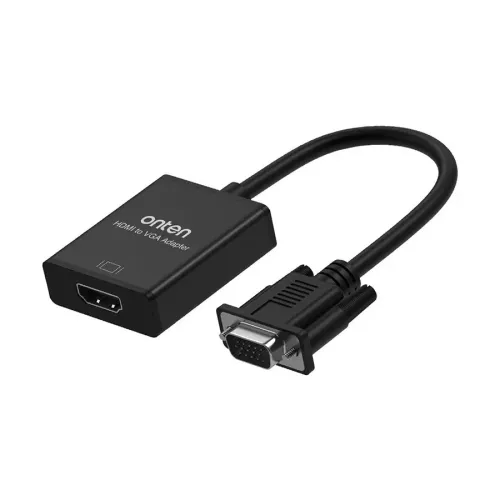 New condition
Computer Accessories
Onten · OTN-7557A
Onten OTN-7557A connects an HDMI source to a VGA display through an HDMI female input and VGA male output. Retailers list up to 1080p at 60Hz, separate 3.5mm audio, Micro USB auxiliary power and a 290mm cable. Conversion is one-way; check power, cables and seller-specific warranty before ordering.
Approximate Market Price
BDT 700 – BDT 810
Informational market estimate only; this is not a current Store offer. Last checked Nov 11, 2026. Source
Compare store prices
No live offers for this variant
BDT 700 – BDT 810
Approximate Market Price
Informational market estimate only; this is not a current Store offer. Last checked Nov 11, 2026. Source
Loading history…
Product story
The OTN-7557A is intended for an HDMI source and a display with a VGA input. Its HDMI female socket accepts a cable from the source, while the VGA male plug connects to the display. Star Tech and IT Source list Full HD output up to 1920 × 1080 at 60Hz, a 290mm cable, PVC construction and a metal connector head. IT Source identifies this as active digital-to-analog conversion.
Connector shape alone does not establish which way an adapter works. This model is listed for HDMI output from a computer or other compatible source to VGA input on a monitor or projector. IT Source explicitly states that reverse conversion is unsupported. A computer that only outputs VGA cannot use this adapter to drive an HDMI-only display.
Check both the signal direction and the physical connector gender. The HDMI side is female, so an appropriate HDMI cable is needed between the source and adapter. The VGA side is male, so check the receiving socket and the space around it. Do not assume that additional HDMI, audio or power cables are included: complete package contents were not verified.
The checked retailers specify 1080p at 60Hz. Choose a resolution and refresh rate supported by both the source and the VGA display. The converter cannot make an older projector display a mode outside its own capabilities. This listing does not promise 4K, 8K, high-refresh gaming or compatibility with every console and media player.
A successful desktop picture also does not prove that every streaming application or protected video will play. Exact-model HDCP support was not established. Mirroring and extended desktop modes depend on the source graphics system and its settings; this adapter is not a multi-monitor splitter.
The adapter includes a 3.5mm audio jack, listed by IT Source as an audio output. Use an appropriate connection to compatible audio equipment when sound is required. The VGA connection carries the display signal; the separate audio path should be planned alongside it. Select the appropriate HDMI audio output on the source where necessary.
The presence of an audio jack does not verify support for every codec, surround-sound format or headset function. Microphone input and headphone amplifier performance were not established. The earlier blanket claim that no separate cables are needed has not been retained.
IT Source identifies Micro USB as an auxiliary power input, not a second video output or a file-transfer port. Additional operating power may be needed for a particular HDMI source. Confirm the device instructions and the supplying seller’s recommended power arrangement before use.
Both checked retailer descriptions list 300mA operating current. That value alone does not establish the required input voltage, an included power supply or the power available from every source port. Exact manufacturer power documentation was not found in the checked results. This page therefore does not promise power-free operation or specify an unverified charger rating.
The listed cable length is 290mm, equivalent to 29cm. This describes the adapter cable and should not be mistaken for a long display lead or a complete package dimension. Plan the position of the HDMI cable, display connector and any auxiliary connections so the adapter is not left pulling on a port.
The retailers describe PVC and a metal connector head, with a black finish. These descriptions do not establish a tested bend life, waterproofing, shielding grade or impact rating. Keep the connector aligned with the receiving socket and allow room for the cable to sit without a tight bend.
For setup, connect the HDMI source to the adapter’s HDMI input, connect the VGA output to the display and select that display input. Add the separate audio connection and suitable auxiliary power where required. Start with a mutually supported display mode. If the screen remains blank, check input selection, source output settings, cables and power before assuming the adapter supports a different direction.
Warranty differs across the checked sellers: Star Tech advertises two years of replacement warranty, while IT Source’s specification table shows N/A. Treat warranty as part of the actual seller offer, not as a universal manufacturer entitlement. Confirm exclusions, invoice requirements and the replacement process with the supplying store.
Match the model OTN-7557A and connector arrangement to the item supplied. A separately verified manufacturer part number, GTIN, country of origin, net weight, full dimensions and complete package contents were not established. These fields are left unasserted rather than inferred from the model or cable length.
Specifications were compared with Star Tech’s OTN-7557A listing and IT Source’s OTN-7557A listing. These are retailer sources; manufacturer certification and a complete compatibility matrix remain unverified.
Helpful answers
Product-specific answers maintained with the catalog information.
It is listed for HDMI source output to VGA display input. IT Source states that reverse VGA-to-HDMI conversion is unsupported.
The video path uses an HDMI female input and VGA male output. It also has a 3.5mm audio output and Micro USB auxiliary power input.
The checked retailers list up to 1920 × 1080 at 60Hz. Both source and display must support the selected mode; 4K and high-refresh modes are not established.
No. IT Source identifies it as an auxiliary power input. Confirm the required power arrangement with the device instructions or supplying seller.
Use the separate 3.5mm audio output for sound with compatible audio equipment. Check the source audio settings and required cable.
Complete package contents were not verified. Confirm HDMI, audio and power cable inclusions with the seller before purchase.
The listed adapter cable length is 290mm, or 29cm. This is not a complete package dimension or a long display cable.
Star Tech lists two years of replacement warranty; IT Source lists N/A. The actual supplying seller’s terms and invoice determine the applicable offer.
Customer community
Become a merchant
Join BiponiBD, publish accurate offers and start free.