Pros
- Two common host connector types in one reader
- SD and microSD card slots
- Manufacturer lists direct card-to-card replication

All categories
 New condition
Computer Accessories
Onten · OTN-CR532
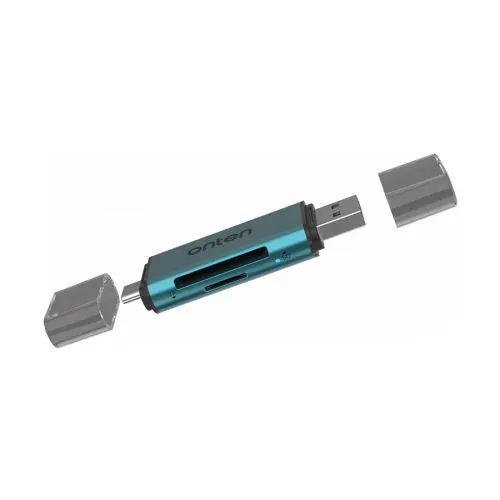
Onten OTN-CR532 reads SD and microSD cards through USB-A or USB-C and supports direct card copying; speeds listed as 25Mbps read and 10Mbps write.
Approximate Market Price
BDT 590
Informational market estimate only; this is not a current Store offer.
Compare store prices
No live offers for this variant
BDT 590
Approximate Market Price
Informational market estimate only; this is not a current Store offer.
Loading history…
Product story
The Onten OTN-CR532 is a dual-connector memory card reader with USB-A and USB-C host plugs and separate SD and TF (microSD) card slots. Onten identifies it as an SD 2.0 / TF 2.0 reader and lists support for reading and writing compatible memory cards. The manufacturer also describes direct data replication between SD and microSD cards. This is a card reader for transferring files; it does not include memory cards or expand the storage capacity of a connected device.
The reader provides both a USB-A host connector and a USB-C host connector, allowing connection to compatible devices with either port type. Use the plug that matches the computer, phone or tablet and avoid forcing the connector. The connector types do not guarantee compatibility with every operating system or device; host support for external storage and the relevant USB mode is required. Confirm your device has a usable data-capable port before purchase.
Onten lists SD, SDHC, MMC, RS-MMC and T-Flash / microSD card families. Its official English product page specifies SD and SDHC for the SD slot and microSD and related formats for the TF slot. Memory card capacity and newer formats are not fully enumerated in the reviewed specification, so do not assume support for every SDXC, UHS or high-capacity card without confirmation. Use a card format supported by both reader and host.
The manufacturer describes two card slots and direct replication between SD and MicroSD. That function can help copy files from one supported card to another without first moving them through a separate computer workflow, depending on the host/device behavior and file system. The listings do not explain whether all devices expose both card volumes simultaneously or detail the exact copy procedure. Check the host instructions and use file-management tools appropriate to the device.
Onten lists read speed of 25Mbps and write speed of 10Mbps. Those are the units as published in the product specification and should not be interpreted as MB/s. Actual transfer performance can vary with the card, file sizes, host port, file system and operating system. The reader is specified for SD 2.0 / TF 2.0; the reviewed model sources do not establish USB 3.x performance or a faster UHS mode.
Onten lists the reader body at 73.6 × 24.6 × 10mm and describes aluminum alloy plus ABS construction. This compact size can fit in a laptop bag or accessory pouch. The separate package dimensions listed by Onten are 150 × 50 × 14.5mm and describe packaging rather than the device itself. The sources do not provide a verified device weight, cable length or water-resistance rating.
The reader is intended for notebook computers, desktop PCs and other devices with a compatible USB interface. Onten’s listing names computers with USB, while seller and manual sources also describe mobile host use. Compatibility depends on the host’s USB storage support, port type, operating system and any required permissions. Some phones may need OTG or external-storage support enabled. The reader cannot make an unsupported card or host mode compatible.
Insert a supported card into the matching SD or TF slot without forcing it, then connect the USB-A or USB-C plug to the host. Wait for the operating system or file manager to mount the card. Copy files using the host’s normal file tools and allow transfers to finish before removing the reader. For direct copying between cards, confirm that both cards are recognized and use the host’s supported file-management workflow.
If a card is not recognized, check orientation, reseat it gently, verify the card in another reader and confirm that its format is supported. Try the other host connector only where it matches the device port. If transfer speed is low, test another card or file set and remember that the published speeds are listed in Mbps. Eject or safely remove mounted storage before disconnecting to reduce the risk of incomplete writes or file-system errors.
Onten’s official product page specifies model and function but does not state the Bangladesh seller warranty. Several local listings show two years, while coverage terms may differ by retailer. Confirm the warranty provider and claim process with the selected BiponiBD seller. Verify OTN-CR532, USB-A and USB-C host connectors, SD and TF slots, and the actual item in the listing photos. No memory card is included unless the offer explicitly says otherwise.
Onten lists SD, SDHC, MMC, RS-MMC and T-Flash or microSD families; confirm newer card variants before use.
Yes. Onten and local listings specify USB-A and USB-C host connections.
Yes. The reader has SD and TF (microSD) slots for supported card types.
Onten lists direct replication between SD and MicroSD; the exact workflow depends on the connected host.
Onten lists 25Mbps read and 10Mbps write; the published unit is Mbps, not MB/s.
Onten lists the device size as 73.6 × 24.6 × 10mm.
Onten specifies an aluminum alloy and ABS construction.
The reader listings do not indicate that memory cards are included; check the selected seller’s package contents.
It may work with a phone that supports USB host or OTG storage; verify the phone’s port and operating-system support.
Some local sellers list two years, but confirm the warranty and claim process for the selected BiponiBD offer.
Source basis: Onten manufacturer specifications compared with Star Tech, Ryans and QASWATEC. Published speed units are preserved as Mbps and seller warranty is stated separately.
Helpful answers
Product-specific answers maintained with the catalog information.
Onten lists SD, SDHC, MMC, RS-MMC and T-Flash or microSD families; confirm newer card variants before use.
Yes. Onten and local listings specify USB-A and USB-C host connections.
Yes. The reader has SD and TF (microSD) slots for supported card types.
Onten lists direct replication between SD and MicroSD; the exact workflow depends on the connected host.
Onten lists 25Mbps read and 10Mbps write; the published unit is Mbps, not MB/s.
Onten lists the device size as 73.6 × 24.6 × 10mm.
Onten specifies an aluminum alloy and ABS construction.
The reader listings do not indicate that memory cards are included; check the selected seller’s package contents.
It may work with a phone that supports USB host or OTG storage; verify the phone’s port and operating-system support.
Some local sellers list two years, but confirm the warranty and claim process for the selected BiponiBD offer.
Customer community
Become a merchant
Join BiponiBD, publish accurate offers and start free.