Pros
- Connects a DisplayPort source to a common HDMI display input
- 3m length offers reach for room and presentation setups
- Model-specific 1080p limit helps distinguish it from 4K DP303

All categories
 New condition
Computer Accessories
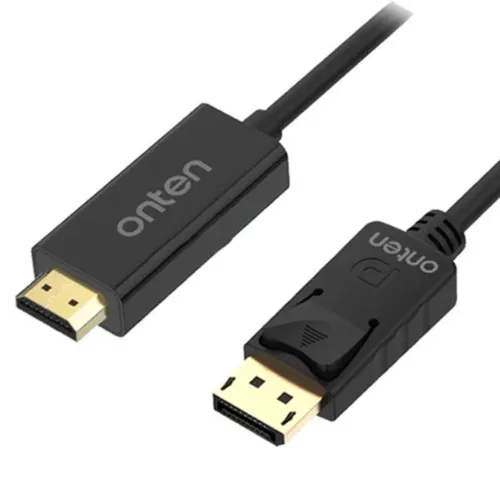
Onten · OTN-DP302 3m DisplayPort to HDMI Cable
Onten OTN-DP302 is a 3m DisplayPort-to-HDMI cable listed for 1080p; verify refresh rate, one-way connection direction and seller warranty.
Approximate Market Price
BDT 600
Informational market estimate only; this is not a current Store offer.
Compare store prices
No live offers for this variant
BDT 600
Approximate Market Price
Informational market estimate only; this is not a current Store offer.
Loading history…
Product story
Onten OTN-DP302 is a video cable with a DisplayPort male plug at the source end and an HDMI male plug at the display end. The reviewed Bangladesh variant is 3 meters long and black. Onten’s DP-series brochure identifies model DP302 as DisplayPort male to HDMI male and lists 1080p, with 1.8m and 3m length options. Local 3m product pages list 1920 × 1080 and one retailer specifies up to 1080p at 60Hz. Treat this as a DisplayPort-to-HDMI connection cable, not a bidirectional converter or a cable with 4K support.
The Onten model page identifies the DisplayPort plug as input and HDMI plug as output. Connect a DisplayPort output on a compatible desktop, laptop or graphics card to an HDMI input on a monitor, television or projector. This is a one-way source-to-display arrangement; an HDMI source to a DisplayPort display is not established. It does not convert USB-C, VGA or DVI ports. Check the exact source and display ports before ordering.
Onten’s product brochure lists DP302 as HDMI 1080P. Ryans lists 1920 × 1080 for its 3m variant, and Star Tech describes up to 1080p at 60Hz; a Ryans Q&A also says 60Hz is supported. The manufacturer product page has an unclear “2K1080hz” title, so the exact refresh specification should be confirmed for the supplied 3m unit if it matters. No reliable 4K claim was found for this model: Onten’s brochure distinguishes the DP302 1080p model from DP303, which is listed for 4K.
The selected product is the 3m black variant. Onten’s brochure lists both 1.8m and 3m DP302 versions; other cables with the same model may have a different length. Measure the route from source to display and leave gentle slack. Avoid tight bends, pulling on the plug, crushing under furniture or running alongside strong interference sources. The listing does not give an independently tested maximum cable-run condition beyond the stated resolution.
Star Tech lists gold-plated connectors, tinned-copper wire and aluminum material for the OTN-DP302. Onten’s model webpage identifies an ABS case with chip and a 5.5mm outside diameter for its described cable, but that page identifies a 1.8m length. The product family brochure includes a 3m DP302 variant. These construction details should be confirmed against the exact delivered version rather than assumed identical across all batches.
The cable requires a compatible DisplayPort source and HDMI display input. Connect the plugs without forcing them, select the correct HDMI display input and configure a mode supported by the source, cable and screen. The cable does not install drivers or require a separate power supply in the reviewed product information. Some DisplayPort sources may need their output configured for HDMI compatibility. A USB-C-only source needs a separate suitable adapter; this DP plug will not fit USB-C.
DisplayPort-to-HDMI connections can carry audio when the source, cable implementation and display support it, but the reviewed model-specific listings do not fully specify audio formats, HDCP, HDR, color depth, chroma mode, ARC/CEC or adaptive refresh support. Do not assume these features from a generic digital-cable description. If sound or protected content is required, verify the exact source and display support and test the chosen mode.
If the display shows no picture, confirm that the cable is connected from DisplayPort output to HDMI input, the monitor is set to the matching HDMI input, and the source is configured for a supported 1080p mode. Check that the plugs are fully seated and inspect for damaged pins or ports. Try a lower refresh rate or another display output if needed. A cable with the correct connector shapes may still fail if the source does not output a compatible signal.
The reviewed sources do not establish 4K capability, refresh rates beyond the local 1080p/60Hz listing, HDR, HDCP revision, audio format, color depth, data bandwidth, active-conversion chipset, or warranty for the selected BiponiBD offer. The manufacturer brochure distinguishes DP302 (1080p) from DP303 (4K), so do not transfer DP303 performance claims to this cable. Verify exact 3m variant and required display mode with the seller.
Ryans lists a two-year warranty for its listing; warranty may vary by seller and stock. Confirm the selected offer’s written warranty and return terms, OTN-DP302 model, 3m length, black color, DisplayPort male source end, HDMI male display end and 1080p mode. Ask about 60Hz if needed. Verify your device has a DisplayPort output and that the destination accepts HDMI input. The live price and stock should be checked with the seller.
It connects a compatible DisplayPort source output to an HDMI display input.
The manufacturer identifies DisplayPort input and HDMI output; reverse HDMI-to-DisplayPort use is not established.
This listing is the 3-meter version; the DP302 family is also sold at 1.8m.
Onten’s brochure lists DP302 for 1080p and distinguishes DP303 as the 4K model. Do not assume 4K support.
Star Tech lists up to 1080p@60Hz and Ryans answered that 60Hz is supported; verify the required mode with the seller.
That reverse direction is not established; this cable is DisplayPort source to HDMI display.
Not directly; a separate compatible USB-C-to-HDMI/DisplayPort adapter may be required.
Star Tech lists gold-plated connectors, tinned-copper wire and aluminum; verify the exact version.
Audio may depend on the source and display, but model-specific audio formats are not documented.
Ryans lists two years on its listing; confirm the selected BiponiBD seller’s written terms.
Source note: Onten OTN-DP302 manufacturer page/brochure, Ryans and Star Tech 3m listings. DP302 is listed for 1080p; the brochure identifies a different DP303 model for 4K. Refresh rate/physical construction may vary by variant; confirm seller details.
Helpful answers
Product-specific answers maintained with the catalog information.
It connects a compatible DisplayPort source output to an HDMI display input.
The manufacturer identifies DisplayPort input and HDMI output; reverse HDMI-to-DisplayPort use is not established.
This listing is the 3-meter version; the DP302 family is also sold at 1.8m.
Onten’s brochure lists DP302 for 1080p and distinguishes DP303 as the 4K model. Do not assume 4K support.
Star Tech lists up to 1080p@60Hz and Ryans answered that 60Hz is supported; verify the required mode with the seller.
That reverse direction is not established; this cable is DisplayPort source to HDMI display.
Not directly; a separate compatible USB-C-to-HDMI/DisplayPort adapter may be required.
Star Tech lists gold-plated connectors, tinned-copper wire and aluminum; verify the exact version.
Audio may depend on the source and display, but model-specific audio formats are not documented.
Ryans lists two years on its listing; confirm the selected BiponiBD seller’s written terms.
Customer community
Become a merchant
Join BiponiBD, publish accurate offers and start free.