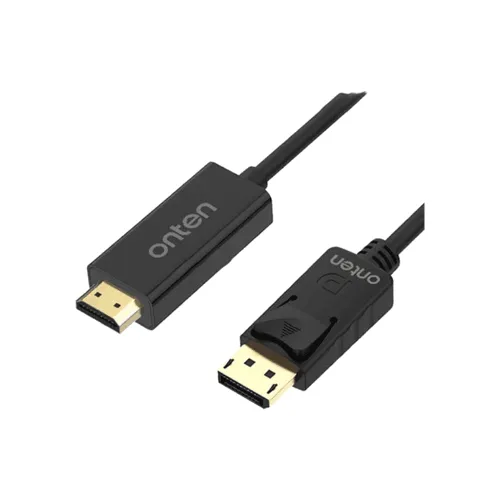
Onten OTN-DP303 1.8 m DisplayPort-to-HDMI 4K 30 Hz Cable The Onten OTN-DP303 is a 1.8-metre cable listed for connecting a DisplayPort video output to an HDMI display input. It is intended for a compatible desktop, laptop or graphics card feeding a monitor, television or projector. Retailers list support for 4K UHD (3840 × 2160) at up to 30 Hz and audio transmission. The supported mode depends on the source, the display, their ports and the full signal path; confirm the intended resolution and refresh rate before buying. Connection direction and compatibility This cable is described as one-way: DisplayPort source to HDMI display. It is not listed for connecting an HDMI output to a DisplayPort input. Check the exact connector on both devices; a USB-C port is not automatically a DisplayPort output, and an HDMI port on the source does not become a DisplayPort output through this cable. The computer or graphics card must provide a compatible DisplayPort signal, and the receiving screen must accept HDMI input. Listings name PCs, laptops, monitors, televisions and projectors as examples, but the port and output mode still need to match. Resolution and audio Star Tech and Shift Tech list up to 4K at 30 Hz. This does not establish 4K at 60 Hz. If you need a higher refresh rate, check the source and display capabilities and choose a connection path rated for that mode. Retailers say the cable supports audio along with video. Audio playback also depends on the source device, selected output, display speakers or external audio setup, and operating-system settings. Some seller pages list Ethernet, 3D video and ARC as additional features; these are retailer claims and should be confirmed for the exact DP303 revision and connected equipment. Physical details and seller-listed construction The reviewed pages identify DisplayPort male and HDMI male connectors, a 1.8 m cable, and a black colour. Shift Tech describes a PVC outer jacket and molded connectors. Star Tech describes gold-plated connectors. These construction details come from retailer descriptions and have not been independently inspected on the BiponiBD unit. The product pages reviewed do not provide verified connector dimensions, cable diameter, bend radius or package contents. Check the supplied item and packaging with the seller. Typical setup 1. Turn off or place the source and display in standby before connecting if their manuals recommend it. 2. Insert the DisplayPort end into a DisplayPort output on the computer or graphics card and the HDMI end into an HDMI input on the display. 3. Select that HDMI input on the monitor, television or projector, then choose the display mode in the source device settings. 4. Start with a mode supported by both endpoints. If the image is unstable or absent, lower the resolution or refresh rate and check the ports and selected input. 5. Select the correct audio output on the source if sound should play through the HDMI display. Troubleshooting and limits If there is no picture, confirm the cable direction, source output, HDMI input selection and device display settings. Re-seat both ends and test a lower resolution or refresh rate. If video works but sound does not, verify that the source is sending audio over the selected DisplayPort output and that the HDMI display or connected audio equipment can play it. The retailer listings describe plug-and-play use without extra drivers or separate power, but device-specific output settings may still be required. No 4K 60 Hz, bidirectional conversion, universal compatibility or guaranteed ARC behavior is established by the reviewed exact-model listings. Key specifications reported by sellers • Brand/model: Onten OTN-DP303. • Connector ends: DisplayPort male to HDMI male. • Direction: DisplayPort source to HDMI display (one-way). • Cable length: 1.8 m. • Maximum mode listed: 4K UHD, 3840 × 2160 at 30 Hz. • Audio: listed as supported; endpoint configuration required. • Colour: black listed by seller pages. • Construction: PVC jacket/molded connectors listed by Shift Tech; gold-plated connectors listed by Star Tech. • Additional functions: Ethernet, 3D and ARC are mentioned by Star Tech; confirm exact revision and endpoint support. • Warranty: Star Tech lists a two-year replacement warranty. The seller, written terms and claim conditions apply. Bangladesh price check On Nov 14, 2026, Star Tech showed the exact OTN-DP303 at BDT 850 and in stock; Shift Tech BD showed it at BDT 750 and in stock. Those listings support an informational BDT 750–850 reference range, not a BiponiBD Store offer. Resource Technology also showed an OTN-DP303 title/code at BDT 850 and in stock, but its specification tables contained unrelated UPS data, so that page was not used to verify cable specifications. Prices, stock and warranty terms can change; confirm them with the seller before ordering. Before you buy Check that your source has a DisplayPort output and your screen has an HDMI input, confirm one-way DisplayPort-to-HDMI use, ensure 1.8 m reaches comfortably, and verify that 4K at 30 Hz is sufficient for your display needs. Ask the seller for written warranty and package details. Do not rely on 4K 60 Hz, ARC, Ethernet or other special-mode claims unless the exact cable revision and both connected devices are confirmed. Sources: Star Tech Onten OTN-DP303 listing; Shift Tech BD OTN-DP303 4K 30 Hz listing; Resource Technology OTN-DP303 listing (price/stock only; product specification table mismatch noted).