Pros
- One adapter provides both Mini-HDMI and Micro-HDMI plug options
- Connects compatible small-port devices to a standard HDMI cable
- Compact form is portable for cameras and other legacy devices

All categories
 New condition
Computer Accessories
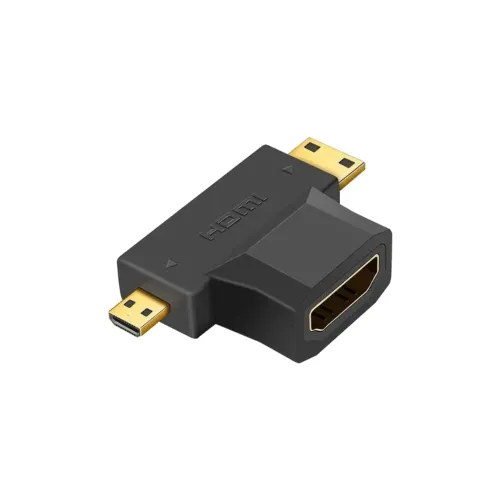
Onten · OTN-HD708 HDMI to Micro/Mini HDMI Adapter
ONTEN OTN-HD708 adapter has an HDMI female socket plus Mini-HDMI and Micro-HDMI male plugs. Retailers list up to 4K@30Hz; confirm port type and source support.
Approximate Market Price
BDT 368
Informational market estimate only; this is not a current Store offer.
Compare store prices
No live offers for this variant
BDT 368
Approximate Market Price
Informational market estimate only; this is not a current Store offer.
Loading history…
Product story
The ONTEN OTN-HD708 is a compact multi-connector HDMI adapter. Star Tech and Techland describe one standard HDMI female socket and two alternative male plugs: Mini HDMI and Micro HDMI. This lets a compatible Mini-HDMI or Micro-HDMI device connect to a standard HDMI cable. Only one of the small device-side plugs is used at a time. The adapter is passive in the sense that it changes connector access; reviewed pages do not document a scaler, active signal converter or external power input.
At one end the OTN-HD708 provides a standard full-size HDMI female port; the other end carries a Mini-HDMI male plug and a Micro-HDMI male plug. Connect the small plug that matches the source device’s port, then connect a standard HDMI cable to the adapter’s female socket. Do not attempt to insert both small plugs at once. Mini HDMI (Type C) and Micro HDMI (Type D) have different sizes and are not interchangeable. Check the port label and physical shape before connecting.
Retailers call this an HDMI-to-Mini/Micro HDMI converter, but the unit is listed as a connector adapter with no active electronics or power. Its physical arrangement joins a standard HDMI cable to a device with a Mini-HDMI or Micro-HDMI port; it does not scale, convert analog video, or reverse an unsupported device signal. Whether video travels from a camera to a TV or from another compatible source depends on the device’s port function and HDMI support. Check the device manual for whether its Mini/Micro HDMI port is an output or input.
Star Tech and Techland list resolution support up to 4K at 30Hz; Ryans lists 4K (3840×2160) and also mentions 4K@30Hz in additional feature text. This is a retailer-stated limit, not an independent certification or a guarantee for every device. The source, display, HDMI cable, content and device settings must also support the selected timing. Do not assume 4K at 60Hz, HDR, a particular color depth or a specific HDMI revision from the 4K label alone.
Ryans states that the adapter supports HDMI video and audio when used with compatible equipment. HDMI can carry both, but the exact audio formats, channel count, ARC/eARC, CEC and HDCP versions are not specified for OTN-HD708. A camera or tablet may output a limited audio/video mode, and some devices require an output setting to be enabled. If audio is important, verify that the source sends audio over its Mini/Micro HDMI port and that the display or receiver accepts it.
The Mini-HDMI or Micro-HDMI plugs can fit compatible cameras, tablets, compact laptops and other devices with those ports. Many newer products use USB-C instead, which this adapter does not connect to. Some device ports are output-only, others have different functions, and not every device supports external display output. Check the exact model’s manual and port type. A physical plug match does not add a video-output feature to a device that lacks one.
Choose the correct small connector before inserting it. Align the plug carefully and insert it straight without force; Mini HDMI and Micro HDMI ports are delicate. Connect a standard HDMI cable to the female socket and support the cable so its weight does not lever against the device port. Avoid twisting or sharply bending the adapter while it is attached. Disconnect by holding the connector body, and power down equipment first if the manufacturer recommends it.
Select the correct HDMI input on the display and enable external video output on the source if required. If there is no picture, check that you used the correct Mini or Micro plug, that the source port is an output, and that the HDMI cable and display work when connected directly. Try a supported lower resolution or refresh rate. If audio is absent, check device audio output settings and display volume. The adapter cannot fix a damaged port or create compatibility with an unsupported signal.
The OTN-HD708 does not convert VGA, DVI, DisplayPort or USB-C signals; those interfaces require a suitable converter or cable. Retail listings do not specify active scaling, signal amplification, USB power, Ethernet, video capture or a separate audio jack. It does not extend cable length by itself beyond the connector arrangement. If the source and display use full-size HDMI ports at both ends, a regular HDMI cable may be the simpler choice.
The black adapter is listed as compact and plug-and-play. Its small size can reduce the need to carry separate Micro-HDMI-to-HDMI and Mini-HDMI-to-HDMI leads, but it adds a rigid connection at the device port. Keep it in a protective pouch, away from loose metal objects and moisture. Do not store it with pressure on the two small plugs. Inspect connector shells for bending or looseness before use, particularly after travel.
Star Tech and Techland list a two-year replacement warranty, and Ryans also lists two years; confirm the provider, coverage conditions, claim location, invoice and return window for the selected BiponiBD offer. Local prices and stock elsewhere do not prove current availability for this catalog item. At delivery, verify the OTN-HD708 marking, black color, HDMI female socket, Mini-HDMI plug, Micro-HDMI plug and warranty terms. Keep the invoice and packaging for a service request.
The OTN-HD708 combines a standard HDMI female socket with Mini-HDMI and Micro-HDMI male plugs, which can be convenient for compatible cameras and portable devices. Retailers list up to 4K@30Hz and plug-and-play use. Only one small connector can be used at a time, the device must support video output, and the adapter does not provide active scaling or conversion from other interfaces. Verify the exact port type, display mode and any audio needs before depending on it.
OTN-HD708 has one HDMI female socket and Mini-HDMI and Micro-HDMI male plugs. Use only the small plug matching the device port. Retailers list up to 4K@30Hz, subject to source, display and HDMI cable support. It is a connector adapter, not a VGA/USB-C converter or scaler. Audio depends on the source and display. Star Tech and Techland list two-year replacement warranty; confirm the selected seller’s terms.
Helpful answers
Product-specific answers maintained with the catalog information.
The adapter model is ONTEN OTN-HD708.
One standard HDMI female socket plus Mini-HDMI and Micro-HDMI male plugs.
No. Use only the Mini-HDMI or Micro-HDMI plug that matches the device.
Local retailers list up to 4K at 30Hz; actual support depends on all connected devices and the HDMI cable.
The reviewed listings describe a compact connector adapter and do not document active scaling or signal conversion electronics.
Ryans states HDMI audio support with compatible devices; the source must output audio and the display must accept it.
No. It provides Mini-HDMI and Micro-HDMI plugs, not USB-C.
Compatible cameras, tablets or other devices with Mini-HDMI or Micro-HDMI video output may use it.
Retailers list the adapter in black.
Star Tech, Techland and Ryans list two years; verify the selected seller’s coverage.
Customer community
Become a merchant
Join BiponiBD, publish accurate offers and start free.