Pros
- Connects USB-A peripherals to a compatible USB-C host
- Combines one USB 3.0 and two USB 2.0 ports
- Direct USB-C plug design without a separate host cable listed

All categories
 New condition
Computer Accessories
Onten · OTN-UC51
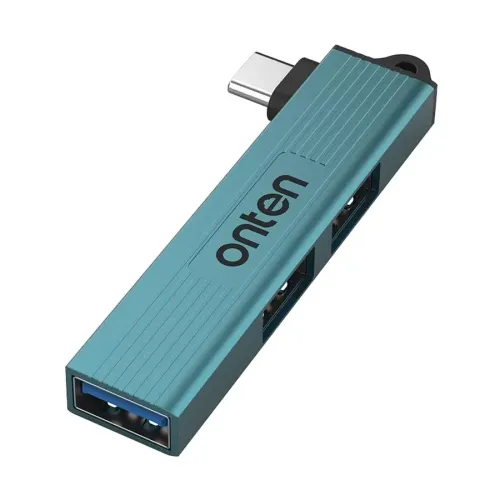
Onten OTN-UC51 adds one USB 3.0 and two USB 2.0 Type-A ports through a USB-C host plug; confirm device support and power limits.
Approximate Market Price
BDT 550
Informational market estimate only; this is not a current Store offer.
Compare store prices
No live offers for this variant
BDT 550
Approximate Market Price
Informational market estimate only; this is not a current Store offer.
Loading history…
Product story
The Onten OTN-UC51 is a three-port USB hub with a USB-C male host plug and three USB-A female downstream ports: one USB 3.0 and two USB 2.0. Onten’s product page confirms this exact model and port layout; local retailer listings specify up to 5Gbps for the USB 3.0 port and a crystal teal finish. It is designed to let a compatible USB-C host connect legacy USB-A accessories. It does not add HDMI, Ethernet, card reading, audio or additional USB-C ports.
Connect the hub’s USB-C plug to a host port that supports USB data. A USB-C-shaped port alone does not guarantee the host supports every peripheral or operating mode. Laptops, tablets and phones may have different data, OTG and power capabilities, so consult the device’s specifications. This model is OTN-UC51 with a USB-C host input; the visually similar OTN-US51 has USB-A input. Choose the version that matches the host.
The downstream layout is one USB 3.0 Type-A port and two USB 2.0 Type-A ports. Use USB-A accessories such as flash drives, keyboards, mice, printers and compatible external storage, subject to each peripheral’s power and operating-system needs. Check port labels before use. A USB 2.0 peripheral remains at its own supported speed even when connected to the USB 3.0 port. No USB-C output port is listed for the UC51.
Retailer specifications list up to 5Gbps for the USB 3.0 downstream connection. USB 2.0’s standard maximum is 480Mbps for each compatible downstream connection. These are signaling/link class maxima rather than guaranteed file-copy speeds. The three ports share the single upstream USB-C link and host resources; simultaneous transfers, device capability, cable, storage, software and protocol overhead reduce real throughput. The hub cannot increase the speed of an existing slow host or peripheral.
The reviewed exact-model manufacturer and local listings do not specify a separate power supply, total current budget, per-port output or USB Power Delivery pass-through. Treat the UC51 as a data hub and do not assume it can fast-charge a phone or reliably power every external drive. Connected devices draw from the host unless another power arrangement is explicitly documented. Higher-power equipment may require a powered hub. Check the host’s USB-C power limit and peripheral requirements before connecting.
Onten’s product page identifies the model and lists dimensions as 72.5 × 15.3 × 8 mm. Ryans repeats those dimensions and identifies crystal teal; Techland lists an aluminum-alloy material. Some secondary documents give different size/material details, so verify the exact seller’s item if these details matter. No exact weight is confirmed in the reviewed manufacturer page. The direct-plug design reduces cable clutter, but avoid placing strain on the USB-C connector.
Onten lists the UC51 as a USB-C to three USB-A hub; Bangladesh retailers list Windows, macOS and Linux compatibility. A model-family manual describes plug-and-play behavior across several operating systems, but host support, drivers for attached peripherals and OTG functionality depend on the specific device. Connect the hub directly to a compatible USB-C data port, then attach one peripheral at a time if troubleshooting. No software download is specified for basic hub operation.
Multiple compatible accessories can be connected at once, but they share the upstream link and host power. For faster storage, use the USB 3.0 port and make sure the host port and drive support that speed. The USB 2.0 ports can suit lower-speed devices such as a mouse, keyboard or printer. If devices disconnect, reduce the load, test them individually and check whether the host can supply enough power. This hub does not provide independent bandwidth per port.
Star Tech and Ryans list a two-year warranty; Techland also lists two years, but claim conditions can differ by seller. Confirm the selected offer’s warranty provider, replacement or repair policy, required receipt/packaging, return period and stock. Check the model OTN-UC51, USB-C male host plug, three USB-A female ports and crystal teal appearance. BiponiBD live offer, price, package contents and warranty service were not verified in this content update.
Choose this model if your compatible host has USB-C data and you need one USB 3.0 plus two USB 2.0 USB-A connections. It may help connect legacy peripherals to newer laptops or tablets with a USB-C port. It is not suitable as a stand-alone charger, a multiport video dock or a USB-C-output hub. If you need HDMI, Ethernet, memory-card slots, PD charging or several high-power drives, select a hub that explicitly lists those functions and power ratings.
One USB-C male plug connects to the host. This is the UC51 version, distinct from OTN-US51 with a USB-A host plug.
Three USB-A female ports: one USB 3.0 and two USB 2.0.
Local listings state up to 5Gbps. Actual transfers depend on the host, peripheral, storage and shared upstream link.
USB 2.0 has a standard link maximum of 480Mbps; real throughput is lower and depends on connected devices.
No USB-C downstream port is listed. A compatible USB-C-to-USB-A cable or adapter may be needed for a USB-C peripheral.
Charging output and USB Power Delivery pass-through are not specified. Do not treat it as a charger.
Only if that host supports USB-C data and the required accessory/OTG mode. Check the host specifications.
The model-family documentation describes plug-and-play hub behavior, but attached devices may need their own drivers and host OS support.
Onten/Ryans list about 72.5 × 15.3 × 8 mm and crystal teal. Verify the physical item with the seller.
Bangladesh retailer listings show two years; verify coverage and claim terms for the selected BiponiBD seller.
Helpful answers
Product-specific answers maintained with the catalog information.
One USB-C male plug connects to the host. This is the UC51 version, distinct from OTN-US51 with a USB-A host plug.
Three USB-A female ports: one USB 3.0 and two USB 2.0.
Local listings state up to 5Gbps. Actual transfers depend on the host, peripheral, storage and shared upstream link.
USB 2.0 has a standard link maximum of 480Mbps; real throughput is lower and depends on connected devices.
No USB-C downstream port is listed. A compatible USB-C-to-USB-A cable or adapter may be needed for a USB-C peripheral.
Charging output and USB Power Delivery pass-through are not specified. Do not treat it as a charger.
Only if that host supports USB-C data and the required accessory/OTG mode. Check the host specifications.
The model-family documentation describes plug-and-play hub behavior, but attached devices may need their own drivers and host OS support.
Onten/Ryans list about 72.5 × 15.3 × 8 mm and crystal teal. Verify the physical item with the seller.
Bangladesh retailer listings show two years; verify coverage and claim terms for the selected BiponiBD seller.
Customer community
Become a merchant
Join BiponiBD, publish accurate offers and start free.