Pros
- Small adapter for connecting nearby USB-C sources to HDMI displays
- Manufacturer-listed 4K@30Hz output
- Short attached lead helps keep the converter close to the source

All categories
 New condition
Computer Accessories
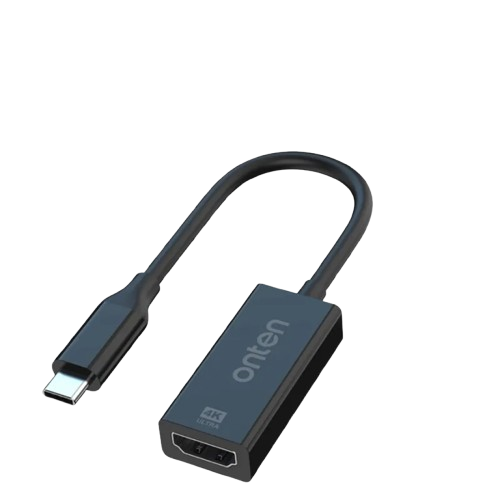
Onten · OTN-UC931 USB-C to HDMI Adapter
Onten OTN-UC931 connects USB-C video-output devices to HDMI displays at up to 4K@30Hz with a 0.15m lead.
Approximate Market Price
BDT 649
Informational market estimate only; this is not a current Store offer.
Compare store prices
No live offers for this variant
BDT 649
Approximate Market Price
Informational market estimate only; this is not a current Store offer.
Loading history…
Product story
The Onten OTN-UC931 is a compact adapter that connects a compatible USB Type-C video source to an HDMI display. Onten’s product page identifies the OTN-UC931 with a USB-C upstream interface and HDMI output up to 4K@30Hz. Local retailer listings specify USB-C male input, HDMI female output and a 0.15-meter lead. The source device must support video output over USB-C; a USB-C connector alone does not guarantee display capability.
The adapter is directional: connect its USB-C male plug to the computer, tablet or phone, and connect an HDMI cable from the adapter’s HDMI female port to a monitor, TV or projector. It is not an HDMI-to-USB-C converter and does not provide an HDMI input to a USB-C display. Use a separate HDMI cable to reach the display; that cable is not confirmed as included.
The manufacturer and Star Tech list HDMI output up to 4K at 30Hz. Ryans lists 3840 × 2160 resolution but its page text mentions 60Hz inconsistently. Because the manufacturer page specifically states 4K@30Hz, use 30Hz as the supported listed maximum and do not assume 4K@60Hz. Actual output also depends on the source device, display, HDMI cable, resolution settings and supported video mode.
A compatible source needs USB-C video output, such as DisplayPort Alt Mode or another supported video mode. Onten’s Indonesia product page explicitly notes DisplayPort Alt Mode for laptops and MHL/DisplayPort Alt Mode for certain phones. Many USB-C ports support only charging or data and will not output a display signal. Check the exact laptop, tablet or phone model documentation before purchase.
Retailer specifications list a 0.15m (15cm) attached lead. This short connection keeps the converter near the source and reduces cable slack, but it does not reach a distant monitor on its own. Place the adapter where the USB-C connector is not under strain, and use a separate HDMI cable of suitable length for the display route.
Ryans lists ABS plus metal alloy and a black finish; Onten’s Indonesia page lists ABS plus alloy material. Star Tech’s description also mentions aluminum alloy and ABS, though the exact material placement is not detailed. The reviewed exact-model pages do not provide a bend-cycle or heat rating, nor do they establish a detachable cable. Avoid pulling the adapter by its short lead.
The device converts USB-C display output to HDMI. Onten’s exact page specifies interface and resolution, but does not enumerate audio format support, HDCP version, HDR, 3D, EDID behavior, or multi-display features. Some reseller pages advertise additional capabilities that are not supported by the manufacturer specification consulted here. Confirm any requirement for protected video, HDR, high refresh rate or specialized audio with the seller.
Connect the adapter to the USB-C video-capable source, then attach an HDMI cable and select the matching display input. Choose a resolution and refresh rate supported by both devices. No driver installation is specified on the exact product listing, but the operating system may need display settings configured. If the display stays blank, confirm the source has video-out capability, reseat both ends, try another display input and restart display detection.
Local listings describe compatibility with laptops, phones and tablets, but only devices with compatible video-output support can use the adapter for display. It does not add video-out to a USB-C data-only port. The listing does not confirm charging pass-through, an extra USB port, USB data functionality, or an included HDMI cable. Verify your device model and the exact 4K@30Hz requirement before ordering.
Star Tech lists a two-year replacement warranty; other reseller pages list differing coverage. That does not confirm the terms of a selected BiponiBD offer. Before purchase, confirm OTN-UC931 model, USB-C male to HDMI female direction, 0.15m lead, 4K@30Hz expectation, included items, seller warranty provider, claim process, return terms and current stock. Do not compare it with OTN-UC951 or other adapters, which are different models.
It connects a compatible USB-C video source to an HDMI display.
Onten and Star Tech specify up to 4K at 30Hz. Do not assume 4K at 60Hz.
No. The source USB-C port must support video output, such as DisplayPort Alt Mode or a compatible mode.
The adapter’s USB-C male plug connects to the source; its HDMI female port connects to an HDMI cable and display.
The reviewed listings do not confirm an HDMI cable in the package; ask the selected seller.
Retailer specifications list 0.15 meter, or 15 centimeters.
Charging pass-through is not specified for this model.
The manufacturer lists 4K@30Hz. A retailer mentions 60Hz inconsistently; 4K@60Hz is not confirmed.
Only if that exact phone supports wired video output over USB-C or another compatible mode.
Retailers list two-year replacement coverage, but confirm the selected BiponiBD seller’s written terms.
Source basis: Onten product specification, Star Tech, Ryans and Onten Indonesia. Onten specifies 4K@30Hz; reseller 60Hz claims are inconsistent.
Helpful answers
Product-specific answers maintained with the catalog information.
It connects a compatible USB-C video source to an HDMI display.
Onten and Star Tech specify up to 4K at 30Hz. Do not assume 4K at 60Hz.
No. The source USB-C port must support video output, such as DisplayPort Alt Mode or a compatible mode.
The adapter’s USB-C male plug connects to the source; its HDMI female port connects to an HDMI cable and display.
The reviewed listings do not confirm an HDMI cable in the package; ask the selected seller.
Retailer specifications list 0.15 meter, or 15 centimeters.
Charging pass-through is not specified for this model.
The manufacturer lists 4K@30Hz. A retailer mentions 60Hz inconsistently; 4K@60Hz is not confirmed.
Only if that exact phone supports wired video output over USB-C or another compatible mode.
Retailers list two-year replacement coverage, but confirm the selected BiponiBD seller’s written terms.
Customer community
Become a merchant
Join BiponiBD, publish accurate offers and start free.