Pros
- Connects a compatible USB-C video source to an HDMI display.
- Retailer-listed 4K at 30Hz output supports a clearly specified display mode.

All categories
 New condition
Computer Accessories
Onten · OTN-UC951
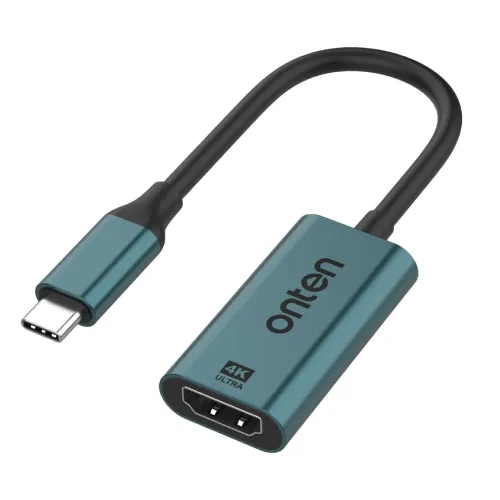
Onten OTN-UC951 converts a compatible USB-C video output to HDMI at up to 4K 30Hz. The host must support DisplayPort Alt Mode. Cable length is inconsistent in the retailer listing and needs confirmation.
Approximate Market Price
BDT 690 – BDT 810
Informational market estimate only; this is not a current Store offer. Last checked Nov 11, 2026. Source
Compare store prices
No live offers for this variant
BDT 690 – BDT 810
Approximate Market Price
Informational market estimate only; this is not a current Store offer. Last checked Nov 11, 2026. Source
Loading history…
Product story
The Onten OTN-UC951 connects a compatible USB-C video source to an HDMI display. The retailer lists output up to 4K at 30Hz, making the resolution and refresh rate a combined specification rather than a generic promise of every 4K display mode. It can be considered for presentations, a larger viewing screen or an additional display when the host and display support the required connection.
The reviewed listing explicitly identifies DisplayPort Alt Mode compatibility on the USB-C input. Your laptop, tablet or phone must provide the required video output through its USB-C port. A connector that fits physically is not enough: some USB-C ports serve charging or data functions without the necessary display capability.
Check the documentation for your exact device and port before ordering. Broad categories such as laptops, smartphones and tablets are not a complete compatibility list. If the device has more than one USB-C port, confirm which one supports an external display. Device-specific screen mirroring or extended-desktop behaviour should also be checked rather than assumed.
Star Tech specifies 4K at 30Hz for this model. A 4K 60Hz mode is not established by that specification. The available output mode depends on the source device, adapter, HDMI connection and destination display working together. Check the mode shown in the operating system after connecting instead of assuming the display is receiving its maximum advertised resolution.
For slides, documents or ordinary viewing, determine whether the listed refresh rate meets your needs. If you require a higher refresh rate for a particular workflow, obtain exact-model confirmation before buying. The reviewed source does not establish HDR, variable refresh rate, HDCP version or a detailed list of supported lower-resolution modes.
The retailer describes audio and video transmission and plug-and-play use without driver installation. These statements should be considered alongside the host compatibility requirement. Selecting the correct HDMI input on the display and the appropriate display or audio output on the host may still be necessary.
The listed direction is USB-C input to HDMI output. Reverse conversion from an HDMI source into a USB-C monitor is not verified. A charging pass-through port, USB hub function or capture-card function is also not established for this product. Confirm any such requirement separately instead of inferring it from the word converter.
The same retailer page gives two different lengths: its key features state 0.12 metre, or 12 cm, while its description states 15 cm. The exact cable length is therefore unresolved. Ask the seller to confirm the supplied unit and clarify whether a measurement includes the connector housings.
Plan the display connection so that the adapter and HDMI cable do not pull on the host port. The source describes an aluminium-alloy housing with a metallic teal-blue finish, but net weight and body dimensions have not been established here. An image can illustrate appearance; it cannot resolve the conflicting length measurements.
Star Tech lists two years of warranty and describes replacement warranty in its sales text. Confirm the actual selling store's coverage, exclusions, proof-of-purchase requirements and replacement procedure. A retailer warranty statement does not establish identical service terms at every merchant.
Before purchase, match model OTN-UC951, USB-C video input and HDMI output against the supplied product. Confirm package contents and whether a separate HDMI cable is included or needed. Barcode, GTIN, origin and a distinct manufacturer part number have not been verified; the model name is not used to invent those identifiers.
Specifications were reviewed against the Star Tech OTN-UC951 listing. The observed BDT 690 cash price and BDT 810 regular price are payment-dependent prices from one retailer, not a multi-store survey. Confirm current stock, delivery costs and the final payable price with the seller.
Helpful answers
Product-specific answers maintained with the catalog information.
No. The host USB-C port must support video output through DisplayPort Alt Mode. Check the exact device and port specifications.
The retailer lists 4K at 30Hz. A 4K 60Hz mode is not established for this model.
The retailer key features state 0.12m while the description says 15cm. The actual supplied length needs seller confirmation.
The retailer describes both audio and video transmission. The host and display settings must use the appropriate output; exact audio-format support is not specified.
Reverse conversion is not verified. The listed direction is USB-C input to HDMI output.
Charging pass-through is not established in the reviewed connection list. Do not assume charging or USB hub functionality.
Star Tech lists two years and describes replacement warranty. Confirm coverage, exclusions and service procedure with the actual seller.
Customer community
Become a merchant
Join BiponiBD, publish accurate offers and start free.