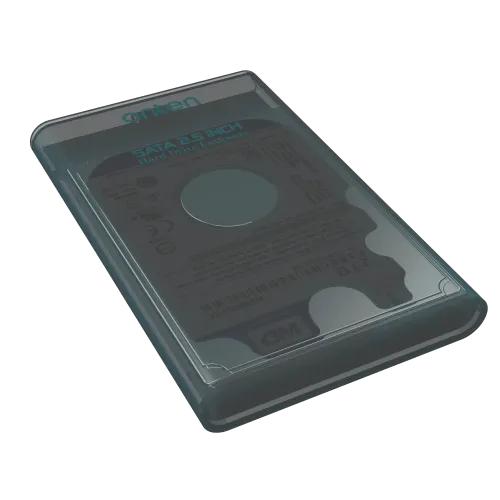
Onten OTN-UHD2 2.5-inch SATA drive enclosure
The Onten OTN-UHD2 is an external case for a 2.5-inch SATA hard disk or solid-state drive. It connects the installed drive to a computer over USB 3.0 and is listed as compatible with USB 2.0. Star Tech and QASWATEC describe a USB 3.0 Type-A to Micro-B cable in the package, support for drives up to 5 TB, a 5 Gbps USB link and UASP. It is a drive enclosure: the storage drive is not included unless the seller explicitly states otherwise.
Drive compatibility
This enclosure is for a 2.5-inch SATA drive. It does not provide an M.2 slot, NVMe support, a 3.5-inch bay or a separate desktop power adapter in the checked listing. Check the drive label and connector before ordering. A 2.5-inch drive that uses a different interface or physical format will not become compatible just because it fits the outer case.
Retailer specifications state support for capacity up to 5 TB. Confirm the exact disk size and compatibility with your operating system and the seller before installing a drive larger than common laptop capacities. The case does not create additional storage; it lets a compatible SATA drive connect externally.
USB connection and transfer limits
The internal connection is SATA; the external connection is USB 3.0 with USB 2.0 compatibility. A USB 3.0 Type-A to Micro-B cable is listed as included. The advertised 5 Gbps is the interface link rate, not a guaranteed disk copy speed. Actual transfer rates depend on the drive, USB port, cable, file sizes, host controller and workload. UASP support is listed by Star Tech and QASWATEC, but a compatible host and operating system are needed to use that protocol path.
The listing describes the enclosure as plug and play for Windows XP, Windows 7, Windows 8 and Windows 10. Those are the versions named by the retailer; current compatibility with newer Windows versions, macOS, Linux, televisions or consoles is not independently specified here. Check the seller or test your intended system before relying on a platform not listed.
Installation and data care
Open the case as directed by its manual, align the SATA drive connector carefully, secure the drive if the package includes a holder, then close the enclosure before connecting it. Do not force an incompatible drive or the connector. Use the included cable and a supported USB port, then allow the operating system to recognize the disk. A new or uninitialized disk may require partitioning and formatting, which can erase existing data; back up important files and read the system prompts before making changes.
Use the operating system's safe-eject function before unplugging a mounted drive. Avoid disconnecting during a file transfer, keep the case away from liquids and excessive heat, and protect the cable connector from bending. An enclosure is not a backup by itself: keep another copy of important data on separate storage.
Power, capacity and warranty
The checked listings describe a USB-powered enclosure and do not list a separate power adapter. Power needs can vary between drives and USB ports, so use a compatible 2.5-inch SATA drive and a stable port. The pages reviewed do not confirm a hardware encryption feature, drive lock, water resistance, shock rating, activity indicator or a specific bridge-chip model.
Star Tech, QASWATEC and Tech Land list a two-year replacement warranty. Confirm whether the warranty applies to the enclosure only, how the claim is handled, and whether a drive installed by the buyer is covered. Back up data before submitting any hardware for service.
Price and package
On 10 November 2026, Tech Land listed the exact model at ৳600 in stock, while Star Tech and QASWATEC listed it at ৳650 in stock. Prices and delivery charges can change. Check the seller's current stock, cable inclusion, return terms and warranty details at checkout. The BiponiBD market estimate is informational and is not a live Store offer.
Before you buy
- Confirm you have a 2.5-inch SATA drive; this is not an M.2 NVMe enclosure.
- Check that the installed drive capacity is within the seller-listed 5 TB maximum.
- Verify that the package includes the USB 3.0 Type-A to Micro-B cable and that your computer has a suitable port.
- Understand that 5 Gbps is the USB link rate, not a guaranteed disk transfer speed.
- Back up files before installing, formatting or sending the drive/enclosure for service.
- Confirm the two-year replacement warranty and exact claim process with the seller.
Specifications above are limited to the exact OTN-UHD2 listings reviewed. Drive, host and operating-system compatibility should be checked for the specific configuration; unlisted features and performance guarantees are intentionally not assumed.