Pros
- Common Type-A to Type-B format for compatible printers and scanners
- 1.8m reach suits many computer desk installations
- USB 3.0 link supports up to 5Gbps with compatible devices

All categories
 New condition
Computer Accessories
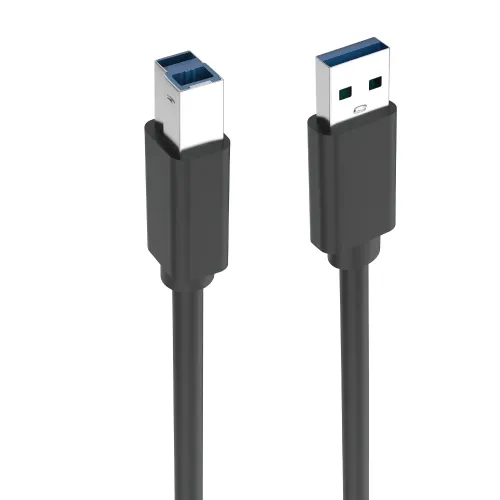
Onten · OTN-US106 1.8m USB 3.0 Printer Cable
ONTEN OTN-US106 connects USB-A hosts to USB-B printers with a 1.8m USB 3.0 cable rated up to 5Gbps. Confirm ports and seller warranty.
Approximate Market Price
BDT 385
Informational market estimate only; this is not a current Store offer.
Compare store prices
No live offers for this variant
BDT 385
Approximate Market Price
Informational market estimate only; this is not a current Store offer.
Loading history…
Product story
The ONTEN OTN-US106 is a 1.8-meter USB 3.0 cable with a Type-A plug at the host end and a Type-B plug at the device end. Bangladesh product listings specify up to 5Gbps data transfer, pure-copper inner conductors and double shielding. It is commonly used to connect compatible printers, scanners and other USB-B devices to a computer. The cable does not make a USB 2.0-only device operate at USB 3.0 speed; both endpoints and their ports determine the negotiated connection.
The cable has a USB-A host connector and a USB-B device connector, the square-style plug commonly used on printers and some scanners. Confirm the device actually has a matching USB-B port; USB-B mini, USB-B micro and USB-C are different connector types. The Type-A end connects to a compatible computer or host port. A USB-C-only computer may require a separate adapter, which is not confirmed as included. Never force a connector into a port with a different shape.
Retailer listings describe USB 3.0 and transfer rates up to 5Gbps. This is a maximum link rate under compatible conditions, not a guaranteed file-copy speed or printer throughput. USB 3.0 is also referred to as USB 3.2 Gen 1 in current naming; older USB 2.0 ports and devices negotiate a lower rate. Printing performance usually depends on the printer, driver, document and host rather than cable bandwidth alone.
The OTN-US106 can connect a computer to a printer or scanner that has a compatible USB Type-B device port and supports the host’s USB connection. It does not install drivers, configure a network printer or make an unsupported device compatible. Follow the peripheral maker’s driver and setup instructions, connect directly to a USB port if initial detection fails, and choose the correct device in the operating system. Some printers use a different USB-B shape, so inspect the port before ordering.
This catalog variant is 1.8 meters long, as listed by Star Tech and other local sources. Measure the route from host to printer and leave enough slack for movement without pulling on either port. Avoid running the cable under chair wheels, across sharp edges or tightly around a power supply. Long or damaged cables, hubs and adapters can affect connection stability. This product is a passive 1.8m cable; the reviewed sources do not identify an active repeater.
The catalog source and retailers list pure-copper conductors with double shielding; Star Tech describes rustproof-alloy connector material. Shielding is a construction feature, but the reviewed pages do not provide a shielding attenuation measurement, certification test, wire gauge or bend-cycle rating. Keep the cable intact and avoid crushing, cutting or sharply folding it. Do not infer water resistance or industrial durability from the words double shielded.
The cable can generally interoperate with compatible older USB ports, but the link speed falls to what the slowest endpoint and port support. A USB 2.0 printer will not print faster because the cable is rated for 5Gbps. Some host ports are physically similar but have different capabilities; check the port and device manuals. If connecting through a hub or dock, confirm that it supports the needed USB mode and has sufficient power for the peripheral.
Turn on the printer or scanner if its setup requires power, connect the Type-B end to the peripheral and the Type-A end to the computer, then install or select the manufacturer’s driver. Follow the device’s setup sequence when prompted. For best initial detection, connect directly to the host rather than through an unknown hub. The cable only carries USB data and, where supported, bus power; it does not supply separate power to devices that require their own adapter.
If the peripheral is not detected, confirm the printer is powered on, check that both plugs are seated and try another known-working USB port. Test the device with its original driver and remove hubs temporarily. If transfers are slow, inspect whether either endpoint is USB 2.0, check system port settings and avoid damaged or loose connectors. Test a known-good cable to isolate the fault. For print errors, check the printer queue and driver rather than assuming the cable is the only cause.
Route the 1.8m cable so that people and equipment do not pull or trip over it. Disconnect by gripping the connector body, not by tugging the wire. Keep connectors dry and clean; do not insert foreign objects into USB ports. If the outer jacket is split, the connector is bent or the cable repeatedly disconnects, stop using it and contact the seller. The reviewed source pages do not state a water-resistance rating or repair instructions.
The pages reviewed establish model, connector type, length and USB 3.0 rating, but do not verify the warranty for the current BiponiBD offer. Confirm the seller’s written coverage, service provider, return window, claim location and required purchase proof before ordering. Other retailers’ listed prices or availability do not confirm the live offer. On delivery, check ONTEN OTN-US106, USB-A to USB-B connectors, 1.8m length, black finish and package condition; retain the invoice.
OTN-US106 offers a 1.8m Type-A-to-Type-B connection, USB 3.0 support up to 5Gbps, and copper conductors with double shielding per retailer specifications. It suits computers and compatible USB-B printers or scanners. Actual speed depends on both endpoints, and many printers do not use high bandwidth for normal jobs. It will not fit USB-B mini/micro or USB-C ports without a separate suitable adapter. Warranty and exact port compatibility should be confirmed for the selected unit.
ONTEN OTN-US106 is a 1.8m USB 3.0 Type-A-to-Type-B cable. Local listings specify up to 5Gbps, pure-copper conductors and double shielding. It can connect a compatible computer to a USB-B printer or scanner. The slowest port/device sets the connection rate. A USB-C adapter, if needed, is separate; current offer warranty should be confirmed with the seller.
Helpful answers
Product-specific answers maintained with the catalog information.
The cable model is ONTEN OTN-US106.
USB Type-A at the host end and USB Type-B at the peripheral end.
This catalog item is 1.8 meters long.
Retailers specify USB 3.0, with a maximum rate up to 5Gbps.
Yes, if the printer has a compatible USB Type-B port and is supported by the host and driver.
It can connect compatible USB devices, but the negotiated rate falls to the slower endpoint.
Not directly; a separate compatible adapter may be needed and is not confirmed as included.
Retailers list pure-copper inner conductors and double shielding.
No. Install the peripheral maker’s driver and setup software separately.
The selected offer warranty was not confirmed; ask the seller for current written terms.
Customer community
Become a merchant
Join BiponiBD, publish accurate offers and start free.