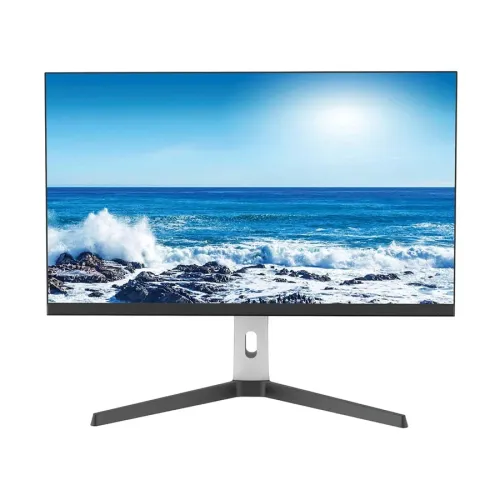
PC Power PCG27Q180DW overview
The PC Power PCG27Q180DW is listed by PC Power Technology as a 27-inch 2K gaming monitor with an IPS panel, 180Hz refresh rate, 1ms response with overdrive, 120% sRGB and an adjustable-height stand with 180-degree rotation. Retail specifications in the current BiponiBD record additionally describe QHD 2560 × 1440, 300 cd/m² brightness, 1000:1 contrast, multiple HDMI and DisplayPort inputs, built-in speakers and VESA mounting. Those secondary details are not all published on the PC Power product page reviewed, so they are marked as seller/catalog-reported and should be confirmed against the unit label or current manual. This listing does not invent unverified connection-specific timings.
27-inch QHD workspace
The catalog identifies a 27-inch flat panel with 2560 × 1440 QHD resolution and 16:9 aspect ratio. QHD provides more image detail than Full HD and extra desktop room for game overlays, documents, browser windows and creative timelines. Select 2560 × 1440 in the operating system for native pixel mapping. Text scaling can make interface elements comfortable while retaining the wider desktop. At QHD, running modern games at very high frame rates requires a capable graphics card. Verify the native resolution from the product label or supplied manual because the PC Power product page reviewed does not expose a full resolution table.
IPS panel and color
PC Power Technology identifies an IPS panel and lists sRGB 120% color gamut for the PCG27Q180DW. The catalog and Bangladesh seller specifications describe 16.7 million colors and 178-degree viewing angles. These figures suggest a wide-viewing desktop display, but the manufacturer page does not provide a full calibration report or clarify every color metric. Gamut size is not the same as measured color accuracy or full coverage of a standard. For gaming and general multimedia, vivid color can be appealing; for photo or print production, calibrate the individual monitor and verify its measured gamut before relying on it.
180Hz refresh rate
The PC Power product listing states a 180Hz refresh rate. A high refresh monitor can display more updates per second than a conventional 60Hz panel when the connected computer outputs matching frames. The exact port and signal timing required for 180Hz are not fully documented on the manufacturer page reviewed. Check the supplied manual and graphics output before selecting a cable or input. After connection, choose QHD and the intended refresh in the computer settings, then confirm the display reports the mode. A monitor does not generate game frames, so the PC and game settings determine the frame rate achieved.
Gaming performance and GPU planning
QHD at 180Hz combines high pixel detail with a high frame-rate target, which can be demanding. Competitive games with tuned settings may run at higher frame rates than visually demanding games. Results depend on graphics card, CPU, game engine, resolution scaling, quality settings and thermal limits. The display can still operate at lower supported refresh modes. Before purchase, compare your computer’s QHD output and the games you play with the monitor’s advertised maximum. Avoid assuming that a 180Hz specification means every title will render 180 frames per second. A stable frame rate with suitable image quality is often preferable to an unstable maximum.
Response time and overdrive
PC Power lists a minimum 1ms response time with overdrive. Overdrive changes pixel transitions and the stated minimum should not be treated as a universal result across all transitions. Response time is different from refresh rate, input lag and motion clarity. An aggressive overdrive setting can cause bright trails or overshoot, so compare the available levels in real games and keep the one that produces the clearest image. The reviewed PC Power product page does not separately provide an MPRT figure, so the catalog does not claim a 0.5ms MPRT mode. Check the on-screen menu or supplied manual for the actual response-time options.
Brightness, contrast and image modes
The catalog record lists 300 cd/m² brightness and 1000:1 contrast, based on retailer-derived information rather than a complete manufacturer datasheet. Treat those values as reported specifications until confirmed by the product carton or manual. Brightness should be adjusted for the room instead of automatically set to maximum. A darker room often needs less output, while a bright environment may need a higher setting. Contrast controls can alter highlight and shadow detail if set too aggressively. Begin with a neutral preset, tune brightness and use any game or picture modes only when they improve the content you actually view.
Adaptive Sync and graphics compatibility
Bangladesh reseller listings for PCG27Q180DW describe Adaptive-Sync and NVIDIA GeForce Adaptive-Sync or G-SYNC support. The official PC Power product page reviewed does not provide a full compatibility matrix, so confirm exact support in the manual and with the GPU driver. Variable refresh can reduce tearing when the graphics card and display operate within a compatible range. It does not increase frame generation or eliminate all latency. Enable a supported option in both monitor and graphics settings and verify that the driver detects the feature. If synchronization is unavailable, check the input, cable, graphics driver and supported refresh mode.
HDR claim and color depth
Some Bangladesh reseller descriptions list HDR support, but the PC Power manufacturer page reviewed does not specify an HDR standard, brightness tier or certification. Therefore this listing does not label the model HDR10 or VESA DisplayHDR certified. The official source’s sRGB figure also does not establish HDR performance. The catalog record lists 16.7 million colors, while sellers may quote different color-depth figures; confirm the exact signal mode and manual before relying on a bit-depth claim. If HDR is a requirement, request the manufacturer’s current datasheet for the precise model and verify supported timing and certification.
Connections and signal setup
The product page reviewed by PC Power does not provide a full port table. The existing catalog record and local reseller listings report two HDMI and two DisplayPort inputs, plus an audio jack; these remain reseller-reported pending confirmation from the supplied manual. Do not infer HDMI or DisplayPort version numbers or which input supports 180Hz. Check the rear labels, manual timing chart and computer output before ordering cables. Docks, adapters and KVM switches may restrict bandwidth or variable refresh. For troubleshooting, connect the computer directly, select the correct input, set QHD and verify the selected refresh in the graphics settings.
Audio and speakers
Local reseller listings report built-in 2W × 2 speakers and an audio jack, while the official PC Power product page reviewed does not confirm those audio details. Treat speaker presence and rating as unverified until checked on the exact product label or manual. If built-in speakers are present, their compact size is best suited to basic system audio and casual video rather than room-filling sound. An audio output may let the display pass sound from a digital source, but port behavior should be checked in the manual. If audio is important, confirm the included functions and accessories before purchase and plan external speakers if needed.
Stand adjustment and rotation
PC Power Technology describes an adjustable-height stand and 180-degree rotation for this model. The catalog and Bangladesh retailer data additionally report a 150mm height range and tilt from -5 to +15 degrees; those exact ranges are not confirmed by the manufacturer page reviewed. Verify the movement range on the current manual before planning a desk setup. Height adjustment can align the screen with seated eye level, while rotation may support portrait use if the computer rotates its image. Allow cable slack when moving the display and make sure the stand sits securely on a level desk.
VESA mounting, dimensions and weight
The catalog and reseller specifications list 100 × 100mm VESA mounting, dimensions around 615.7 × 239.2 × 527.3mm and a weight of about 5.7kg. The manufacturer product page reviewed does not show a complete physical specification table, so confirm those numbers against the carton or manual before selecting a mount. Use a bracket rated for the monitor and follow the specified screw depth. The listed dimensions appear to include the stand, but configuration can change physical height and depth. Measure desk clearance and leave space for cables and stand movement.
Power and operating conditions
Retailer-derived catalog information lists a 12V, 4A input, approximately 46W power consumption and an external adapter. The manufacturer source reviewed does not verify those electrical values. Inspect the supplied adapter label and manual before connecting or replacing a power supply; voltage, current, connector and polarity must all match. Keep the adapter ventilated and avoid cable strain. Actual consumption changes with brightness and operating mode. Disconnect the monitor safely before moving or cleaning it, and use a grounded outlet when specified by the supplied documentation.
Advantages and practical trade-offs
The PCG27Q180DW’s advertised combination is a 27-inch IPS monitor, QHD detail, 180Hz refresh and 1ms overdrive claim, with an adjustable-height stand described by PC Power. This can suit a PC gamer seeking both resolution and responsive motion, while the reported sRGB 120% figure may produce vivid color. The key trade-off is incomplete official technical documentation for some reseller-claimed details: port versions and timings, HDR, audio, VESA, power and exact stand ranges should be confirmed. QHD at 180Hz also requires capable source hardware. Make the purchase decision from the actual model documentation rather than assuming similar PC Power models share identical specifications.
Warranty and Bangladesh purchase terms
PC Power Technology’s official product page lists a three-year warranty, and Bangladesh reseller listings also show three years. The warranty provider and exact coverage for a specific Bangladesh serial still require confirmation with the seller. Ask whether service is manufacturer-authorized or seller-backed, when coverage starts, what panel and pixel defects qualify, where service is available and which invoice is required. Price, stock, delivery, return terms and any bundled accessories change independently of technical specifications. Confirm those details on the live BiponiBD offer and retain the serial label and invoice.
Setup and troubleshooting
Assemble the monitor and stand using the supplied instructions, connect the included power adapter and use the source connection approved by the manual. Select the native QHD resolution and then choose 180Hz only if the connected port, cable and GPU expose that mode. If the option is missing, test a direct connection, check cable quality, update the graphics driver and consult the model timing table. Enable adaptive synchronization only when the GPU and input support it. If overdrive creates artifacts, reduce its level. Verify speaker and USB/audio behavior from the manual rather than assuming that a similarly named model has the same ports.
Who should consider this display
Consider this PC Power monitor if you want a 27-inch QHD gaming display with a high advertised refresh rate and IPS viewing. It may fit competitive games, general PC use and media on a desk where QHD density is useful. It is most compelling when your graphics system can provide high frame rates and the exact model’s input supports the required mode. Buyers who need verified HDR certification, a specific port revision, color calibration, integrated audio or a precisely defined stand range should request the current manufacturer manual or a photograph of the actual unit label. Confirm local warranty and included accessories before placing an order.
Product summary
PC Power Technology lists the PCG27Q180DW as a 27-inch IPS 2K gaming monitor with 180Hz refresh, 1ms overdrive response, sRGB 120% and a height-adjustable stand with 180-degree rotation. The catalog identifies 2560 × 1440 QHD and reseller-reported details such as 300-nit brightness, 1000:1 contrast, multiple HDMI/DP ports, speakers and VESA mounting. These latter details should be checked against the supplied manual because they are not all present on the manufacturer page reviewed. Confirm exact input timing, local warranty, live offer price and stock before purchase.