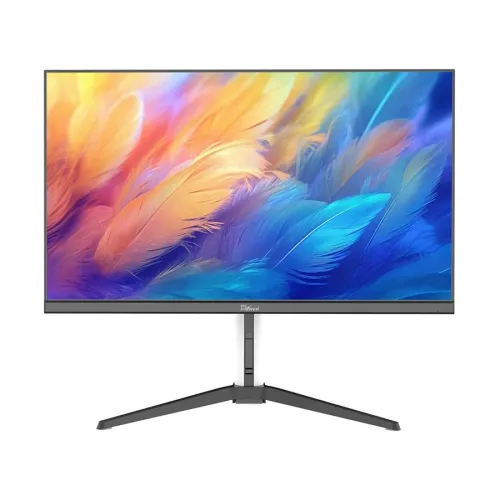
Product overview
PC Power PCG27Q180W is listed by Bangladesh retailers as a 27-inch QHD gaming monitor with a 2560 × 1440 resolution, IPS panel, 180Hz refresh rate and 1ms response rating. Retailer pages also identify HDMI and VGA inputs, while the seller information disagrees on color gamut, HDR, exact connectors and some stand features. No accessible manufacturer specification sheet was found during this review. This description therefore separates the commonly listed core details from points that require confirmation on the exact delivered unit. Check the model label, carton and the seller’s written specification before purchase.
Screen size, resolution and format
The local product listings identify a 27-inch display with 2560 × 1440 pixels, commonly called QHD or 2K, in a 16:9 format. QHD has more pixels than Full HD and can provide more desktop workspace and finer image detail at the same screen size. It also asks more from a graphics card, especially when targeting high frame rates in demanding games. Set the source to the display’s native resolution for the clearest result. Retail descriptions can contain copied errors, so confirm the information menu or product label if native resolution is material to your purchase.
Refresh rate and setup
Multiple local listings identify the model as 180Hz. A high refresh mode can make supported motion appear smoother when the computer produces matching frames and the selected input supports that timing. The exact port-by-port refresh capability has not been verified from an accessible PC Power document. Ask the seller which input and cable support 2560 × 1440 at 180Hz, and request the answer in writing. After connection, choose QHD and the highest supported refresh setting in the operating system or GPU control panel, then check the monitor’s information screen. Do not infer that every input or console can drive 180Hz.
IPS panel and viewing
Retail specifications identify an IPS panel and list 178° horizontal and vertical viewing angles. IPS panels are often selected for broad viewing angles, but individual contrast, uniformity, color accuracy and response depend on the panel and settings. A seller claims an sRGB 120% gamut figure; another listing reports sRGB 100%, so the gamut is disputed and is not presented here as confirmed. These gamut numbers also do not prove calibration. For color-critical work, obtain a reliable manufacturer data sheet or an independent measurement for the exact unit and use a measured display profile.
Response time and motion clarity
Retailer specifications state 1ms response, with one listing specifying “with OD” (overdrive). The measurement method and conditions are not confirmed by the manufacturer, so this figure should be treated as a seller-listed rating rather than a guarantee that every pixel transition completes in one millisecond. Overdrive settings can trade ghosting for overshoot; compare modes using real moving content. A high refresh rate and a quoted response figure describe different properties. Actual motion clarity also depends on frame rate, pixel behavior, selected settings and the game or video source.
Ports and connector conflict
Retailer pages commonly list one HDMI input and one VGA input. A seller response on the Ryans listing says one HDMI, one VGA, no DisplayPort and no built-in speaker. Since other listings omit a complete port table and no manufacturer manual was located, treat this connector set as retailer-reported and inspect the back panel before finalizing an order. HDMI and VGA do not offer identical resolution and refresh capabilities; confirm the exact signal timing for each port. Do not assume the monitor includes DisplayPort, USB, USB-C or an audio output unless the seller confirms it for the actual unit.
HDR and adaptive sync claims
One reseller page advertises HDR and Adaptive-Sync, but another retailer’s FAQ explicitly says HDR is not supported. No primary manufacturer specification was available to resolve this conflict. Accordingly, HDR and Adaptive-Sync are not stated as verified features in this product record. Ask the seller to identify the exact model revision, provide a manual or carton label, and explain whether HDR input, tone mapping or any certification is supported. Likewise, verify adaptive refresh compatibility by operating system, graphics card and input before relying on it for a particular gaming setup.
Color reproduction
Color specifications vary among seller listings: one reports sRGB 120%, while another reports sRGB 100%. The figure depends on gamut measurement convention and source accuracy; without an official data sheet, neither value is treated as manufacturer-confirmed. The monitor may be suitable for ordinary gaming, office work and entertainment, but a gamut number alone does not establish color accuracy, uniformity or factory calibration. If design, photo editing or print matching is important, request the exact unit’s color-space specification and calibration evidence before choosing it.
Stand, rotation and mounting
Retailer pages describe adjustable height and 180-degree rotation, but the exact stand motions and mounting standard are not consistently documented. “Rotation” may refer to pivot, swivel or another adjustment, so do not assume portrait rotation without checking the physical stand. Confirm height range, tilt, swivel, pivot, VESA pattern and included screws with the seller. Measure available desk depth and monitor height. If using a third-party arm, verify the actual mounting pattern, fastener depth and load rating from the delivered product rather than relying on a generic listing.
Audio and built-in speakers
The Ryans seller response for this model says built-in speakers are absent. A headphone or line-out jack is not consistently verified in the available retailer information. Plan for separate speakers or headphones if needed, and confirm whether audio travels through the chosen input and whether an output jack exists on the exact revision. Avoid assuming that a monitor can play sound merely because an HDMI connection carries audio. The seller should clarify how audio is routed before purchase if it affects a console or desk setup.
Compatibility and performance
A QHD 180Hz mode can suit a PC whose graphics hardware and connection can render and transmit the desired timing. QHD gaming generally demands more GPU work than Full HD; the monitor’s refresh rating does not guarantee a game will run at 180 frames per second. Consoles and older computers may support fewer resolution and refresh combinations. Check the device’s output standard, cable, GPU driver and game settings. For a laptop, verify its external display output, supported refresh and any adapter limitations before ordering.
Everyday work and desk use
The 27-inch QHD format can provide additional workspace for documents, browsers and multitasking compared with a 27-inch Full HD screen. Text scaling may need adjustment depending on viewing distance and eyesight. The panel can also serve for general video and office use, subject to its verified input, stand and speaker configuration. Position the center of the screen near eye level, keep a comfortable viewing distance and adjust room lighting to reduce glare. Ergonomics depend on the actual supplied stand and the user’s desk layout.
Warranty and local service
Several Bangladesh retailer pages advertise a three-year warranty. That claim does not confirm warranty coverage for a BiponiBD sale or a particular serial number. Before payment, ask who provides service, where the authorized service point is, how the serial is registered, whether the panel and dead pixels are covered, what proof of purchase is needed and how long repair or replacement takes. Obtain the terms on the invoice or in writing. Preserve the box and serial label until the return period and initial inspection are complete.
Price, stock and offer status
Retailer pages show different price and stock situations, which change over time and do not establish a live BiponiBD offer. A listing may be out of stock or display a temporary discount. This page does not claim a current market price. Check the current total price, delivery charge, payment options and stock with BiponiBD before ordering. If comparing other sellers, compare the exact model, revision, included cables, serial warranty and return terms rather than relying on headline price alone.
Strengths to consider
The commonly listed strengths are the 27-inch QHD resolution, IPS panel, 180Hz refresh rating and 1ms response claim. These can make the model worth considering for a buyer seeking higher-resolution PC gaming at a high refresh target. HDMI plus VGA input claims may help connect different sources, but their exact count and capabilities need confirmation. These are specification-based considerations, not independent measurements or promises of game performance. Check the graphics hardware, output port, panel condition and complete warranty terms before choosing it.
Limitations and unresolved points
The available information has meaningful gaps: no manufacturer spec sheet was located; the claimed color gamut conflicts; HDR support is disputed; and seller pages do not consistently document exact ports, stand motions, speakers or VESA fitment. The 180Hz rating and 1ms response are retailer-listed, not manufacturer-verified in this review. Buyers who need verified HDR, a specific DisplayPort mode, USB-C docking, built-in speakers or guaranteed color performance should obtain documentary confirmation first or select a model with an accessible official specification.
Purchase and inspection checklist
Before ordering, confirm the label reads PCG27Q180W and request a photo of the rear connector panel and carton. Ask for written confirmation of 2560 × 1440 at 180Hz, input-specific refresh limits, 1ms measurement type, gamut, HDR and Adaptive-Sync status, stand movements, VESA pattern, audio, included cables and warranty provider. On delivery, inspect the screen and ports, test for dead pixels under the seller’s policy, connect using the recommended cable, select native resolution and verify refresh rate in the display information menu. Keep the invoice and serial record.
FAQ: What resolution and refresh rate are listed?
Retailer listings identify 2560 × 1440 QHD resolution and 180Hz. These details were cross-checked across local product listings but not verified against a primary manufacturer document. Confirm the exact revision and supported input timing with the seller.
FAQ: Does it have an IPS panel?
Multiple retailer specification tables identify an IPS panel. No accessible manufacturer data sheet was found during this review, so verify the panel type on the package or seller’s written specification.
FAQ: Does it include HDR?
Retailer information conflicts: one page claims HDR and another says it is not supported. This review does not mark HDR as verified. Request a manual or written confirmation for the exact unit.
FAQ: Does it include DisplayPort or speakers?
A Ryans seller response says the model has one HDMI port, one VGA port, no DisplayPort and no built-in speaker. Confirm the actual revision and back-panel ports before purchase.
FAQ: What is the local warranty?
Several resellers list three years, but the local provider and serial-specific terms for a BiponiBD offer were not independently verified. Ask for written warranty, dead-pixel and service details.
Summary
PC Power PCG27Q180W is commonly listed in Bangladesh as a 27-inch 2560 × 1440 QHD IPS monitor with a 180Hz refresh rate and a 1ms response rating. Retailers describe HDMI and VGA connectivity; one seller response reports one HDMI, one VGA, no DisplayPort and no built-in speakers. Stand features, color gamut and HDR claims conflict or lack primary documentation. The monitor may suit a QHD PC gaming setup, but confirm input timings, features, box contents, local offer and serial-specific warranty in writing.