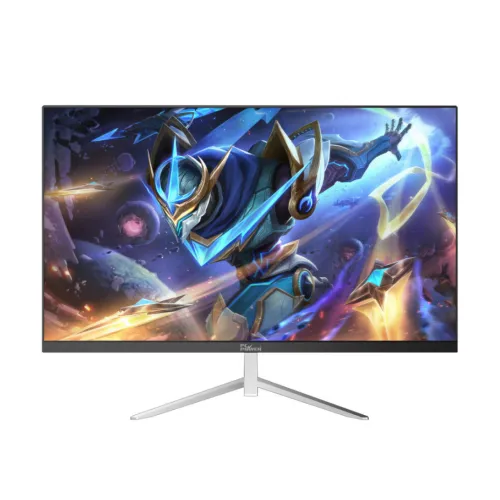
PC Power PCGMX27Q120B 27-inch QHD 120Hz IPS Gaming Monitor
The PC Power PCGMX27Q120B is a 27-inch IPS monitor with a 2560 × 1440 QHD resolution and a 120Hz refresh rate. It is intended for gaming and general computer use where a sharper image and larger desktop workspace are useful. Bangladesh retailer specifications list a 4ms response time, 1000:1 contrast, 178-degree viewing angles and HDMI 2.0 plus DisplayPort 1.4 inputs. Seller listings differ on brightness, audio and availability, so confirm the exact unit and included features before purchase.
This page is for the exact model code PCGMX27Q120B. Do not confuse it with PC Power's PCG27Q180W, PCG27Q200DW, PCGMX27Q180 or other 27-inch products. Their refresh rate, port count, stand, colour claims and appearance can differ. No manufacturer-hosted product specification or manual for this exact code was located during the review. The technical description therefore separates repeated retailer claims from details that remain unverified and does not present them as manufacturer-certified.
27-inch QHD IPS screen
The listed panel size is 27 inches diagonally, with a flat 16:9 layout and native resolution of 2560 × 1440 pixels. QHD provides more pixels and workspace than Full HD at the same size. That can make text and interface elements appear more detailed and allow more content to fit on the desktop. The result depends on operating-system scaling, viewing distance, application layout and the computer's graphics output.
Retailers describe an IPS panel with 178-degree horizontal and vertical viewing angles and a typical contrast ratio of 1000:1. The broad viewing angles can help when the display is viewed from off-centre. A typical IPS contrast ratio does not provide the deep blacks of OLED or high-contrast VA panels, and individual units can differ in uniformity. Seller listings report brightness values from 300 cd/m² to other figures; because they disagree, verify the specification on the exact unit rather than treating brightness as confirmed.
Some Bangladesh seller pages claim 100% sRGB and 16.7 million colours. No exact measurement standard, calibration report or independent colour test for the PCGMX27Q120B was verified. Gamut percentage is not the same as colour accuracy or uniformity. Treat colour-space figures as seller-reported until a datasheet or measurement for the exact model is available. For print, photography or grading, seek a verified gamut standard and calibration information before relying on it.
120Hz refresh and 4ms response claim
The repeated Bangladesh listings specify a maximum refresh rate of 120Hz at QHD. A 120Hz refresh can make cursor movement, scrolling and supported games appear smoother than 60Hz. The computer, graphics card, selected resolution, cable and connection all need to support the display mode. QHD at a higher frame rate requires more graphics performance than Full HD; check the frame rate your games can actually deliver before choosing a monitor based on refresh rate alone.
Retailers list a 4ms response time, with some specifying 4ms GTG or 4ms overdrive. The exact measurement method is not consistent across the listings. Response time varies with grey-to-grey transition, overdrive setting and test conditions. Treat 4ms as a seller-reported specification rather than a guarantee that all motion is free of blur. If the monitor offers overdrive controls, test them for both ghosting and overshoot.
Some seller descriptions mention eye-care or low-blue-light features, and Adaptive-Sync support may appear in related PC Power monitor listings. The model-specific material reviewed did not establish the exact VRR range, certification or mode behaviour for this code. This page therefore does not promise FreeSync or G-SYNC certification. Check the on-screen display and product manual for the actual unit if variable refresh or a specific eye-care feature is essential.
HDMI and DisplayPort connections
Ryans lists one HDMI 2.0 port and one DisplayPort, while other retailer pages list HDMI 2.0 and DP 1.4. The most consistent model-specific port description is one HDMI and one DisplayPort. Verify the exact revisions on the rear label or manual, because port version affects the resolution and refresh combinations available. Seller pages also differ on whether there is a headphone jack. Do not assume audio-out or USB ports are present without checking the supplied unit.
There is no VGA input listed in the reviewed model specifications. USB-C, a USB hub and KVM are also not listed. If your laptop has only USB-C or Mini DisplayPort, use an adapter that supports 2560 × 1440 at the desired refresh rate. Check the graphics card's supported output modes and choose the correct refresh in display settings. A cable that physically connects is not necessarily rated for the required bandwidth.
Audio and accessories
Retailer information conflicts about built-in speakers. The TechLand description advertises 2 × 2W audio, while the Ryans detailed specification marks built-in speakers as no and the Skyland product copy does not consistently state speaker output. The actual audio configuration is therefore unverified. Check the physical unit or official box specification before assuming it has speakers. Headphone output is also inconsistently listed, so confirm the port before planning to connect external audio through the monitor.
The product code ends in “B,” and some listings show a matte-black finish. A common image or colour description does not guarantee that all regional packages are identical. Confirm whether the box includes an HDMI cable, DisplayPort cable, power cable or adapter, stand parts and screws. Retain the packaging and purchase documents until you have verified the product and warranty.
Stand and VESA mounting
Retailer specifications list a 100 × 100mm VESA mount. If accurate for your unit, that pattern can fit many monitor arms and wall brackets, but check screw size, depth and load rating before installation. The listings do not consistently document height, swivel or pivot adjustment. Do not assume the stand is fully ergonomic: confirm the included base's range and adjustment on the exact version. A riser or compatible arm may help position the screen at eye level.
A 27-inch display needs desk space for its width, stand and cables. QHD can be comfortable at different viewing distances, but the optimal scaling depends on eyesight and software. Measure the available desk depth and leave room for the stand and rear ports. Use the manufacturer's manual for safe assembly and wall mounting; avoid applying pressure to the LCD panel when fitting the stand or bracket.
Power, energy and practical use
Retailer pages do not agree on every power specification. One product listing reports typical consumption around 31W, while detailed adapter and standby figures were not consistently published for this code. Check the power label on the monitor and use the supplied power cable or adapter. Do not select a replacement adapter based on connector fit alone; voltage, polarity and current rating must match.
For everyday work, the higher QHD resolution can provide more room for side-by-side documents than a 27-inch Full HD display. For games, QHD requires a capable graphics card to approach 120 frames per second in demanding titles. You can reduce graphics settings or use a lower refresh mode where supported. The monitor does not create extra frames, and its 120Hz ceiling does not guarantee that every game will run at 120 FPS.
Bangladesh price, stock and warranty
Bangladesh retailer observations for PCGMX27Q120B ranged from about ৳15,000 to ৳18,500 in the reviewed listings. Some pages showed out-of-stock status while other price listings did not clearly confirm live availability. These are external seller observations, not BiponiBD offers, and they may change. Call or message the seller to confirm current price, stock, delivery and the exact model code before ordering.
Local sellers advertise different warranty terms, including one-year and three-year entries. That disagreement means the warranty for this catalog unit is not established. Confirm the warranty provider, duration, service centre, dead-pixel policy, replacement conditions and required packaging or invoice with the seller in writing. Ask whether the monitor's serial number is eligible for service in Bangladesh. Do not rely on a warranty claim copied from another PC Power model.
Who should consider PCGMX27Q120B?
Consider this monitor if you want a 27-inch QHD IPS screen with a 120Hz refresh target and can verify the connection and warranty details. QHD offers more image detail and desktop space than Full HD at this size, while 120Hz can support smoother motion when the computer can render enough frames. The model may fit gaming, programming, office work and general media, depending on its confirmed input, stand and audio configuration.
Compare alternatives if you need a manufacturer-published datasheet, certified colour accuracy, consistent HDR or VRR documentation, integrated speakers, USB-C docking or clearly stated warranty coverage. Before buying, compare the exact PCGMX27Q120B code with competing QHD displays, confirm the model's refresh support over each port and verify whether the seller price is actually in stock.
Key features
- 27-inch flat IPS display
- QHD 2560 × 1440 native resolution, 16:9
- 120Hz maximum refresh reported by retailers
- 4ms response time reported; exact method differs by listing
- 178° horizontal and vertical viewing angles
- 1000:1 contrast reported by retailers
- One HDMI and one DisplayPort; exact revisions vary in listings
- 100 × 100mm VESA mount reported by sellers
- Colour gamut and brightness claims require exact-unit verification
- Built-in audio configuration is inconsistent between retailer pages
- Warranty reports vary from one to three years
- Confirm live stock, ports, accessories and service terms before purchase
Advantages
- QHD provides more pixels and desktop room than Full HD at 27 inches.
- 120Hz can improve motion smoothness when the system supplies enough frames.
- IPS panel and wide viewing angles suit shared viewing and desk tasks.
- HDMI plus DisplayPort provide digital video options for modern systems.
- Reported VESA support can allow arm mounting after exact-unit verification.
Limitations to consider
- No manufacturer-hosted spec sheet for this exact model code was verified.
- Retailer pages disagree on brightness, speakers, headphone output and warranty.
- One retailer reported no built-in speakers; another advertised 2 × 2W.
- QHD at 120Hz requires capable graphics hardware and a suitable cable.
- Warranty terms vary by listing and need written seller confirmation.
- Current stock was not consistently available across the retailer sources.
Frequently asked questions
What are the screen size and resolution?
Retailer listings describe the PCGMX27Q120B as a 27-inch IPS monitor with 2560 × 1440 QHD resolution and a 16:9 aspect ratio.
Does it support 120Hz at QHD?
Retailers list 120Hz at 2560 × 1440. Confirm the supported mode for the exact HDMI/DisplayPort revisions and your computer.
What ports are included?
Listings consistently mention one HDMI and one DisplayPort, with HDMI 2.0 and DP 1.4 noted by some sellers. Check the unit's rear labels and manual.
Does it have built-in speakers?
Seller pages conflict: one advertises 2 × 2W while another lists no built-in speaker. Verify the exact unit before purchase.
What is the response time?
Retailers report 4ms, but the precise test method is not consistent. Treat it as a seller specification rather than a guarantee of blur-free motion.
Can I mount it on a monitor arm?
Retailers list 100 × 100mm VESA mounting. Confirm the pattern, screw size and load rating on your unit before fitting an arm.
What warranty is available in Bangladesh?
Retailer listings vary between one and three years. Ask the seller for written provider, duration, service and dead-pixel terms for the serial number.
What is the Bangladesh price?
Observed price listings ranged around ৳15,000–৳18,500, but availability varied. These are not BiponiBD offers; confirm live stock and final price.
Before ordering: verify exact PCGMX27Q120B code, 120Hz QHD over the selected port, speaker/audio configuration, VESA pattern, accessories, current stock and written warranty.