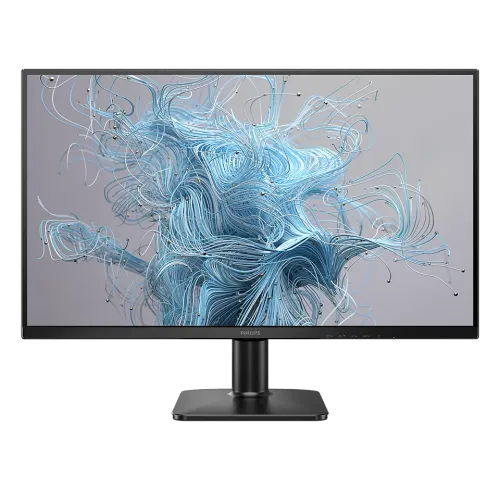
The Philips 27E2N1500/69 is a 27-inch Quad HD IPS monitor with 2560 × 1440 resolution, overclockable refresh up to 120Hz, Adaptive-Sync, HDR10 input and LowBlue/Flicker-Free features. It has HDMI 2.0 and DisplayPort 1.2 inputs and a tilt-only stand. Philips notes the maximum resolution/refresh mode works over HDMI; verify the source and overclock setting before relying on 120Hz.
QHD detail and workspace
The 27-inch 2560 × 1440 panel provides about 108.79 pixels per inch with a 0.2331mm pixel pitch. This density allows detailed spreadsheets, web pages and creative canvases to fit more content than Full HD on the same screen size. Operating-system scaling can enlarge text while preserving the panel’s extra workspace.
The value of QHD depends on viewing distance, eyesight and the applications used. Users coming from 1080p may notice smaller interface elements; scaling and font size can make them comfortable. QHD also asks the computer to render more pixels, so older graphics hardware may need lower game settings than it would at Full HD.
IPS panel and viewing
Philips identifies an IPS W-LED panel and 178-degree horizontal/vertical viewing angles at CR greater than 10. IPS supports broad-angle viewing when sharing the display or shifting position. These ratings do not guarantee identical brightness or color at every edge, so inspect the delivered panel for uniformity.
The flat 16:9 screen has an active area of 596.736 by 335.664mm. Its anti-glare 3H coating with 25% haze helps diffuse reflections, but bright windows and lamps can still reduce perceived contrast. Set the monitor where reflected light does not fall directly on the screen.
120Hz overclock and HDMI note
Philips markets the 120Hz mode as overclockable and lists a vertical scan range of 48–120Hz. The leaflet specifies maximum resolution 2560 × 1440 at 120Hz overclocked and states that this maximum mode works for HDMI input. If 120Hz is essential, check the source device, cable, OSD overclock setting and timing on the regional manual.
Philips warns the overclock function has associated risks and advises disabling it in the OSD if the screen appears abnormal after restart. Begin at a stable mode and enable overclock only as needed. If artifacts, flicker or loss of signal appears, reduce refresh and check the source and cable before returning to the maximum setting.
Motion, response and Adaptive-Sync
The specification gives 4ms typical gray-to-gray response and a 1ms MPRT mode. GtG measures pixel transitions; MPRT describes moving-picture response by a different method. They are not interchangeable. Philips explains MPRT uses backlight strobing synchronized to refresh, which can alter brightness and may cause noticeable flicker.
Adaptive-Sync can coordinate display refresh with changing frame delivery from compatible graphics hardware. It may reduce tearing within supported operation, but does not generate frames or guarantee a fixed frame rate. Game, GPU, driver, cable, input and selected refresh all affect the result. Turn off MPRT if image flicker or dimming is uncomfortable.
Brightness, contrast and HDR
Philips lists 250 cd/m² brightness, 1000:1 typical contrast and SmartContrast processing. It supports HDR10 signal input, but the leaflet does not list VESA DisplayHDR certification or a high peak brightness tier. HDR10 compatibility should not be read as proof of bright, certified HDR performance.
For ordinary work, set brightness to match room lighting and choose a neutral image mode. SmartContrast and SmartImage can change contrast and image presentation. For color-sensitive work, calibrate the individual screen and use managed applications. The 250-nit rating is more suited to controlled indoor lighting than direct sun or a very bright office.
Reading and eye comfort
LowBlue Mode, Flicker-Free and EasyRead are designed for extended reading and general use. EasyRead offers a paper-like presentation while LowBlue changes display color balance. Select modes based on comfort and task; disable color-altering features when checking image color.
Eye-care features do not guarantee that a user will avoid fatigue. Viewing distance, text scale, glare, posture and breaks also matter. Use balanced room lighting, keep text readable and take breaks during long sessions instead of relying on a single display feature.
Inputs and devices
Philips lists one HDMI 2.0 and one DisplayPort 1.2 input, with HDCP 1.4 and 2.2. The leaflet’s maximum mode is specifically annotated for HDMI input. Connect the intended source directly when possible, select the proper input and check the manual if a desired refresh is missing.
No USB hub, USB-C input, speakers or headphone output is listed. Plan audio through the computer or separate equipment. A console, office laptop or older desktop can support fewer modes than a gaming PC even when connected to the same display. Verify the source output before selecting a cable.
Stand, VESA and desk placement
The included stand supports tilt from -5° to +20°; height, swivel and pivot adjustments are not listed. Philips provides a VESA 100 × 100mm pattern for compatible arms. Check the arm’s load rating, correct screw length and rear clearance before mounting; do not assume another Philips model’s stand fits.
Dimensions are 614 × 457 × 200mm with stand and 614 × 363 × 35mm without. Weight is 3.18kg with stand, 2.81kg without and 5.6kg packaged. Leave space for the external power adapter, base and cable bends, and place the screen on a stable desk.
Power and environmental care
This monitor uses an external 100–240VAC, 50–60Hz supply. Typical on-mode consumption is 25.6W, standby 0.5W and off mode 0.3W. Actual use varies by settings. Use the supply intended for the regional product and keep airflow around the monitor clear.
The listed operating range is 0–40°C and relative humidity 20%–80%. Keep the device away from liquids and excessive heat. Disconnect power before cleaning and follow the manual; use a soft cloth and avoid pressing the LCD surface.
Bangladesh price and warranty
PQS displayed ৳25,600 and In Stock; Global Brand listed ৳27,300. These page observations may change and do not establish BiponiBD price or inventory. Confirm the exact 27E2N1500/69 model, checkout price, delivery fee, return terms and stock directly with the selected seller.
Retailers advertise three-year warranty, while local coverage depends on serial and regional policy. Ask who provides service, which panel/dead-pixel rules apply, whether the unit is eligible and what invoice or package is required. Retain the purchase documents and box if the seller’s service process asks for them.
Who should consider another display
This monitor may suit people seeking a 27-inch QHD workspace, IPS viewing angles, Adaptive-Sync and document-reading modes. The overclockable refresh can help compatible gaming or motion use, while VESA mounting supports an aftermarket arm if tilt-only adjustment is insufficient.
Consider another model if you need a height-adjustable included stand, USB-C docking, USB ports, built-in audio, headphone output, certified high-brightness HDR or guaranteed native 120Hz on a particular input. Compare exact regional model suffixes and warranty support. No hands-on picture or overclock test is claimed.
Features
- 27-inch IPS Quad HD screen at 2560 × 1440 and 16:9.
- Up to 120Hz overclocked refresh; Philips identifies the mode as overclockable.
- Philips note says maximum resolution/refresh mode works for HDMI input.
- 1ms MPRT blur-reduction and 4ms typical GtG are different measures.
- 250 cd/m² and 1000:1 typical contrast with SmartContrast.
- HDR10 input support and Adaptive-Sync.
- One HDMI 2.0 and one DisplayPort 1.2.
- LowBlue, Flicker-Free, EasyRead and SmartImage.
- Anti-glare 3H, 25% haze screen coating.
- Tilt-only stand, VESA 100 × 100 mm and Kensington lock.
- External universal supply; typical on-mode consumption 25.6W.
- No speakers, USB hub or headphone output listed by Philips.
Pros
- QHD at 27 inches provides finer detail and more workspace than FHD at that size.
- IPS and 178° ratings support broad viewing positions.
- Overclockable 120Hz and Adaptive-Sync can smooth compatible motion.
- LowBlue, Flicker-Free and EasyRead provide useful office/reading modes.
- VESA mounting enables third-party arms when tilt-only stand is insufficient.
Cons
- 120Hz is overclocked, not guaranteed native; max-mode footnote specifies HDMI input.
- 250-nit brightness is modest in bright rooms and is not certified HDR brightness.
- Stand lists tilt only, with no height, swivel or pivot adjustment.
- No integrated speakers, USB hub or headphone output listed.
- Bangladesh price, stock and warranty must be checked for the regional model.
Specifications
- Brand: Philips
- Model: 27E2N1500/69
- Size: 27 inches (68.6 cm)
- Panel: IPS, W-LED
- Resolution: Quad HD 2560 × 1440
- Aspect: 16:9
- Refresh: Up to 120Hz overclocked; 48–120Hz scan; max mode note specifies HDMI input
- Response: 4ms typical GtG; 1ms MPRT mode
- Brightness: 250 cd/m²
- Contrast: 1000:1 typical; SmartContrast Mega Infinity DCR
- Angles: 178° H / 178° V (CR > 10)
- Pitch: 0.2331 × 0.2331 mm
- Density: 108.79 PPI
- Area: 596.736 × 335.664 mm
- Color: 8-bit, 16.7 million
- Coating: Anti-glare, 3H, 25% haze
- HDR: HDR10 input support; no VESA DisplayHDR certification listed
- Sync: Adaptive-Sync
- Inputs: 1 × HDMI 2.0; 1 × DisplayPort 1.2; HDCP 1.4/2.2
- Stand: Tilt -5° to +20° only
- VESA: 100 × 100 mm
- Comfort: LowBlue, Flicker-Free, EasyRead, SmartImage
- Power: External 100–240VAC; 25.6W typical on; 0.5W standby; 0.3W off
- Dimensions: 614 × 457 × 200 mm with stand; 614 × 363 × 35 mm without
- Weight: 3.18 kg with stand; 2.81 kg without; 5.6 kg packaged
- Warranty: Bangladesh seller pages advertise 3 years; verify provider/serial eligibility
- EAN: 8721038003260
FAQs
What is the resolution?
27-inch Quad HD at 2560 × 1440 pixels, 16:9.
Is 120Hz native?
Philips describes it as overclockable. Treat 120Hz as the maximum overclocked mode, not a guaranteed native rate. The leaflet says the maximum resolution/refresh mode works for HDMI input; confirm the source timing.
What inputs are available?
One HDMI 2.0 and one DisplayPort 1.2 input; no USB hub, speakers or headphone output is listed.
What is response time?
The leaflet lists 4ms typical GtG and a 1ms MPRT mode. MPRT may alter brightness or flicker; methods differ.
Does it support HDR?
HDR10 input is listed, but no VESA DisplayHDR certification. Typical brightness is 250 cd/m².
What does Adaptive-Sync do?
It can synchronize refresh with compatible GPU frame delivery to reduce tearing; behavior depends on source, driver and mode.
Can it be VESA mounted?
Yes, Philips lists 100 × 100 mm. Check arm capacity, screw length and clearance.
Does the stand adjust in height?
Only -5° to +20° tilt is listed; height/swivel/pivot are not.
How bright is the display?
250 cd/m². Position it away from direct reflections in bright rooms.
Are speakers built in?
Philips specifications do not list speakers or audio output; plan external audio.
What is the local warranty?
Retailers advertise three years; confirm service provider, serial eligibility and exclusions.
What is the Bangladesh price?
PQS showed ৳25,600/In Stock and Global Brand listed ৳27,300. Seller snapshots only, not BiponiBD price or stock guarantee.
Source note: Philips leaflet/manual provide technical facts; Bangladesh retailers provide price, stock and warranty observations only. No BiponiBD offer or hands-on test is claimed.