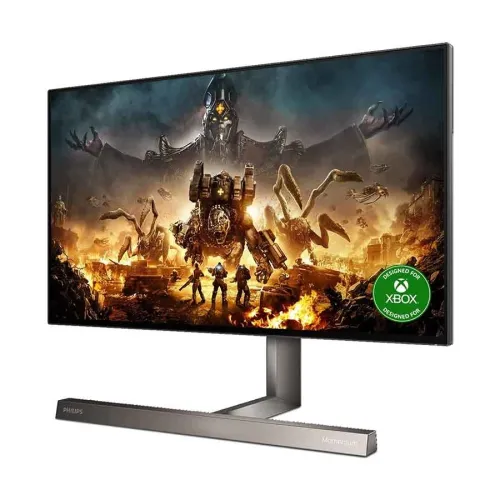
Philips Momentum 279M1RV: complete 4K gaming monitor guide
Philips Momentum 279M1RV overview
The Philips Momentum 279M1RV is a 27-inch 4K gaming monitor built around a Nano IPS panel, a 144Hz refresh rate and four-sided Ambiglow lighting. Philips specifies 3840 x 2160 at up to 144Hz over HDMI or DisplayPort, while USB-C supports up to 4K at 120Hz. The model is DisplayHDR 600 certified and offers 450 cd/m² typical brightness, AMD FreeSync Premium Pro, G-SYNC Compatible operation over DisplayPort and a broad color gamut. Its connectivity includes three HDMI 2.1 inputs, DisplayPort 1.4, USB-C with 65W power delivery, four USB-A downstream ports and a USB-B upstream connection. This record is associated with “Others” and has a no-warranty label; the brand will be corrected to Philips and local warranty details will be left for seller confirmation rather than treated as verified.
4K resolution and 27-inch pixel density
The screen measures 27 inches diagonally and has a native 3840 x 2160 resolution in a 16:9 format. Philips lists 163 pixels per inch and a 0.1554mm pixel pitch. This high pixel density can show fine detail in games, photographs, video and desktop interfaces. At 4K, running recent games at high frame rates requires substantial GPU performance; users can select a lower resolution or graphics preset if needed. Windows or macOS scaling may be useful to keep text comfortably sized. The effective viewing area is approximately 603.9 by 347.45mm. The Nano IPS technology and W-LED backlight provide the display foundation; panel claims should not be confused with an OLED screen.
144Hz refresh and connection-specific modes
Philips specifies 3840 x 2160 up to 144Hz using HDMI or DisplayPort, and 3840 x 2160 up to 120Hz over USB-C. The exact mode depends on the graphics source, connection, cable, color depth, chroma format and settings. DisplayPort 1.4 and HDMI 2.1 allow higher-bandwidth gaming paths, but the computer or console must support the desired output. Check the host's port specification and enable the refresh rate in its display settings after connecting. A game must also render enough frames to benefit from the higher refresh ceiling. The monitor can run at lower standard refresh rates when paired with less powerful hardware, so its use is not restricted to a top-end gaming PC.
Nano IPS color and gamut
Philips lists 1.07 billion colors, typical color gamut coverage of 112% NTSC, 133% sRGB and 110.1% Adobe RGB, with minimum DCI-P3 coverage of 98%. The product sheet also cites Delta E below 2 in sRGB mode and SmartUniformity of 97 to 102%. These values make the monitor suitable for broad color work as well as gaming, but gamut coverage by itself does not prove every unit is calibrated for a particular production environment. Select the correct color mode for the destination and use a measured calibration workflow for color-critical tasks. Wide-gamut content can appear oversaturated in applications that do not manage color profiles. Keep a standard sRGB mode available for ordinary web and document use.
DisplayHDR 600 and brightness
The monitor is VESA DisplayHDR 600 certified. Philips lists 450 cd/m² typical brightness, and the certification indicates a defined HDR capability that is more specific than a generic HDR10 input label. HDR quality still depends on the source, content, mode, panel behavior and room lighting. It is not an OLED display, and the stated 1000:1 typical native contrast remains relevant when setting expectations for dark scenes. Enable HDR only when the operating system, application or game provides compatible content and settings. For color work, compare HDR mode behavior with the SDR reference mode rather than assuming the HDR preset is correct for every task.
Adaptive sync and G-SYNC compatibility
Philips specifies AMD FreeSync Premium Pro and G-SYNC Compatible operation over DisplayPort from 60Hz to 144Hz. Adaptive sync can match the display refresh to a compatible GPU's changing frame rate and reduce tearing within the supported range. Performance depends on the graphics card, driver, game, connection and display settings. HDMI 2.1 includes VRR and FRL features according to the Philips product sheet. These features do not increase a game's frame rate and cannot compensate for severe system performance limits. Use the host manufacturer's instructions to enable VRR and confirm the displayed refresh range. Consoles support their own limited set of modes; do not assume every PC feature is exposed in the same way on every console.
Ambiglow and gaming image features
Four-sided Ambiglow uses lighting around the display to extend the on-screen color atmosphere onto the wall behind the monitor. Users can select lighting behavior to suit games, films or room bias lighting. Ambient effects depend on wall color, distance and room brightness and are a preference feature rather than a screen-performance specification. Philips also lists SmartImage Game, low input lag, flicker-free operation and LowBlue Mode. These controls can help tailor the display for different content, but they do not guarantee a competitive advantage or remove the need to tune the source image. For color-critical work, select a known color profile and avoid ambient effects that distract from the intended image.
HDMI, DisplayPort and USB-C connectivity
The official Philips specification lists three HDMI 2.1 inputs, one DisplayPort 1.4 input and one USB-C connection with DisplayPort Alt Mode and up to 65W power delivery. USB-C supports 4K up to 120Hz per the product sheet. It can provide video, data and laptop charging through one cable when the host supports those functions. A laptop needing more than 65W may still require its own charger. Confirm the USB-C cable supports video and power delivery, not just charging. Philips also lists a USB-B upstream connector and four USB-A downstream ports, two with BC 1.2 fast charging. Connect the USB-B or USB-C upstream path as required for the hub/KVM function and check the manual's port layout.
USB hub, KVM and MultiView
The 279M1RV lists KVM functionality using USB-C and USB-B and supports PBP MultiView for two devices. These features can help share keyboard, mouse and display area across a compatible computer setup. Connect each system's video and USB upstream path, then select the matching KVM source in the monitor menu. The USB-A hub depends on an active upstream connection. Picture-by-picture can show two sources at once, but each source receives only part of the full display area. KVM is a peripheral-switching feature, not a network bridge or secure file-transfer system. Follow workplace policies before connecting personal and managed computers to shared peripherals.
DTS speakers and headphone output
Philips includes two 5W speakers with DTS Sound processing and a headphone output. The built-in speakers provide practical audio for games, films and calls without separate desktop speakers, while the headphone jack supports private listening. Audio quality and spatial impression depend on content, placement, sound mode and room acoustics. A monitor speaker system is convenient but should not be assumed to replace dedicated speakers or headphones for detailed audio production. Select the monitor as the operating system's sound output when using HDMI, DisplayPort or USB-C audio. Verify the monitor volume and source mute settings if there is no sound.
Stand ergonomics and VESA mounting
The stand provides 130mm of height adjustment and tilt from -5 to +20 degrees. Philips lists a 100 x 100mm VESA mount. The official specification should be consulted for the complete stand adjustment range and installation details; the seller's local manual and carton label identify the exact regional unit. Position the screen so the viewing angle is comfortable and the panel does not reflect a bright light source. A compatible monitor arm can free desk space, subject to its load limit and VESA compatibility. Check clearance for the wide stand, USB hub, power cable and HDMI/DisplayPort plugs before installation.
Power, dimensions and package
Philips lists 62.7W on-mode power consumption, 0.5W standby and 0.3W off-mode. The voltage specification is 100-240V AC at 50-60Hz. The catalog's 609 x 545 x 282mm size and 9kg weight should be checked against the exact regional product documentation because dimensions and weight can depend on stand configuration and measurement convention. The Philips specification sheet is the authority for the box contents and region; ask the Bangladesh seller what cables and accessories are included. Keep the packaging and invoice for service. Use the supplied power cable and do not block ventilation openings.
PC and console compatibility
A PC with a compatible DisplayPort 1.4 or HDMI 2.1 output can use the listed 4K/144Hz mode if its GPU and cable support the necessary bandwidth. USB-C hosts can use up to 4K/120Hz with DisplayPort Alt Mode and may receive up to 65W charging. Console capabilities vary by generation, game and output settings; HDMI 2.1 features can support high-resolution VRR workflows when the console and title expose them. Confirm supported resolution, refresh and HDR in the device manual. The 4K 144Hz combination is demanding for gaming hardware. Users can lower rendering resolution or detail while retaining the monitor's high refresh capabilities where the source configuration allows.
Bangladesh price and warranty checks
The captured catalog variant has no price, and this review did not verify a current Bangladesh checkout quote for the exact 279M1RV model and regional suffix. The variant MSRP remains null rather than borrowing a foreign price or another Philips monitor's listing. The current product record says “No Warranty,” which is not verified by the global Philips spec sheet and should not be presented as established local coverage. Ask the seller to confirm the exact product suffix, import channel, warranty card, service provider, dead-pixel policy, return terms and box contents. Confirm whether the unit is new, sealed and supported locally. Retain the invoice and serial number. Regional suffixes such as /01 or /89 may carry different packaging or market details.
Who should consider the Momentum 279M1RV
The Momentum 279M1RV can suit a user seeking a 27-inch 4K display that combines high refresh, DisplayHDR 600, wide color, HDMI 2.1, USB-C laptop connectivity, Ambiglow and integrated speakers. It can work across gaming, media and creative tasks if the host provides compatible signals and the user selects suitable color modes. Trade-offs include the substantial graphics demand for 4K/high frame rates, 65W maximum USB-C charging and the need to confirm the Bangladesh warranty and price. Users who prefer simpler office use may not need the gaming features; users needing stronger HDR contrast or higher laptop power should compare alternatives. Match the regional model suffix and local service terms before buying.
Model identity and source notes
This item is Philips Momentum 279M1RV, an Xbox-designed Momentum 7000-series 27-inch 4K monitor. Philips' official product sheet specifies the /01 model; its regional /89 sheet confirms the same core Nano IPS, 4K/144Hz, 450-nit, DisplayHDR 600, FreeSync Premium Pro, G-SYNC Compatible, HDMI 2.1 and USB-C 65W characteristics. Exact suffix should be confirmed on the local carton. The catalogue brand link was corrected to the existing active Philips brand. Local price, local warranty, stock and GTIN remain unverified. This record is not the 279M1RVE variant or other Momentum monitors.
Frequently asked questions
1. What resolution and size does it have?
It is a 27-inch 4K monitor with 3840 x 2160 resolution and 163 pixels per inch.
2. Can it run 4K at 144Hz?
Philips lists 4K up to 144Hz over HDMI or DisplayPort; USB-C supports up to 4K at 120Hz. The host and cable must support the mode.
3. What panel does it use?
The 279M1RV uses a Nano IPS LCD panel with W-LED backlighting.
4. Does it support HDR?
Yes. Philips specifies VESA DisplayHDR 600 certification and HDR support.
5. Which video ports are included?
Three HDMI 2.1 inputs, one DisplayPort 1.4 input and one USB-C input with DisplayPort Alt Mode.
6. How much power does USB-C deliver?
The USB-C connection supports up to 65W power delivery; check laptop requirements and cable compatibility.
7. Does it support FreeSync or G-SYNC?
Philips lists AMD FreeSync Premium Pro and G-SYNC Compatible operation over DisplayPort from 60 to 144Hz.
8. Does it have built-in speakers?
Yes. It has two 5W speakers with DTS Sound and a headphone output.
9. Does the monitor include a USB hub?
Yes. Philips lists four USB-A downstream ports and one USB-B upstream connection; two USB-A ports support BC 1.2 charging.
10. What is Ambiglow?
Ambiglow is four-sided lighting that projects colors around the screen onto the wall behind the monitor.
11. What is its Bangladesh price?
A current exact-model Bangladesh checkout quote was not verified; the variant price remains unset.
12. What warranty applies in Bangladesh?
The catalog currently says No Warranty, but local coverage is unverified. Confirm the exact unit warranty card with the seller.