Pros
- Plug-and-play wired use without batteries
- Ambidextrous shape
- Optical sensor specification from manufacturer

All categories
 New condition
Computer Accessories
Rapoo · N100
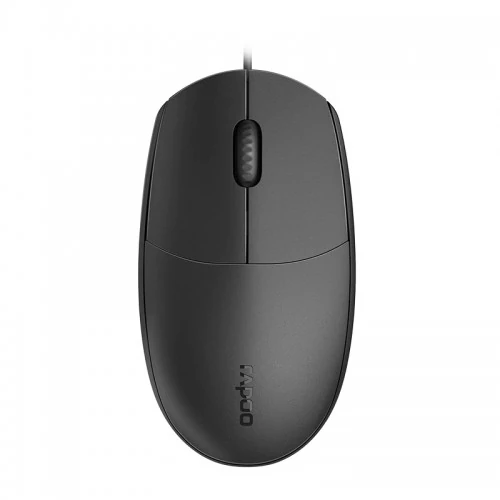
Rapoo N100 is a wired USB optical mouse with three buttons and a 1600 DPI sensor per Rapoo. Local listings vary; confirm the offered unit.
Approximate Market Price
BDT 475
Informational market estimate only; this is not a current Store offer.
Compare store prices
No live offers for this variant
BDT 475
Approximate Market Price
Informational market estimate only; this is not a current Store offer.
Loading history…
Product story
Rapoo N100 is a wired optical mouse with a symmetric, ambidextrous shape and three buttons including a non-slip scroll wheel. Rapoo’s official N100 product page specifies a 1600 DPI optical sensor, USB cable connectivity, no DPI switch and no driver requirement. Some Bangladesh listings advertise 1000 DPI, so the exact regional variant should be confirmed. This mouse is suited to everyday desktop navigation where a wired USB connection is preferred.
Rapoo specifies a 1600 DPI optical sensor for the N100, intended for smooth pointer movement in everyday computer use. Local retailer pages also show 1000 DPI, creating a model listing discrepancy. Rapoo’s official specification is used here, but the received unit’s revision should be checked with the merchant. The model does not have a dedicated DPI switch, so on-the-fly sensitivity changes are not available from a mouse button.
The mouse connects to a computer through its USB cable and does not require batteries, Bluetooth pairing or a wireless receiver. Plug it into an available compatible USB port. The cable gives a continuous connection but limits placement to its reach; exact cable length is not specified on Rapoo’s product page. A local retailer lists 1.5m, which should be confirmed for the offered unit.
Rapoo lists three buttons, including a 2D non-slip scroll wheel. The standard left and right buttons support selection and context actions, while the wheel supports scrolling and a middle click. The N100 is not described as having extra programmable side buttons, dedicated DPI controls or silent switches. Rapoo explicitly lists Silent Click as No.
Rapoo describes the mouse as full-size and ambidextrous, with a symmetric ergonomic form intended for both left- and right-handed use. Comfort depends on hand size, grip, desk setup and session length. Its shape is intended for general navigation rather than a specialized ergonomic vertical posture or gaming-specific button layout.
Rapoo Europe lists dimensions of 115 × 63 × 38mm and a weight of 66g. A Bangladesh retailer listing reports 116 × 61.8 × 35.6mm and 81g. The figures may reflect regional or measurement differences; confirm exact unit packaging if these details matter. Dimensions and weight should not be combined across variants as though measured on the same sample.
Rapoo states that no driver or setup is needed and lists Windows XP/Vista/7/8/10 and macOS compatibility. Current operating-system behavior may vary, and the manufacturer page does not list every newer OS version. Standard pointer functions are expected through USB HID support, but confirm compatibility with specialized or locked-down systems.
The N100’s optical tracking and scroll wheel support common tasks such as browsing, office applications and basic navigation. The 1600 DPI sensor is manufacturer-listed, but no polling rate, sensor model, acceleration curve or gaming performance certification is provided. This description does not claim esports-grade performance or a specific surface-tracking range.
Place the mouse on a stable surface and keep the USB cable routed to avoid tension or snagging. Avoid sharply bending the cable near the connector, pulling the mouse by its cord or exposing the optical sensor to dust and liquids. If pointer tracking is inconsistent, clean the sensor opening and try a suitable non-reflective surface.
The N100 is wired, has three buttons and does not provide a dedicated DPI switch or silent clicks. It has no confirmed wireless mode, rechargeable battery, RGB lighting, programmable side buttons or bundled software. These omissions are consistent with the manufacturer’s published feature list; buyers needing those functions should choose a model that explicitly includes them.
Current price, stock, color variant, cable length and Bangladesh warranty were not verified for the live offer. Confirm whether the seller supplies an official distributor warranty and retain the invoice. Check the box and product label for the N100 model and regional revision, particularly because local DPI and physical measurements differ from the official page.
Choose the Rapoo N100 if you need a straightforward USB wired mouse with a symmetric shape, optical tracking and a scroll wheel. Confirm the 1600 versus 1000 DPI listing discrepancy, dimensions, cable length and local warranty with the merchant. Match the wired connection to your computer’s USB ports and consider a USB-C adapter if the computer has no USB-A port.
Rapoo’s N100 product page specifies optical tracking with a 1600 DPI sensor. Some local listings show 1000 DPI, so verify the exact unit revision with the seller.
The N100 is a wired mouse that connects over USB. It does not use Bluetooth or a wireless receiver.
Rapoo lists three buttons, including a non-slip scroll wheel. The scroll wheel click functions as the third button.
Rapoo’s specification says the N100 has no DPI switch. The cursor resolution is not adjustable through a dedicated mouse button.
Rapoo describes the N100 as a full-size ambidextrous mouse with a symmetric shape for left- or right-handed use. Individual comfort depends on hand size and grip style.
Rapoo says no driver or setup is required. Operating-system support may vary; the product page lists Windows XP through Windows 10 and macOS.
No. Rapoo’s specification lists Silent Click as No.
Rapoo Europe lists dimensions of 115 × 63 × 38mm and weight of 66g. A Bangladesh listing gives different dimensions and 81g; confirm the local revision and packaging.
Some local listings state 1.5m, but the official Rapoo page checked does not list cable length. Treat 1.5m as retailer-listed and verify before buying.
Warranty coverage depends on the local seller and distributor. Confirm duration, provider and claim process for the exact unit before ordering.
Helpful answers
Product-specific answers maintained with the catalog information.
Rapoo’s N100 product page specifies optical tracking with a 1600 DPI sensor. Some local listings show 1000 DPI, so verify the exact unit revision with the seller.
The N100 is a wired mouse that connects over USB. It does not use Bluetooth or a wireless receiver.
Rapoo lists three buttons, including a non-slip scroll wheel. The scroll wheel click functions as the third button.
Rapoo’s specification says the N100 has no DPI switch. The cursor resolution is not adjustable through a dedicated mouse button.
Rapoo describes the N100 as a full-size ambidextrous mouse with a symmetric shape for left- or right-handed use. Individual comfort depends on hand size and grip style.
Rapoo says no driver or setup is required. Operating-system support may vary; the product page lists Windows XP through Windows 10 and macOS.
No. Rapoo’s specification lists Silent Click as No.
Rapoo Europe lists dimensions of 115 × 63 × 38mm and weight of 66g. A Bangladesh listing gives different dimensions and 81g; confirm the local revision and packaging.
Some local listings state 1.5m, but the official Rapoo page checked does not list cable length. Treat 1.5m as retailer-listed and verify before buying.
Warranty coverage depends on the local seller and distributor. Confirm duration, provider and claim process for the exact unit before ordering.
Customer community
Become a merchant
Join BiponiBD, publish accurate offers and start free.