Pros
- Wired USB connection requires no battery or wireless pairing
- Three-button layout provides familiar navigation and scrolling
- 1200 DPI maximum and 1.5m cable are listed by several local retailers

All categories
 New condition
Computer Accessories
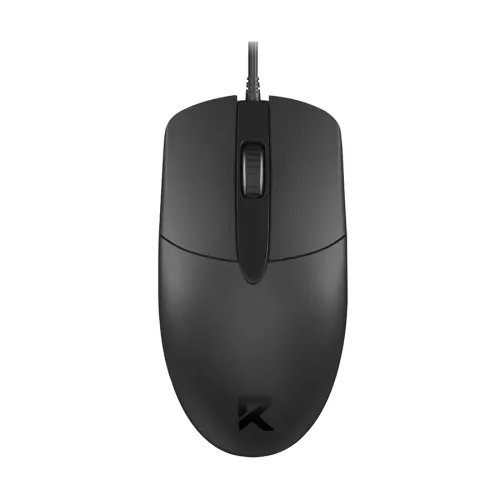
Redragon · BM-4125 Wired Optical Mouse
Redragon BM-4125 wired optical mouse with 1200 DPI, 3 buttons, USB-A and 1.5m cable listed. Confirm device compatibility and seller warranty.
Approximate Market Price
BDT 350
Informational market estimate only; this is not a current Store offer.
Compare store prices
No live offers for this variant
BDT 350
Approximate Market Price
Informational market estimate only; this is not a current Store offer.
Loading history…
Product story
The Redragon BM-4125 is a basic wired optical mouse intended for everyday computer navigation. Bangladesh retailer listings identify a USB connection, three buttons, a maximum 1200 DPI resolution, black color and a 1.5-meter cable. It is suited to common pointer tasks such as browsing, documents, schoolwork and general desktop use. The model does not have the multi-button or high-DPI feature set associated with Redragon’s gaming mice, so choose it according to ordinary-use needs rather than assuming gaming-specific performance.
The product model is BM-4125. Listings from Star Tech, Techland, Skyland and Ryans consistently describe a wired optical mouse with three buttons and 1200 DPI. The typical three controls are the left and right buttons and a clickable scroll wheel; sellers also list a scroll wheel. Confirm that the box label says BM-4125 because Redragon model numbers can identify substantially different mice, with different sensor, switch, lighting and software features.
The BM-4125 is listed with a maximum resolution of 1200 DPI. DPI describes how far the pointer moves relative to physical mouse movement; it is not a measurement of sensor accuracy or a guarantee that every surface will track equally well. A higher DPI is not automatically preferable for office work. Pointer speed can also be adjusted in the operating system. The retailer specification does not establish selectable DPI stages, a DPI button, polling rate, sensor model or gaming-grade tracking tests.
The mouse is listed with three buttons and a scroll wheel, providing familiar primary clicks and page scrolling. The reviewed product listings do not establish programmable side buttons, extra macro controls, tilt scrolling or configuration software. It can suit straightforward navigation and document work where a simple layout is preferred. If an application depends on thumb buttons, custom profiles or dedicated macro keys, compare a different mouse with those features explicitly documented.
The BM-4125 connects by cable and uses a USB interface; Star Tech specifies a USB Type-A connection. Wired operation avoids batteries and wireless pairing, and it can be useful when a computer has an available compatible USB-A port. The mouse does not offer Bluetooth or a wireless receiver. For a USB-C-only laptop, a separately compatible adapter may be required; the adapter and port must support a stable connection and should not put strain on the mouse plug.
Retailers list a 1.5-meter cable. Measure the route from the computer port to the mouse position, allowing room for movement and cable routing around the desk. Keep the wire away from chair wheels, sharp edges and places where it can snag. The cable is attached and is not described as detachable. A cable holder can reduce drag, but do not sharply bend the wire near the mouse body or USB plug.
Local listings identify the BM-4125 in black and describe an ergonomic or comfortable shape. Fit is personal and depends on hand size, grip style and how long the mouse is used at a time. The available sources do not provide verified dimensions, weight, hand-specific design, material finish or left-handed support details. If possible, compare the actual shape before extended use. Keep the mouse clean and dry, and avoid pulling it across abrasive or wet surfaces.
Retailer pages list compatibility with Windows and Mac. A standard USB mouse can generally be used for basic pointer input when the computer recognizes its USB interface, but operating-system versions and available ports vary. The inspected listings do not publish a complete supported-version matrix or guarantee every specialized operating environment. Plug it into a direct USB port first. If the pointer is not detected, try another port and check system settings or device support.
For web browsing, text editing, file selection and routine productivity, the simple wired layout can provide the core controls most users expect. It is not listed with RGB lighting, wireless connectivity, a high polling-rate rating, adjustable weights or programmable profiles. The model is a general-use mouse, and retailer descriptions do not provide independent latency, click-life or surface-compatibility measurements. For competitive play or specialist creative workflows, confirm the required features before selecting it.
Connect the USB-A plug to an available compatible computer port and allow the operating system to detect the mouse. Move it on a clean, flat surface. If tracking is erratic, remove dust from the sensor opening, try another surface and test another USB port. If clicks or scrolling do not respond, reconnect the plug and check for application or system settings that change button behavior. Do not open the mouse while it is connected, and stop using it if the cable or plug is visibly damaged.
Unplug the mouse before cleaning. Wipe the outer shell with a soft, slightly damp cloth and keep liquid away from the sensor, buttons and USB connector; allow the device to dry fully before reconnecting. The available specifications do not claim water resistance, a detachable cable, replaceable switches, onboard memory or a warranty against wear. Avoid twisting the wire and do not force the USB plug into a port. Retain the purchase invoice and packaging for any service request.
Star Tech, Techland, Skyland and Ryans listings state a one-year warranty for this model, but the service provider, claim steps and exclusions can differ by seller. Confirm warranty coverage in writing with the shop selected for the BiponiBD order. Retail prices and stock shown on other sites are offers from those sellers and can change; they do not prove the current BiponiBD price or availability. At delivery, verify the BM-4125 label, black color, wired USB configuration and invoice.
The BM-4125 offers a familiar three-button optical layout, a wired USB connection, 1200 DPI maximum resolution and a 1.5-meter cable according to several local retailer listings. It needs no mouse battery or wireless setup. The tradeoffs are a fixed cable, a basic button layout and no confirmed advanced gaming or customization features. Check USB port fit, the mouse shape and the selected seller’s one-year warranty terms to make sure the simple configuration fits your needs.
The Redragon BM-4125 is a wired optical mouse. Retailers list up to 1200 DPI, three buttons, a USB Type-A connection and a 1.5-meter cable. It is listed in black and Windows/Mac compatibility is stated by local shops. It does not use Bluetooth or batteries. The sources do not confirm programmable side buttons, adjustable DPI stages, polling rate or RGB lighting. Multiple Bangladesh sellers list one-year warranty, subject to the selected seller’s terms.
Helpful answers
Product-specific answers maintained with the catalog information.
The product is Redragon BM-4125 wired optical mouse.
Local retailer specifications list a maximum resolution of 1200 DPI.
Retailers list three buttons, along with a scroll wheel.
It is a wired USB mouse; wireless or Bluetooth connectivity is not listed.
A USB connection is listed, with USB Type-A specified by Star Tech.
Retailer listings specify a 1.5-meter cable.
The reviewed listings identify the mouse as black.
Some Bangladesh sellers list Windows and Mac compatibility; confirm your OS and port support.
These features are not listed for the BM-4125 in the inspected exact-model sources.
Several local retailers list one year; confirm the provider and terms for the seller you choose.
Customer community
Become a merchant
Join BiponiBD, publish accurate offers and start free.