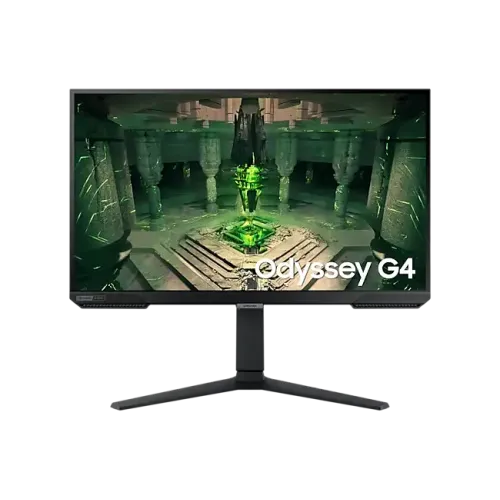
Verified model overview
The Samsung Odyssey G4 G40B 27-inch monitor, model family LS27BG400E, has a Full HD IPS display with a maximum 240Hz refresh rate. Samsung lists 1ms gray-to-gray response, 400 cd/m² typical brightness, 1000:1 typical static contrast, 99% sRGB coverage, HDR10 and 178-degree viewing angles. Features include AMD FreeSync Premium, G-Sync compatibility and an ergonomic stand with height adjustment, tilt, swivel and pivot. Inputs include two HDMI 1.4 ports and one DisplayPort. Confirm the exact regional suffix because port and warranty terms can vary.
27-inch Full HD gaming
The 27-inch screen uses native 1920 × 1080 Full HD resolution in a 16:9 format. Samsung lists a 59.67 × 33.56cm active display area. Full HD can be less demanding on a graphics card than QHD or 4K, which may help a compatible PC reach high frame rates. At 27 inches, it is less pixel-dense than a QHD panel of the same size. Set native resolution and use scaling or game UI options for comfortable text and interface size.
IPS panel and viewing angles
Samsung specifies an IPS panel with 178-degree horizontal and vertical viewing angles. This supports a broad viewing position and clear colors when the user shifts to the side. Typical static contrast is 1000:1, while the product page also lists a dynamic contrast feature; dynamic processing does not represent native black level. The flat screen suits standard desks and multi-monitor layouts. Adjust the panel angle to reduce glare, and do not treat IPS technology as proof of factory calibration.
240Hz refresh rate
Samsung lists a maximum refresh rate of 240Hz. High refresh can make fast motion appear smoother if the computer supplies matching frames. Select 1920 × 1080 and the desired refresh in display settings, then verify the connection, graphics output and game frame rate. If 240Hz is missing, check the monitor input, cable, driver and whether a dock or adapter limits the signal. A 240Hz screen does not guarantee that every game will render at 240 frames per second.
1ms gray-to-gray response
The monitor is rated at 1ms GtG. Samsung clarifies that this figure is measured under internal test conditions and requires Extreme response mode; results can vary by content and settings. The quoted millisecond value is truncated from a range, not a promise that every transition always completes in exactly one millisecond. Extreme overdrive may create visible artifacts. Compare response modes in the games you play and use the setting that gives the cleanest motion.
FreeSync Premium and G-Sync compatibility
Samsung lists AMD FreeSync Premium and NVIDIA G-Sync compatibility. Variable refresh synchronizes supported display updates with changing GPU frame output to help reduce tearing and stutter. Compatibility depends on graphics card, driver, connection and supported range. Enable the feature in the monitor and graphics settings. It does not improve the GPU’s rendering performance. If flicker appears, test a stable frame-rate range, another cable or a different refresh setting.
HDR10 and brightness
Samsung lists HDR10 and typical brightness of 400 cd/m², with a minimum of 320 cd/m². HDR10 accepts compatible HDR content, but this specification does not list a VESA DisplayHDR certification tier. HDR appearance depends on content, system configuration, brightness and picture mode; the label alone does not imply local dimming. Compare HDR and SDR with familiar material and adjust brightness for the room. Samsung’s page lists a static contrast ratio of 1000:1.
Color coverage and color depth
Samsung lists 99% sRGB coverage and a maximum of 16.7 million colors. These figures support general gaming and media use but do not certify professional calibration. For image editing, use a calibrated monitor and color-managed software. Gamut and accuracy can vary with picture mode and the individual display. Avoid interpreting sRGB coverage as proof that every color is reproduced within a specific Delta E tolerance unless the exact regional documentation provides that test result.
HDMI and DisplayPort connections
The product has two HDMI 1.4 inputs and one DisplayPort input. The Samsung regional page identifies HDMI and DP connections; the monitor’s supported resolution and refresh depend on the port, source, cable and region. Select the correct input in the OSD. Use a direct graphics-card connection when diagnosing a missing 240Hz mode. The previous catalog incorrectly called a port HDMI 2.2; that standard was not specified by Samsung and has been corrected to HDMI 1.4 for the sourced variant.
Audio and speakers
Samsung’s product specification page lists no integrated speakers. Use a headset, external speakers or another audio system. The monitor includes an audio output in relevant regional specification tables; source sound may be carried over HDMI or DisplayPort to compatible equipment. Select the display as the system playback device if using monitor audio out. Confirm the exact regional connection list because product suffixes can vary. Do not mistake an audio output for built-in speakers or a microphone input.
Height-adjustable stand
The ergonomic stand supports approximately 120mm of height adjustment, tilt from -3 to +22 degrees, swivel around ±15 degrees and pivot around ±92 degrees. Adjust the display to eye height and tilt for glare or viewing posture. Pivot can support portrait use for documents or code. Leave cable slack for movement and secure the base on a level desk. The exact range includes small tolerances, so follow the regional user manual for safe adjustment.
VESA mounting and dimensions
Samsung lists a 100 × 100mm wall mount. With stand, dimensions are about 614.7 × 571.1 × 244.8mm; without stand, about 614.7 × 376.6 × 85.4mm. Product weight is around 5.3kg with stand and 3.6kg without stand. Measure desk depth, height and cable clearance before installation. For a monitor arm, verify its load rating and screw compatibility, support the screen while mounting and make sure the pivot/swivel range cannot strike a wall or desk partition.
Power and consumption
Samsung lists an external adapter, AC 100–240V input and up to 48W maximum consumption for the regional model page. Actual power draw depends on brightness, refresh mode and content. Use the supplied power adapter and cable for the exact SKU; do not substitute an adapter based only on matching voltage. Keep the power supply ventilated and use a properly grounded outlet. Disconnect power before cleaning or moving the display.
Eye Saver and flicker-free modes
Samsung lists Eye Saver Mode and Flicker Free Mode for the Odyssey G4 family. These are display features, not medical claims. Comfort also depends on room lighting, brightness, viewing distance, text scale and breaks. Eye Saver can change color appearance, so use a neutral setting for color-sensitive work. The stand’s height and tilt options can help align the panel with a comfortable posture. Adjust brightness to the environment rather than leaving it at maximum.
Gaming settings and on-screen display
The monitor provides an on-screen display for source selection and picture settings. Samsung advertises low input response, high refresh and sync features to support gaming. Use the OSD to choose the input, adjust response mode and configure FreeSync or other supported options. Settings can change brightness or introduce artifacts, so compare them in actual gameplay. Monitor features display the computer’s output; they do not alter game balance, network latency or frame-generation capability.
Strengths and trade-offs
The Odyssey G4 combines 27-inch Full HD IPS, up to 240Hz, 1ms GtG, FreeSync Premium, G-Sync compatibility and a fully adjustable stand. Its Full HD resolution is easier to drive at high frame rates but less detailed than QHD at this screen size. HDR10 support is listed without a VESA DisplayHDR tier, and built-in speakers are not specified. Confirm the exact regional suffix, connection details and local warranty. Samsung’s 1ms rating requires Extreme response mode under its test conditions.
Bangladesh warranty and suffix check
Samsung’s India and other regional product pages describe regional product configurations and warranty terms that do not verify coverage for a Bangladesh serial. The catalog says three years; ask the seller to confirm local eligibility, warranty start, authorized service location and panel defect terms. Verify the full model suffix on the carton; LS27BG400EW variants can differ by region. Check current price, stock, delivery, return and payment terms at checkout and retain the invoice.
Setup and troubleshooting
Connect power, then use HDMI or DisplayPort and set native 1920 × 1080. Select a supported refresh up to 240Hz after checking the graphics output, cable and selected input. If no 240Hz option appears, update drivers, bypass docks and adapters, and recheck monitor settings. Enable FreeSync Premium or G-Sync compatibility when supported if tearing occurs. Use Extreme response mode only if its motion image looks clean. Route sound to headphones or external speakers because speakers are not listed.
Who should consider this monitor
The Samsung Odyssey G4 G40B can suit a gamer who values 240Hz motion, a 27-inch IPS panel and an ergonomic stand, especially with a PC capable of high Full HD frame rates. It can also support console or desktop use at compatible timing. Buyers who prioritize higher resolution, integrated speakers, certified HDR or USB-C docking should compare other models. Confirm the exact LS27BG400E suffix, HDMI/DisplayPort timing and local serial warranty before ordering.
Specification summary
Samsung Odyssey G4 G40B, LS27BG400E family: 27-inch flat IPS, 1920 × 1080, 16:9, maximum 240Hz, 1ms GtG (Extreme mode), 400 cd/m² typical, 1000:1 static contrast, 99% sRGB, 16.7M colors, HDR10. AMD FreeSync Premium and NVIDIA G-Sync compatibility. Inputs: 2 × HDMI 1.4 and DisplayPort; no built-in speakers listed. Stand: ~120mm lift, tilt, ±15° swivel and ±92° pivot; VESA 100 × 100mm. Verify exact regional suffix and Bangladesh warranty.