Pros
- Large 32-inch QHD screen with IPS viewing angles.
- 165Hz refresh and adaptive-sync support.
- Adjustable height, swivel, tilt and portrait pivot stand.
- HDR10/DisplayHDR 400, sRGB modes and useful gaming controls.

All categories
 New condition
Monitors
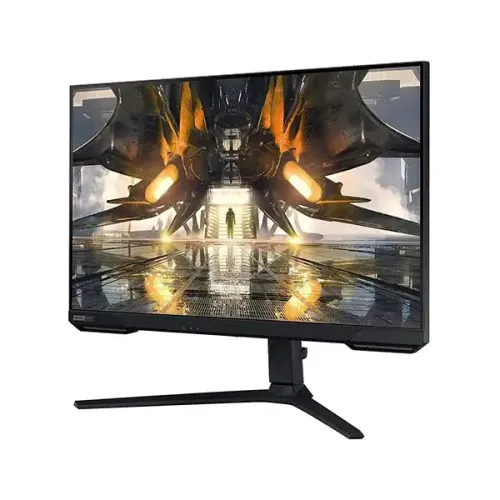
Samsung · Odyssey G5 G52A LS32AG520PWX
32-inch flat QHD IPS gaming monitor with 165Hz, HDR400, FreeSync Premium and an adjustable HAS stand.
Price unavailable
Price range updating
No verified price is available yet. Store offers will appear when merchants publish them.
Compare store prices
No live offers for this variant
Offers will appear when merchants publish them.
Loading history…
Product story
The Samsung Odyssey G5 LS32AG520PWX belongs to the flat G52A 32-inch IPS family. Samsung's product page specifies 2560 × 1440 QHD, up to 165Hz, 1ms GtG, HDR10, VESA DisplayHDR 400, 99% sRGB, FreeSync Premium and G-SYNC Compatible. It includes an adjustable HAS stand and a 100 × 100mm VESA mounting pattern. Refer to Samsung's product page and local user guide for setup. Performance depends on source device, input, cable, settings and content. Current Bangladesh price, inventory, warranty and return conditions are seller-specific and should be confirmed before purchase.
Check the complete regional model code on the rear label and invoice. Samsung uses similar Odyssey G5 names for different curved VA and flat IPS monitors. This listing is for LS32AG520PWX, aligned with the LS32AG520P G52A 32-inch IPS specification. Regional suffixes can change the exact package, warranty or energy labeling; verify the supplied unit before ordering. Refer to Samsung's product page and local user guide for setup. Performance depends on source device, input, cable, settings and content. Current Bangladesh price, inventory, warranty and return conditions are seller-specific and should be confirmed before purchase.
The 32-inch screen uses a 16:9 format and native 2560 × 1440 QHD resolution. QHD offers more detail and desktop space than Full HD, though driving games at 165Hz requires a capable GPU. Use the native mode for clear text. At 32 inches, consider desk depth, viewing distance and scaling to keep text comfortable. Refer to Samsung's product page and local user guide for setup. Performance depends on source device, input, cable, settings and content. Current Bangladesh price, inventory, warranty and return conditions are seller-specific and should be confirmed before purchase.
Samsung specifies an IPS panel with 178-degree horizontal and vertical viewing angles. Typical static contrast is 1000:1. IPS can help maintain color appearance off-axis, while room light and panel uniformity affect perceived contrast. HDR and picture presets can change the image; use the mode that suits the work or game. Refer to Samsung's product page and local user guide for setup. Performance depends on source device, input, cable, settings and content. Current Bangladesh price, inventory, warranty and return conditions are seller-specific and should be confirmed before purchase.
The maximum refresh rate is 165Hz, and Samsung lists 1ms GtG. Samsung notes that response behavior depends on the selected Extreme setting and content; at some combinations a faster setting may create blur artifacts. Select 165Hz in the graphics settings and adjust response time based on actual image quality rather than assuming one mode is best for every game. Refer to Samsung's product page and local user guide for setup. Performance depends on source device, input, cable, settings and content. Current Bangladesh price, inventory, warranty and return conditions are seller-specific and should be confirmed before purchase.
The product supports HDR10 and carries VESA DisplayHDR 400. Samsung lists 350 cd/m² typical brightness and 400 cd/m² typical peak brightness, with a 280 cd/m² minimum. HDR appearance varies with content, source and mode. DisplayHDR 400 is an entry-level certification and does not imply local dimming or OLED-like blacks. Refer to Samsung's product page and local user guide for setup. Performance depends on source device, input, cable, settings and content. Current Bangladesh price, inventory, warranty and return conditions are seller-specific and should be confirmed before purchase.
Samsung lists 99% sRGB coverage and up to 1 billion colors. Picture options include custom, FPS, RTS, RPG, AOS, Cinema, sRGB and Dynamic Contrast. These are useful starting points, but gamut coverage alone is not a color calibration report. For color-sensitive work, use an appropriate measured profile and verify the intended output color space. Refer to Samsung's product page and local user guide for setup. Performance depends on source device, input, cable, settings and content. Current Bangladesh price, inventory, warranty and return conditions are seller-specific and should be confirmed before purchase.
Samsung lists AMD FreeSync Premium and NVIDIA G-SYNC Compatible. Enable compatible settings in the monitor and GPU control panel, and verify the supported range for your input and graphics hardware. Variable refresh can reduce tearing under supported conditions; it does not increase a game's rendering speed or guarantee a stable frame rate. Refer to Samsung's product page and local user guide for setup. Performance depends on source device, input, cable, settings and content. Current Bangladesh price, inventory, warranty and return conditions are seller-specific and should be confirmed before purchase.
Samsung lists Eye Saver Mode and Flicker Free. These settings provide viewing adjustments but cannot guarantee prevention of eye fatigue. Set brightness to match the room, avoid glare, use comfortable text scaling and take regular breaks. Low-blue-light modes may change image colors and may be less suitable for color-critical tasks. Refer to Samsung's product page and local user guide for setup. Performance depends on source device, input, cable, settings and content. Current Bangladesh price, inventory, warranty and return conditions are seller-specific and should be confirmed before purchase.
The HAS stand provides 120mm height adjustment, tilt, swivel and pivot up to portrait orientation. Samsung lists approximately -11° to +15° tilt, ±15° swivel and pivot to 90° with stated tolerances. Position the screen at a comfortable height, keep the base stable and allow clearance before rotating the 32-inch panel. Refer to Samsung's product page and local user guide for setup. Performance depends on source device, input, cable, settings and content. Current Bangladesh price, inventory, warranty and return conditions are seller-specific and should be confirmed before purchase.
Connectivity includes one HDMI 2.0, one DisplayPort 1.2 and a headphone jack. The power supply is an external adapter. Samsung's French product page lists DP 1.2 and HDMI 2.0 for this G52A family; check the local unit's rear label and manual. A port's presence alone does not prove that every cable is included in the regional package. Refer to Samsung's product page and local user guide for setup. Performance depends on source device, input, cable, settings and content. Current Bangladesh price, inventory, warranty and return conditions are seller-specific and should be confirmed before purchase.
Game functions include Black Equalizer, Low Input Lag Mode, refresh-rate optimization, Super Arena Gaming UX, Auto Source Switch and Ultrawide Game View. Samsung also provides Easy Setting Box. Features alter display behavior or desktop arrangement; they do not replace GPU/game settings or guarantee performance in every title. Refer to Samsung's product page and local user guide for setup. Performance depends on source device, input, cable, settings and content. Current Bangladesh price, inventory, warranty and return conditions are seller-specific and should be confirmed before purchase.
For PC gaming, use DisplayPort 1.2 or a suitable HDMI 2.0 connection, set 2560 × 1440 and up to 165Hz in the OS, then check the monitor's signal information. Update the graphics driver and choose a game frame-rate target your GPU can sustain. Adjust response-time mode and sync settings to the specific game's behavior. Refer to Samsung's product page and local user guide for setup. Performance depends on source device, input, cable, settings and content. Current Bangladesh price, inventory, warranty and return conditions are seller-specific and should be confirmed before purchase.
Console output depends on the console model and title. The monitor can accept compatible HDMI video, but many consoles target 60Hz or 120Hz and do not use 165Hz. Confirm console resolution, VRR and HDR support for the exact setup. QHD input handling and scaling depend on the source; test the desired mode before purchase if it is essential. Refer to Samsung's product page and local user guide for setup. Performance depends on source device, input, cable, settings and content. Current Bangladesh price, inventory, warranty and return conditions are seller-specific and should be confirmed before purchase.
Samsung lists maximum power consumption of 59W and typical 37W, with 0.5W DPMS and 0.3W off-mode figures. The adapter accepts AC 100–240V. Dimensions with stand are 714.6 × 602.9 × 311.1mm; without stand 714.6 × 440.6 × 91.5mm. Weight is 7.5kg with stand and 5.6kg without. VESA is 100 × 100mm. Refer to Samsung's product page and local user guide for setup. Performance depends on source device, input, cable, settings and content. Current Bangladesh price, inventory, warranty and return conditions are seller-specific and should be confirmed before purchase.
Strengths include a large 32-inch QHD IPS panel, 165Hz refresh, adaptive sync support, HDR400 certification and a fully adjustable stand. Trade-offs include a demanding GPU load at QHD/high refresh, one HDMI and one DisplayPort input, external adapter and entry-level HDR brightness. Choose it for the combination of workspace size and gaming refresh rather than HDR alone. Refer to Samsung's product page and local user guide for setup. Performance depends on source device, input, cable, settings and content. Current Bangladesh price, inventory, warranty and return conditions are seller-specific and should be confirmed before purchase.
The 32-inch QHD canvas can suit games, multitasking and general media. A flat 16:9 panel works with standard desktop and video layouts. Samsung's sRGB and picture modes are useful for ordinary content, but they do not make this a professional reference monitor. Consider desk distance and scaling for long reading or multi-window work. Refer to Samsung's product page and local user guide for setup. Performance depends on source device, input, cable, settings and content. Current Bangladesh price, inventory, warranty and return conditions are seller-specific and should be confirmed before purchase.
Inspect the panel, stand adjustment, ports, adapter, cable and included accessories on arrival. Keep invoice, serial number and packaging through the seller's return window. Clean the screen with a soft microfiber cloth and avoid spraying liquid directly on it. Test QHD, refresh rate, HDR, sync and headphone output with compatible devices before final setup. Refer to Samsung's product page and local user guide for setup. Performance depends on source device, input, cable, settings and content. Current Bangladesh price, inventory, warranty and return conditions are seller-specific and should be confirmed before purchase.
Before buying in Bangladesh, confirm current price and stock, exact LS32AG520PWX suffix, included cables and adapter, return/dead-pixel policy, delivery and serial-specific Samsung warranty provider and term. Samsung's international specification does not establish local seller coverage. Retain invoice and serial information, and have the seller confirm service terms. Refer to Samsung's product page and local user guide for setup. Performance depends on source device, input, cable, settings and content. Current Bangladesh price, inventory, warranty and return conditions are seller-specific and should be confirmed before purchase.
Samsung specifies a 32-inch flat IPS panel with 2560 × 1440 QHD, up to 165Hz, 1ms GtG, HDR10, DisplayHDR 400, 99% sRGB, FreeSync Premium and G-SYNC Compatible. The stand adjusts height and supports tilt, swivel and pivot. Verify the exact suffix, local warranty and included accessories with the Bangladesh seller. Refer to Samsung's product page and local user guide for setup. Performance depends on source device, input, cable, settings and content. Current Bangladesh price, inventory, warranty and return conditions are seller-specific and should be confirmed before purchase.
Helpful answers
Product-specific answers maintained with the catalog information.
Samsung lists 2560 × 1440 QHD and up to 165Hz.
No. The LS32AG520P G52A specification describes a flat 32-inch IPS panel.
It supports HDR10 and carries VESA DisplayHDR 400 certification.
Samsung lists FreeSync Premium and G-SYNC Compatible.
One HDMI 2.0, one DisplayPort 1.2 and a headphone jack.
Yes, the stand supports height adjustment, tilt, swivel and pivot.
Samsung does not list built-in speakers for this model.
Console output is limited by its model and game; many use 60Hz or 120Hz.
Confirm serial-specific Samsung local warranty provider, term and service conditions with the seller.
Customer community
Become a merchant
Join BiponiBD, publish accurate offers and start free.