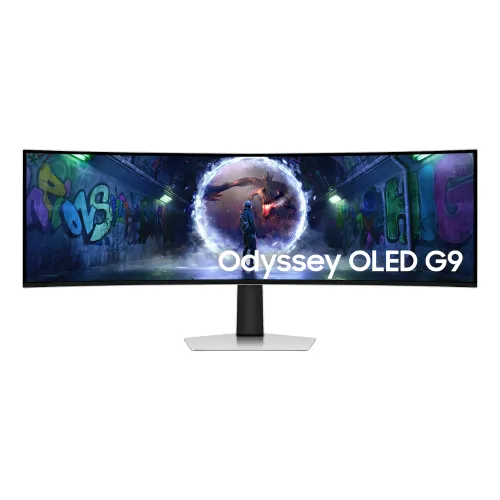
Samsung Odyssey OLED G9 G93SD overview
The Samsung Odyssey OLED G9 G93SD, model family LS49DG930SW, is a 49-inch curved OLED gaming monitor with 5120 × 1440 Dual QHD resolution, a 32:9 aspect ratio, 1800R curvature, up to 240Hz refresh and 0.03ms GTG response. Samsung Bangladesh lists HDR10+ Gaming, FreeSync Premium Pro, G-SYNC Compatible, Glare Free technology, Picture-in-Picture and Picture-by-Picture. This model uses HDMI 2.1, Micro HDMI 2.1, DisplayPort 1.4 and USB data connections.
Confirm the exact model suffix
The Samsung Bangladesh page lists LS49DG930SWXXL; other regions may append a different suffix. Compare the supplied unit’s label, carton and invoice to the LS49DG930SW model family before purchase. This OLED G93SD model is distinct from older Odyssey G9 LCD models and other OLED G9 variants, whose panel and ports differ. This catalog entry keeps its established slug, active status and SKU.
49-inch curved OLED screen
Samsung specifies a 49-inch class OLED display with an active area of 1,196.7 × 339.2mm and 1800R curvature. Its broad 32:9 shape provides an immersive horizontal view for supported games and room for multiple desktop windows. It needs a wide desk and enough viewing distance to see the full screen comfortably. Check the physical dimensions before arranging the monitor, stand and cables.
Dual QHD 5120 × 1440 resolution
The native 5120 × 1440 resolution places two QHD-width work areas side by side in one continuous 32:9 display. Samsung lists about 110 pixels per inch. Games and video must support ultrawide output to fill the panel; standard 16:9 sources may show side bars or use a different layout. Verify your graphics hardware can drive the native resolution at the chosen refresh rate.
240Hz refresh and 0.03ms GTG
Samsung specifies up to 240Hz refresh and a 0.03ms gray-to-gray response rating. A high refresh rate can make motion smoother when the source supplies supported frame rates. The response figure describes pixel transition under Samsung’s test conditions, not full system latency. Cable, GPU, game, resolution and settings determine the actual signal; select and verify the intended mode in the source system.
OLED contrast and brightness
Samsung lists 250 cd/m² typical brightness, 200 cd/m² minimum brightness and a 1,000,000:1 static contrast ratio. OLED pixels can produce deep blacks because individual pixels control their light. Brightness is affected by image content and settings; the typical figure should not be read as guaranteed full-screen HDR brightness. Adjust the picture mode to suit the room and content.
HDR10 and HDR10+ Gaming
The monitor supports HDR10 and HDR10+ Gaming according to Samsung Bangladesh. HDR requires compatible content, source output and monitor settings. The result depends on game or video mastering, system configuration and selected picture mode. Samsung lists OLED contrast and Quantum Dot Color among its capabilities, but HDR support does not guarantee identical brightness or tone mapping across every source.
Color coverage and eye comfort features
Samsung specifies maximum 1 billion colors and 99% DCI coverage using CIE 1976. It also lists Eye Saver Mode and Flicker Free support. These features do not establish color accuracy for every delivered unit or replace color-managed workflows. Use the factory calibration report where available, select a suitable color mode and adjust brightness for ambient light and viewing comfort.
Glare Free screen coating
Samsung describes OLED Glare Free technology as reducing reflections compared with its conventional anti-reflection film. Reduced glare can help in rooms with surrounding light, but the screen is not reflection-proof. Position it away from direct windows and bright lamps, and compare the display in your actual room. Coating and surface behavior can vary with lighting and viewing angle.
HDMI 2.1 and Micro HDMI 2.1
The official interface list includes one HDMI 2.1 port and one Micro HDMI 2.1 port, both with HDCP 2.2. Samsung highlights HDMI and DisplayPort connections for 240Hz gaming. The compact Micro HDMI connection uses a different physical connector from a standard HDMI socket; check the included cable and source connector. Available resolution and refresh depend on the attached device, cable and signal mode.
DisplayPort 1.4 and HDCP
One DisplayPort 1.4 input is listed, with HDCP 2.2 support. Use a suitable DisplayPort cable and confirm the source’s supported timing for 5120 × 1440 at high refresh. The cable and graphics output must support the data rate and mode in use. If the expected refresh option is missing, update source drivers, check display settings and verify the input selection.
USB-C connections are data ports
The Samsung specification distinguishes one USB-C upstream port for data only and two USB Type-C downstream ports using USB 3.2 Gen 1. Samsung explicitly lists USB-C as a video input: No. These USB ports do not provide USB-C video or laptop charging on this model. Connect display signals through HDMI, Micro HDMI or DisplayPort, and use USB-C only for the specified data functionality.
KVM, PIP and PBP functions
Samsung lists Picture-in-Picture and Picture-by-Picture, allowing compatible sources to appear in a smaller inset or side by side. PIP/PBP can help monitor a second device without a separate screen, though layouts and compatible combinations depend on inputs. Configure the selected display inputs and output resolution in the monitor menu. Do not assume these modes increase the panel’s native resolution.
FreeSync Premium Pro and G-SYNC Compatible
Samsung lists AMD FreeSync Premium Pro and NVIDIA G-SYNC Compatible. These variable-refresh features can coordinate supported GPUs and the monitor to reduce tearing and stutter. Compatibility depends on connected hardware, driver, cable, active resolution and refresh. Enable VRR in the monitor and source settings and test a supported game. Samsung notes package logo presence can vary by purchase timing.
OLED Safeguard and burn-in coverage
Samsung describes a thermal modulation system, logo/taskbar detection and screen saver behavior to help manage OLED panel use. Samsung’s product specifications state that burn-in from normal use is covered within warranty, excluding commercial use, abuse or misuse. Regional warranty scope and conditions vary; confirm the exact serial and local terms. Follow on-screen care prompts and the manual, especially for long-running static content.
Stand adjustment and mounting
The height-adjustable stand offers 120 ± 5mm of height adjustment and tilt from approximately -2° to +15°. Samsung specifies a 100 × 100mm wall-mount pattern. Dimensions are 1194.7 × 529.3 × 284.1mm with stand and 1194.7 × 365 × 180.8mm without stand. Account for the curved display width, arm capacity, VESA screws, desk depth and safe installation clearance.
Weight, power and supplied accessories
Samsung lists 12.9kg with stand and 9.2kg without stand. Maximum power consumption is 220W, and the power supply is an external adapter accepting AC 100–240V. The Bangladesh page lists a DisplayPort cable and a USB Type-C-to-Type-A cable among accessories. Regional bundles can vary, so confirm the actual included cables, adapter, manuals and packaging with the seller.
Bangladesh price, stock and warranty
Samsung Bangladesh lists the model family and features, but this content review does not verify a live BiponiBD offer, current stock, delivery condition or the warranty of an individual unit. Ask the seller to confirm the precise LS49DG930SW suffix, sealed/new condition, local service eligibility, warranty duration and burn-in terms for the serial being supplied. Keep the invoice and carton label for service.
Frequently asked questions
What is the panel size? 49 inches. What resolution? 5120 × 1440 DQHD. What is the aspect ratio? 32:9. What curvature? 1800R. What refresh rate? Up to 240Hz. Which HDR is supported? HDR10 and HDR10+ Gaming. Does USB-C carry video or charge a laptop? No; Samsung lists these USB-C ports for data only. Does it have speakers? No integrated speakers are listed. What VESA mount? 100 × 100mm. What Bangladesh warranty applies? Confirm the exact model suffix and serial terms with the seller.