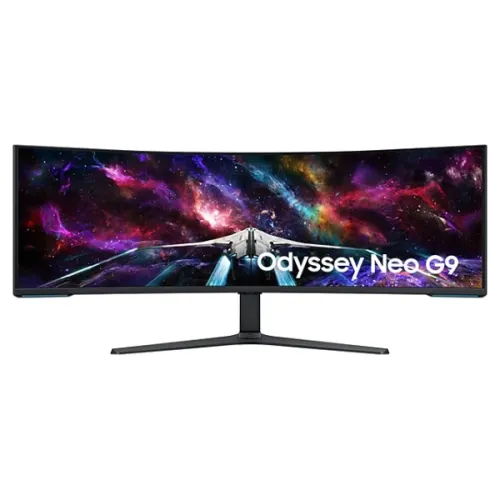
Samsung Odyssey Neo G9 LS57CG950NWXXL: product guide
Overview and ideal setup
Samsung Odyssey Neo G9 G95NC (LS57CG950NWXXL) is a 57-inch curved gaming monitor with a 32:9 aspect ratio and Dual UHD resolution of 7680 x 2160. This combines two UHD-width picture areas into one continuous panoramic display. Samsung lists a 1000R curve, Quantum Mini LED backlight with 2,392 local dimming zones, VESA DisplayHDR 1000, HDR10+ Gaming, up to 240Hz refresh and 1ms GtG response. It is aimed at gaming and productivity users who have a deep, wide desk and a computer capable of driving very high pixel counts. The panel is a VA LCD with quantum dot colour, not an OLED display. Its large 1327.5mm width and 19kg weight with stand should be considered before arranging delivery or installation.
Dual UHD resolution and 32:9 layout
The native resolution is 7680 x 2160, often called Dual UHD or DUHD, with a 32:9 aspect ratio. Samsung describes the format as equivalent in width to two UHD monitors placed side by side. This can provide a large workspace for multiple windows and a broad view in games that support ultrawide layouts. Software scaling, game support and window management determine how useful the extra width will be. It is not an 8K 16:9 screen: the pixel matrix is 7680 wide by 2160 high. The panel's active display area is approximately 1394.6 x 392.2mm, and Samsung specifies around 140 pixels per inch. Full DUHD at high refresh requires a graphics output and cable with sufficient bandwidth. Samsung states that a graphics card supporting DisplayPort 2.1 UHBR 13.5 or above, or HDMI 2.1 FRL 12Gbps, is required for full DUHD and 240Hz; actual support varies by GPU.
VA panel, Quantum Mini LED and local dimming
The monitor uses a VA panel with Samsung Quantum Matrix technology and a Quantum Mini LED backlight. Samsung lists 2,392 local dimming zones, which can control brightness in sections behind the LCD to improve perceived contrast in suitable scenes. Native static contrast is specified as 2,500:1; the manufacturer's HDR marketing also cites 1,000,000:1 contrast for HDR content. Those are different figures and measurement contexts. Local dimming can produce blooming or haloing around bright objects on dark backgrounds, depending on scene and settings. The anti-glare surface helps reduce some reflections but cannot eliminate them in every room. The 1000R curve wraps strongly around the viewer; sit centered at a comfortable distance and ensure the desk depth supports the large arc.
Brightness, HDR and colour
Samsung lists 420cd/m² typical brightness and 350cd/m² minimum, VESA DisplayHDR 1000 and HDR10+ Gaming. The HDR feature set is designed for bright highlights and detailed shadow areas, while actual results depend on game or video mastering, HDR settings, local dimming behaviour and the PC or console. Samsung specifies 1 billion colours and typical DCI-P3 coverage of 95%, with quantum dot colour. The monitor also includes factory tuning and a factory calibration report in its accessory list. Coverage figures do not guarantee that an individual unit is calibrated for every workflow. For colour-critical work, configure the intended colour mode and use a managed workflow. Samsung's specifications provide peak/HDR positioning but do not mean that 1,000 nits is sustained across the full screen in every mode.
Refresh rate, response and graphics requirements
The display supports a maximum 240Hz refresh rate and has a 1ms GtG response rating. Samsung defines its 1ms claim as an average response range from 1.00ms to 1.99ms rounded down to a whole number, measured under internal test conditions and requiring Extreme mode; results vary by content and monitor settings. A high refresh can make motion appear smoother when the source produces matching frames, but the monitor cannot make games render faster. For 7680 x 2160 at 240Hz, Samsung calls for DisplayPort 2.1 with UHBR 13.5 or better or HDMI 2.1 FRL 12Gbps, plus a compatible GPU and cable. Select a supported input-port version in the monitor menu if needed. FreeSync Premium Pro and Adaptive-Sync support can reduce tearing with compatible graphics hardware.
Inputs, USB hub and audio
Samsung lists one DisplayPort 2.1 input, three HDMI 2.1 inputs, two USB 3.0 hub ports and one headphone output. HDCP 2.2 is listed for DisplayPort and HDMI. The monitor does not provide USB-C charging, and Samsung lists no built-in speaker output. The USB hub requires the upstream link to the PC for peripheral connection. A supplied HDMI cable, DisplayPort cable and power cord are shown in Samsung's accessory list; confirm the contents of the Bangladesh package with the retailer. When using Picture-by-Picture, the full refresh rate is not available on every combination: Samsung notes that the DP and HDMI ports 2 and 3 support up to 120Hz in PBP, while HDMI port 1 supports up to 60Hz. Its 3-source PBP option may require a firmware update. PIP supports refresh rates up to 120Hz.
Multisource features and gaming tools
Picture-in-Picture can place a second source in a smaller window, and Picture-by-Picture can show multiple computers at once. Samsung describes three-source PBP for gaming, chat and browsing, with a firmware requirement noted for that function. The built-in KVM switch supports control of two sources, so compatible keyboard and mouse peripherals can be shared between computers. Other listed tools include GamePlus-style Virtual Aim Point, Black Equalizer, Eye Saver Mode, Flicker Free, Auto Source Switch+, Adaptive Picture, Off Timer Plus and CoreSync lighting. Each option has its own input and mode compatibility; check the manual for which combinations work at a given resolution and refresh rate. The display can also switch aspect size for different content. These are optional functions rather than a replacement for supported software or computer hardware.
Stand, dimensions and mounting
The included height-adjustable stand provides about 120mm of height travel, tilt from roughly -3 to +10 degrees and swivel around 15 degrees in each direction. Samsung lists a 100 x 100mm VESA mount. With the stand, the monitor measures 1327.5 x 601.0 x 499.6mm (W x H x D); without it, 1327.5 x 429.5 x 338.4mm. The set weighs 19.0kg with stand and 15.4kg without stand. The package measures 1455 x 420 x 557mm and weighs 26.8kg. Measure desk width, depth, doorways and stairs before delivery. Use two people to lift and install this large panel, support the frame rather than pressing the display surface, and ensure any monitor arm is rated for the weight and VESA pattern.
Power, care and operating environment
Samsung lists AC input at 100 to 240V, 50/60Hz, internal power and maximum power consumption of 300W. Actual power depends on brightness, refresh rate, HDR, USB devices and content. The operating temperature range is 10 to 40 degrees Celsius with 10% to 80% non-condensing humidity. Keep vents clear and use a suitable power outlet. The manufacturer includes a cable and supports display maintenance through its on-screen features. Use the user manual for cleaning and handling instructions; avoid applying pressure to the large LCD panel or spraying liquid directly onto it. Configure a comfortable brightness and use Eye Saver Mode if desired for prolonged viewing. The monitor is not a television with built-in speakers, so plan for external audio or headphones.
Bangladesh price, availability and warranty
On 6 November 2026, Star Tech listed ৳312,000 against a regular price of ৳337,440 and marked the unit In Stock. Ryans listed ৳312,000 against ৳337,440 with availability check required, while Computer Village listed ৳309,050 against ৳330,684 and marked it In Stock. These dated listings are market observations, not a guaranteed final checkout price or delivery promise. The existing catalog MSRP of ৳312,000 is retained. Retailer warranty descriptions should be checked against the actual Bangladesh warranty card, seller and Samsung authorized service terms. Samsung Bangladesh's support page confirms support for model LS57CG950NWXXL, but the reviewed product support page does not display a model-specific term in its captured text. Confirm the warranty duration, dead-pixel policy, physical damage exclusions and claim documents for the exact unit before purchase.
Who should consider it and trade-offs
This Neo G9 may suit a user who wants an unusually wide single-screen setup for supported racing, flight, simulation or productivity workflows. Its Dual UHD pixel count, 1000R curve, high refresh, Mini LED local dimming, multiple inputs, USB hub and KVM can combine several desk functions in one panel. Trade-offs include the size, weight, graphics bandwidth requirement, limited PBP refresh combinations, VA viewing behaviour and potential local-dimming halos in demanding scenes. Some games and video services do not support 32:9, and full DUHD at 240Hz depends on the GPU and connection. It has no built-in speakers or USB-C laptop charging. Check desk fit, graphics card outputs, software support and local warranty terms before choosing it.
Source and regional-data notes
The Samsung India product page for exact model LS57CG950NWXXL provides a detailed specification set for the 57-inch 7680 x 2160 display, 32:9 aspect ratio, 240Hz, 1ms GtG, 420cd/m² typical brightness, 1000R, 2,392-zone Mini LED, DP 2.1, three HDMI 2.1 inputs, stand, dimensions and weight. Samsung Bangladesh's page has correct feature content for 57-inch Dual UHD and 240Hz, but some overview rows in its captured specification table conflict with the product-specific details, showing 49-inch, DQHD 5120 x 1440 and 120Hz. Those rows appear to be stale or copied data; this description follows the exact-model information repeated in Samsung's India page and Bangladesh feature section, and records the discrepancy for transparency. Bangladesh retail prices were checked separately. Country of origin is left unset because the India page's Vietnam origin disclosure may not establish the origin of a Bangladesh-market unit. Barcode and GTIN are also not asserted.
Frequently asked questions
1. What is the native resolution?
7680 x 2160 Dual UHD at a 32:9 aspect ratio.
2. Is the panel OLED?
No. It is a VA LCD with a Quantum Mini LED backlight and local dimming.
3. How curved is it?
Samsung specifies a 1000R curve.
4. What is the maximum refresh rate?
The detailed exact-model specification lists up to 240Hz. Full Dual UHD at 240Hz requires supported DisplayPort 2.1 UHBR 13.5 or higher or HDMI 2.1 FRL 12Gbps output.
5. How many local dimming zones are there?
Samsung lists 2,392 Mini LED local dimming zones.
6. Which ports are provided?
One DisplayPort 2.1, three HDMI 2.1 inputs, two USB 3.0 hub ports and a headphone output.
7. Does it have speakers?
Samsung lists no speaker output; use external speakers or headphones.
8. Does it have USB-C charging?
No. Samsung lists USB-C charging power as not supported.
9. Can it show multiple computers at once?
Yes. It supports PIP and PBP; 3-source PBP may require firmware and supported refresh rates vary by input combination.
10. Can the stand adjust?
Yes. The stand supports about 120mm height adjustment, tilt and swivel.
11. What price was observed in Bangladesh?
On 6 November 2026 retailers listed ৳309,050 to ৳312,000. Confirm current stock and checkout price.
12. What warranty applies in Bangladesh?
Check the exact Samsung Bangladesh warranty card and seller terms for the unit. Support for model LS57CG950NWXXL is listed, but the captured Samsung support page did not show the model-specific warranty term.