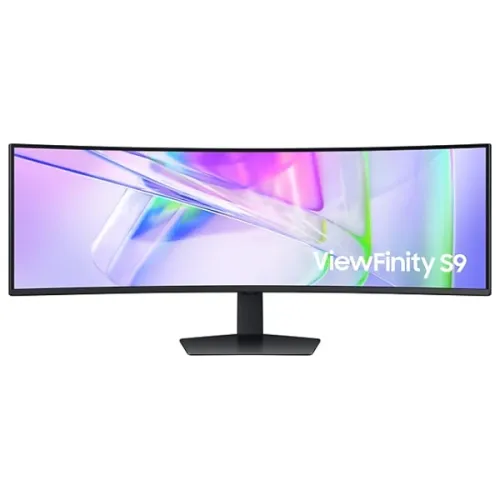
Samsung ViewFinity S9 S95UC overview
Samsung ViewFinity S9 S95UC is a 49-inch curved productivity monitor with 5120 × 1440 Dual QHD resolution, 32:9 aspect ratio, 1000R curvature and a maximum 120Hz refresh rate. Samsung lists a VA panel, 350 cd/m² typical brightness, 3000:1 static contrast, VESA DisplayHDR 400, USB-C with 90W charging, built-in KVM, LAN, USB hub and dual 5W speakers. The large ultrawide workspace can replace two adjacent displays for compatible workflows.
Identify the correct regional model
S95UC products have regional model identifiers such as LS49C950UAEXXS, LS49C950UAUXEN and LS49C954UANXZA. Check the complete suffix on the rear label and invoice. Port details, plugs, warranty and bundled cables can vary by market. This monitor is not an OLED gaming display; Samsung specifies a VA panel. The BiponiBD product slug and SKU are retained.
49-inch 32:9 ultrawide screen
The 49-inch display uses a 32:9 aspect ratio and is roughly as wide as two 16:9 QHD screens side by side. This can support large spreadsheets, editing timelines, code windows and multiple applications without a center bezel. The physical width is substantial, so measure the desk and viewing distance first. Some apps and videos may not use the full width.
Dual QHD 5120 × 1440 resolution
Samsung specifies 5120 × 1440 Dual QHD (DQHD) resolution. The wide pixel canvas offers two QHD-width work areas, but a source must support the resolution and chosen refresh. Check the graphics output, operating system, dock and cable. Window-management software such as Samsung Easy Setting Box can help arrange workspaces; support and feature availability vary by computer.
1000R curvature and viewing position
The panel has a 1000R curve designed to wrap around the user’s field of view. A centered seating position can make the wide edges easier to see, while off-center viewing may feel different. The curve is a physical design characteristic and does not distort every application uniformly. Position the monitor centrally and adjust the stand before deciding on a permanent desk layout.
120Hz refresh rate
Samsung lists a maximum 120Hz refresh rate. Compared with common 60Hz desktop monitors, compatible motion can appear smoother and pointer movement more responsive. Actual output depends on source capability, connection, refresh settings and application. The panel does not increase game frame rate on its own. Set the supported mode in display settings after connecting the appropriate cable.
VA panel contrast and image characteristics
Samsung specifies a VA panel and 3000:1 static contrast ratio. The panel is not OLED; the higher specified static contrast relative to many conventional IPS panels can help distinguish dark and bright areas. Viewing angle, gamma, brightness and uniformity depend on position and unit. For detailed photo work, consider calibration and check viewing conditions across the wide screen.
HDR and typical brightness
Samsung lists VESA DisplayHDR 400, typical brightness of 350 cd/m² and a minimum figure of 280 cd/m². HDR format support and picture mode depend on the source and software. DisplayHDR 400 is an entry certification tier and should not be treated as equivalent to higher peak-brightness local-dimming displays. Use compatible HDR content and adjust settings if desktop whites appear too bright.
Color coverage and factory tuning
Samsung specifies up to 1.07 billion colors and 92% DCI coverage using its stated CIE 1976 basis, along with factory tuning. Gamut coverage alone does not indicate color accuracy for a particular task or delivered unit. Choose the appropriate picture mode and use color-managed software. For print proofing or strict brand-color work, request a calibration report and verify the individual panel.
USB-C with 90W charging
The monitor’s USB-C port supports video and up to 90W charging according to Samsung. A compatible laptop can connect over one cable for display, data and power, subject to the laptop’s requirements and cable capability. Some laptops draw more than 90W under load. Confirm the regional port and bundled USB-C cable, and retain the laptop’s charger if additional power is needed.
Built-in KVM and multi-computer setup
Samsung lists a KVM switch for controlling two connected sources with one keyboard and mouse. A correct setup usually needs video and USB upstream connections from each source; map the cables using the manual. KVM switches peripherals and does not make one computer’s desktop appear as two independent systems. Verify the selected source and USB routing if keyboard or mouse does not follow the screen.
Picture-by-Picture and Picture-in-Picture
The S95UC supports Picture-by-Picture and Picture-in-Picture features. These can display multiple connected sources at once, depending on supported resolutions and settings. A split view changes the available layout and may affect refresh, scaling or source behavior. Check the manual’s signal combinations before planning a two-computer workflow, especially when one input is USB-C.
Ports and LAN connectivity
Samsung lists two HDMI 2.0 ports, one DisplayPort 1.4, one USB-C, three USB 3.0 downstream ports and one Ethernet LAN connection on the cited US regional specification. These ports are suitable for connecting display sources and peripherals, but each has its own bandwidth and function. Do not confuse HDMI 2.0 on this model with HDMI 2.1 found on gaming monitors. Confirm regional specifications for the exact suffix.
Audio and built-in speakers
The monitor includes two built-in speakers rated at 5W each and a headphone output according to Samsung. Integrated speakers can reduce desk clutter for calls and basic media playback. Sound performance is not equivalent to a dedicated speaker system. For headphones, check volume and output routing after switching between connected computers or Picture-by-Picture sources.
Eye care and adaptive picture
Samsung lists Eye Saver Mode, Flicker Free, Adaptive Picture, Off Timer Plus and TÜV-certified eye-care features. Samsung notes automatic brightness behavior has operating conditions, including that screen brightness does not adjust when surrounding light exceeds 200 lux. Eye-care modes can change color and brightness; choose settings that suit ambient light and personal comfort.
Ergonomic stand and VESA mounting
Samsung specifies a height-adjustable stand with 120mm travel, tilt from about -2° to 11° and swivel around ±15°, plus a 100 × 100mm VESA mount. A 49-inch curved screen is wide and heavy; check support-arm load limits and mounting instructions. Allow clearance behind the curved panel and for cables. Use the delivered manual and proper assistance during installation.
Computer and console compatibility
For a PC, verify that the graphics card and connection support 5120 × 1440 at the desired refresh. Laptop docks may limit resolution, color depth or refresh even when the laptop itself is capable. Consoles generally do not render in 32:9, so a console image may use a narrower mode or bars. Confirm source support and the display’s input timing table before choosing this monitor for console-first use.
Workspace planning and multitasking
The S95UC is designed for productivity as well as entertainment. Plan the window layout, software snapping behavior and viewing distance before replacing dual monitors. A wide screen may reduce bezel gaps but does not provide the same independent mounting or portrait orientation as two separate displays. Samsung Easy Setting Box is optional software and needs installation on each supported PC.
Bangladesh stock, warranty and package
This review does not verify a live BiponiBD offer, stock, delivery condition or serial-specific Bangladesh warranty. Ask the seller to confirm the exact regional model, new/sealed condition, included cables, local service route, warranty duration and invoice. Warranty and support can depend on the suffix and country of sale. Check desk and delivery access because the monitor’s carton is large.
Frequently asked questions
What is the S95UC resolution? 5120 × 1440 Dual QHD. What is the refresh rate? Up to 120Hz. Is it curved? Yes, 1000R. What panel type does Samsung list? VA. Does USB-C charge a laptop? It supports up to 90W, subject to device requirements. Does it include KVM? Yes. Does it have speakers? Samsung lists two 5W speakers. Which HDR tier is listed? VESA DisplayHDR 400. Is it OLED? No, it is a VA monitor. What Bangladesh warranty applies? Confirm the exact regional suffix and serial-specific terms with the seller.