Pros
- Adds several peripheral ports through one compatible USB-C host connection
- Three USB-A outputs suit common wired peripherals
- One extra USB-C output is listed for the HC-28

All categories
 New condition
Computer Accessories
Surpass · HC-28
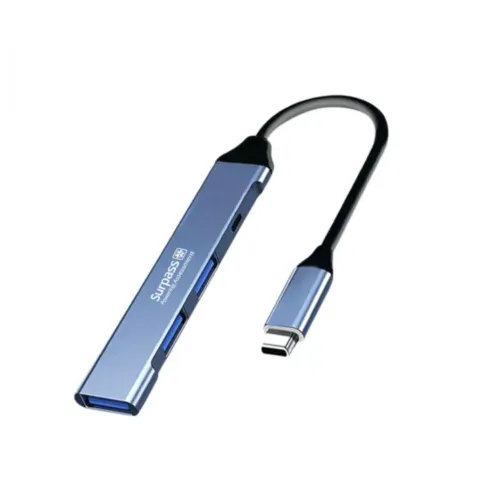
Surpass HC-28 expands a USB-C host into three USB-A ports and one USB-C port. Confirm host support and port data/power limits; HDMI and PD are not verified.
Approximate Market Price
BDT 450
Informational market estimate only; this is not a current Store offer.
Compare store prices
No live offers for this variant
BDT 450
Approximate Market Price
Informational market estimate only; this is not a current Store offer.
Loading history…
Product story
The Surpass HC-28 is a wired USB-C hub designed to expand a compatible host connection with additional peripheral ports. Star Tech and T-TECH listings describe a USB Type-C host input and four output ports: three USB Type-A and one USB Type-C. This layout can connect common USB peripherals such as a keyboard, mouse or compatible storage device. The available product sources do not establish HDMI/video output, Ethernet, SD-card slots, USB-C Power Delivery input or a 10Gbps data rate; those features should not be inferred from generic hub marketing.
Connect the hub’s USB-C input plug to a compatible phone, tablet, laptop or desktop USB-C port. The host must support USB data and the relevant operating-system device functions. Some mobile devices require USB OTG or host mode and may supply limited power. A USB-C connector shape alone does not guarantee that the device can run every peripheral. Check your device manual and available power before connecting storage or several bus-powered accessories.
The listed port layout includes three USB-A outputs for compatible USB accessories. These may be useful for low-power peripherals such as a mouse or keyboard and, where host and hub support it, USB storage. The product information reviewed does not consistently identify the USB generation or per-port transfer rate, so no particular USB 3.x speed is claimed here. Actual performance may be shared among ports and depends on the host, connected device and workload.
Listings identify one USB-C output port in addition to the USB-C host connection. The available descriptions do not clearly state whether this output is for data, charging, or both, and do not document its power limit, data rate, video function or USB Power Delivery pass-through. Do not treat it as a charger or laptop charging input without confirmation. Verify the intended function of this specific port with the seller before use.
The phrase “4-in-1” refers in the reviewed T-TECH description to one USB-C and three USB-A output ports from a USB-C host connection. The upstream host plug is separate from those four downstream ports. Product titles and third-party listings can use “Type-C hub” generically, so compare the physical port diagram and exact HC-28 model before ordering. The current port description does not include an HDMI connector.
A catalog source previously claimed 10Gbps, but the reviewed local product listings did not verify that rate or specify a USB protocol for each output. Therefore, a maximum speed is not asserted. File transfers depend on the host port, hub controller, cable, storage device and whether other ports are active. A hub cannot upgrade a slower host port, and simultaneous peripherals can share available bandwidth and power.
No reliable current limit or USB-C Power Delivery pass-through rating was found for the HC-28. The hub may draw power from its host, but the capacity available to attached devices depends on the host and hub design. Avoid connecting high-power devices unless the seller confirms support. Do not attach a charger to the USB-C output as though it were a PD input; port direction and electrical limits must be verified first.
The hub may work with laptops, desktops, tablets or phones that support USB-C data and the required peripherals. T-TECH lists uses such as keyboards, mice and storage devices. Compatibility is determined by the host operating system, driver support, device power demand and exact port function. It is not a universal adapter for HDMI displays, wired networks, memory cards or audio equipment unless the exact version includes those ports, which has not been confirmed.
Connect the hub to the host first, then add one peripheral at a time. Check the host’s USB-C data support and whether mobile OTG must be enabled. If a device is not detected, test it directly on the host, try another hub port and check whether the accessory needs external power. Disconnect storage through the operating system’s safe-eject option before unplugging. If several devices disconnect together, reduce the load and retest.
A legacy listing described the casing as fire-retardant PC, but material and safety certification were not corroborated by the current primary listings. The case material and certification therefore remain unverified. Keep the hub dry, avoid blocking any ventilation openings and do not pull it by its cable or connector. Support the attached hub so its weight does not strain a phone or laptop USB-C port.
Confirm the supplied port arrangement (USB-C host, three USB-A outputs and one USB-C output), port functions, cable/plug construction, included accessories, warranty and return terms with the selected seller. Some listings state no warranty while others do not specify terms; verify the exact seller’s coverage. An HDMI/PD feature, external power supply or USB-C data cable should not be assumed included. Other shop inventory and prices are not a live BiponiBD offer.
Local listings describe four output ports: three USB-A and one USB-C, in addition to the USB-C host input.
The hub uses a USB-C input and needs a compatible host USB-C port that supports data.
HDMI output was not verified for this HC-28 listing. Do not assume display support.
PD pass-through, charging direction and output limits are not specified in the reviewed listings. Confirm with the seller.
The reviewed sources do not establish a confirmed speed for this exact hub. The former 10Gbps catalog claim is unverified.
T-TECH lists keyboard and mouse use; compatibility also depends on host support and power.
Only if that device supports USB-C data and any required OTG/host mode, and can supply enough power.
No laptop charging capability or port power limit was established. Verify before connecting a charger or high-power device.
Compatible USB storage may work if the host, hub and power budget support it. Eject drives safely before disconnecting.
Seller listings vary or omit warranty details; confirm the exact terms with the retailer.
Helpful answers
Product-specific answers maintained with the catalog information.
Local listings describe four output ports: three USB-A and one USB-C, in addition to the USB-C host input.
The hub uses a USB-C input and needs a compatible host USB-C port that supports data.
HDMI output was not verified for this HC-28 listing. Do not assume display support.
PD pass-through, charging direction and output limits are not specified in the reviewed listings. Confirm with the seller.
The reviewed sources do not establish a confirmed speed for this exact hub. The former 10Gbps catalog claim is unverified.
T-TECH lists keyboard and mouse use; compatibility also depends on host support and power.
Only if that device supports USB-C data and any required OTG/host mode, and can supply enough power.
No laptop charging capability or port power limit was established. Verify before connecting a charger or high-power device.
Compatible USB storage may work if the host, hub and power budget support it. Eject drives safely before disconnecting.
Seller listings vary or omit warranty details; confirm the exact terms with the retailer.
Customer community
Become a merchant
Join BiponiBD, publish accurate offers and start free.