Pros
- USB 3.0 data transfer is listed for the model.
- OTG use can connect compatible USB peripherals to a host device.
- Compact adapter form is convenient to carry.

All categories
 New condition
Computer Accessories
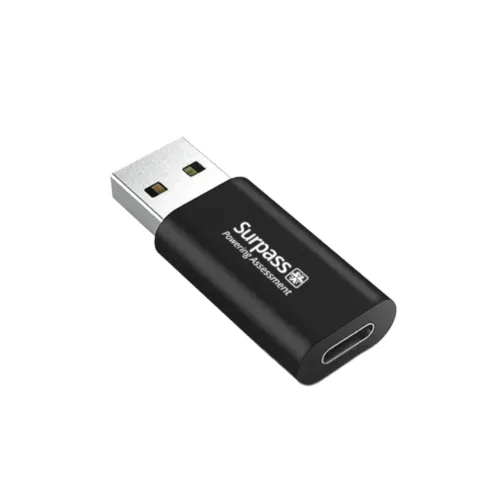
Surpass · TU-30 USB 3.0 OTG Adapter
Surpass TU-30 OTG adapter with USB 3.0/5Gbps listed. Confirm the actual USB-A/Type-C plug genders, host OTG support, power limits and local warranty.
Approximate Market Price
BDT 299
Informational market estimate only; this is not a current Store offer.
Compare store prices
No live offers for this variant
BDT 299
Approximate Market Price
Informational market estimate only; this is not a current Store offer.
Loading history…
Product story
The Surpass TU-30 is a compact OTG adapter marketed for connecting USB peripherals and USB-A/USB-C devices. Surpass Technology describes USB 3.0 data transfer and OTG support; a Bangladesh retailer lists transfer up to 5Gbps and compatibility with keyboards, mice and printers. The available text does not clearly state which connector gender is on each end. For the stated peripheral-to-Type-C-host use case, the expected form is a USB-C male plug with a USB-A female socket, but confirm the actual plugs from the seller’s product image or packaging before ordering.
The model code is TU-30. “USB-A to Type-C” naming can describe a cable direction or an adapter’s host/peripheral pairing, so it does not by itself identify male/female ends. A common OTG configuration for connecting USB-A peripherals to a Type-C phone is USB-C male to USB-A female. Verify that the offered item physically matches the ports on the host and peripheral. Do not force a connector or assume this product is an A-male-to-C-female charging adapter.
Surpass and local product descriptions list USB 3.0, and the retailer states up to 5Gbps. This is the maximum theoretical rate associated with USB 3.0/USB 3.2 Gen 1 signaling, not a guaranteed file-copy speed. The host port, peripheral, cable and adapter revision must all support SuperSpeed. A USB 2.0 device or port will operate more slowly. Check negotiated link speed when performance matters.
OTG use requires the Type-C phone, tablet or computer to act as a USB host and enumerate the connected peripheral. Not every Type-C device or app supports every accessory. Some phones require an OTG setting, unlock state or permission prompt, and battery/power limits can prevent a high-draw peripheral from working. USB-C connector presence alone does not guarantee host mode. Verify the device manual and peripheral power needs before purchase.
Surpass and the retailer mention keyboards, mice and printers as example peripherals. A compatible USB flash drive, keyboard, mouse or printer may work if the host supports the required USB class and operating system driver. The adapter does not add multiple ports, Ethernet, video conversion or a card reader. Printer setup may need a supported print app or driver; a physical USB connection alone does not ensure mobile printing.
The inspected TU-30 pages do not establish a verified current rating, USB Power Delivery profile or maximum charging wattage. OTG adapters often connect a host to a peripheral rather than function as a wall charger. Do not assume it can charge a phone, provide high current to an external drive or negotiate fast charging. Host power availability and adapter orientation determine what is possible. Use a separately powered hub only when supported by the host and peripheral.
A 5Gbps link is possible only when every component in the data path supports USB 3.0/SuperSpeed. Real transfers are constrained by storage speed, protocol overhead, file sizes, host controller and operating system. The adapter cannot upgrade a USB 2.0-only host or peripheral. If transfers are slow, check the port markings and OS-reported link speed, and test a known-good USB 3.0 peripheral and cable.
The TU-30 is described as a compact converter, but the sources reviewed do not establish its exact dimensions, material, weather protection or insertion-cycle rating. Small adapters can apply leverage to a phone or laptop port when a heavy USB device is attached. Support the peripheral and avoid bending the connector sideways. Keep plugs dry and free of debris, and disconnect by the plug body rather than pulling on an attached cable.
Confirm connector genders, then connect the host end to a device that supports OTG/USB host mode and attach a compatible USB peripheral. Unlock the host and approve any prompt. If the accessory is not detected, confirm the adapter direction, enable OTG if required, test a lower-power device, and try another compatible host. For slow data, verify USB 3.0 support along the whole path. Do not hot-plug damaged connectors or continue if the adapter overheats.
Before ordering, compare the product photo with the device and accessory ports, confirm Type-C male/USB-A female if that is the needed OTG configuration, and ask the seller to state the actual connector ends. Confirm the host supports OTG and the peripheral does not exceed available power. The product text does not establish USB-C charging, Power Delivery, video, or a specific current limit. Do not infer those functions from the model’s 5Gbps data claim.
The reviewed Surpass and One Stop product pages do not establish a consistent warranty term. Ask the selected seller for the warranty provider, duration, invoice requirement, return window and replacement terms. Confirm the model TU-30 and the exact connector genders and USB 3.0 revision in the package. Current offer price, stock and package contents may change and were not independently validated for the selected BiponiBD offer.
The TU-30 is marketed as a USB 3.0 OTG adapter with transfer up to 5Gbps and support for common peripherals. It can be useful when a compatible Type-C host needs to connect a USB-A accessory. The source pages do not unambiguously confirm the connector genders or electrical power rating, and actual OTG operation depends on host support. Verify plugs and device compatibility rather than relying solely on “USB-A to Type-C” naming.
What is the model? Surpass TU-30. What interfaces are listed? USB-A and Type-C with OTG support, but exact connector genders need seller confirmation. What is the advertised data speed? Up to 5Gbps is listed for USB 3.0; actual rate depends on the complete connection. Can it connect a keyboard or mouse? The seller lists these examples, provided the host supports OTG and the peripheral is compatible. Does every USB-C phone support OTG? No, host-mode support varies by device. Can it charge a phone? A charging profile was not established; do not assume it is a wall charger. Does it support PD? No exact PD rating was found. Does it support video? Video conversion/output was not listed. Are connector genders confirmed? Not by the inspected product text; verify the actual plugs. What warranty applies in Bangladesh? Confirm with the selected seller.
Helpful answers
Product-specific answers maintained with the catalog information.
The model code is TU-30.
Product text says USB-A to Type-C but does not clearly state plug genders; confirm with the seller.
The retailer lists up to 5Gbps for USB 3.0; actual speed depends on the host, peripheral and cable.
Surpass lists OTG support, subject to host-device compatibility.
Those are listed use cases if the host supports OTG and the peripheral is compatible.
No, USB host/OTG support varies by device and may require a setting or permission.
No exact PD rating was established in the inspected sources.
Video output was not listed for the TU-30 adapter.
Its charging role and power rating were not established; do not treat it as a wall charger.
Confirm the warranty provider and terms with the selected seller.
Customer community
Become a merchant
Join BiponiBD, publish accurate offers and start free.