Pros
- Wired USB connection needs no batteries
- Adjustable DPI for different pointer preferences
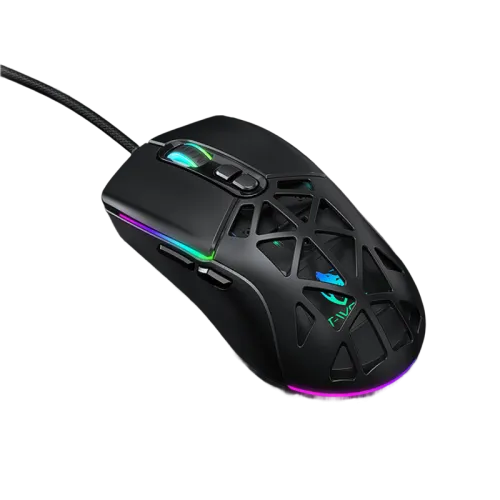
- Seven-button layout and RGB lighting

All categories
 New condition
Computer Accessories
T-WOLF · G520
T-WOLF G520 wired USB gaming mouse with seven buttons, adjustable sensitivity up to a listed 12,800 DPI and RGB lighting.
Approximate Market Price
BDT 850
Informational market estimate only; this is not a current Store offer. Last checked Nov 11, 2026. Source
Compare store prices
No live offers for this variant
BDT 850
Approximate Market Price
Informational market estimate only; this is not a current Store offer. Last checked Nov 11, 2026. Source
Loading history…
Product story
The T-WOLF G520 is a wired USB mouse for gaming and everyday computer use. A retailer lists seven buttons, adjustable sensitivity up to 12,800 DPI and RGB lighting modes. Its wired connection avoids battery charging and the listed 147 cm cable gives room to route it across a desk, subject to the position of your computer.
The retailer describes six DPI levels spanning 800 to 12,800 DPI. A lower setting can suit controlled pointer movements, while a higher setting moves the pointer farther for the same hand movement; the preferred setting depends on the user, display and application. The seven-button layout offers controls beyond the primary buttons and wheel. Check the functions and software support with the seller before relying on custom button assignments.
The G520 is described with 13 RGB marquee lighting modes and a honeycomb-style shell. Star Tech lists dimensions of 125 × 65 × 38 mm and a weight of 134 g. Hand size and grip preferences vary, so compare these measurements with a mouse you already use. Retail listings show black and white choices; confirm which colour is supplied before ordering rather than assuming both are included.
Connect the USB plug to a compatible computer and allow the operating system to recognise the mouse. Check pointer movement and each button, then adjust pointer speed and DPI to your preference. If the device does not respond, try a different USB port and check the computer settings. The 147 cm cable is a fixed reach; measure the route around desk edges and leave slack to prevent strain.
Confirm model G520, selected colour, package contents, compatibility and warranty terms with the merchant. One retailer lists a one-year warranty for its own offer, but seller coverage can differ. Keep liquids away from the openings, avoid pulling the cable, and clean the exterior gently. Verify software availability and programmable features for your operating system before purchase.
Helpful answers
Product-specific answers maintained with the catalog information.
Star Tech lists six adjustable levels from 800 to 12,800 DPI. Confirm the exact settings for the supplied variant with the seller.
No. It is a wired USB mouse with a listed 147 cm cable, so it needs a suitable USB port.
A retailer lists black and white options. Confirm the selected colour and availability with the merchant before ordering.
Customer community
Become a merchant
Join BiponiBD, publish accurate offers and start free.