Pros
- No battery or wireless receiver required
- Grip tape may provide a more textured hold
- Four-button layout for everyday pointer use

All categories
 New condition
Computer Accessories
T-WOLF · G580
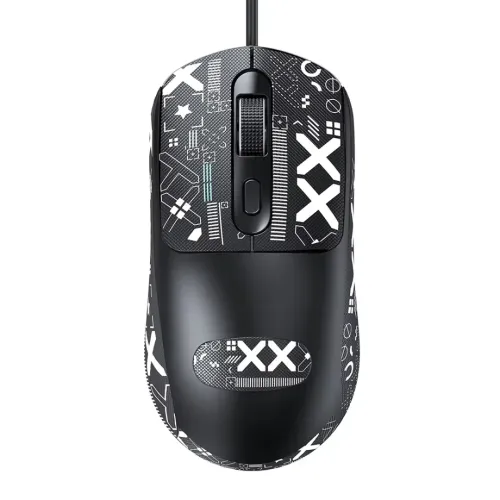
T-WOLF G580 is a 4-button wired USB optical mouse with grip tape; DPI differs across retailer listings and should be confirmed.
Approximate Market Price
BDT 450
Informational market estimate only; this is not a current Store offer.
Compare store prices
No live offers for this variant
BDT 450
Approximate Market Price
Informational market estimate only; this is not a current Store offer.
Loading history…
Product story
T-WOLF G580 is a wired USB optical mouse with four buttons and grip tape on the shell, listed for everyday computer use. Retailer descriptions show black and white color variants, a 1.5m cable and one-year warranty. It does not need a battery or wireless receiver. The DPI information conflicts between retailers: Star Tech lists 2400 DPI, while Ryans lists 1000–1600 DPI and 1600 maximum. Confirm the exact revision before expecting a particular sensitivity.
DPI indicates how far the pointer moves relative to physical mouse movement, but the published G580 values do not agree. Star Tech’s model listing shows 2400 DPI. Ryans identifies a 1000–1600 DPI range and a 1600 DPI maximum. The sources do not explain whether this reflects a hardware revision, data error or different measurement. This description retains the discrepancy rather than asserting both as one mode. Ask the seller to confirm the exact unit and whether DPI is adjustable before purchase.
The G580 is listed with four buttons and optical tracking. Retailer pages do not consistently explain button mapping, dedicated DPI-switch behavior, polling rate, sensor part number or programmable software. Do not assume extra side controls or customizable profiles unless they are visible on the actual unit or stated in the seller’s current specification. A basic optical mouse can handle common navigation and office tasks; gaming performance depends on sensor consistency, settings and personal preference.
The product name and seller copy highlight grip tape, intended to provide a more textured contact area. Placement, adhesive, surface feel and whether spare strips are included are not documented consistently. Comfort depends on hand size, grip style and the mouse’s shell shape. If you have sensitive skin or prefer a smooth surface, inspect current product photos and ask whether the grip tape is pre-applied or removable. Left-handed suitability is also not clearly established by the reviewed exact-model sources.
Ryans lists a 1.5m cable and USB interface. This wired connection avoids charging and radio interference, but cable length limits placement and the cord can drag across a desk. Plug the mouse into a compatible USB host port and allow the operating system to recognize it. If using a USB-C-only computer, a compatible adapter may be required; package inclusion is not confirmed.
Ryans lists no lighting and identifies black, while retailers also show a white color option. Confirm the selected color variant and exact photos before ordering. The reviewed sources do not establish RGB lighting, body material, weight, dimensions or water resistance. Avoid borrowing details from other T-WOLF G-series mice, which may have different buttons, sensors or lighting.
Ryans lists a one-year warranty, and local sellers may have their own service terms. Confirm whether coverage applies to switches, cable and sensor faults, and keep the invoice. Before checkout, verify G580 model identity, 4-button layout, grip tape, cable length, color, the DPI value on the actual revision and warranty provider. BiponiBD live inventory and checkout price were not checked in this review.
The G580 may suit someone seeking a simple wired USB mouse with a textured grip and four buttons for general navigation or casual play. It may not suit users who need a verified 2400 DPI setting, adjustable profiles, documented sensor performance, wireless operation or a confirmed left-handed shell. Resolve the DPI discrepancy with the seller if sensitivity is important.
The G580 is a wired USB optical mouse. Connect the USB plug to a compatible host port; no battery or wireless receiver is required.
Star Tech and Ryans list four buttons. The exact functions of each button are not fully documented.
DPI listings differ: Star Tech lists 2400 DPI, while Ryans lists an adjustable/maximum range of 1000–1600 DPI and 1600 maximum. Confirm the exact model revision with the seller before relying on a sensitivity setting.
Ryans lists no lighting. The reviewed sources do not establish RGB or other illumination for this model.
Ryans lists a 1.5m USB cable. Confirm the exact version if your desk setup requires a longer reach.
Retailers describe grip tape on the shell to improve hand contact. Grip and comfort depend on hand size, placement and personal preference; the sources do not specify whether spare tape is included.
The reviewed exact-model specifications do not clearly confirm an ambidextrous shape. Check the mouse’s physical profile and side-button placement if left-hand use matters.
It works through a compatible USB host port on a computer. USB-C-only devices may require a suitable adapter, which is not listed as included.
Ryans lists one year. Confirm the selected seller’s written coverage and service/claim process.
This review did not verify a live BiponiBD offer, stock or checkout price. Confirm color, DPI revision, warranty and package contents with the seller.
Helpful answers
Product-specific answers maintained with the catalog information.
The G580 is a wired USB optical mouse. Connect the USB plug to a compatible host port; no battery or wireless receiver is required.
Star Tech and Ryans list four buttons. The exact functions of each button are not fully documented.
DPI listings differ: Star Tech lists 2400 DPI, while Ryans lists an adjustable/maximum range of 1000–1600 DPI and 1600 maximum. Confirm the exact model revision with the seller before relying on a sensitivity setting.
Ryans lists no lighting. The reviewed sources do not establish RGB or other illumination for this model.
Ryans lists a 1.5m USB cable. Confirm the exact version if your desk setup requires a longer reach.
Retailers describe grip tape on the shell to improve hand contact. Grip and comfort depend on hand size, placement and personal preference; the sources do not specify whether spare tape is included.
The reviewed exact-model specifications do not clearly confirm an ambidextrous shape. Check the mouse’s physical profile and side-button placement if left-hand use matters.
It works through a compatible USB host port on a computer. USB-C-only devices may require a suitable adapter, which is not listed as included.
Ryans lists one year. Confirm the selected seller’s written coverage and service/claim process.
This review did not verify a live BiponiBD offer, stock or checkout price. Confirm color, DPI revision, warranty and package contents with the seller.
Customer community
Become a merchant
Join BiponiBD, publish accurate offers and start free.