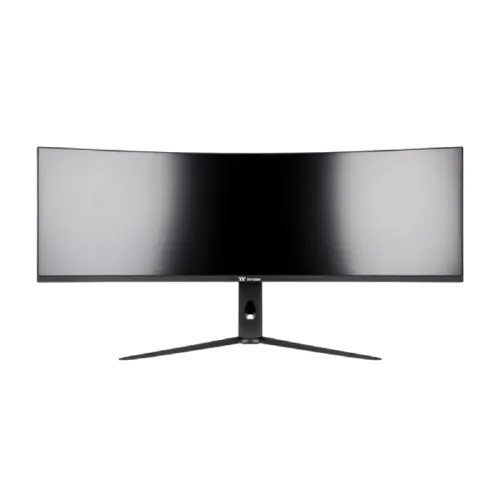
Thermaltake TGM-V49CDQ overview
The Thermaltake TGM-V49CDQ is a 49-inch curved super-ultrawide monitor with a 32:9 aspect ratio and 5120 × 1440 Dual QHD resolution. Thermaltake markets it with a Fast VA panel, 1ms GTG response, HDR10, FreeSync Premium and NVIDIA G-SYNC compatibility, plus HDMI 2.1, DisplayPort 1.4 and USB-C with up to 90W Power Delivery. Manufacturer page text advertises 240Hz, but its detailed timing table lists vertical frequency up to 160Hz for HDMI and DisplayPort. Confirm the exact mode on the delivered revision before buying it specifically for 240Hz. Actual operation depends on regional panel revision, input, cable, GPU, firmware and current timing support. Verify manufacturer documentation and the delivered unit before relying on the disputed specification.
Confirm model and regional part number
The model is TGM-V49CDQ; Thermaltake lists regional part numbers such as GM-GCE-49CEUB-US. This screen is 49 inches and 32:9, not a conventional 16:9 monitor and not a 5120 × 1440 OLED. It uses Fast VA. Check the label and regional suffix because the package, local warranty, refresh mode and included cables may vary. Some retailer pages incorrectly identify it as QD-OLED or repeat unverified details, so use the manufacturer source and the exact unit documentation. Actual operation depends on regional panel revision, input, cable, GPU, firmware and current timing support. Verify manufacturer documentation and the delivered unit before relying on the disputed specification.
49-inch 32:9 Dual QHD screen
The panel has native 5120 × 1440 resolution and a 32:9 aspect ratio, giving a horizontal canvas comparable to two 2560 × 1440 displays placed side by side without a central bezel. Thermaltake lists 49 inches, 1191.9 × 335.2mm active area and 0.0776 × 0.2328mm pixel pitch. The extremely wide shape is useful for racing simulators, strategy games and multiple desktop windows. It needs a wide desk and can require application-specific window layouts. Actual operation depends on regional panel revision, input, cable, GPU, firmware and current timing support. Verify manufacturer documentation and the delivered unit before relying on the disputed specification.
5120×1440 resolution and pixel density
At 5120 × 1440, the screen provides 7.37 million pixels, twice the horizontal pixel count of QHD at the same vertical resolution. This gives a broad workspace but needs substantial graphics bandwidth and GPU rendering performance. Some games support 32:9 natively; others may show a narrower field, black bars or unsupported menus. Desktop window tiling can keep documents, communication and media visible together. Check the chair position and viewing distance so the user can see both edges without excessive head movement. Actual operation depends on regional panel revision, input, cable, GPU, firmware and current timing support. Verify manufacturer documentation and the delivered unit before relying on the disputed specification.
Advertised 240Hz mode and timing-table conflict
The Thermaltake product page advertises a 240Hz maximum at 5120 × 1440 and 240Hz gaming, but its detailed PC input range lists 48–160Hz vertical frequency for HDMI and DisplayPort. The page also separately states a maximum display frequency of 5120 × 1440/240Hz. Those statements conflict. Do not promise a guaranteed 240Hz mode until Thermaltake confirms it for the exact region/firmware or the delivered unit demonstrates it over a supported input. The catalog must surface this specification ambiguity rather than treating the headline as fully verified. Actual operation depends on regional panel revision, input, cable, GPU, firmware and current timing support. Verify manufacturer documentation and the delivered unit before relying on the disputed specification.
Fast VA response and motion features
Thermaltake advertises a typical 1ms GTG response time and Fast VA technology. Response-time figures describe pixel transitions under specified settings, not the end-to-end input latency of a game. Overdrive settings can change overshoot and visible artifacts. Use the manufacturer’s recommended mode, select a supported refresh and test motion in the actual titles. A 49-inch VA panel can offer strong immersion, while its dark-scene behavior and response characteristics differ from IPS and OLED technologies. Actual operation depends on regional panel revision, input, cable, GPU, firmware and current timing support. Verify manufacturer documentation and the delivered unit before relying on the disputed specification.
Brightness, color and HDR10 source differences
Thermaltake’s page narrative mentions 250 nits and 99% DCI-P3, while the detailed specification table lists 400 nits typical and 95% DCI-P3. The table gives 1000:1 typical contrast, 1.07 billion colors and 10-bit output. As the manufacturer source conflicts on brightness and gamut, record the discrepancy and verify the exact regional datasheet before relying on those values for HDR or color work. The monitor lists HDR10 compatibility, not a VESA DisplayHDR certification. Actual operation depends on regional panel revision, input, cable, GPU, firmware and current timing support. Verify manufacturer documentation and the delivered unit before relying on the disputed specification.
FreeSync Premium and G-SYNC compatibility
The product page states G-SYNC compatibility and AMD FreeSync Premium. Variable refresh can synchronize the display with compatible GPU frame output to reduce tearing and stutter when the frame rate fluctuates. Feature behavior can depend on input, refresh timing, cable, driver and firmware. Enable VRR in the monitor OSD and GPU software, then confirm the active mode. VRR does not create frames, and it does not resolve the 240Hz-versus-160Hz timing-table discrepancy. Actual operation depends on regional panel revision, input, cable, GPU, firmware and current timing support. Verify manufacturer documentation and the delivered unit before relying on the disputed specification.
HDMI 2.1, DisplayPort and USB-C ports
Inputs listed by Thermaltake are two HDMI 2.1 ports, one DisplayPort 1.4, one USB-C, one USB-B upstream, two USB-A downstream and an audio output. The USB-C input supports DisplayPort Alt Mode and up to 90W power delivery. This allows video from a compatible laptop and can provide meaningful charging, while a desktop can use DP or HDMI. Use a cable certified for the required link and check whether the signal mode is supported by the chosen input. Actual operation depends on regional panel revision, input, cable, GPU, firmware and current timing support. Verify manufacturer documentation and the delivered unit before relying on the disputed specification.
USB-C video and 90W charging
USB-C video requires a laptop or device that supports DisplayPort Alt Mode. The advertised 90W Power Delivery can charge many business laptops and reduce cable clutter, though high-performance laptops may need a separate adapter under load. A single USB-C port does not automatically make the screen a Thunderbolt dock. Connect USB upstream and downstream cables as needed for the integrated hub, and check the computer’s USB-C power and display capabilities before expecting one-cable operation. Actual operation depends on regional panel revision, input, cable, GPU, firmware and current timing support. Verify manufacturer documentation and the delivered unit before relying on the disputed specification.
USB hub, KVM and audio connectivity
The monitor includes a USB-B upstream connection and two USB-A outputs, plus an audio/headphone output. A KVM switch and PIP/PBP functions are mentioned in manufacturer materials, but the detailed page table does not fully enumerate all switching limits. Confirm the KVM signal routing and supported layouts in the delivered OSD/manual. No built-in speakers are listed. Use external speakers or headphones and select the correct audio output on the source device. Actual operation depends on regional panel revision, input, cable, GPU, firmware and current timing support. Verify manufacturer documentation and the delivered unit before relying on the disputed specification.
Ergonomic stand, VESA and placement
The stand supports tilt from -5° to +20°, height adjustment from 0 to 130mm, swivel ±20° and pivot ±5° according to the detailed specification. A 100 × 100mm VESA pattern and Kensington lock are listed. At 49 inches wide, the panel is much larger than a typical desk monitor; verify desktop width, depth, load capacity and room for the stand’s feet. A compatible arm should be rated for the monitor’s size and weight, and cables should have slack for stand movement. Actual operation depends on regional panel revision, input, cable, GPU, firmware and current timing support. Verify manufacturer documentation and the delivered unit before relying on the disputed specification.
PC gaming and GPU requirements
For PC gaming, connect the GPU directly through DisplayPort or HDMI 2.1, set 5120 × 1440 and check the supported refresh options in the operating system. Because the manufacturer’s timing table conflicts with the 240Hz headline, document the negotiated signal and test stability before assuming 240Hz. Rendering at Dual QHD can be demanding; lower graphics settings may be needed to achieve high frame rates. Simulator and racing titles benefit from the broad view when the game and camera settings support 32:9. Actual operation depends on regional panel revision, input, cable, GPU, firmware and current timing support. Verify manufacturer documentation and the delivered unit before relying on the disputed specification.
Console, multi-window and simulator use
A console may connect over HDMI 2.1, but console output depends on its model, game, resolution limits and supported aspect ratios. A console does not automatically use the monitor’s advertised PC refresh rate or fill the 32:9 screen. Picture-by-Picture could show more than one source if supported by the firmware and selected mode, but confirm the exact layout behavior. For office applications, the ultrawide surface can replace two screens while requiring deliberate window management. Actual operation depends on regional panel revision, input, cable, GPU, firmware and current timing support. Verify manufacturer documentation and the delivered unit before relying on the disputed specification.
Power, size and desk requirements
Thermaltake lists typical power consumption up to 240W and standby up to 0.5W, with a 100–240V 50/60Hz input range. The monitor is approximately 1150 × 690 × 570mm with its stand and 9.6kg net weight according to the product table. Plan for a large delivery carton, sturdy furniture, ventilation and accessible power. A desk riser, wall shelf or monitor arm must support the large panel and account for leverage when the screen is moved. Actual operation depends on regional panel revision, input, cable, GPU, firmware and current timing support. Verify manufacturer documentation and the delivered unit before relying on the disputed specification.
Advantages of the super-ultrawide format
The strongest benefit is the continuous 32:9 workspace: racing games can extend across a broad field of view, while desktop tasks can place multiple windows side by side without a bezel. HDMI 2.1, DisplayPort 1.4, USB-C charging, a USB hub and an adjustable stand add flexibility. Fast VA, 5120 × 1440 resolution and variable refresh are attractive for immersive PC gaming if the actual supported timing meets the buyer’s requirements. Actual operation depends on regional panel revision, input, cable, GPU, firmware and current timing support. Verify manufacturer documentation and the delivered unit before relying on the disputed specification.
Limitations and verification checks
The monitor occupies substantial desk space and 5120 × 1440 is demanding for a graphics card. The detailed input table limits vertical frequency to 160Hz even though other manufacturer text says 240Hz. Brightness and DCI-P3 figures also differ between page narrative and detailed table. HDR10 does not establish a VESA HDR tier, and integrated speakers are not listed. These uncertainties make direct verification of regional manual, firmware and negotiated input mode important. Actual operation depends on regional panel revision, input, cable, GPU, firmware and current timing support. Verify manufacturer documentation and the delivered unit before relying on the disputed specification.
Bangladesh stock, price and warranty
Before buying in Bangladesh, confirm the exact GM-GCE-49CEUB regional suffix, local inventory, final delivered price, unit revision, included stand/cables, dead-pixel and return policy, and serial-specific Thermaltake warranty. Ask the seller to demonstrate 5120 × 1440 at the claimed refresh with the exact input and GPU, and confirm the detailed-table timing discrepancy with Thermaltake support. Also ask which documented brightness/gamut values apply to the regional panel. Get the local warranty period and service provider in writing. Actual operation depends on regional panel revision, input, cable, GPU, firmware and current timing support. Verify manufacturer documentation and the delivered unit before relying on the disputed specification.
Frequently asked questions
What is the native resolution? 5120 × 1440 Dual QHD. What aspect ratio? 32:9. What panel? Fast VA. Does Thermaltake advertise 240Hz? Yes, but the page timing table lists HDMI/DP vertical frequency up to 160Hz; verify the exact mode before buying. How much USB-C power? Up to 90W. Which video inputs? Two HDMI 2.1, one DisplayPort 1.4 and USB-C DP Alt Mode. Does it have built-in speakers? They are listed as N/A. Which stand adjustments? Height, tilt, swivel and limited pivot are specified. Actual operation depends on regional panel revision, input, cable, GPU, firmware and current timing support. Verify manufacturer documentation and the delivered unit before relying on the disputed specification.
Who should consider this monitor
Consider the TGM-V49CDQ if an exceptionally wide 49-inch 32:9 screen fits your desk and games, and if Thermaltake confirms the required refresh timing for the local unit. It can suit racing/simulator play and broad multitasking. It is not a simple plug-in upgrade for a low-power GPU or small desk. Resolve the official 240Hz/160Hz timing conflict, verify brightness/color data and confirm serial warranty before placing an order. Actual operation depends on regional panel revision, input, cable, GPU, firmware and current timing support. Verify manufacturer documentation and the delivered unit before relying on the disputed specification.