Pros
- Choose between detailed 4K/160Hz and competitive FHD/320Hz modes.
- Fast IPS with wide viewing angles and 95% DCI-P3 gamut.
- HDMI 2.1 and USB-C video connectivity.
- Height, swivel, tilt and pivot adjustment.

All categories
 New condition
Monitors
Thermaltake · TPM-I27FUK
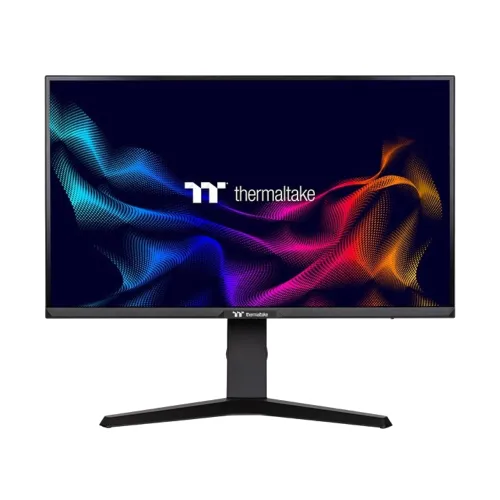
27-inch Fast IPS dual-mode display: 4K at 160Hz or FHD at 320Hz, with HDMI 2.1 and USB-C 15W.
Price unavailable
Price range updating
No verified price is available yet. Store offers will appear when merchants publish them.
Compare store prices
No live offers for this variant
Offers will appear when merchants publish them.
Loading history…
Product story
The Thermaltake TPM-I27FUK is a 27-inch Fast IPS gaming monitor with two display modes: 3840 × 2160 4K UHD at 160Hz or 1920 × 1080 Full HD at 320Hz. Thermaltake lists 1ms GTG/MPRT, 95% DCI-P3, 400 cd/m² typical brightness, HDR10, HDMI 2.1, DisplayPort 1.4 and USB-C with 15W output. Refer to Thermaltake's TPM-I27FUK specification and guide for mode-specific setup. Results depend on source, input, cable, selected resolution and content. Current Bangladesh price, stock, warranty and return terms are seller-specific and should be confirmed before purchase.
Confirm model TPM-I27FUK and regional part number on the rear label. Thermaltake distinguishes this dual-mode monitor from other TPM/TGM models. Use the manufacturer's spec for mode-specific resolution and refresh rather than treating 320Hz as a 4K refresh rate. Regional package, cable and warranty details can vary and should be confirmed by the seller. Refer to Thermaltake's TPM-I27FUK specification and guide for mode-specific setup. Results depend on source, input, cable, selected resolution and content. Current Bangladesh price, stock, warranty and return terms are seller-specific and should be confirmed before purchase.
Dual Mode allows 4K UHD at up to 160Hz or FHD at up to 320Hz. These are separate resolution/refresh combinations; the monitor does not run 4K at 320Hz. Switching to 1080p can help competitive players prioritize motion speed, while 4K offers higher image detail. Confirm the source and selected input support the desired mode. Refer to Thermaltake's TPM-I27FUK specification and guide for mode-specific setup. Results depend on source, input, cable, selected resolution and content. Current Bangladesh price, stock, warranty and return terms are seller-specific and should be confirmed before purchase.
The 27-inch panel has a 16:9 ratio, native 3840 × 2160 resolution and 0.15525mm pixel pitch. 4K provides fine detail and desktop space. High-refresh 4K gaming requires substantial GPU performance. Use native resolution for sharp text, with scaling chosen for comfortable viewing distance and application size. Refer to Thermaltake's TPM-I27FUK specification and guide for mode-specific setup. Results depend on source, input, cable, selected resolution and content. Current Bangladesh price, stock, warranty and return terms are seller-specific and should be confirmed before purchase.
Thermaltake specifies an AUO IPS panel, 95% DCI-P3 typical color gamut, 1.07 billion colors, 1000:1 typical contrast and 178-degree horizontal/vertical viewing angles. The anti-glare surface helps manage reflections. Gamut coverage describes color range, not a unit-specific calibration certificate; color-critical work needs an appropriate measurement workflow. Refer to Thermaltake's TPM-I27FUK specification and guide for mode-specific setup. Results depend on source, input, cable, selected resolution and content. Current Bangladesh price, stock, warranty and return terms are seller-specific and should be confirmed before purchase.
The specification lists 1ms GTG and 1ms MPRT. These are measurement modes and should not be interpreted as total input latency or a universal pixel transition time. Motion clarity depends on resolution mode, refresh, frame output, overdrive and adaptive-sync configuration. Test the modes with your own games and select the clearest stable image. Refer to Thermaltake's TPM-I27FUK specification and guide for mode-specific setup. Results depend on source, input, cable, selected resolution and content. Current Bangladesh price, stock, warranty and return terms are seller-specific and should be confirmed before purchase.
HDR10 input and 400 cd/m² typical brightness are listed. HDR appearance depends on source content, system settings and the monitor's selected picture mode. The specification does not state a VESA DisplayHDR certification or local dimming. Treat HDR10 compatibility as a signal/content feature, not a guarantee of premium HDR contrast or peak highlights. Refer to Thermaltake's TPM-I27FUK specification and guide for mode-specific setup. Results depend on source, input, cable, selected resolution and content. Current Bangladesh price, stock, warranty and return terms are seller-specific and should be confirmed before purchase.
Thermaltake lists flicker-free, blue-light reduction and adaptive sync compatibility including G-SYNC Compatible/FreeSync. Configure VRR in the monitor and graphics software, then verify the active mode. Eye comfort also depends on brightness, ambient lighting, viewing distance and breaks; software modes cannot guarantee prevention of eye fatigue. Refer to Thermaltake's TPM-I27FUK specification and guide for mode-specific setup. Results depend on source, input, cable, selected resolution and content. Current Bangladesh price, stock, warranty and return terms are seller-specific and should be confirmed before purchase.
Inputs include two HDMI 2.1, one DisplayPort 1.4 and one USB-C with 15W output, plus one USB-B upstream connection. One USB-A downstream port and audio output are listed. Thermaltake specifies HDMI 2.1 console support up to 4K at 120Hz. Verify timing for each port in the user guide and use a compatible cable. Refer to Thermaltake's TPM-I27FUK specification and guide for mode-specific setup. Results depend on source, input, cable, selected resolution and content. Current Bangladesh price, stock, warranty and return terms are seller-specific and should be confirmed before purchase.
USB-C supports the monitor's video input and provides 15W power output according to the specification. This modest delivery is not a substitute for most laptop power adapters. USB peripherals may require the USB-B upstream connection to the PC. Confirm host USB-C DisplayPort Alt Mode support and keep high-bandwidth video and power requirements separate. Refer to Thermaltake's TPM-I27FUK specification and guide for mode-specific setup. Results depend on source, input, cable, selected resolution and content. Current Bangladesh price, stock, warranty and return terms are seller-specific and should be confirmed before purchase.
The specification lists speaker output as N/A and an audio-out/headphone connection. Do not assume built-in speakers. Use a headset or external speakers connected to the source or monitor audio output, and select the correct audio device in the operating system. Audio behavior varies by HDMI/DP/USB-C source and configuration. Refer to Thermaltake's TPM-I27FUK specification and guide for mode-specific setup. Results depend on source, input, cable, selected resolution and content. Current Bangladesh price, stock, warranty and return terms are seller-specific and should be confirmed before purchase.
The stand offers -5° to +20° tilt, 110mm height adjustment, ±30° swivel and ±90° pivot. Kensington lock support is listed, with 75 × 75mm VESA mounting. Adjust the stand on a stable surface and check clearance before rotating the 27-inch panel. A VESA arm must support the display and use the correct fasteners. Refer to Thermaltake's TPM-I27FUK specification and guide for mode-specific setup. Results depend on source, input, cable, selected resolution and content. Current Bangladesh price, stock, warranty and return terms are seller-specific and should be confirmed before purchase.
For PC gaming, connect with DisplayPort 1.4 or a suitable HDMI 2.1 cable, select the target resolution/refresh in the OS, and verify the signal. Use 4K/160Hz for detailed play when the GPU supports it or FHD/320Hz for competitive titles. Set frame limits and VRR according to the game's actual performance. Refer to Thermaltake's TPM-I27FUK specification and guide for mode-specific setup. Results depend on source, input, cable, selected resolution and content. Current Bangladesh price, stock, warranty and return terms are seller-specific and should be confirmed before purchase.
Thermaltake lists HDMI 2.1 support for 4K at 120Hz, making compatible console connections possible. Consoles do not typically output 320Hz; their available resolution and refresh depend on model and game. Confirm 4K, 120Hz, HDR and VRR support on the exact console and connect to the HDMI input required by its output mode. Refer to Thermaltake's TPM-I27FUK specification and guide for mode-specific setup. Results depend on source, input, cable, selected resolution and content. Current Bangladesh price, stock, warranty and return terms are seller-specific and should be confirmed before purchase.
Dual-mode switching suits players who want detailed single-player 4K and faster FHD competitive settings on one display. The monitor can also support high-resolution desktop work. Switching resolution can change perceived sharpness and desktop scaling; check game support, source timing and menu controls before depending on a particular mode for a tournament or workflow. Refer to Thermaltake's TPM-I27FUK specification and guide for mode-specific setup. Results depend on source, input, cable, selected resolution and content. Current Bangladesh price, stock, warranty and return terms are seller-specific and should be confirmed before purchase.
Advantages include two useful refresh/resolution combinations, Fast IPS, 95% DCI-P3, HDMI 2.1 and a full ergonomic stand. Trade-offs include the GPU demand for 4K/160Hz, 15W-only USB-C power output, no listed speakers and the need to select the correct mode. Consider whether your PC can use the highest mode you plan to buy it for. Refer to Thermaltake's TPM-I27FUK specification and guide for mode-specific setup. Results depend on source, input, cable, selected resolution and content. Current Bangladesh price, stock, warranty and return terms are seller-specific and should be confirmed before purchase.
The monitor measures 27 inches diagonally and offers height, tilt, swivel and pivot adjustments. Place it at a comfortable distance with the screen top near eye level. Adjust brightness to the room and avoid direct reflections. The stand's range improves positioning but does not replace a suitable chair, posture and regular breaks. Refer to Thermaltake's TPM-I27FUK specification and guide for mode-specific setup. Results depend on source, input, cable, selected resolution and content. Current Bangladesh price, stock, warranty and return terms are seller-specific and should be confirmed before purchase.
Inspect the panel, stand articulation, RGB lighting, ports, USB hub, adapter, cables and included accessories on delivery. Keep the invoice, serial label and packaging through the return period. Clean the screen with soft microfiber and do not spray liquid directly on it. Test both 4K/160Hz and FHD/320Hz modes with compatible graphics hardware. Refer to Thermaltake's TPM-I27FUK specification and guide for mode-specific setup. Results depend on source, input, cable, selected resolution and content. Current Bangladesh price, stock, warranty and return terms are seller-specific and should be confirmed before purchase.
Before buying in Bangladesh, confirm live price and availability, exact TPM-I27FUK regional code, included DP/HDMI/USB cables, return/dead-pixel terms, delivery and serial-specific Thermaltake warranty provider and term. The manufacturer's international data does not establish local warranty. Confirm accessory bundle and service conditions with the seller before ordering. Refer to Thermaltake's TPM-I27FUK specification and guide for mode-specific setup. Results depend on source, input, cable, selected resolution and content. Current Bangladesh price, stock, warranty and return terms are seller-specific and should be confirmed before purchase.
Thermaltake specifies dual mode: 4K at 160Hz or Full HD at 320Hz, with Fast IPS, 1ms GTG/MPRT, 95% DCI-P3, HDMI 2.1 ×2, DP 1.4, USB-C 15W and 75 × 75mm VESA. It does not list built-in speakers. Confirm source compatibility, regional bundle and Bangladesh warranty. Refer to Thermaltake's TPM-I27FUK specification and guide for mode-specific setup. Results depend on source, input, cable, selected resolution and content. Current Bangladesh price, stock, warranty and return terms are seller-specific and should be confirmed before purchase.
Helpful answers
Product-specific answers maintained with the catalog information.
4K UHD at up to 160Hz or Full HD at up to 320Hz.
No. Thermaltake lists 320Hz only for FHD; 4K mode tops out at 160Hz.
A 27-inch Fast IPS panel.
Two HDMI 2.1, one DisplayPort 1.4, USB-C 15W, USB-B upstream, USB-A and audio out.
USB-C power output is 15W, which is not a substitute for most laptop adapters.
Thermaltake lists speaker output as N/A.
110mm height, -5° to +20° tilt, ±30° swivel and ±90° pivot.
Console output is limited by the console and game; HDMI console mode is listed up to 4K/120Hz.
Confirm serial-specific local Thermaltake warranty provider, duration and service with the seller.
Customer community
Become a merchant
Join BiponiBD, publish accurate offers and start free.