Product overview
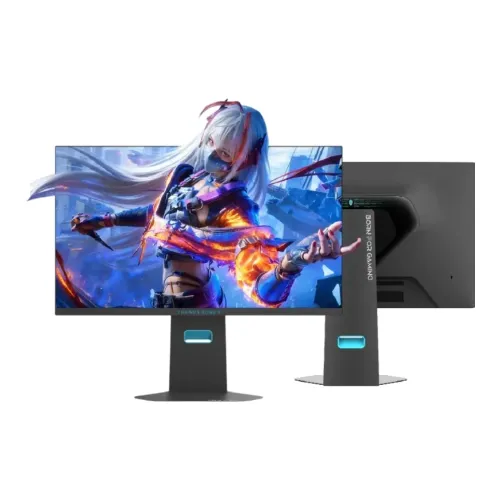
The CU27F160M-EVO is a 27-inch flat gaming monitor listed by ThundeRobot with a Mini LED display and two operating modes: 3840 × 2160 at up to 160Hz or 1920 × 1080 at up to 320Hz. The manufacturer page lists 99% DCI-P3, 100% sRGB and 1100:1 contrast. This is a model-specific overview: confirm the exact regional unit, connection timing, accessories and local service terms before purchase. For this item, the manufacturer describes CU27F160M-EVO as a 27-inch 4K 160Hz / Full HD 320Hz dual-mode Mini LED display. Use the exact model documentation for connector limits, regional features and care instructions; verify local seller terms separately.
Exact model and dual-mode display
Check that the model code on the carton and rear label reads CU27F160M-EVO. A similarly named CU27F160M without “EVO” is a distinct listing and its measurements or features should not be copied to this product. The official EVO page names a 27-inch panel, flat geometry, Mini LED technology and the two resolution/refresh combinations. Local catalog specifications include further details that require the product manual or serial-specific confirmation. For this item, the manufacturer describes CU27F160M-EVO as a 27-inch 4K 160Hz / Full HD 320Hz dual-mode Mini LED display. Use the exact model documentation for connector limits, regional features and care instructions; verify local seller terms separately.
4K resolution and pixel detail
The manufacturer lists 3840 × 2160 UHD (4K) as one mode. At 27 inches this provides a dense desktop image for detailed games, text and media. The second listed mode is 1920 × 1080 Full HD. Choose a mode supported by the source and monitor input; operating system scaling, game settings, GPU performance and cable/port timing affect the practical setup. For this item, the manufacturer describes CU27F160M-EVO as a 27-inch 4K 160Hz / Full HD 320Hz dual-mode Mini LED display. Use the exact model documentation for connector limits, regional features and care instructions; verify local seller terms separately.
Refresh rates and switching modes
The official product information specifies 160Hz at 4K and 320Hz at Full HD. These are alternative operating modes, not simultaneous refresh rates. The 320Hz mode reduces the pixel workload for high-frame-rate competitive play, while 4K emphasizes detail. Confirm the input and cable needed for each mode in the manual, then check the active resolution and refresh in the operating system and on-screen display. For this item, the manufacturer describes CU27F160M-EVO as a 27-inch 4K 160Hz / Full HD 320Hz dual-mode Mini LED display. Use the exact model documentation for connector limits, regional features and care instructions; verify local seller terms separately.
Mini LED and HDR information
ThundeRobot markets this EVO model as Mini LED and its product title references HDR 1000 nits. The product summary reviewed does not fully document local-dimming zone count, certification, test window, sustained brightness or HDR signal requirements. The catalog’s older value of 1100 cd/m² peak is a retailer-derived claim and should not be treated as a verified measured result or certification. Check the official datasheet and unit documentation. For this item, the manufacturer describes CU27F160M-EVO as a 27-inch 4K 160Hz / Full HD 320Hz dual-mode Mini LED display. Use the exact model documentation for connector limits, regional features and care instructions; verify local seller terms separately.
Color gamut and contrast
The manufacturer lists 99% DCI-P3 and 100% sRGB gamut coverage, with 1100:1 contrast. Gamut coverage describes the range of colors and is not the same as factory calibration accuracy. No unit-specific calibration report or Delta E result was verified. For color-critical work, confirm the product revision and calibrate the individual monitor. Room lighting and picture mode also influence perceived image quality. For this item, the manufacturer describes CU27F160M-EVO as a 27-inch 4K 160Hz / Full HD 320Hz dual-mode Mini LED display. Use the exact model documentation for connector limits, regional features and care instructions; verify local seller terms separately.
Panel geometry and viewing
The official listing describes a 27-inch flat screen and gives viewing-angle figures as 89° in each direction. The summary does not spell out an anti-glare coating or every panel construction detail. Treat local specifications as claims unless confirmed by the current manual. Place the monitor at a comfortable viewing distance, avoid direct reflections and evaluate the screen in the intended room. For this item, the manufacturer describes CU27F160M-EVO as a 27-inch 4K 160Hz / Full HD 320Hz dual-mode Mini LED display. Use the exact model documentation for connector limits, regional features and care instructions; verify local seller terms separately.
Response time and motion claims
The catalog lists 1ms overdrive and 5ms typical response, but the official product summary reviewed does not describe the measurement method or operating conditions. Response-time figures are not input-lag measurements and do not promise identical motion clarity in every overdrive mode. Test available OSD response settings for overshoot and artifacts after choosing the desired refresh mode. For this item, the manufacturer describes CU27F160M-EVO as a 27-inch 4K 160Hz / Full HD 320Hz dual-mode Mini LED display. Use the exact model documentation for connector limits, regional features and care instructions; verify local seller terms separately.
Ports and connection planning
The existing catalog record lists two HDMI 2.1 inputs, two DisplayPort 1.4 inputs and an audio output. These port counts and versions are retailer-derived here; the official page summary did not enumerate them. Confirm exact connector capability and maximum mode timing in the manual for the supplied regional revision. Use a suitable certified cable and select the input that supports the requested resolution and refresh. For this item, the manufacturer describes CU27F160M-EVO as a 27-inch 4K 160Hz / Full HD 320Hz dual-mode Mini LED display. Use the exact model documentation for connector limits, regional features and care instructions; verify local seller terms separately.
Adaptive sync and compatibility
The listing’s G-Sync and FreeSync entries need verification against the manufacturer’s compatibility documentation. Adaptive sync depends on the source GPU, driver, input, firmware and supported refresh range. Confirm whether the feature is officially supported for this exact model and which operating modes allow it. Do not assume that a compatibility label proves certification or operation on every port. For this item, the manufacturer describes CU27F160M-EVO as a 27-inch 4K 160Hz / Full HD 320Hz dual-mode Mini LED display. Use the exact model documentation for connector limits, regional features and care instructions; verify local seller terms separately.
Stand movement and ergonomics
The catalog record describes tilt, swivel and 120mm height adjustment, but these stand details were not confirmed from the official summary. Verify the adjustment range on the delivered unit. Set the top of the display near eye level and position it to reduce glare. If the stand does not fit the desk, confirm the actual VESA pattern and screw requirements before buying a separate mount. For this item, the manufacturer describes CU27F160M-EVO as a 27-inch 4K 160Hz / Full HD 320Hz dual-mode Mini LED display. Use the exact model documentation for connector limits, regional features and care instructions; verify local seller terms separately.
Mounting, dimensions and desk setup
The current catalog dimensions are 613.2 × 533.4 × 200mm and the listed weight is 6.4kg; these remain retailer-derived until checked against the manufacturer manual or physical unit. Allow extra clearance for cables, stand movement and ventilation. Confirm package contents and safe lifting requirements. Verify the VESA value directly because incompatible screw length or pattern can damage the monitor. For this item, the manufacturer describes CU27F160M-EVO as a 27-inch 4K 160Hz / Full HD 320Hz dual-mode Mini LED display. Use the exact model documentation for connector limits, regional features and care instructions; verify local seller terms separately.
PC gaming configuration
For PC setup, connect the GPU directly to the monitor with a cable rated for the chosen signal. Select 3840 × 2160 at 160Hz or 1920 × 1080 at 320Hz only when the port, cable, driver and display mode all support it. Check the monitor OSD signal information after configuration. Update graphics drivers and adjust game settings to balance frame rate, image quality and hardware load. For this item, the manufacturer describes CU27F160M-EVO as a 27-inch 4K 160Hz / Full HD 320Hz dual-mode Mini LED display. Use the exact model documentation for connector limits, regional features and care instructions; verify local seller terms separately.
Console compatibility
Console capabilities differ by model and game. Most current consoles do not use the 320Hz mode, and 4K refresh output depends on the console, game, input and signal format. Confirm supported resolution, refresh, HDR and variable-refresh features for the exact console before relying on them. The monitor’s maximum PC refresh headline does not mean a console can output at that rate. For this item, the manufacturer describes CU27F160M-EVO as a 27-inch 4K 160Hz / Full HD 320Hz dual-mode Mini LED display. Use the exact model documentation for connector limits, regional features and care instructions; verify local seller terms separately.
Work, media and color tasks
The 4K mode can suit detailed desktop work, streaming and single-player games; Full HD at 320Hz targets compatible high-frame-rate PC play. The manufacturer’s color-gamut figures may be useful for broad media viewing but do not establish color accuracy. Enable an appropriate mode for the task and verify any HDR workflow, color profile and brightness setting with the actual system and content. For this item, the manufacturer describes CU27F160M-EVO as a 27-inch 4K 160Hz / Full HD 320Hz dual-mode Mini LED display. Use the exact model documentation for connector limits, regional features and care instructions; verify local seller terms separately.
What the specifications do not establish
Published headline values do not establish every port’s timing, local-dimming behavior, measured response, factory calibration, regional warranty or included cable. This catalog content identifies official manufacturer claims separately from retailer-derived details. The local warranty field previously said three years, but no Bangladesh serial eligibility or provider was established. Treat these points as questions for the seller rather than settled facts. For this item, the manufacturer describes CU27F160M-EVO as a 27-inch 4K 160Hz / Full HD 320Hz dual-mode Mini LED display. Use the exact model documentation for connector limits, regional features and care instructions; verify local seller terms separately.
Advantages and trade-offs
Potential strengths are the choice between detailed 4K at 160Hz and a faster Full HD 320Hz mode, a 27-inch format, Mini LED positioning and the manufacturer’s stated wide gamut. Trade-offs include switching resolution to reach the maximum refresh, demanding GPU requirements for high-frame-rate gaming, and several locally listed hardware details that still need confirmation. Compare the intended use and exact revision before deciding. For this item, the manufacturer describes CU27F160M-EVO as a 27-inch 4K 160Hz / Full HD 320Hz dual-mode Mini LED display. Use the exact model documentation for connector limits, regional features and care instructions; verify local seller terms separately.
Setup and care guidance
Keep the monitor on a stable surface, leave ventilation clear and support the frame when adjusting or moving it. Clean with a soft microfiber cloth; do not spray liquid onto the panel or use abrasive cleaners. Retain packaging, serial labels, invoice and accessories until the display has been checked. Inspect for shipping damage and verify each input and display mode during the return window. For this item, the manufacturer describes CU27F160M-EVO as a 27-inch 4K 160Hz / Full HD 320Hz dual-mode Mini LED display. Use the exact model documentation for connector limits, regional features and care instructions; verify local seller terms separately.
Bangladesh warranty and purchase checklist
Before ordering in Bangladesh, ask for current stock and price, delivery timing, return/dead-pixel policy, the serial-specific warranty provider and service location, and written confirmation of the covered term. Match the unit serial to the invoice. Confirm included power cable, video cables and stand. Catalog warranty text is not proof that a particular imported serial is covered locally. For this item, the manufacturer describes CU27F160M-EVO as a 27-inch 4K 160Hz / Full HD 320Hz dual-mode Mini LED display. Use the exact model documentation for connector limits, regional features and care instructions; verify local seller terms separately.
Model verification and frequently checked details
The manufacturer’s exact model is CU27F160M-EVO. Do not merge specifications from CU27F160M or other 27-inch ThundeRobot monitors. Officially listed items used here are the model, 27-inch flat Mini LED display, 4K 160Hz and Full HD 320Hz modes, 99% DCI-P3, 100% sRGB and 1100:1 contrast. Confirm remaining specifications and purchase conditions against the current manual and delivered product. For this item, the manufacturer describes CU27F160M-EVO as a 27-inch 4K 160Hz / Full HD 320Hz dual-mode Mini LED display. Use the exact model documentation for connector limits, regional features and care instructions; verify local seller terms separately.