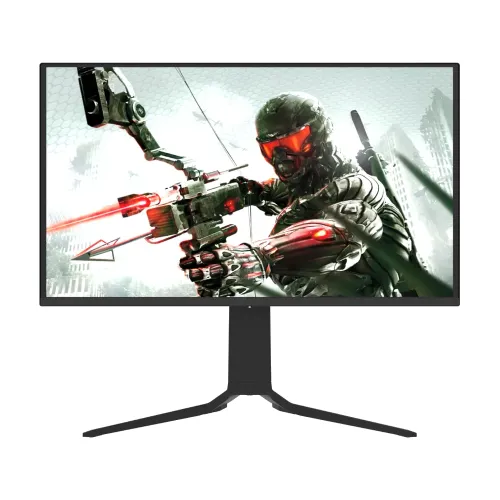
ThundeRobot DQ27F280E overview
The ThundeRobot DQ27F280E is a 26.5-inch QHD QD-OLED gaming monitor with a 280Hz maximum refresh rate and a published 0.03ms typical response time. ThundeRobot’s official product page identifies the exact model and lists its OLED panel, high refresh, HDR 1000-nit feature and USB-C reverse charging. This combination targets smooth PC gaming, deep OLED contrast and vivid wide-gamut image quality. Actual mode depends on the source, cable, input selection, firmware, graphics hardware and settings. Confirm the delivered version and written seller terms before purchase; a feature listing does not establish local stock, current price, serial warranty or package contents.
Exact model identification
Confirm the full DQ27F280E model code on the carton and rear label. It differs from DQ27F240E, DQ27F240E-SE, DQ27F320E and the Fast IPS JQ27F280L. Do not carry the stand, resolution, refresh rate or panel details of those neighbors into this listing. “27-inch class” is a rounded category; the official product information and regional specifications identify a 26.5-inch panel. Actual mode depends on the source, cable, input selection, firmware, graphics hardware and settings. Confirm the delivered version and written seller terms before purchase; a feature listing does not establish local stock, current price, serial warranty or package contents.
26.5-inch QHD display
The display uses a 16:9 2560 × 1440 QHD resolution. At 26.5 inches, that pixel count offers a balance between sharp desktop detail and frame rates that a capable gaming PC can reach more often than 4K. The catalog’s 110.8 PPI claim is consistent with this panel size and resolution. Use native resolution, then adjust operating system scaling for comfortable text size. Actual mode depends on the source, cable, input selection, firmware, graphics hardware and settings. Confirm the delivered version and written seller terms before purchase; a feature listing does not establish local stock, current price, serial warranty or package contents.
QD-OLED picture characteristics
QD-OLED uses individually emissive pixels and quantum-dot color conversion. Independent pixel control can produce deep blacks and strong contrast in dark scenes without a conventional LCD backlight. Reflections, ambient light, content mastering and the selected preset still affect perceived image quality. A wide color gamut is useful for games and media but does not by itself prove calibration accuracy. Actual mode depends on the source, cable, input selection, firmware, graphics hardware and settings. Confirm the delivered version and written seller terms before purchase; a feature listing does not establish local stock, current price, serial warranty or package contents.
280Hz refresh rate
The official listing specifies 280Hz. This is the maximum refresh capability rather than a promise that every input, computer or game will operate at that rate. Choose QHD at 280Hz in the operating system and verify the reported signal in the monitor menu. The GPU and game must render the corresponding frame rate to take full advantage of a high-refresh display. Actual mode depends on the source, cable, input selection, firmware, graphics hardware and settings. Confirm the delivered version and written seller terms before purchase; a feature listing does not establish local stock, current price, serial warranty or package contents.
0.03ms response and motion
ThundeRobot lists 0.03ms typical response. This describes panel pixel transition under the maker’s test conditions, not total system latency or guaranteed blur-free motion. Frame pacing, refresh, VRR, game performance and settings all matter. Keep the direct GPU connection and test the actual game at the brightness and refresh settings you intend to use. Actual mode depends on the source, cable, input selection, firmware, graphics hardware and settings. Confirm the delivered version and written seller terms before purchase; a feature listing does not establish local stock, current price, serial warranty or package contents.
HDR 1000-nit peak brightness
The official product title advertises HDR 1000-nit peak capability. A detailed regional product listing reports SDR 250 nits typical and HDR E/P 1000 nits typical at 3% APL, meaning peak brightness is associated with small highlights and the specified test pattern. Do not interpret that peak as sustained full-screen brightness. Confirm HDR mode and content support in your setup. Actual mode depends on the source, cable, input selection, firmware, graphics hardware and settings. Confirm the delivered version and written seller terms before purchase; a feature listing does not establish local stock, current price, serial warranty or package contents.
Color coverage and factory accuracy
The detailed listing reports 99% DCI-P3, 98% Adobe RGB, 80% BT.2020, 100% sRGB, 10-bit color and average Delta E ≤2 with individual sRGB/P3 calibration. Those figures describe color gamut and an advertised calibration process; unit variation, firmware and picture mode can still affect output. For professional work, verify the correct color mode and use a calibrated workflow. Actual mode depends on the source, cable, input selection, firmware, graphics hardware and settings. Confirm the delivered version and written seller terms before purchase; a feature listing does not establish local stock, current price, serial warranty or package contents.
Connectivity and port selection
The product catalog and manufacturer-associated listings report two HDMI 2.1 ports and one DisplayPort 1.4, plus USB-C, USB-B upstream, two USB-A and a headphone/audio output. HDMI modes may differ by settings: the detail page reports up to QHD 280Hz on HDMI 2.1 and a switchable HDMI 2.0 mode up to QHD 144Hz. Check the menu and source signal when troubleshooting. Actual mode depends on the source, cable, input selection, firmware, graphics hardware and settings. Confirm the delivered version and written seller terms before purchase; a feature listing does not establish local stock, current price, serial warranty or package contents.
USB-C video and 15W power delivery
USB-C is advertised with 15W power delivery and QHD video capability in the product details. Fifteen watts can top up small devices but is not sufficient to fully power most laptops under load. The connected computer’s Type-C port must support DisplayPort Alt Mode. Keep the laptop’s own charger connected when its power requirements exceed the monitor’s output. Actual mode depends on the source, cable, input selection, firmware, graphics hardware and settings. Confirm the delivered version and written seller terms before purchase; a feature listing does not establish local stock, current price, serial warranty or package contents.
KVM, PIP and PBP functions
The detailed listing describes KVM control for two computers using one keyboard and mouse, and PIP/PBP for showing two sources. These tools require the appropriate upstream USB and video connections and may have input-mode limits. Use the monitor’s menu to assign the USB upstream source and inspect the available picture layouts. Do not assume every source pairing can run at 280Hz. Actual mode depends on the source, cable, input selection, firmware, graphics hardware and settings. Confirm the delivered version and written seller terms before purchase; a feature listing does not establish local stock, current price, serial warranty or package contents.
Stand ergonomics and VESA
ThundeRobot’s product heading describes a height-adjustable rotating stand. A detailed product listing reports 120mm height travel, ±90° swivel and tilt adjustment; the catalog says 75 × 75mm VESA. Confirm the delivered regional manual and rear mounting points before buying an arm. Make sure the desk supports the base and the cable has enough slack for rotation. Actual mode depends on the source, cable, input selection, firmware, graphics hardware and settings. Confirm the delivered version and written seller terms before purchase; a feature listing does not establish local stock, current price, serial warranty or package contents.
PC configuration for 280Hz
For 280Hz PC use, connect directly with a suitable DisplayPort 1.4 or HDMI 2.1 cable, set 2560 × 1440 and select 280Hz. Enable VRR in both monitor and GPU controls where supported. If the option is missing, check cable rating, GPU output, driver, input mode and active signal. USB docks or adapters may reduce bandwidth or block high refresh. Actual mode depends on the source, cable, input selection, firmware, graphics hardware and settings. Confirm the delivered version and written seller terms before purchase; a feature listing does not establish local stock, current price, serial warranty or package contents.
Console and laptop compatibility
Console refresh is determined by the console and game rather than the monitor’s 280Hz maximum. Connect through HDMI and confirm the detected resolution and refresh in console video settings. Laptops can send USB-C video only if that port supports DisplayPort Alt Mode; the 15W output is not full laptop charging. Confirm the graphics port and power requirements before relying on a single-cable desk setup. Actual mode depends on the source, cable, input selection, firmware, graphics hardware and settings. Confirm the delivered version and written seller terms before purchase; a feature listing does not establish local stock, current price, serial warranty or package contents.
OLED care and burn-in protection
OLED pixels can be affected by long exposure to static high-contrast content. The detailed feature listing describes pixel shifting and AI boundary detection as anti-burn measures. Enable manufacturer-provided protection and pixel care as directed, allow maintenance cycles to complete and vary static desktop content. Do not interrupt panel maintenance; use only the cleaning method in the supplied manual. Actual mode depends on the source, cable, input selection, firmware, graphics hardware and settings. Confirm the delivered version and written seller terms before purchase; a feature listing does not establish local stock, current price, serial warranty or package contents.
Advantages for gaming and media
Benefits include QHD sharpness, 280Hz refresh, fast OLED response, deep pixel-level blacks, broad reported color coverage, HDR highlights, USB-C 15W and multi-device features. Those attributes can support esports, immersive single-player games and media. The adjustable stand and KVM functions may also simplify a shared desk when their exact operation suits the connected devices. Actual mode depends on the source, cable, input selection, firmware, graphics hardware and settings. Confirm the delivered version and written seller terms before purchase; a feature listing does not establish local stock, current price, serial warranty or package contents.
Trade-offs and buyer fit
Trade-offs include the graphics performance needed for high frame rates, OLED care for static desktop use, peak rather than sustained HDR brightness, and modest USB-C power delivery. A 280Hz specification does not mean a console can output 280Hz. Check the regional USB hub details, mount pattern, bundled cables, local service terms and burn-in coverage before deciding. Actual mode depends on the source, cable, input selection, firmware, graphics hardware and settings. Confirm the delivered version and written seller terms before purchase; a feature listing does not establish local stock, current price, serial warranty or package contents.
Bangladesh purchase checklist
Before ordering in Bangladesh, confirm DQ27F280E on the carton and monitor label, current stock, delivered price, package contents, return/dead-pixel policy and local service provider. Ask for warranty duration and OLED burn-in coverage in writing against the serial number. Manufacturer or overseas marketplace terms do not automatically confirm local entitlement. This content review does not verify the current BiponiBD offer. Actual mode depends on the source, cable, input selection, firmware, graphics hardware and settings. Confirm the delivered version and written seller terms before purchase; a feature listing does not establish local stock, current price, serial warranty or package contents.
Frequently asked questions
Is this a 27-inch monitor? It is 26.5 inches, often grouped as 27-inch class. What is its resolution? QHD 2560 × 1440. What refresh rate? Up to 280Hz. What panel? QD-OLED. Response time? 0.03ms typical published. Does USB-C charge a laptop? It provides up to 15W, which is usually not full laptop charging. What is HDR brightness? 1000-nit peak is advertised for small highlights; it is not sustained full-screen brightness. Verify warranty locally. Actual mode depends on the source, cable, input selection, firmware, graphics hardware and settings. Confirm the delivered version and written seller terms before purchase; a feature listing does not establish local stock, current price, serial warranty or package contents.
Final product summary
The ThundeRobot DQ27F280E is best suited to buyers who want a 26.5-inch QHD QD-OLED display with very high PC refresh, fast pixel response and vivid HDR-capable output. A capable graphics card and a direct high-bandwidth connection are important. Confirm regional ports, stand, bundled accessories, warranty and live price before ordering. The exact model code should match DQ27F280E rather than a similarly named monitor. Actual mode depends on the source, cable, input selection, firmware, graphics hardware and settings. Confirm the delivered version and written seller terms before purchase; a feature listing does not establish local stock, current price, serial warranty or package contents.