Product overview
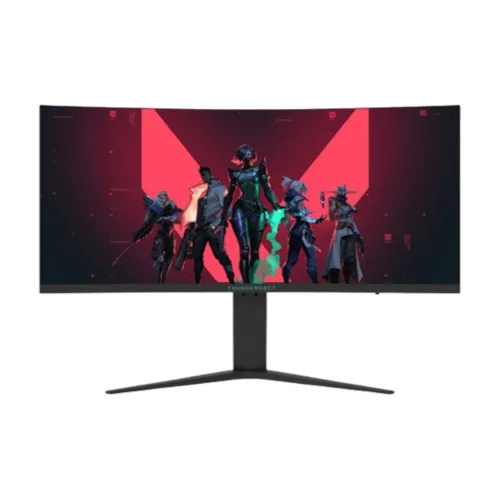
The official Thunderobot product listing identifies model DQ34C240L as a 34-inch Fast VA curved ultrawide monitor with 250Hz refresh. The page lists 90% DCI-P3, 99% sRGB, 4000:1 contrast, 3440 × 1440 resolution and 1500R curvature. Local seller listings add more details, but any value not in the official model record should be verified against the delivered revision before purchase. ThundeRobot DQ34C240L is the exact model; verify the model code and regional revision rather than substituting details from similar DQ34 products. Check the supported signal mode, accessories and warranty terms with the seller. Source specifications are subject to revision, and the physical label and current manual should govern setup.
34-inch ultrawide display
A 34-inch panel gives a wide horizontal field suited to compatible games and side-by-side desktop windows. The official listing calls the product a curved ultrawide display. Check that the desk is wide and deep enough for the screen and seating distance, and center the user relative to the curve. A large aspect ratio can improve immersion but needs application support. ThundeRobot DQ34C240L is the exact model; verify the model code and regional revision rather than substituting details from similar DQ34 products. Check the supported signal mode, accessories and warranty terms with the seller. Source specifications are subject to revision, and the physical label and current manual should govern setup.
3440 × 1440 UWQHD resolution
The official listing states 3440 × 1440 pixels. This UWQHD format offers a broad 21:9 workspace for supported games, timelines and multiple windows. Select native resolution in the graphics settings for sharp text and imagery. Some video and console output is 16:9 and may use side bars or scaling; behavior depends on the source and content. ThundeRobot DQ34C240L is the exact model; verify the model code and regional revision rather than substituting details from similar DQ34 products. Check the supported signal mode, accessories and warranty terms with the seller. Source specifications are subject to revision, and the physical label and current manual should govern setup.
Fast VA panel and contrast
The product is advertised as Fast VA. Thunderobot lists a 4000:1 contrast ratio, which can support deeper dark-image appearance than many typical IPS panels. Display characteristics vary with room light, image mode and viewing angle. Verify any brightness or viewing-angle numbers in the precise product datasheet; reseller listings may not match manufacturer materials or regional revisions. ThundeRobot DQ34C240L is the exact model; verify the model code and regional revision rather than substituting details from similar DQ34 products. Check the supported signal mode, accessories and warranty terms with the seller. Source specifications are subject to revision, and the physical label and current manual should govern setup.
1500R curved screen
The manufacturer lists 1500R curvature. A curved ultrawide panel can keep the left and right regions within a more consistent arc for a centered viewer. Comfort depends on distance, desk position and individual preference. The curvature does not change the pixel count or guarantee ultrawide support in every game. Sit centered and test the viewing distance before extended use. ThundeRobot DQ34C240L is the exact model; verify the model code and regional revision rather than substituting details from similar DQ34 products. Check the supported signal mode, accessories and warranty terms with the seller. Source specifications are subject to revision, and the physical label and current manual should govern setup.
250Hz refresh rate
Thunderobot markets this model with a 250Hz refresh rate. The local catalog describes 240Hz standard with 250Hz overclock, while the official store product title says 250Hz. Confirm the exact mode, required overclock setting and port support in the manual or OSD for the specific unit. A compatible GPU, cable, driver and source timing are needed to use high refresh. ThundeRobot DQ34C240L is the exact model; verify the model code and regional revision rather than substituting details from similar DQ34 products. Check the supported signal mode, accessories and warranty terms with the seller. Source specifications are subject to revision, and the physical label and current manual should govern setup.
Response time and overdrive
Retailer descriptions claim 1ms response time, but measurement method and overdrive conditions are not consistently documented. Treat the number as a claim rather than guaranteed end-to-end latency or blur-free motion. Response settings can introduce artifacts, and frame rate depends on the source. Verify whether the figure is MPRT or GTG on the delivered revision before comparing it with other monitors. ThundeRobot DQ34C240L is the exact model; verify the model code and regional revision rather than substituting details from similar DQ34 products. Check the supported signal mode, accessories and warranty terms with the seller. Source specifications are subject to revision, and the physical label and current manual should govern setup.
HDR and brightness claims
Some Bangladesh listings claim HDR400 support and up to 450cd/m² brightness; those claims are not visible in the available official product summary. Do not call the display VESA DisplayHDR 400 certified without a matching certification record. Check the actual datasheet, packaging and HDR controls. HDR behavior depends on source, content, display mode and supported signal. ThundeRobot DQ34C240L is the exact model; verify the model code and regional revision rather than substituting details from similar DQ34 products. Check the supported signal mode, accessories and warranty terms with the seller. Source specifications are subject to revision, and the physical label and current manual should govern setup.
Color gamut and viewing angles
Thunderobot’s official listing reports 99% sRGB and 90% DCI-P3. Retailer specifications report 178-degree viewing angles and additional color coverage figures that are not all confirmed by the official page. Gamut coverage is not calibration proof. For color-critical design, verify the exact unit’s gamut and calibrate it instead of relying on listing percentages. ThundeRobot DQ34C240L is the exact model; verify the model code and regional revision rather than substituting details from similar DQ34 products. Check the supported signal mode, accessories and warranty terms with the seller. Source specifications are subject to revision, and the physical label and current manual should govern setup.
Inputs and signal limits
Local listings report one DisplayPort 1.4 and two HDMI 2.1 connectors, with a stated 250Hz high-refresh mode. Confirm the supported resolution and refresh for each input in the model manual; connector version alone does not prove every timing. Use a suitable cable and check the active signal in the OSD. The exact product listing should be consulted for port-specific limits. ThundeRobot DQ34C240L is the exact model; verify the model code and regional revision rather than substituting details from similar DQ34 products. Check the supported signal mode, accessories and warranty terms with the seller. Source specifications are subject to revision, and the physical label and current manual should govern setup.
Audio and speakers
Retailer listings mention two 2W speakers and a headphone jack, while the official product page does not provide complete audio details. Verify speaker presence, output power and audio connectors on the actual unit if these matter. Integrated speakers are typically intended for basic sound, not a dedicated listening setup. Check source audio routing and the monitor volume controls after connection. ThundeRobot DQ34C240L is the exact model; verify the model code and regional revision rather than substituting details from similar DQ34 products. Check the supported signal mode, accessories and warranty terms with the seller. Source specifications are subject to revision, and the physical label and current manual should govern setup.
Stand adjustment
Local product specifications state no height adjustment and do not reliably document stand movement. The existing catalog name does not promise stand ergonomics; confirm tilt range and included stand from the exact revision documentation. For a large curved screen, plan desk height and viewing distance. If using a separate arm, verify the VESA pattern and load rating first. ThundeRobot DQ34C240L is the exact model; verify the model code and regional revision rather than substituting details from similar DQ34 products. Check the supported signal mode, accessories and warranty terms with the seller. Source specifications are subject to revision, and the physical label and current manual should govern setup.
VESA mounting
Local retailer data lists a 100 × 100mm VESA pattern, but confirm this on the exact unit before buying an arm. Verify screw depth, mount capacity and clearance, and support the monitor during installation. Do not assume that a reseller attribute applies to every regional revision. Use the manual and physical rear-panel labels to identify the correct mounting standard. ThundeRobot DQ34C240L is the exact model; verify the model code and regional revision rather than substituting details from similar DQ34 products. Check the supported signal mode, accessories and warranty terms with the seller. Source specifications are subject to revision, and the physical label and current manual should govern setup.
PC setup and refresh selection
Connect a compatible PC using the port and cable documented for the intended UWQHD refresh mode. Set 3440 × 1440 and select the available high-refresh setting in the operating system and monitor OSD. If the mode does not appear, check GPU output, cable, driver, input, and whether overclock must be enabled. Do not assume all listed ports support the same maximum signal. ThundeRobot DQ34C240L is the exact model; verify the model code and regional revision rather than substituting details from similar DQ34 products. Check the supported signal mode, accessories and warranty terms with the seller. Source specifications are subject to revision, and the physical label and current manual should govern setup.
Competitive gaming
The 34-inch curved format and 250Hz headline refresh are aimed at high-frame-rate gaming. The graphics card must render enough frames at 3440 × 1440 to benefit from the refresh headroom. Game support for 21:9 varies; some titles can crop or letterbox. Adaptive-sync is claimed by local retailers, but verify range and compatibility with the monitor manual and GPU before relying on it. ThundeRobot DQ34C240L is the exact model; verify the model code and regional revision rather than substituting details from similar DQ34 products. Check the supported signal mode, accessories and warranty terms with the seller. Source specifications are subject to revision, and the physical label and current manual should govern setup.
Console and media use
Console video modes and refresh rates depend on console generation and game. Many consoles target 16:9 and may not fill the ultrawide panel. Confirm supported resolution, refresh, HDR and variable-refresh behavior with the console and the monitor’s input timing table. A PC-focused 250Hz mode does not imply 250Hz console output. ThundeRobot DQ34C240L is the exact model; verify the model code and regional revision rather than substituting details from similar DQ34 products. Check the supported signal mode, accessories and warranty terms with the seller. Source specifications are subject to revision, and the physical label and current manual should govern setup.
Desktop productivity
UWQHD provides broad horizontal space for spreadsheets, timelines, browser panes and editing applications. Some software may not use the full width efficiently, and text scaling should be configured for comfortable reading. Confirm the actual color mode for creative tasks; manufacturer-listed gamut does not demonstrate factory calibration. Use a calibrated workflow for color-sensitive output. ThundeRobot DQ34C240L is the exact model; verify the model code and regional revision rather than substituting details from similar DQ34 products. Check the supported signal mode, accessories and warranty terms with the seller. Source specifications are subject to revision, and the physical label and current manual should govern setup.
Power and physical fit
Retailer pages list varying values for brightness, power and weight, so verify these against the exact product label and revision documentation. Measure the desk and leave room for the curved screen, stand, cable bends and ventilation. Confirm included power adapter, cable and stand components at delivery. Do not rely on conflicting reseller numbers to calculate operating cost or mount capacity. ThundeRobot DQ34C240L is the exact model; verify the model code and regional revision rather than substituting details from similar DQ34 products. Check the supported signal mode, accessories and warranty terms with the seller. Source specifications are subject to revision, and the physical label and current manual should govern setup.
Care and maintenance
Install the monitor on a stable surface and keep vents unobstructed. Clean with a soft microfiber cloth; do not spray fluid directly onto the panel or use abrasive products. Handle the curved display by its frame and avoid twisting or pressing the screen. Keep serial, invoice, box and accessory records in case support or return service is needed. ThundeRobot DQ34C240L is the exact model; verify the model code and regional revision rather than substituting details from similar DQ34 products. Check the supported signal mode, accessories and warranty terms with the seller. Source specifications are subject to revision, and the physical label and current manual should govern setup.
Bangladesh warranty and order checks
The catalog’s three-year warranty entry does not confirm service eligibility for a Bangladesh serial. Ask the seller to identify warranty provider, duration, local service point, dead-pixel terms, invoice requirements and overclock-related coverage. Match monitor and box serials with the invoice. Confirm current stock, offer price, delivery, return policy and included cables before paying. ThundeRobot DQ34C240L is the exact model; verify the model code and regional revision rather than substituting details from similar DQ34 products. Check the supported signal mode, accessories and warranty terms with the seller. Source specifications are subject to revision, and the physical label and current manual should govern setup.