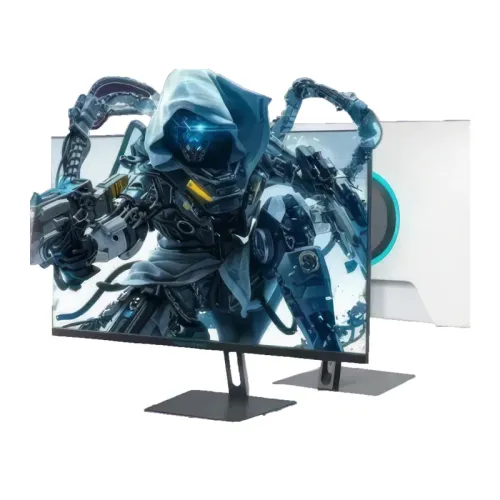
The ThundeRobot Thor CF25F300-W is a 24.5-inch Full HD Fast IPS gaming monitor. ThundeRobot advertises an overclocked 320Hz mode; launch material distinguishes 300Hz native refresh and 320Hz overclocked over DisplayPort, with HDMI up to 240Hz at 1080p. This page separates model facts, source-dependent modes and Bangladesh seller observations so buyers can check the right version and connection.
Model identity and intended use
The ThundeRobot Thor CF25F300-W is a white-accented 24.5-inch gaming display with a Full HD Fast IPS panel. The manufacturer describes the panel as overclockable to 320Hz, while launch information identifies 300Hz as the native rate. The exact 320Hz mode therefore depends on the source device, DisplayPort connection and overclock setting. This page names the full CF25F300-W model so it is not confused with CF25F300 or CF25F300L versions.
Its feature balance is aimed at players who value fast response and very high frame rates in competitive games. Full HD places less rendering load on the graphics card than QHD or 4K, which can help a capable PC sustain a high frame rate. The panel itself does not create frames: game settings, CPU, GPU, driver and connection all affect the result.
Panel size, resolution and image detail
The 24.5-inch, 16:9 screen displays 1920 × 1080 pixels. This resolution is familiar for games, streaming video and general desktop tasks. At this size, text and interface elements are larger than on a higher-resolution screen of the same dimensions, while fine detail is lower than QHD. Choose it when frame rate and the game’s competitive view matter more than maximizing workspace detail.
Fast IPS technology is designed to combine quick pixel transitions with the broad viewing behavior associated with IPS panels. The manufacturer listing gives the panel type and resolution. Retailer descriptions identify CSOT as the panel supplier, but component sourcing may vary by batch and should not be treated as a guaranteed retail specification unless confirmed on the delivered unit.
Native and overclocked refresh modes
ThundeRobot’s product title calls out 320Hz overclocking. Launch reports distinguish a native 300Hz mode from the overclocked 320Hz maximum. Overclocking is selected through supported display controls and a compatible signal mode; it is not the same as a native fixed 320Hz panel rating. If the operating system does not offer the mode, confirm the port, cable, GPU output and driver before troubleshooting the monitor.
Launch materials state up to 320Hz through DisplayPort 1.4 and up to 240Hz through HDMI 2.0 at Full HD. A cable or device that works at a lower rate may not support the maximum mode. Connect directly to the computer where possible, then select the intended refresh rate in the display settings. Avoid assuming the HDMI input can reach the DisplayPort maximum.
To benefit from 300Hz or 320Hz, the computer must render close to that number of frames per second in the chosen game and quality settings. Competitive titles may reach high rates on suitable hardware, but demanding scenes can still fall below the refresh target. Variable refresh can help smooth changes within its supported range; it does not guarantee a specific frame rate.
Pixel response and motion controls
Launch material reports 1ms GtG with overdrive and 0.5ms MPRT. GtG measures a pixel transition between gray levels, while MPRT describes motion picture response under a different method. They are not interchangeable measurements. The 1ms number may depend on overdrive settings and can involve trade-offs such as overshoot, so assess the picture at the setting you actually intend to use.
Overdrive can reduce visible trailing when pixel transitions are slow relative to the refresh rate, but the strongest setting may introduce bright or dark inverse trails. MPRT-style blur reduction can use backlight strobing and may reduce brightness or interact with variable refresh. The supported combinations and names can vary with firmware. The manual for the delivered unit is the final reference for its on-screen menu.
Adaptive sync and compatible graphics systems
Launch information identifies Adaptive-Sync and compatibility with AMD FreeSync Premium and NVIDIA G-SYNC Compatible. These labels describe synchronization features intended to reduce tearing and uneven pacing when the source frame rate varies. They require a supported graphics device, driver and input path. The monitor’s exact refresh range for adaptive sync was not confirmed by the sources used here, so this page does not claim a particular minimum or maximum VRR range.
Enable synchronization using the monitor menu and graphics driver, then test the desired game and refresh setting. Some high-refresh or overclocked modes can behave differently across drivers and cables. If flicker or blanking appears, return to a stable refresh rate and check the manufacturer support guidance before changing other settings.
Color reproduction and gamut claims
The manufacturer listing states 99% sRGB and 93% DCI-P3; launch material also reports 85% NTSC, 8-bit color and Delta E no greater than 2. These figures describe claimed coverage or factory calibration targets, not an independent measurement of the specific monitor. Retail units can differ, and brightness, color temperature, viewing mode and software affect what appears on screen.
A wide-gamut display can show vivid colors in content designed for that gamut, but unmanaged standard-gamut applications may appear oversaturated. Launch information mentions an sRGB mode and factory calibration. For photo or design work, use a colorimeter and a color-managed workflow if accuracy matters, and verify whether the monitor’s chosen game or HDR-like preset overrides color controls.
Brightness, contrast and room lighting
The launch material describes 400 cd/m² typical brightness and up to 450 cd/m² peak; local sellers list 450 cd/m². Brightness depends on mode and measurement conditions, so the peak figure should not be read as a guaranteed sustained setting across the whole screen. The official listing states 1000:1 contrast. These values support comparison, but they do not substitute for independent uniformity or black-level measurements.
For a comfortable desk setup, adjust brightness to the room and reduce reflections from windows or lamps. An anti-glare coating can diffuse reflections, although it cannot remove strong direct light. If the image looks washed out, check the selected picture mode, black level, cable range and ambient light before assuming the panel is defective.
Ports, devices and audio output
The launch material specifies two HDMI 2.0 ports and two DisplayPort 1.4 ports. It identifies up to 240Hz over HDMI and the 320Hz overclocked mode over DisplayPort. This makes DP the appropriate route for the highest advertised rate. Exact timing limits can depend on the source device and color settings; use the supplied manual and test the particular computer or console.
A 3.5mm audio output is listed for connecting headphones or external speakers. The source materials do not establish built-in speakers, USB hub ports or a microphone input, so do not plan on those features without checking the actual unit. A console may have a lower output refresh limit than a gaming PC even when connected to the same HDMI input.
Stand, tilt and VESA installation
Bangladesh retailer listings describe a tilt range of approximately -5° forward to +20° backward and a 75 × 75 mm VESA mounting pattern. They do not list height or swivel adjustment for this W version. If a raised eye line or portrait orientation is important, plan for a separate compatible arm and verify its VESA plate, screw length and load rating. Do not assume the CF25F300L stand specifications apply to the W variant.
Star Tech lists dimensions of 556.7 × 427.8 × 180 mm and a weight of 3.6 kg; measurement convention and packaging exclusion should be confirmed with the seller. Leave room for the stand footprint, power lead and video cables. Route cables without sharp bends, and mount the monitor only to a stable desk or properly rated arm.
Setup and troubleshooting for maximum refresh
Use DisplayPort 1.4 to target the 320Hz overclocked setting. Confirm that the graphics card has the necessary output, use a suitable cable, update the graphics driver, and then select the mode in the operating system or GPU control panel. If 320Hz is unavailable, test the native 300Hz setting and remove adapters or docks that may limit bandwidth. HDMI 2.0 is stated for up to 240Hz at Full HD in launch materials.
A blank screen, flicker or signal drop at a high rate can indicate a cable, adapter, driver or source timing limit. Reduce the refresh rate to recover the picture, reconnect directly, and verify the monitor’s overclock menu. Apply one change at a time so the stable mode is clear. Use the product support service for repeated signal loss or persistent artifacts.
Bangladesh price, stock and warranty terms
At review time, Star Tech displayed “To be announced” and Out of Stock. TechLand displayed ৳24,500 and Out of Stock. Those are seller page observations and can change; they are not BiponiBD pricing or confirmation of BiponiBD inventory. The manufacturer website’s China price is not a Bangladesh retail quote and is not used as a local market price.
The two Bangladesh sellers state a three-year warranty, but the checked pages showed no stock. Before buying, confirm that the seller’s warranty applies to the exact CF25F300-W serial, who handles service, what dead-pixel policy applies, whether parts or panel issues are excluded, and whether an invoice is required. Retain the box and invoice if the local service terms require them.
Who should consider this monitor
This model may suit a player who prioritizes competitive Full HD gaming and has a PC capable of delivering very high frame rates. Fast IPS, Adaptive-Sync claims, multiple inputs and a DP overclocked mode make it a feature-rich option on paper. Buyers should check whether the game and GPU can use the advertised rate before choosing the monitor solely by its 320Hz headline.
It may be less suitable for users who want QHD detail, built-in speakers, USB connectivity, a height-adjustable included stand, confirmed HDR support or currently verified Bangladesh stock. Consider the full system, desk ergonomics, source ports and local warranty along with the display specifications. No hands-on test, current BiponiBD offer or guaranteed calibration result is claimed here.
Key features
- 24.5-inch Fast IPS panel with Full HD 1920 × 1080 resolution and 16:9 aspect ratio.
- 300Hz native refresh rate with a manufacturer overclocked mode up to 320Hz; the 320Hz mode requires a compatible DisplayPort connection and source.
- Two DisplayPort 1.4 inputs; launch materials state up to 320Hz over DP.
- Two HDMI 2.0 inputs; launch materials state up to 240Hz at Full HD over HDMI.
- 1ms GtG with overdrive and 0.5ms MPRT figures are separately reported; response depends on mode and measurement method.
- Fast IPS panel; manufacturer listing reports 99% sRGB and 93% DCI-P3, while launch materials also report 85% NTSC.
- Manufacturer listing states 1000:1 contrast; launch material reports 400-nit typical and 450-nit peak brightness.
- Adaptive-Sync compatibility; launch materials identify FreeSync Premium and G-SYNC Compatible.
- Hardware low-blue-light and DC-dimming/flicker-free features are identified in launch material.
- PIP/PBP and gaming tools such as dark-area enhancement, crosshair, frame-rate counter and timer are listed in launch material.
- Tilt-only stand adjustment is reported; VESA mounting uses a 75 × 75 mm pattern.
- White rear housing, 3.5mm audio out and no confirmed HDR certification; inspect exact seller package and cable contents.
Pros
- Very high refresh headroom for competitive play when the PC and DisplayPort connection can produce and transmit the chosen mode.
- Fast IPS technology combines high refresh with wide-angle color viewing compared with many basic TN alternatives.
- Full HD resolution is relatively manageable for a system targeting very high frame rates.
- Two HDMI and two DisplayPort inputs support multiple connected devices; use DP for the 320Hz overclocked mode.
- Adaptive-Sync and low-blue-light/DC-dimming features are stated in the launch information.
Cons and trade-offs
- 320Hz is an overclocked mode, not the native refresh rate; it requires compatible DP output, cable, GPU and settings.
- Full HD on 24.5 inches provides less desktop detail than QHD; it prioritizes frame rate over pixel density.
- The included stand is reported as tilt-only; confirm desk ergonomics or plan for a compatible VESA arm.
- Bangladesh retailer pages checked for this review show out-of-stock status, so their prices do not prove current availability.
- Color gamut, Delta E and peak brightness are manufacturer/launch claims, not independent measurements of the specific unit.
Specifications
- Brand: ThundeRobot
- Model: CF25F300-W
- ProductLine: Thor / Black Warrior (manufacturer listing)
- DisplaySize: 24.5 inches
- PanelType: Fast IPS (CSOT panel reported in Bangladesh retailer listings)
- Resolution: Full HD 1920 × 1080
- AspectRatio: 16:9
- RefreshRate: 300Hz native; 320Hz overclocked maximum over DisplayPort 1.4
- HDMIRefreshRate: Up to 240Hz at 1920 × 1080 via HDMI 2.0 (manufacturer launch materials)
- ResponseTime: 1ms GtG with overdrive; 0.5ms MPRT (manufacturer launch material)
- Brightness: 400 cd/m² typical; up to 450 cd/m² peak (manufacturer launch material; some seller listings state 450 cd/m²)
- ContrastRatio: 1000:1 typical
- ColorDepth: 8-bit
- ColorGamut: 99% sRGB; 93% DCI-P3; 85% NTSC (manufacturer launch material)
- ColorAccuracy: Delta E ≤ 2 as stated in launch material; not independently verified for each unit
- ViewingAngle: 89° horizontal / 89° vertical (seller specification convention; equivalent manufacturer angle details not supplied here)
- ScreenSurface: Flat, anti-glare
- VideoInputs: 2 × HDMI 2.0; 2 × DisplayPort 1.4
- Audio: 3.5mm audio output
- AdaptiveSync: Adaptive-Sync; AMD FreeSync Premium and NVIDIA G-SYNC Compatible stated in launch material
- EyeCare: Hardware low blue light; DC dimming / flicker-free listed in launch material
- GamingFeatures: Overdrive, MPRT, dark-area enhancement, crosshair/frame-rate/timer tools, sRGB mode, PIP/PBP (launch material)
- Ergonomics: Tilt approximately -5° to +20°; height and swivel adjustment not listed for this W model
- VesaMount: 75 × 75 mm
- Color: White rear shell with dark front bezel (seller images/descriptions)
- Dimensions: 556.7 × 427.8 × 180 mm (Star Tech listing; verify measurement convention)
- Weight: 3.6 kg (Star Tech listing)
- Warranty: Bangladesh sellers list 3 years; verify local authorized coverage, exclusions and serial eligibility before purchase
- HDR: No manufacturer HDR certification or HDR support confirmed for this model
Frequently asked questions
What is the native resolution of the ThundeRobot CF25F300-W?
It is a 24.5-inch Full HD display with a native resolution of 1920 × 1080 pixels, according to the manufacturer listing and Bangladesh retailer specifications.
Does the monitor really run at 320Hz?
The manufacturer describes 320Hz as an overclocked mode. Launch information identifies 300Hz as the native refresh and says the maximum 320Hz mode uses DisplayPort. Availability depends on the graphics output, cable, driver and selected display settings.
What refresh rate can I use through HDMI?
Launch materials state up to 240Hz at 1920 × 1080 over HDMI 2.0. For the 320Hz overclocked mode, use a compatible DisplayPort 1.4 connection. Confirm exact timing support with the source device and manual supplied with your unit.
What is the response time?
A 1ms GtG figure with overdrive and a 0.5ms MPRT figure are stated in launch material. These are different measurement approaches and do not guarantee the same pixel transition or motion clarity at every setting.
What panel does it use?
The official product listing calls it Fast IPS. Bangladesh retailer descriptions identify a CSOT-made panel; treat that panel-supplier detail as retailer-reported rather than a manufacturer-guaranteed component for every production batch.
Does it support Adaptive-Sync, FreeSync or G-SYNC?
Launch material lists Adaptive-Sync compatibility and identifies AMD FreeSync Premium and NVIDIA G-SYNC Compatible. Compatibility can depend on the source GPU, driver, cable, input and selected refresh mode.
Does it support HDR?
The sources reviewed for this model do not confirm an HDR certification or reliable HDR mode. Do not assume HDR support from the 450-nit peak brightness claim alone.
What ports are available?
Launch materials and Bangladesh listings indicate two HDMI 2.0 ports, two DisplayPort 1.4 ports and one 3.5mm audio output. Verify port labels and maximum modes in the manual for the exact regional unit.
Can I mount it on an arm?
Bangladesh listings report a 75 × 75 mm VESA mounting pattern. Confirm the arm supports that pattern and the monitor’s weight, and use the screws specified by the monitor documentation.
Does the stand adjust for height?
Seller specifications report tilt adjustment, approximately -5° to +20°, but do not list height or swivel adjustment for this CF25F300-W version. A separate CF25F300L variant has a different stand, so do not transfer its ergonomics to the W model.
What is the warranty in Bangladesh?
Star Tech and TechLand listings state three years, but their pages showed out-of-stock status when checked. Confirm the authorized warranty provider, serial eligibility, dead-pixel terms, exclusions and service process with the actual seller before ordering.
What is its current price and stock status?
Star Tech showed “To be announced” and Out of Stock; TechLand showed ৳24,500 and Out of Stock. These are seller page snapshots, not a BiponiBD offer, and may change. Check current seller terms before purchasing.
Source note: Manufacturer listing supports model identity, 320Hz overclocked mode, Full HD resolution, gamut and contrast. Launch materials support native/port-specific refresh and additional functions. Local retailer pages support seller-only price, stock and warranty observations. No hands-on performance or BiponiBD offer is claimed.