Pros
- QHD resolution and 240Hz headline refresh for PC gaming.
- Official page lists 98% DCI-P3 and 99% sRGB.
- 27-inch size works for gaming and general desktop use.
- Panel claims can be checked against a serial/revision datasheet before purchase.

All categories
 New condition
Monitors
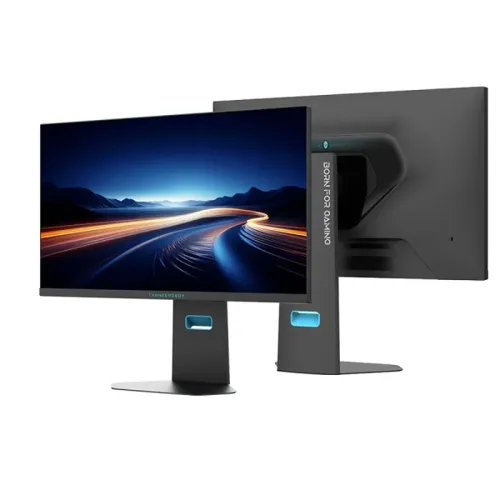
Thunderobot · Thor CQ27F240M
27-inch QHD 240Hz monitor. Verify Fast IPS versus Mini LED revision and HDR details with the seller.
Price unavailable
Price range updating
No verified price is available yet. Store offers will appear when merchants publish them.
Compare store prices
No live offers for this variant
Offers will appear when merchants publish them.
Loading history…
Product story
The ThundeRobot Thor CQ27F240M is a 27-inch 2560 × 1440 QHD monitor advertised at 240Hz. ThundeRobot's current official product page describes the CQ27F240M as Fast IPS and lists 98% DCI-P3, 99% sRGB and dynamic contrast information. Some older listings describe the same model code as Mini LED with local dimming. Because these panel descriptions conflict, the Mini LED and zone-count claim is not treated as confirmed here. Exact performance and hardware depend on the revision delivered. Current price, stock, warranty, return terms and documentation are seller-specific and should be verified before purchase.
Use the complete model code CQ27F240M on the invoice and rear label. ThundeRobot's current official item page calls it a 2K 240Hz Fast IPS monitor, while older product coverage and prior catalog copy call it Mini LED. Exact revision, panel construction and local package should be confirmed from the unit label and seller documentation before relying on either panel technology claim. Exact performance and hardware depend on the revision delivered. Current price, stock, warranty, return terms and documentation are seller-specific and should be verified before purchase.
The listed display size is 27 inches with 2560 × 1440 QHD resolution. QHD provides more detail and desktop space than Full HD, and 240Hz targets fast PC gaming. Driving games at QHD and high frame rates requires a suitable graphics card. Use native resolution for sharp text and verify the selected input can carry the desired refresh. Exact performance and hardware depend on the revision delivered. Current price, stock, warranty, return terms and documentation are seller-specific and should be verified before purchase.
The currently indexed ThundeRobot official product page describes CQ27F240M as Fast IPS. Earlier CQ27F240M announcements and this catalog's original data describe Mini LED, sometimes with local dimming zones. These claims are not reconciled by the available current official page; therefore this listing does not promise Mini LED, a specific zone count or HDR peak luminance. Ask the seller for a current datasheet tied to the serial/revision. Exact performance and hardware depend on the revision delivered. Current price, stock, warranty, return terms and documentation are seller-specific and should be verified before purchase.
The official product title describes a 240Hz QHD display. A compatible graphics card, port, cable, driver and game are needed to select and use 240Hz at native resolution. Set the operating system to 2560 × 1440 and the intended refresh, then check the monitor's information display. Frame output is determined by the PC and game, not the monitor alone. Exact performance and hardware depend on the revision delivered. Current price, stock, warranty, return terms and documentation are seller-specific and should be verified before purchase.
The original catalog's HDR and 1400-nit peak claims are not confirmed by the current official page reviewed for this model. Do not assume HDR certification, local dimming or a peak brightness figure until the seller supplies revision-specific documentation. HDR performance also depends on content, source settings and panel implementation. This page deliberately avoids presenting unresolved claims as confirmed features. Exact performance and hardware depend on the revision delivered. Current price, stock, warranty, return terms and documentation are seller-specific and should be verified before purchase.
The current official product listing gives 98% DCI-P3 and 99% sRGB, plus dynamic contrast information. These gamut figures describe color range and do not replace a unit calibration report. Color-critical work should use a measured profile. Viewing angle and uniformity should be evaluated on the delivered unit and at normal seating distance. Exact performance and hardware depend on the revision delivered. Current price, stock, warranty, return terms and documentation are seller-specific and should be verified before purchase.
Catalog records mention FreeSync and G-SYNC compatibility, flicker-free operation and low-blue-light modes, but these details should be checked against the exact revision's manual. If adaptive sync is available, enable it in the monitor and GPU settings and verify operation at the selected mode. Eye-comfort features do not guarantee prevention of eye strain. Exact performance and hardware depend on the revision delivered. Current price, stock, warranty, return terms and documentation are seller-specific and should be verified before purchase.
Older catalog data lists multiple HDMI/DisplayPort inputs and audio output, but those values are not independently confirmed by the current official product page. Confirm the exact number and version of inputs, USB connections and audio outputs from the physical unit or revision-specific datasheet before purchase. Use a certified cable suitable for QHD at 240Hz. Exact performance and hardware depend on the revision delivered. Current price, stock, warranty, return terms and documentation are seller-specific and should be verified before purchase.
Earlier product details list height, tilt, swivel, pivot and VESA adjustments. Confirm the stand's actual adjustment range and VESA pattern on the exact CQ27F240M revision; do not assume details from another ThundeRobot monitor. Set the 27-inch screen on a stable surface and verify mounting hardware and load rating before using an arm. Exact performance and hardware depend on the revision delivered. Current price, stock, warranty, return terms and documentation are seller-specific and should be verified before purchase.
For PC setup, connect through the input and cable documented for the exact revision, choose 2560 × 1440 and 240Hz in system settings, and verify the active signal. Update the GPU driver and select an achievable game frame-rate target. If the advertised refresh mode is unavailable, check cable certification, port version, GPU output and OSD settings. Exact performance and hardware depend on the revision delivered. Current price, stock, warranty, return terms and documentation are seller-specific and should be verified before purchase.
A 27-inch QHD 240Hz display can suit competitive PC games and general desktop work. Color gamut can be useful for broad-color content, but suitability for professional grading depends on calibration and the verified panel. For motion-focused play, prioritize stable frame output and configure adaptive sync only if it is supported by the delivered revision. Exact performance and hardware depend on the revision delivered. Current price, stock, warranty, return terms and documentation are seller-specific and should be verified before purchase.
Console modes depend on console generation and game. Many consoles target 60Hz or 120Hz rather than 240Hz, and QHD/HDR/VRR support varies. Confirm the exact input version and supported console timings before buying. The monitor's 240Hz maximum does not mean a console will output that refresh rate. Exact performance and hardware depend on the revision delivered. Current price, stock, warranty, return terms and documentation are seller-specific and should be verified before purchase.
Before purchase, request a current ThundeRobot datasheet or clear product-label evidence confirming whether the unit uses Fast IPS or Mini LED, any dimming-zone count, HDR certification and peak brightness. The current official listing labels the product Fast IPS, while older records differ. Record the hardware revision and exact spec sheet with the purchase. Exact performance and hardware depend on the revision delivered. Current price, stock, warranty, return terms and documentation are seller-specific and should be verified before purchase.
Potential strengths are the official listing's 27-inch QHD resolution, 240Hz refresh and broad 98% DCI-P3/99% sRGB claims. The main purchase risk is inconsistent panel technology information across listings. Choose based on the exact delivered specification, not an unverified Mini LED or HDR peak headline. Local stock and warranty also need current seller confirmation. Exact performance and hardware depend on the revision delivered. Current price, stock, warranty, return terms and documentation are seller-specific and should be verified before purchase.
Set the display at a comfortable distance and reduce glare from windows or lights. Use a stable stand or verified VESA mount and leave access to ports. Select brightness for the room, scale text to preference and take breaks during long sessions. Confirm stand range and physical dimensions before planning a desk or arm installation. Exact performance and hardware depend on the revision delivered. Current price, stock, warranty, return terms and documentation are seller-specific and should be verified before purchase.
Inspect the screen, ports, stand, labels, cables and package contents on delivery. Test native QHD, 240Hz, sync features, HDR claims and brightness only against the revision-specific documentation. Keep invoice, serial label and packaging through the return window. Clean with a soft microfiber cloth and avoid spraying liquid onto the panel. Exact performance and hardware depend on the revision delivered. Current price, stock, warranty, return terms and documentation are seller-specific and should be verified before purchase.
For Bangladesh, confirm live price and stock, exact CQ27F240M revision, verified panel type, supported 240Hz input/cable, included accessories, return/dead-pixel policy, delivery and serial-specific warranty provider and duration. The China official page does not establish local seller coverage. Ask the seller to confirm panel and warranty details before payment. Exact performance and hardware depend on the revision delivered. Current price, stock, warranty, return terms and documentation are seller-specific and should be verified before purchase.
What is confirmed? The current ThundeRobot official page describes a 27-inch QHD 240Hz Fast IPS CQ27F240M and lists 98% DCI-P3/99% sRGB. Older Mini LED descriptions conflict with that listing. Confirm panel type, dimming zones, HDR certification, ports, stand and Bangladesh warranty from the exact revision before buying. Exact performance and hardware depend on the revision delivered. Current price, stock, warranty, return terms and documentation are seller-specific and should be verified before purchase.
This page preserves the model code and 27-inch QHD 240Hz identity while leaving contradictory panel and HDR claims explicitly unconfirmed. Current official listing: Fast IPS, 98% DCI-P3 and 99% sRGB. The Mini LED/zone-count and 1400-nit claims need revision-specific verification. Ask the seller for the exact datasheet, port timing, accessories, live offer and local warranty. Exact performance and hardware depend on the revision delivered. Current price, stock, warranty, return terms and documentation are seller-specific and should be verified before purchase.
Helpful answers
Product-specific answers maintained with the catalog information.
The current official listing describes QHD 2560 × 1440 at 240Hz.
Older listings say Mini LED, while the current official product page describes Fast IPS. Verify the exact revision with the seller.
That claim appears in older reporting but is not confirmed by the current official page reviewed here.
The current official product listing gives 98% DCI-P3 and 99% sRGB.
No revision-specific HDR certification or peak brightness was confirmed from the current official listing.
The product is listed as 240Hz; confirm the exact port, cable and revision timing.
Confirm exact ports, stand travel and VESA pattern from the delivered revision datasheet.
Confirm local provider, duration and serial-specific service terms with the seller.
Ask for the exact model/revision datasheet and confirm panel type, HDR, ports, accessories and local warranty.
Customer community
Become a merchant
Join BiponiBD, publish accurate offers and start free.