Pros
- QHD and 240Hz balance detail with high-frame-rate gaming.
- QD-OLED provides pixel-level blacks and fast pixel transitions.
- Wide reported DCI-P3 coverage suits vivid games and video.
- Multiple HDMI/DP inputs support several connected sources.

All categories
 New condition
Monitors
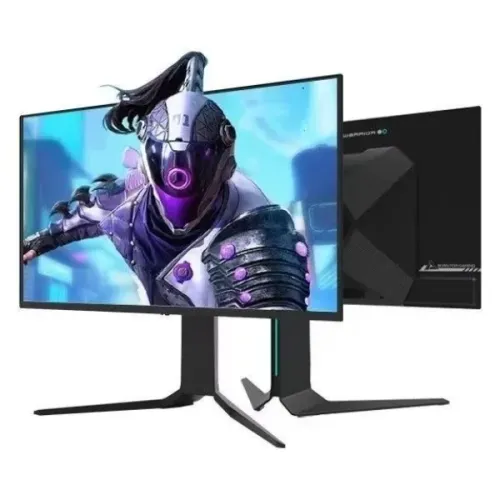
Thunderobot · Thor DQ27F240E
26.5-inch QHD QD-OLED gaming monitor with 240Hz refresh, 0.03ms response and HDMI 2.1.
Price unavailable
Price range updating
No verified price is available yet. Store offers will appear when merchants publish them.
Compare store prices
No live offers for this variant
Offers will appear when merchants publish them.
Loading history…
Product story
The ThundeRobot Thor DQ27F240E is a flat 26.5-inch gaming display built around a QHD QD-OLED panel. The model combines 2560 × 1440 resolution, a 240Hz maximum refresh rate and a published 0.03ms response figure. The manufacturer identifies it as a 26.5-inch 2K 240Hz OLED monitor; contemporaneous launch coverage specifies QD-OLED and lists its principal inputs. This makes the exact model code important when comparing product pages. Verify the exact DQ27F240E label and regional documentation because similarly named ThundeRobot monitors can use different panels and hardware. The listed capability describes a model specification, not a guaranteed outcome with every graphics card, cable, game, setting or room. Local inventory, delivered price, package contents and serial-specific support are not established by the manufacturer specifications.
This listing is for DQ27F240E, not DQ27F240E-SE, DU27F240E, LQ27F240E or a similarly named IPS display. The suffix SE is a separate later SKU, so do not assume its motorized stand or newer feature set applies here. Match the label on the rear cabinet and carton with DQ27F240E before purchase. Model confusion can change panel type, ports, stand, resolution and warranty terms. Verify the exact DQ27F240E label and regional documentation because similarly named ThundeRobot monitors can use different panels and hardware. The listed capability describes a model specification, not a guaranteed outcome with every graphics card, cable, game, setting or room. Local inventory, delivered price, package contents and serial-specific support are not established by the manufacturer specifications.
The active screen measures 26.5 inches diagonally and uses a 16:9 ratio with 2560 × 1440 pixels. That resolution is commonly called QHD or 2K in monitor listings. It gives a useful balance between fine desktop detail and frame rates that are more attainable than 4K for many gaming PCs. At native resolution, use the computer’s scaling preference to keep text comfortable while retaining sharpness. Verify the exact DQ27F240E label and regional documentation because similarly named ThundeRobot monitors can use different panels and hardware. The listed capability describes a model specification, not a guaranteed outcome with every graphics card, cable, game, setting or room. Local inventory, delivered price, package contents and serial-specific support are not established by the manufacturer specifications.
QD-OLED combines self-emissive OLED pixels with quantum-dot color conversion. Each pixel can switch off independently, so dark scenes can show deep blacks without a conventional LCD backlight. The technology supports a wide color presentation, but screen reflections, room light, content mastering and selected picture mode still affect the image you see. A panel type alone does not guarantee factory calibration or identical performance across units. Verify the exact DQ27F240E label and regional documentation because similarly named ThundeRobot monitors can use different panels and hardware. The listed capability describes a model specification, not a guaranteed outcome with every graphics card, cable, game, setting or room. Local inventory, delivered price, package contents and serial-specific support are not established by the manufacturer specifications.
The specified maximum refresh is 240Hz. A 240Hz panel can display up to 240 refreshes each second when the selected input mode and graphics source provide a compatible signal. Competitive games may benefit from smoother motion and lower display latency, but the game and GPU must render enough frames to make full use of the refresh. Set QHD and 240Hz in the operating system and confirm the active signal in the monitor menu. Verify the exact DQ27F240E label and regional documentation because similarly named ThundeRobot monitors can use different panels and hardware. The listed capability describes a model specification, not a guaranteed outcome with every graphics card, cable, game, setting or room. Local inventory, delivered price, package contents and serial-specific support are not established by the manufacturer specifications.
The reported response time is 0.03ms, a panel response specification rather than a promise that every complete input-to-photon interaction takes that long. Actual motion clarity also depends on frame rate, refresh mode, game engine, VRR and overdrive settings. OLED pixel response is typically very fast; still, users should assess motion with their preferred brightness and refresh settings rather than treating one number as a guarantee of zero blur. Verify the exact DQ27F240E label and regional documentation because similarly named ThundeRobot monitors can use different panels and hardware. The listed capability describes a model specification, not a guaranteed outcome with every graphics card, cable, game, setting or room. Local inventory, delivered price, package contents and serial-specific support are not established by the manufacturer specifications.
Launch reporting lists up to 1000 nits peak brightness and HDR capability; a third-party parameter listing identifies HDR 400. Peak figures can be limited to particular highlights, patterns or picture modes and should not be treated as sustained full-screen brightness. OLED HDR appearance depends on content, firmware and ambient light. Avoid assuming a specific certification level or sustained brightness from the general “HDR” feature label alone. Verify the exact DQ27F240E label and regional documentation because similarly named ThundeRobot monitors can use different panels and hardware. The listed capability describes a model specification, not a guaranteed outcome with every graphics card, cable, game, setting or room. Local inventory, delivered price, package contents and serial-specific support are not established by the manufacturer specifications.
Published coverage is about 99% DCI-P3, indicating a broad color gamut suited to vivid games and media. Gamut coverage describes how much of a defined color space the display can reproduce; it does not by itself establish accuracy, uniformity or calibration. For photo, video or print work, use a suitable color profile, check the chosen display preset and calibrate when the workflow needs dependable color. Verify the exact DQ27F240E label and regional documentation because similarly named ThundeRobot monitors can use different panels and hardware. The listed capability describes a model specification, not a guaranteed outcome with every graphics card, cable, game, setting or room. Local inventory, delivered price, package contents and serial-specific support are not established by the manufacturer specifications.
The model is reported with two HDMI 2.1 inputs, one DisplayPort 1.4 input, one USB-C connection, one USB-B upstream connection, two USB-A ports and a 3.5mm audio output. This gives options for a PC, console and peripherals. The USB-A sockets depend on the upstream USB-B connection for host data. Check the supplied cable pack and the exact rear-port labels on the delivered regional version. Verify the exact DQ27F240E label and regional documentation because similarly named ThundeRobot monitors can use different panels and hardware. The listed capability describes a model specification, not a guaranteed outcome with every graphics card, cable, game, setting or room. Local inventory, delivered price, package contents and serial-specific support are not established by the manufacturer specifications.
USB-C is listed as a connection, but the available DQ27F240E source material does not establish a specific video mode or power-delivery wattage. Do not assume it charges a notebook or carries video merely because the connector is present. Confirm DisplayPort Alt Mode, supported resolution/refresh and charging output with the exact unit manual or seller. Use DisplayPort or HDMI for video if USB-C capability is uncertain. Verify the exact DQ27F240E label and regional documentation because similarly named ThundeRobot monitors can use different panels and hardware. The listed capability describes a model specification, not a guaranteed outcome with every graphics card, cable, game, setting or room. Local inventory, delivered price, package contents and serial-specific support are not established by the manufacturer specifications.
FreeSync support is reported for the DQ27F240E. Variable refresh rate can synchronize the monitor refresh with supported graphics output to reduce tearing and judder within the supported range. Exact compatibility depends on GPU, driver, input and settings. Connect directly to the graphics card, enable adaptive sync in the monitor menu and GPU control panel, then verify the feature in the actual game. Verify the exact DQ27F240E label and regional documentation because similarly named ThundeRobot monitors can use different panels and hardware. The listed capability describes a model specification, not a guaranteed outcome with every graphics card, cable, game, setting or room. Local inventory, delivered price, package contents and serial-specific support are not established by the manufacturer specifications.
Launch information describes the stand as tilt-adjustable; the original model’s published detail should not be confused with the later SE motorized stand. The catalog currently has conflicting adjustment and VESA values, so height travel, swivel, pivot and mount pattern are not asserted as verified specifications here. Before planning an arm or desk installation, check the physical label/manual, mounting pattern, stand footprint and clearance. Verify the exact DQ27F240E label and regional documentation because similarly named ThundeRobot monitors can use different panels and hardware. The listed capability describes a model specification, not a guaranteed outcome with every graphics card, cable, game, setting or room. Local inventory, delivered price, package contents and serial-specific support are not established by the manufacturer specifications.
For PC gaming, connect a discrete GPU directly using a certified HDMI 2.1 or DisplayPort cable, select 2560 × 1440 and then choose 240Hz. Enable VRR where supported and verify the monitor reports the intended signal. If the high refresh mode is absent, check the GPU output, cable, adapter, driver and operating-system advanced display settings. A dock or conversion adapter may restrict bandwidth. Verify the exact DQ27F240E label and regional documentation because similarly named ThundeRobot monitors can use different panels and hardware. The listed capability describes a model specification, not a guaranteed outcome with every graphics card, cable, game, setting or room. Local inventory, delivered price, package contents and serial-specific support are not established by the manufacturer specifications.
For a console, the usable resolution, refresh and VRR are determined by both the console and each game. HDMI 2.1 connectors do not mean every console title runs at 240Hz. Check the console’s video information screen for the detected mode and use a direct HDMI connection. A laptop can use HDMI or DisplayPort-capable USB-C if its port supports the needed display output; confirm before relying on USB-C. Verify the exact DQ27F240E label and regional documentation because similarly named ThundeRobot monitors can use different panels and hardware. The listed capability describes a model specification, not a guaranteed outcome with every graphics card, cable, game, setting or room. Local inventory, delivered price, package contents and serial-specific support are not established by the manufacturer specifications.
OLED care guidance is relevant for any display that shows fixed interface elements for long periods. Use the manufacturer’s pixel-care or panel-maintenance functions as directed, allow automatic routines to complete, vary static content and avoid leaving an unchanged bright desktop onscreen for extended periods. Do not interrupt panel maintenance or use improvised cleaning chemicals. Follow the supplied manual for cleaning and care intervals. Verify the exact DQ27F240E label and regional documentation because similarly named ThundeRobot monitors can use different panels and hardware. The listed capability describes a model specification, not a guaranteed outcome with every graphics card, cable, game, setting or room. Local inventory, delivered price, package contents and serial-specific support are not established by the manufacturer specifications.
Key benefits are QHD resolution, 240Hz refresh, fast OLED response, deep pixel-level blacks, wide DCI-P3 coverage and a broad reported port selection including HDMI 2.1 and DisplayPort. These traits make the model attractive for high-frame-rate gaming and HDR media in a controlled room. The 26.5-inch size also fits many standard desks while retaining the pixel density of QHD. Verify the exact DQ27F240E label and regional documentation because similarly named ThundeRobot monitors can use different panels and hardware. The listed capability describes a model specification, not a guaranteed outcome with every graphics card, cable, game, setting or room. Local inventory, delivered price, package contents and serial-specific support are not established by the manufacturer specifications.
Trade-offs include the graphics power needed to sustain high frame rates, the need to manage static OLED content, and uncertainty in available sources about USB-C power, precise HDR certification and original stand ergonomics. The published peak-brightness figure is not the same as sustained full-screen brightness. Buyers who need guaranteed laptop charging, a particular mount or formal HDR certification should obtain written confirmation for the exact unit. Verify the exact DQ27F240E label and regional documentation because similarly named ThundeRobot monitors can use different panels and hardware. The listed capability describes a model specification, not a guaranteed outcome with every graphics card, cable, game, setting or room. Local inventory, delivered price, package contents and serial-specific support are not established by the manufacturer specifications.
Before ordering in Bangladesh, ask the seller to confirm DQ27F240E on the carton and rear label, the sealed package contents, dead-pixel policy, return window, stock state, delivered price and local service provider. Request the warranty duration and OLED burn-in coverage in writing against the serial number. The manufacturer’s mainland-China coverage does not automatically establish local Bangladesh support, and no live BiponiBD offer or serial-specific entitlement is confirmed by this product-content review. Verify the exact DQ27F240E label and regional documentation because similarly named ThundeRobot monitors can use different panels and hardware. The listed capability describes a model specification, not a guaranteed outcome with every graphics card, cable, game, setting or room. Local inventory, delivered price, package contents and serial-specific support are not established by the manufacturer specifications.
Is the screen 27 inches? The manufacturer listing describes the panel as 26.5 inches; “27-inch class” is a rounded market category. What is its native resolution? 2560 × 1440 QHD. What is its refresh rate? Up to 240Hz, subject to source and input mode. Which panel does it use? QD-OLED according to the launch coverage. What is response time? Published as 0.03ms. Does it have HDMI 2.1? Two HDMI 2.1 ports are reported. Is USB-C laptop charging confirmed? No wattage is verified. Is local warranty confirmed? Ask the seller for serial-specific written terms. Verify the exact DQ27F240E label and regional documentation because similarly named ThundeRobot monitors can use different panels and hardware. The listed capability describes a model specification, not a guaranteed outcome with every graphics card, cable, game, setting or room. Local inventory, delivered price, package contents and serial-specific support are not established by the manufacturer specifications.
The ThundeRobot Thor DQ27F240E suits buyers seeking a 26.5-inch QHD OLED gaming monitor with 240Hz refresh and fast pixel response. Its strongest use case is PC gaming with a capable graphics card and a direct high-bandwidth connection. Verify stand, USB-C behavior, HDR certification, included accessories and local warranty against the exact regional unit. Price and availability in Bangladesh remain offer-specific and must be checked at checkout. Verify the exact DQ27F240E label and regional documentation because similarly named ThundeRobot monitors can use different panels and hardware. The listed capability describes a model specification, not a guaranteed outcome with every graphics card, cable, game, setting or room. Local inventory, delivered price, package contents and serial-specific support are not established by the manufacturer specifications.
Helpful answers
Product-specific answers maintained with the catalog information.
It is a 26.5-inch display with native 2560 × 1440 QHD resolution.
Published product information lists a maximum refresh rate of 240Hz; confirm the active signal, cable and graphics source.
Launch reporting identifies a QD-OLED panel for the DQ27F240E.
The published response figure is 0.03ms. It is a panel specification, not total system latency.
Sources report two HDMI 2.1 ports and one DisplayPort 1.4 port.
A specific USB-C power delivery wattage is not verified. Confirm the exact unit documentation before expecting laptop charging.
FreeSync support is reported; exact operation depends on GPU, input, driver and settings.
The original DQ27F240E should be checked against its own manual; do not assume DQ27F240E-SE stand details apply.
HDR is reported, but the exact certification and sustained brightness need confirmation from the model manual or label.
Ask the local seller to confirm duration, provider, OLED burn-in coverage and serial-specific terms in writing.
Customer community
Become a merchant
Join BiponiBD, publish accurate offers and start free.