Pros
- QHD resolution and a high refresh target suit powerful gaming PCs.
- Fast IPS panel and Adaptive Sync are reported for the model.
- Multiple digital input types are reported.
- Some sources describe a 320Hz overclock mode.

All categories
 New condition
Monitors
Thunderobot · DQ27F300L
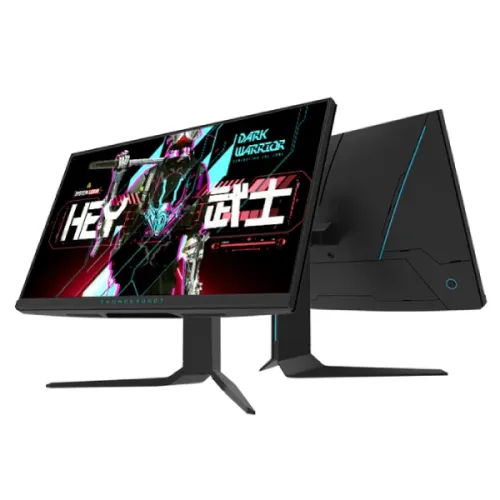
27-inch QHD Fast IPS monitor with 300Hz standard refresh reported; some model sources describe a 320Hz overclock. Verify exact regional unit.
Price unavailable
Price range updating
No verified price is available yet. Store offers will appear when merchants publish them.
Compare store prices
No live offers for this variant
Offers will appear when merchants publish them.
Loading history…
Product story
ThundeRobot DQ27F300L is presented in Chinese manufacturer materials as a 27-inch 2K high-refresh Fast IPS gaming monitor. Manufacturer listing and launch coverage identify 300Hz operation, while some Bangladesh listings call it 320Hz, usually as an overclocked mode. The monitor in this catalog is the DQ27F300L code, and that suffix should be checked on the carton and rear label before purchase. A separate Thunderobot 27F300L regional product page describes a Full HD 300Hz model; those specifications must not be silently merged with the DQ27F300L QHD product.
The DQ27F300L is described by the Chinese launch material as a 27-inch display with 2560 × 1440 resolution. QHD offers more desktop detail and workspace than Full HD, but it also asks the graphics card to render more pixels. Confirm the resolution in the operating system after connecting the monitor and check that the correct model identification is shown in the display menu. Regional model naming is important here because a similarly named 27F300L in another market is documented with a different Full HD resolution.
The exact DQ27F300L manufacturer product page identifies a 2K 320Hz overclocked Fast IPS panel and hardware low-blue-light support. The public launch report describes a 2K 300Hz product and lists a set of color, brightness and input details. Bangladesh retailer pages also identify Fast IPS. Panel response and viewing behavior vary with settings and individual units; these specifications do not establish professional calibration, uniformity or an identical measured result for every unit.
The DQ27F300L name and manufacturer materials point to 300Hz native operation with a 320Hz overclock mode described on the manufacturer catalog page. Some retailer titles advertise 320Hz without clearly distinguishing native from overclocked operation. Treat 300Hz as the published standard rate and 320Hz as a mode requiring confirmation for the exact regional unit, cable, input and graphics source. An overclock may need activation in the monitor menu and may not be available at every resolution or on every input.
The Chinese launch report identifies two HDMI 2.1 inputs, one DisplayPort 1.4 and an audio output. This source does not provide a complete port-by-port timing matrix. Do not infer that HDMI and DisplayPort both support every advertised QHD refresh mode just from connector versions. Check the exact manual and source device capabilities, select the correct input and use a rated cable. If 300Hz or 320Hz is unavailable, verify refresh settings, GPU output, color format and any required overclock option.
Retail listings often describe a 1ms response time for this monitor, but the measurement method and overdrive conditions are not consistently documented for this exact market version. A response-time label does not mean every pixel transition is one millisecond in ordinary use, and it is different from input lag. Fast IPS, high refresh and overdrive can improve motion presentation when correctly configured, while aggressive overdrive can produce visible halos. Compare the monitor modes using real game scenes and choose a comfortable setting.
The launch coverage reports Adaptive Sync support, and regional listings may additionally mention FreeSync or G-SYNC compatibility. Availability and certification should be checked against the exact unit and the GPU driver; a retailer claim alone does not confirm every VRR mode. Variable refresh can reduce tearing when the graphics source outputs fluctuating frame rates inside the supported range. Connect the display directly during setup and enable compatible settings in both the monitor menu and GPU software.
The launch report describes HDR400 support, while some local listings say HDR10 or HDR400. The public material reviewed does not establish a VESA DisplayHDR certificate for every regional configuration. HDR labels describe signal or certification capabilities, not necessarily premium local-dimming performance. Confirm whether the exact monitor is certified and whether it has local dimming before promising either. HDR content, operating-system settings, input format and application support all affect the result.
Some Bangladesh listings cite brightness around 450cd/m² and broad color coverage; manufacturer launch coverage reports 450nit and 95% DCI-P3 / 99% sRGB. These figures come from launch or retailer sources rather than a region-specific datasheet attached to the exact serial. Color coverage percentages depend on measurement standard and mode. Use the product for gaming and general media as specified, but do not position it as a calibrated reference display without independent calibration evidence.
Manufacturer and launch material refer to hardware low-blue-light support, and retailer listings may add flicker-free or eye-care labels. These features can be useful for personal comfort, but they do not remove the need to set appropriate brightness, maintain a comfortable viewing distance and take breaks. Effects vary by user and settings. If a low-blue-light mode changes the screen color, that is expected for many such modes; disable it when accurate color is more important.
The product listing supplied for this catalog describes height adjustment around 120mm, tilt, swivel and pivot. Regional seller pages vary in what stand adjustments they state, so verify the delivered stand and model before assuming all movements are present. Adjust the screen for a neutral neck position and make sure the desk has clearance for rotation. A separately purchased monitor arm should match the exact VESA mount pattern and monitor weight.
Retail product data lists a VESA 100 × 100mm mount, but the exact regional manual should be checked before buying an arm. Use the proper screw length and ensure the mount supports the monitor weight. Leave enough rear space for the stand, cables and ventilation. If the unit ships with an adjustable stand, retain its screws and hardware. Never apply pressure to the LCD surface when moving or mounting the display.
The model is listed with an audio output; integrated speakers are not established in the available model-specific sources. Plan for headphones or external speakers if sound is required. Cable and adapter contents vary across markets and retailers. Ask which DisplayPort/HDMI cable, power adapter, AC cord, stand parts and warranty documents come in the box. Do not assume that a cable included with another Thunderobot monitor is included with this exact SKU.
A high-refresh QHD monitor requires the source device, graphics hardware, cable and selected input to support the intended mode. The launch source lists HDMI 2.1 and DP 1.4 but does not confirm every console timing. Console refresh is limited by console generation and game support, and an overclocked PC mode does not guarantee a console can use the same rate. Check the console or GPU output settings and choose a supported resolution and refresh combination.
At QHD, a 300Hz display can show very frequent frames when the PC can render them and the input mode is supported. Competitive esports games may reach high frame rates at adjusted settings, while graphically demanding titles can run below the panel maximum. A faster screen cannot make the GPU render more frames. Configure game settings, frame caps and adaptive sync according to the hardware and prioritize stable play over a headline refresh number.
The 27-inch QHD format can also support office work, browsing and media. It provides more pixels than Full HD at the same approximate screen size, which can help with text and side-by-side windows when scaling is comfortable. The monitor remains a gaming display rather than a workstation certification product. For tasks involving color-sensitive output, verify gamut, calibration and uniformity with dedicated tools instead of relying only on marketing coverage.
A major purchasing check is the full regional identifier. Chinese manufacturer materials for DQ27F300L describe 2K and 300Hz with a 320Hz overclock claim on the product catalog. The Russian official page for 27F300L lists a different Full HD, 300Hz configuration. Bangladesh retailers use DQ27F300L and advertise QHD, sometimes 320Hz. This listing follows the QHD DQ27F300L evidence while clearly marking the 320Hz mode conditional; confirm the unit label, OSD and manual before relying on it.
The existing catalog warranty says three years, but the product-specific local terms and serial coverage have not been verified. Ask the seller who provides service, the warranty start date, service location, dead-pixel policy and proof-of-purchase requirements. Compare the serial on the monitor, box and invoice. Warranty can differ by importer and channel. Keep the packaging and included accessories until the return period has ended, and request written warranty terms before payment.
Confirm the price, available stock, delivery charge, return rules and current promotion on the live offer; these can change independently of specifications. Confirm that the exact code is DQ27F300L and ask whether the supplied region is QHD or another regional variant. On delivery, inspect the panel and stand, check the serial, connect over the intended port and test QHD resolution, native refresh and any overclock mode. Record defects during the seller’s inspection window.
This model is suited to buyers seeking a 27-inch QHD Fast IPS gaming display with very high advertised refresh and willing to verify the exact unit’s regional mode. The published evidence supports 300Hz as the standard refresh and describes 320Hz overclock on the manufacturer catalog; regional alternatives mean buyers should check the full code. It is less suitable for someone who needs guaranteed 320Hz across all inputs, verified local warranty or built-in speakers without confirming those details first.
Helpful answers
Product-specific answers maintained with the catalog information.
Chinese model-specific material and launch coverage describe 2560 × 1440 QHD; confirm the exact regional unit because a similarly named 27F300L is listed as Full HD.
Sources describe 300Hz standard refresh and a 320Hz overclock mode; some retailers omit that distinction. Confirm the exact unit and input.
Model-specific manufacturer catalog material identifies Fast IPS.
Launch and retailer sources mention HDR; verify the exact regional certification and do not assume local dimming.
Launch coverage lists two HDMI 2.1, one DisplayPort 1.4 and audio out; verify the regional model and port timing.
Integrated speakers are not confirmed in the sources reviewed; an audio output is listed.
Launch and retailer materials report Adaptive Sync; check GPU compatibility and the exact unit’s menu.
Retailer specifications differ; confirm stand adjustments and VESA pattern against the delivered unit manual.
Confirm the DQ27F300L serial-specific local warranty and service terms with the seller.
Customer community
Become a merchant
Join BiponiBD, publish accurate offers and start free.