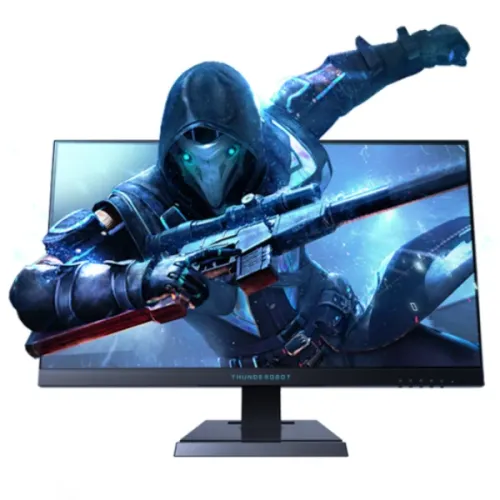
ThundeRobot Thor ZPF25F240 24.5-inch Full HD Fast IPS gaming monitor
The Thor ZPF25F240 is listed in Bangladesh as a 24.5-inch 1920 × 1080 Fast IPS gaming display with 240Hz native refresh and an overclocked mode up to 280Hz. Local sellers also list 400 cd/m² brightness, 1000:1 contrast, Adaptive Sync, Low Blue Light, audio output and VESA mounting. Seller tables disagree about HDMI input count and DisplayPort revision, so check the exact unit label and manual before ordering. Seller claims are distinguished from confirmed BiponiBD offer information.
240Hz native and 280Hz overclocked
The model is advertised with a 240Hz native refresh and an optional overclocked mode up to 280Hz. Overclocking changes the timing sent to the panel; it should be enabled only as described in the unit manual. Start with the native mode, test for a stable image and return to a lower setting if flicker, blanking or signal loss occurs.
A monitor rating does not make a computer render more frames. The graphics card, processor, game engine, resolution and quality settings all affect frame rate. If a game produces 100 frames per second, the screen cannot show 280 unique game frames each second. Competitive players should measure their actual titles and tune settings for stable frame pacing.
Fast IPS image and Full HD detail
Local sellers describe a 24.5-inch Fast IPS panel with 1920 × 1080 pixels. IPS technology is generally chosen for broad viewing angles and consistent colour across a desk; seller sheets list 178° horizontal and vertical. That is a stated viewing range, not a promise of identical brightness or colour at every angle or across all units.
Full HD at this size can be a practical choice for high-frame-rate gaming because it asks less of the graphics card than QHD. The trade-off is lower text and image detail than a similarly sized QHD screen. If your main task is dense spreadsheets, design work or multiple documents, compare resolution and scaling needs before choosing a gaming-focused Full HD monitor.
Response-time claims and motion
Retailer pages advertise 1ms response, but the test method is not consistently specified for this exact model. Response numbers can refer to different transition tests or motion-picture methods; aggressive overdrive can also create bright inverse trails. Treat 1ms as a listing claim rather than a guarantee that every pixel changes in one millisecond at all settings.
For a practical setup, choose an overdrive level that reduces blur without producing distracting overshoot. Refresh rate describes how often the screen can update; pixel response describes colour transitions. Frame rate, frame pacing, input latency and the monitor mode all affect perceived movement. Test the games you play instead of comparing one number in isolation.
Brightness, contrast and anti-glare
Seller tables list 400 cd/m² brightness and 1000:1 contrast. These are published specifications and may depend on the exact panel revision and measurement method. Set brightness for your room rather than running at maximum by default. Place the screen away from direct sunlight and strong lamps; an anti-glare surface can reduce reflections but does not eliminate glare.
The reviewed listings do not provide a per-unit calibration report. Brightness and contrast figures do not establish colour accuracy or uniformity. For colour-sensitive work, request documented calibration evidence or use a suitable measurement device. For gaming and everyday use, select a picture mode that looks comfortable and consistent in your lighting.
Adaptive Sync and graphics settings
Local listings mention Adaptive Sync, FreeSync and G-Sync compatibility. Check the exact monitor revision and manual because seller labels do not establish a certification for every GPU. Variable refresh requires a compatible graphics output, driver and monitor setting. The supported frequency range was not consistently documented in the sources reviewed.
If the feature is missing, check the graphics driver, selected input, operating-system refresh setting and monitor menu. Connect directly to the graphics card where possible and avoid adapters or docks until the direct connection is confirmed. Variable refresh coordinates display updates with rendered frames; it does not increase the frame rate produced by the computer.
Port information that needs confirmation
Bangladesh product pages list HDMI 2.0 and DisplayPort, but disagree on the number of HDMI inputs and DisplayPort revision. One retailer’s key-features block says two HDMI inputs and DP1.4, while its detailed table lists one HDMI and DP1.2. Other local pages describe one HDMI and one DP, also with differing DP revisions. Those details cannot all be assumed to describe every supplied revision.
Before buying, request a photo of the exact unit’s rear connections or the manual page for the carton being sold. Some seller sheets associate 240Hz with HDMI and 280Hz overclock with DisplayPort, but verify that against the exact product. A cable, laptop output, dock or adapter may limit refresh even when the display supports a higher mode. This description deliberately avoids asserting a universal port count.
Audio and speakers
Detailed local specification tables mark built-in speakers as unavailable or N/A. An audio output is listed, so plan on headphones or external powered speakers. Do not assume that the monitor itself provides loudspeaker playback unless the seller confirms the exact unit revision and demonstrates it.
HDMI and DisplayPort can carry audio from compatible devices, but you may need to choose the monitor as the computer’s sound output. If sound is absent, check the operating-system output selection, application volume, cable and monitor menu. A 3.5mm audio output does not mean the monitor has speakers, a microphone input or a USB hub.
Stand, tilt and VESA mounting
Local seller tables list tilt of approximately five degrees forward and twenty degrees backward and a 100 × 100mm VESA pattern. Height, swivel and pivot are not consistently documented for the ZPF25F240. Do not assume a full-motion ergonomic stand based on a similarly named ThundeRobot model. Verify what stand is included and what movements it supports.
Before using a monitor arm, consult the unit manual for screw size and depth, check the arm’s load rating and make sure the plate clears the housing. Route cables with enough slack for tilt. Position the screen at a comfortable height and viewing distance. The reported weight is only a seller-listed approximation; use the label or manual for final mount selection.
Gaming PC setup
Connect the display directly to a graphics output that supports the target resolution and refresh. Select 1920 × 1080 at 240Hz in the operating system, then check the game’s own display settings. Try 280Hz only if the supplied manual confirms the overclock mode and the image remains stable. Some titles require a fullscreen mode or separate refresh selection.
A high refresh display is most useful when the computer produces a matching frame rate. Lowering demanding graphics effects or using a performance preset may improve frame rate, but results vary by game and hardware. Check frame pacing and input response in the actual titles you play. Once the setup works, verify that sleep and wake, input switching and the selected refresh rate remain stable.
Console, laptop and daily use
A console or laptop can connect through HDMI if its output and the monitor revision support the required mode. Consoles often target lower refresh rates than a gaming PC, and the available resolution/refresh combination depends on the device. Check the source manufacturer’s supported modes before expecting 240Hz or 280Hz. Port count uncertainty also matters if multiple devices need to remain connected.
For study, office work and media, the display can operate at a supported Full HD mode. High refresh may make pointer motion smoother, but it does not increase resolution or create more workspace. If you need several devices connected, first confirm the actual rear-panel input layout for the unit being sold.
Eye comfort and long sessions
Low Blue Light appears in local feature lists. Such a mode may change the spectrum or image preset, but it cannot guarantee that long sessions prevent eye fatigue. Adjust brightness to the room, avoid reflections, use readable text scaling and take breaks. If the preset changes colour appearance, choose a milder setting or disable it during colour-sensitive work.
Comfort depends on lighting, viewing distance, posture and individual needs. Keep the room from being dramatically brighter or darker than the screen and avoid sitting too close for long periods. No medical benefit is claimed for this product.
Physical setup and care
Seller pages list a black finish, dimensions around 557 × 192 × 400mm and weight near 3.9kg, but do not consistently say whether every measurement includes the stand. Measure your desk and allow rear clearance for cables. Follow the included manual for assembly and use the packaging label as the source for final dimensions and weight.
Turn off and unplug the monitor before cleaning. Use a soft cloth as permitted by the manual; do not spray liquid directly on the panel or press hard against it. Keep ventilation openings clear and route cables so they cannot be pulled or caught by a chair. Retain the carton and invoice through the initial inspection and the seller’s return period.
Price, stock and local warranty
Reviewed Bangladesh seller snapshots ranged from approximately ৳22,000 to ৳22,900. Availability differed: one page showed in stock, while other pages showed upcoming or out of stock. Those figures and statuses can change, and they do not represent a BiponiBD offer. Confirm final cash/card price, delivery fees, dispatch timing and the exact model before ordering.
Seller pages claim three-year coverage, but the importer, service provider, serial eligibility, dead-pixel threshold and replacement terms were not independently verified for a specific unit. Ask for written terms and an invoice that identifies the model and serial. Confirm where service is provided and what documentation is needed for a claim. Treat a copied warranty badge as unverified until the seller confirms it.
Unboxing and compatibility checklist
Check the carton label for Thor ZPF25F240 and compare it with the invoice. Inspect the panel, stand, power cable, documentation, screws and any included display cable against the packing list. Photograph shipping damage before assembly. After connecting a known-good computer, verify Full HD, the supported refresh options, the selected input and stable wake/sleep behaviour.
Before paying, request the exact rear-port photo and manual page, confirm whether the 280Hz mode is supported by that revision, and ask which cable is included. Also confirm warranty provider, serial registration, dead-pixel policy, return period, stock location and delivery charge. This avoids relying on a specification copied from another similarly named product.
Who should consider this model
The ZPF25F240 may suit someone seeking a 24.5-inch Full HD gaming monitor with a high advertised refresh rate and a PC capable of producing high frame rates. Fast IPS, 240Hz native and a listed 280Hz overclock are its main gaming claims. Confirm the mode, port layout and warranty for the actual unit before comparing offers.
A different display may suit you better if you need sharper QHD text, a larger workspace, built-in speakers, a documented height-adjustable stand, USB hub features or verified factory calibration. Compare service terms and exact revision alongside refresh numbers. Local retailer prices are observations only and must not be confused with BiponiBD’s own offer.
Frequently asked questions
What are the native and maximum refresh rates?
Local listings describe 240Hz native and up to 280Hz overclocked. The higher mode depends on the exact revision, compatible source, connection and settings.
What resolution does this monitor use?
The ZPF25F240 is listed as a 24.5-inch 1920 × 1080 Full HD display with a 16:9 aspect ratio.
Is the response time 1ms?
Retailers advertise 1ms, but the exact response-time method is not consistently stated. Treat it as a seller claim, not a guarantee for every pixel transition.
Which video ports are included?
Local seller pages list HDMI 2.0 and DisplayPort, but disagree on the HDMI count and DP revision. Ask for a photo of the exact unit rear panel or manual.
Can HDMI run at 280Hz?
Seller tables generally associate 240Hz with HDMI and the 280Hz overclock with DisplayPort. Verify the supplied unit documentation and use an appropriately rated cable.
Are speakers built in?
Detailed local tables mark built-in speakers as N/A. An audio output is listed for headphones or external powered speakers.
Does it support Adaptive Sync?
Adaptive Sync, FreeSync and G-Sync compatibility are seller-listed. Actual operation depends on the exact revision, GPU, driver and connection.
Can I attach a monitor arm?
Local listings specify a 100 × 100mm VESA pattern. Confirm screw size and mounting load guidance in the included manual.
Does the stand adjust in height?
Retailer specifications list tilt near -5° to +20°. Height, swivel and pivot are not consistently documented for this exact variant.
What are the current Bangladesh price and warranty?
Reviewed seller snapshots ranged around ৳22,000–৳22,900, with stock status varying. These are not BiponiBD offers. Confirm live price, stock and written serial warranty with the seller.
Model note: verify exact ZPF25F240 SKU, port layout, overclock support, live stock and serial-specific warranty with the Bangladesh seller.