Product overview
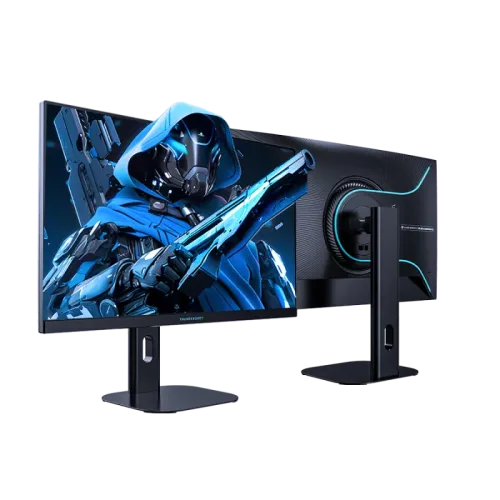
ThundeRobot Thor ZQ27F210L is a 27-inch flat gaming monitor with a 2560 × 1440 QHD panel and Fast IPS technology. The manufacturer’s official product listing identifies 210Hz as an overclocked refresh rate, 95% DCI-P3 color gamut, 99% sRGB, 1000:1 contrast and a four-way adjustable stand. Its QHD resolution gives more desktop and game detail than Full HD at the same screen size, while the high refresh target is intended for compatible gaming computers. This page is about the exact ZQ27F210L model. Closely named ZQ27F210 and ZQ27F210P versions are distinct products; check the rear label, connector layout and stand before purchase.
Screen size and QHD resolution
The 27-inch flat panel uses a native 2560 × 1440 resolution with a 16:9 aspect ratio. QHD provides 3.69 million pixels, which creates more workspace for multiple windows and finer detail in supported games than a 1920 × 1080 display. Text and interface scaling can be adjusted in the operating system to suit the viewing distance. QHD at high frame rates asks more of a graphics card than Full HD, so the panel’s maximum refresh does not mean every game will reach that frame rate. The official listing describes the model as 27 inches and 2560 × 1440.
Fast IPS panel and viewing
The manufacturer identifies a Fast IPS panel and lists viewing angles of 89 degrees in four directions. IPS technology is commonly selected for broad off-axis viewing and responsive gaming, but actual contrast, uniformity and motion behavior can vary between panels and settings. Use the monitor directly in front of the viewer for the most consistent image. The flat-screen construction avoids the geometric curvature of an ultrawide display and suits a conventional single-monitor desk. The exact product listing reports 1000:1 contrast; the value describes a typical specification and is not a guarantee for every picture mode or individual unit.
Native and overclocked refresh rate
The ZQ27F210L product name and official listing specify 210Hz overclocked refresh. The “OC” qualification matters: the monitor may use a lower native mode before overclock is enabled in its on-screen menu. Enable the mode only after confirming the supported source, port, cable and graphics settings, then check the selected refresh rate in the operating system. A 210Hz refresh target is useful only when the PC can produce a matching frame rate. If the screen blanks, flickers or shows artifacts, return to a stable supported refresh and review the cable and GPU output. The listing does not make 210Hz unconditional across every connector.
Input connections and mode limits
The catalog identifies one DisplayPort input, two HDMI inputs and one audio output, and lists DP 1.2 plus HDMI 2.0. The exact model listing found on the manufacturer site focuses on resolution, refresh and panel rather than publishing a complete port-by-port timing table. As a result, do not infer that HDMI carries QHD at 210Hz from the maximum refresh headline. Check the monitor manual or on-screen information for the connector-specific limit and use a DisplayPort connection if that is the verified path to the overclocked mode. A graphics card, adapter or cable can further limit resolution and refresh.
Response time and motion clarity
The existing product specification gives a 1ms response figure but does not identify its measurement method in the exact official listing reviewed. Treat it as a manufacturer or seller headline rather than a universal transition-time guarantee. Response time and refresh rate are separate: refresh describes how often the display can update, while pixel transitions describe how quickly pixels change shade. Fast motion clarity also depends on the game frame rate, overdrive setting, synchronization and viewing conditions. Compare overdrive modes carefully because an aggressive setting can introduce bright or dark overshoot. This model’s Fast IPS panel and overclocked 210Hz mode are aimed at fast-moving gameplay when the complete PC setup supports them.
Color gamut and factory color claim
The official ThundeRobot product listing for ZQ27F210L states 95% DCI-P3 and 99% sRGB. The catalog also contains a 10-bit (8-bit + FRC) and Delta E less than or equal to 2 factory-calibration claim, which should be treated as catalog-derived unless confirmed from the exact model’s primary documentation or included report. Gamut coverage and color accuracy are different properties: a wide gamut describes the range of colors, while a Delta E value describes measured color difference under stated test conditions. For design or print work, confirm the unit’s calibration documentation and use an appropriate color-managed workflow.
Contrast, HDR and brightness expectations
The official listing states 1000:1 contrast but does not provide a verified brightness figure or HDR certification in the exact product details reviewed. Do not transfer the 400-nit or HDR400 figures from another related ZQ27F210 family variant without confirming they apply to the L model. The L suffix can identify a different stand or product configuration, and names within the range are easy to confuse. The listing’s color coverage and contrast are useful comparison data, but they do not prove HDR performance. Before buying for a brightness-sensitive room or HDR use, request the exact-model datasheet and verify its peak brightness, certification and input mode.
Adaptive sync and graphics compatibility
The catalog record currently lists both FreeSync and G-Sync support, but the official exact-model page reviewed does not specify certification, supported adaptive-sync range or port requirements. Treat these entries as unverified until confirmed in an official manual or product specification. Variable refresh operation depends on the GPU, driver, connector, cable, frame-rate range and settings. If adaptive sync is important, ask the seller or manufacturer to confirm the exact ZQ27F210L mode and test it with the intended graphics card. A menu toggle alone does not establish an NVIDIA G-SYNC certification.
Stand and ergonomic adjustment
The exact ThundeRobot product page presents the ZQ27F210L as a height-adjustable and rotating model. Existing catalog details list tilt from approximately 5 degrees forward to 20 degrees backward, and a 75 × 75mm VESA mounting pattern. The source product listing confirms lift and rotation in its title but does not publish the adjustment ranges in the specification block reviewed, so verify the precise travel and VESA dimensions against the included manual before ordering a monitor arm. Adjust the stand on a stable desk and leave slack in the video and power leads. Place the panel at a comfortable eye level and viewing distance for long sessions.
Eye comfort and low-blue-light feature
ThundeRobot describes hardware low-blue-light support for this monitor. The feature is intended to change blue-light output through a display mode or hardware method; it is not a medical treatment and can change the image color temperature. The exact model listing does not document flicker performance or a certification in the reviewed specification block, so do not assume a separate flicker-free certification. Adjust brightness for the room, avoid reflections, take regular breaks and follow a comfortable posture. If a low-blue-light mode makes the image too warm for color work, choose a more appropriate display preset for that task.
Gaming use and system requirements
A QHD 210Hz gaming display can suit a gaming PC that can deliver high frame rates at 2560 × 1440. Performance depends on the graphics processor, game, scene complexity, image quality settings and driver. Many games will run below 210 frames per second, especially at demanding quality levels. Competitive players may prefer lower rendering settings to increase frame rate, while visually rich games may prioritize detail over matching the maximum refresh. Use the native resolution, confirm the overclock mode, and review the selected display timing after installation. Console output modes may not use the monitor’s maximum refresh and should be checked against the console’s own supported resolutions.
Audio and desk setup
The existing catalog lists one audio output, which can be used with compatible external headphones or speakers when the input source routes audio through the monitor. The exact manufacturer listing reviewed does not specify built-in speakers, so plan for separate audio equipment rather than assuming onboard sound. The catalog lists the monitor at approximately 6kg and dimensions around 614 × 208 × 455mm; confirm whether the dimensions include the stand and verify the package label because the exact official listing did not expose those measurements. Leave room for the base, cables and rear connectors.
Advantages and trade-offs
The main advantages are a 27-inch QHD resolution, Fast IPS panel, official 210Hz overclock claim, 95% DCI-P3 and 99% sRGB coverage, plus a stand described as height-adjustable and rotatable. Those features can make it a flexible choice for gaming and general desktop use. Trade-offs include the graphics performance needed to approach 210Hz at QHD, uncertainty around connector-specific mode limits, and missing verified exact-model details for brightness, HDR certification, adaptive-sync range, speaker configuration and some stand dimensions. Check those points if they are essential to your decision.
Warranty, offer and local service
The existing BiponiBD record states a three-year warranty. The reviewed manufacturer product page describes service for purchases from its own China storefront; that is not proof of Bangladesh warranty coverage or authorization for a particular serial number. Ask the Bangladesh seller for the warranty provider, service location, dead-pixel policy, panel exclusions, start date and invoice requirements in writing. Current BiponiBD stock, price, delivery charge and promotional offer were not verified in this content pass. Confirm the current offer and return conditions at checkout, and keep the invoice and packaging.
Setup and troubleshooting
Place the monitor on a level surface, connect power and attach the selected video cable securely. Select the correct input in the on-screen display. Start at 2560 × 1440 and a stable refresh rate, then enable the model’s overclock setting if available and select 210Hz in the computer’s display settings. If that mode is missing, check that the graphics card output and cable support the needed timing and that no adapter or dock is reducing bandwidth. If the screen flickers or loses signal, lower refresh temporarily, reconnect the cable and update the graphics driver. Use the audio output only when the source sends audio through the selected connection.
Buyer checklist and summary
Before purchase, confirm that the rear label says ZQ27F210L, not ZQ27F210 or ZQ27F210P. Verify the QHD resolution, 210Hz overclock procedure and port-specific timing with the exact manual; check the required cable and graphics output. Confirm stand range, VESA pattern, brightness, HDR status, adaptive-sync support, audio and the contents of the local package if any of these affect your setup. Obtain serial-specific Bangladesh warranty and return terms in writing. In summary, ThundeRobot Thor ZQ27F210L is a 27-inch QHD Fast IPS monitor whose official page lists 210Hz overclocking, 95% DCI-P3, 99% sRGB and an adjustable rotating stand.
Product identity and source note
This product page is written for the ZQ27F210L suffix specifically. Official ThundeRobot listings also show ZQ27F210 and ZQ27F210P, whose title and specification details differ. Specifications should not be copied between these variants merely because their names share the same base model. The source examined identifies the L as a 27-inch QHD Fast IPS model with an overclocked 210Hz refresh rate, hardware low-blue-light wording, height adjustment and rotation. Where a numerical detail appears only in the existing BiponiBD catalog rather than the official source, it is explicitly treated as unverified pending an exact-model document.