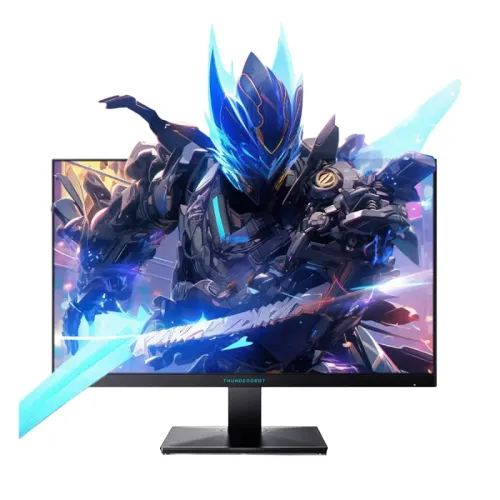
ThundeRobot ZQ25F180 24.5-inch QHD 180Hz Fast IPS Gaming Monitor is a 24.5-inch QHD Fast IPS gaming display listed for 180Hz operation (overclocked in local specifications), 1ms response, 300 cd/m² brightness, 1000:1 contrast and HDR/8-bit+FRC. Bangladesh sellers list two HDMI ports, one DisplayPort, audio out, anti-glare, tilt and 75 × 75mm VESA. Port versions and overclock mode differ across listings, so confirm the delivered manual and local warranty terms.
QHD detail on a compact panel
The ZQ25F180 combines a 24.5-inch screen with 2560 × 1440 QHD resolution. This packs more pixels into a smaller area than a 27-inch QHD display and can produce detailed text, game interfaces and image edges when viewed at a normal desk distance. The 16:9 format supports common PC games, desktop software and video. QHD also provides more workspace than Full HD, though the graphics device must render more pixels to maintain a high frame rate.
Use the native resolution for the clearest image. If interface text appears small, adjust system scaling or application fonts rather than forcing an unsupported resolution. Games rendered below QHD can be displayed, but scaling may soften the result. For office documents, QHD can show more content; for gaming, select settings that balance sharpness and stable frames. Viewing distance and eyesight affect how much extra pixel density you notice.
Fast IPS viewing and colour
Local product tables identify a Fast IPS panel and list 89-degree horizontal and vertical viewing angles. IPS technology is often chosen for wide viewing positions and consistent colour when the viewer shifts around the desk. Seller pages list 300 cd/m² brightness and 1000:1 typical contrast. These specifications describe the stated display characteristics; colour consistency, panel uniformity and response behaviour can vary by unit and settings.
Some retailer data describes HDR as 8-bit plus FRC, but that is not a complete HDR performance measurement. Brightness and contrast alone do not establish certification, local dimming or a premium HDR effect. For colour-sensitive work, calibrate the individual monitor with suitable tools. For general gaming and browsing, select a comfortable picture mode and set brightness for the room. Avoid treating a seller’s wording as proof of a measured calibration result.
180Hz overclock and timing verification
Bangladesh retailers list the ZQ25F180 at 180Hz, with one dataset explicitly marking the value as overclocked. An overclocked refresh can depend on the firmware, input, cable, GPU and display menu, so verify the exact timing supported by the delivered unit. Select QHD and the intended refresh in the operating system or graphics control panel and check that the signal remains stable during use. Seller specification tables can differ by regional version.
If 180Hz is not available, confirm the selected DisplayPort or HDMI input, use a suitable cable, update the graphics driver and consult the manual’s supported timing table. An adapter or dock may limit the mode. Test for flicker, blanking or image artifacts over time before relying on the maximum mode. A stable lower refresh can be preferable if the overclocked setting is not reliable on the particular source and connection.
Response-time headline and motion
Retailers advertise 1ms response time, but the checked sources do not consistently identify whether the number is MPRT, GTG or another method. These measurements are not interchangeable. Actual pixel transitions depend on colour change, response setting, refresh rate and individual panel behaviour. The headline should not be read as a guarantee that all pixel changes complete in one millisecond or that motion blur disappears in every game.
Try the monitor’s available response or overdrive controls using the applications you play. Aggressive overdrive can create bright or dark inverse trails. Frame rate and frame pacing also affect perceived motion clarity. Keep the GPU driver current, use a supported cable and confirm the display is running at the selected refresh. Treat response-time claims as product data, not a substitute for testing the delivered unit under your normal workload.
Variable refresh and gaming compatibility
Some local listings include Adaptive-Sync, FreeSync or G-Sync support. Variable refresh can coordinate the monitor with compatible frame output to reduce tearing within a supported range. Enable the feature in the monitor menu or graphics driver where needed and confirm that the source recognizes the display. Compatibility depends on GPU, driver, input, cable and active timing; the product label does not guarantee every device will expose the same settings.
If the image flickers or blanks, test another cable, update the GPU driver, reduce refresh temporarily or disable variable refresh to find the cause. A laptop dock or console may support fewer modes than a desktop graphics card. Variable refresh does not create extra frames; it synchronizes the display with the frames the device produces. Stable output and appropriate in-game settings are still important for a smooth experience.
Ports, audio and connection choices
Bangladesh listings describe two HDMI inputs, one DisplayPort and an audio output. Creatus specifies HDMI 2.1 and DisplayPort 1.4, while other tables give less detail, so confirm the exact version on the delivered unit. Multiple inputs can allow a PC and console to remain connected, with the display menu used to select the source. The product tables do not specify built-in speakers, making external audio equipment necessary for sound.
For QHD high refresh, choose a source port and cable that support the desired mode. If the computer sends audio over HDMI or DisplayPort, check that the correct audio output is selected before using the monitor’s audio-out connection. If sound is absent, review the source settings and external speaker power. Ask the seller which cables are included in the regional package. USB-C video, USB hub and laptop charging are not listed in the sources reviewed.
Stand, tilt and VESA setup
Retailers list a 75 × 75mm VESA pattern and a tilt range around five degrees forward to twenty degrees back. Height adjustment is not listed. Approximate external dimensions of 614 × 208 × 455mm and weight near 5kg appear in seller tables; measurements can differ depending on whether the stand or packaging is included. A VESA arm may help position the panel, provided the bracket fits the pattern and carries the display safely.
Verify the correct screw length and load rating in the delivered guide before mounting. Support the monitor while attaching the arm and avoid overtightening. The stand’s movement should be checked in person or against the manual, especially if frequent ergonomic adjustment matters. Measure the desk footprint and cable clearance before setup. A 75mm mount requires the correct plate; not every 100mm-only bracket will fit without an adapter.
HDR and eye-comfort wording
Retailer listings mention HDR and 8-bit plus FRC, along with anti-glare treatment. These labels do not by themselves show the monitor’s peak HDR brightness, contrast behaviour, certification or local-dimming capability. The listed 300 cd/m² and 1000:1 contrast set expectations for a general gaming display rather than advanced HDR. If HDR performance is important, check the exact regional product documentation and certification rather than relying on copied seller descriptions.
An anti-glare surface can reduce reflections but does not eliminate strong direct light. Adjust brightness for the room and position the screen to avoid glare. If low-blue-light modes are available, they may shift colour balance; use a neutral profile when judging colours. Breaks, readable text size, posture and viewing distance also support comfort. These are general setup suggestions, not medical claims about the product.
PC performance and workload
QHD at 180Hz can demand substantially more GPU performance than Full HD. Competitive games with modest visual demands may reach high frame rates more easily than graphically intensive titles. Lowering quality settings can help stabilize frames, while native QHD maintains sharper edges. Check the GPU, video output, cable and driver support before expecting the highest refresh at full resolution. The monitor can display the source signal but cannot produce frames the PC has not rendered.
For desktop work, QHD can show more rows, panels or browser content than Full HD on a similarly sized screen. System scaling can preserve comfortable text size. For video playback, the source material and service determine image quality; the monitor does not convert standard video into native QHD detail. Choose a refresh target that remains stable in your actual games and applications rather than selecting settings only by the maximum number on the package.
Care, delivery and package inspection
Place the monitor on a stable desk or suitable mount, leave ventilation clear and route the adapter and signal cables away from trip hazards. Clean the panel with a soft microfiber cloth and do not press on the LCD surface or spray liquid directly onto it. Keep the shipping box and purchase paperwork until the return window ends. Check the serial number, adapter, stand, connectors and any cable listed as included before discarding packaging.
On delivery, inspect for panel damage and test native QHD, available 180Hz mode, each intended port, Adaptive-Sync and audio output with external speakers or headphones. Record any missing accessory or issue promptly and follow the seller’s return process. Regional bundles can vary, so confirm the contents with the seller rather than assuming product photographs show the exact package. Retain invoice and warranty material for any service claim.
Bangladesh price and warranty
PCPartsBD aggregates a current listed range from ৳21,900 to ৳23,900. Techland’s page shows ৳21,900 but marks the product out of stock; Creatus lists ৳23,900 and also marks it out of stock. These are time-sensitive seller observations, not a BiponiBD offer. Confirm stock and final payable price directly with the seller because delivery, promotions and payment terms can change.
Local listings advertise a three-year warranty, but the specific serial’s eligibility, distributor and claim process must be confirmed in writing. Ask which service centre handles repairs, what exclusions apply, whether panel defects have a separate policy and what documents are required. Keep the invoice, warranty card and serial details. An advertised warranty period does not independently prove official distribution or that every failure is covered.
Who should consider the ZQ25F180
The ZQ25F180 may suit a gamer who wants QHD detail on a compact 24.5-inch screen and a high refresh mode for a capable PC. Fast IPS, an anti-glare surface, multiple inputs and VESA mounting provide practical flexibility. It can also handle general browsing and productivity, though the stand’s listed movement is tilt-only and there are no built-in speakers. Confirm the delivered port versions and refresh behavior before choosing it for competitive play.
Consider a different monitor if you need integrated speakers, a verified height-adjustable stand, USB-C docking, a stronger documented HDR specification or confirmed local warranty service for a serial. Compare the GPU performance needed for QHD high-refresh with your actual games. Check seller stock and warranty provider, then confirm the regional manual. These steps help match the screen to the desk, PC and support expectations.
Specification source notes
The ThundeRobot official page identifies the ZQ25F180 as a 24.5-inch QHD 180Hz Fast IPS display. Local Bangladesh listings cross-check 300 cd/m², 1000:1 contrast, HDMI/DisplayPort, tilt, 75 × 75mm VESA, weight, dimensions and three-year warranty advertisement. Several seller pages mark 180Hz as overclocked and differ on whether ports are HDMI 2.1 / DP 1.4. Where the official page is not sufficiently detailed, those fields are explicitly retained as retailer claims.
The copy does not claim a live BiponiBD offer, review, serial-specific warranty, measured response time, verified accessory bundle, product origin, GTIN or in-hand gallery audit. Confirm the delivered model label, ports, stand and refresh table from its manual. Prices and stock are snapshots from source pages and can change; the local seller’s written offer and warranty terms govern the transaction.
Bangladesh price observations and sources
Checked 2026-11-08 against ThundeRobot official product information and local seller pages. PCPartsBD aggregates ৳21,900–৳23,900; Techland listed ৳21,900 out of stock, while Creatus listed ৳23,900 out of stock. These are seller snapshots, not a BiponiBD offer. Confirm current availability, exact port versions and written warranty coverage.