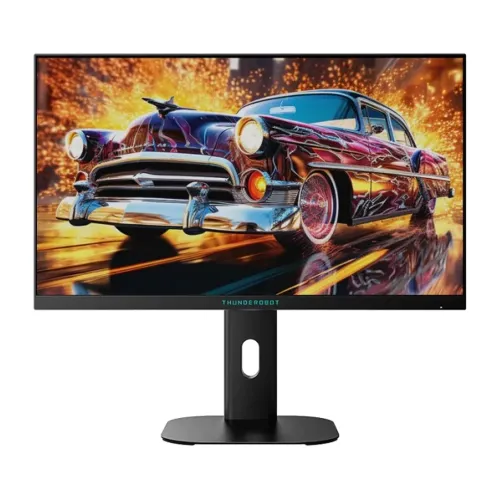
The Thunderobot ZQ25F180L is a 24.5-inch QHD 2560 × 1440 Fast IPS monitor. Thunderobot’s official page describes its 180Hz refresh mode as overclocked and advertises hardware Low Blue Light plus height and rotation adjustment. Local listings report 350-nit brightness, 1ms response, 99% sRGB/95% DCI-P3, DisplayPort and dual HDMI. Some regional specifications differ or remain unverified; read the details below before comparing offers.
Exact model and panel
The ZQ25F180L is part of Thunderobot’s Silver Wing monitor line. The manufacturer’s product page names the 24.5-inch version and identifies a Fast IPS panel. This is a specific model code; do not substitute details for the related ZQ25F180, ZQ25F180L variants sold in other regions, or other ZQ25 models without checking their labels.
The official title describes the monitor as a 2K overclocked 180Hz Fast IPS display with hardware low blue light and height/rotation adjustment. Local names sometimes shorten the model to ZQ25F180. Match the full `ZQ25F180L` code on the carton, rear label and invoice before relying on a retailer specification or warranty.
QHD detail on a 24.5-inch screen
The manufacturer page identifies a 24.5-inch 2560 × 1440 panel. At this size, QHD provides a dense image and more workspace than Full HD of the same diagonal. Fine interface elements can appear smaller, so operating-system scaling and application zoom may make text more comfortable while preserving the added resolution for content.
A higher pixel count also increases the rendering load. Games that run at very high frame rates at 1080p may need lower graphics settings at 1440p. Consider the GPU, game genre and target frame rate together. The panel size and resolution do not by themselves guarantee color accuracy, uniformity or a particular viewing experience.
180Hz overclock mode
Thunderobot’s official page explicitly describes this model as 180Hz overclocked. The overclock qualifier matters: enablement may require an OSD option, supported source timing and an appropriate connection. The sources reviewed do not give enough text detail to state the native refresh rate or exact input-by-input maximum.
After setup, select the intended refresh mode in the computer’s display settings and confirm the monitor OSD reports it. If the image flickers or becomes unstable, return to a supported lower mode and check the manual, GPU output and cable. A 180Hz label does not make every game render 180 frames per second.
Fast IPS and response claims
The official model page identifies Fast IPS. Local merchants list 1ms response, but they do not supply the measurement protocol, transition data or overdrive condition. Response-time numbers may reflect a selected mode or a best-case transition. They are not the same as input lag and do not guarantee that every moving object will appear free of blur or overshoot.
Use the monitor’s available response settings with care and look for inverse ghosting as well as ordinary blur. A less aggressive setting can produce cleaner motion depending on the panel sample and refresh mode. No independent instrumented response test or hands-on evaluation is claimed in this product description.
Color coverage and contrast
The manufacturer product detail lists 99% sRGB, 95% DCI-P3 and 1000:1 contrast. These figures describe gamut coverage and a stated contrast ratio; they do not establish factory calibration, white-point accuracy or screen uniformity. PCPartsBD and TechLand report 350 cd/m² typical brightness, which is a retailer/aggregator figure in this audit.
For web graphics, sRGB coverage is relevant, while a wider DCI-P3 gamut can show a broader range of colors in supported content. A wide gamut without color management may render some content more saturated than intended. For color-critical editing, use measured calibration information and a workflow designed for the destination.
HDR and brightness limits
TechLand lists HDR10 support, while other local pages use general HDR wording or describe 8-bit + FRC. The manufacturer page text reviewed does not confirm a VESA HDR certification. Therefore HDR support is described here as a local retailer claim, not an independently verified certification.
HDR results depend on peak brightness, contrast, black level, local dimming, tone mapping and the source. A format label alone cannot establish a strong HDR image. Ask for the exact manual, specification label and certification information for the regional unit if HDR is central to the purchase decision.
Ports and maximum refresh compatibility
TechLand and PCPartsBD list one DisplayPort 1.4 and two HDMI 2.0 inputs. PCPartsBD’s compact key-feature text elsewhere conflicts by calling out HDMI 2.1, so this record uses the more detailed product specification table and still flags port confirmation. A 3.5 mm audio jack is reported by local listings.
Check each input’s supported resolution and refresh in the manual. The source device, graphics output, cable, color format and selected mode all affect the available timing. Older docks or adapters can restrict high refresh. If you plan to use a console or multiple PCs, verify that the exact device combination meets your resolution and refresh requirements.
Ergonomics, stand and mounting
The official product title advertises a height-adjustable and rotatable stand. PCPartsBD lists tilt support and 75 × 75 mm VESA mounting. The precise lift range, swivel/pivot angles and whether every regional package has the same stand were not available in the extracted official page text. Check the unit or manual for the movement range you need.
For comfortable placement, align the screen near eye level and keep it at a suitable viewing distance. Before using an arm, verify the mounting holes, screw length and weight capacity. Do not assume a 100 × 100 mm mounting pattern from a different Thunderobot monitor applies to this model; the local listing for this SKU says 75 × 75 mm.
Hardware low blue light and daily use
Thunderobot advertises hardware Low Blue Light for this model. This is a display feature, not a medical claim. Adjust the color mode and brightness to the room, use readable text size, avoid strong reflections and take regular breaks. No screen setting can guarantee that a long session will be comfortable for every viewer.
The compact 24.5-inch size can work for a gaming desk and general office tasks. QHD can fit more content than Full HD, while scaling allows larger text. The rotating stand may help with portrait-oriented content, but confirm the actual pivot behavior and cable clearance on the delivered stand.
Gaming setup and frame delivery
The overclocked 180Hz mode can be useful when a compatible graphics card and game produce high frame rates. Adaptive-Sync is listed by merchants for related pages, but official exact-model VRR range and certification details were not found in the manufacturer text. Verify whether the exact SKU and GPU combination supports variable refresh at the mode you want.
When a game cannot sustain the target rate, adjust resolution scaling, visual effects or frame limits to achieve stable delivery. A high-refresh panel does not improve a game’s simulation or guarantee lower input lag. Use a suitable DisplayPort or HDMI cable and confirm that the operating system has not defaulted to a lower refresh.
Bangladesh stock, price and warranty
At the time of review PCPartsBD showed Star Tech at ৳25,900/In Stock and Sell Tech at ৳25,900/Check Stock. TechLand’s product page showed Up Coming at ৳25,900. These are seller/aggregator snapshots and can change. They do not represent a BiponiBD offer, reservation or guarantee of current availability.
TechLand advertises a three-year warranty. Warranty wording can depend on importer, distributor, serial number and sales channel. Before purchase, get the service provider, coverage period, dead-pixel policy, invoice requirements, exclusions and service location in writing. Do not infer that warranty for a different region or ZQ25 model applies to this unit.
Before ordering
Confirm the full ZQ25F180L model on the product label and invoice, ask whether the 180Hz mode is enabled by overclock in the OSD, and verify the refresh support for the input you plan to use. Check port versions, supplied cables, brightness, HDR wording and stand adjustments against the exact regional manual.
Inspect the delivered unit for panel condition and included accessories. Confirm the seller’s return period and warranty process before removing protective packaging. The manufacturer page is the primary source for model identity, overclock refresh, panel family, color gamut and ergonomic feature claims; numeric Bangladesh prices and local warranty are retailer observations.
Key features
- 24.5-inch QHD 2560 × 1440 flat Fast IPS panel, model identity confirmed on the official Thunderobot product page.
- 180Hz is described by the manufacturer as an overclocked refresh mode; it is not presented as an unqualified native rate.
- Official product details list 99% sRGB, 95% DCI-P3, 1000:1 contrast and 24.5-inch size.
- The official product title advertises hardware Low Blue Light.
- Official product title and listing describe a height-adjustable, rotatable stand; exact travel and rotation angles are not published in reviewed page text.
- Local retailer listings report 350-nit typical brightness and 1ms response; response method requires confirmation.
- Local listings describe 1 × DisplayPort 1.4 and 2 × HDMI 2.0; check exact regional port implementation.
- HDR10/HDR support appears on retailer pages, but independent HDR certification was not verified.
- PCPartsBD lists 75 × 75 mm VESA mounting and tilt; inspect the delivered unit/manual.
- Local seller lists three-year warranty; provider and serial-based eligibility should be confirmed before purchase.
Pros
- QHD at 24.5 inches provides fine pixel density and a detailed image in a compact gaming setup.
- Fast IPS with a manufacturer-advertised 180Hz overclock may support smooth compatible PC gameplay.
- The official listing advertises height adjustment and rotation, which can improve positioning for different desks and tasks.
- Official gamut information lists 99% sRGB and 95% DCI-P3.
- Bangladesh seller and price-comparison pages provide local availability references for the exact ZQ25F180L model.
Cons and buying considerations
- The 180Hz mode is overclocked; stability and selectable mode can depend on signal source, connection and settings.
- QHD at high refresh asks more from the graphics card than Full HD; demanding games may need reduced settings.
- Brightness, HDR capability, ports and VESA details vary between local listings and need verification against the delivered regional unit.
- The 1ms claim lacks a published measurement method in the sources reviewed and should not be read as guaranteed blur-free motion.
- Local three-year warranty is seller-advertised; local service provider, serial registration and exclusions are unverified.
Full specifications
- Brand: Thunderobot
- Model: ZQ25F180L (Silver Wing)
- ManufacturerPartNumber: ZQ25F180L
- DisplaySize: 24.5 inches
- AspectRatio: 16:9
- Panel: Fast IPS; flat panel
- Resolution: 2560 × 1440 (QHD/2K)
- RefreshRate: Up to 180Hz overclocked (manufacturer product title and official listing)
- Brightness: 350 cd/m² typical (Bangladesh seller/aggregator listings)
- Contrast: 1000:1 (manufacturer product detail listing)
- ColorGamut: 99% sRGB; 95% DCI-P3 (manufacturer product detail and seller listings)
- ResponseTime: 1ms listed by Bangladesh sellers; measurement method not stated
- ViewingAngles: 178° / 178° (seller listing)
- Surface: Anti-glare (seller/aggregator listing)
- ColorDepth: 8-bit + FRC reported by sellers; official source reviewed does not specify
- HDR: HDR10 support reported by TechLand; other sellers describe HDR or 8-bit + FRC. Certification and peak behavior unverified
- Ports: 1 × DisplayPort 1.4; 2 × HDMI 2.0 reported by TechLand/PCPartsBD; confirm exact unit/region
- Audio: Audio output/headphone jack listed by local aggregator; integrated speakers not verified
- Ergonomics: Official page advertises height adjustment and rotation; exact adjustment range unavailable
- Tilt: Supported per retailer listing; exact range not published in reviewed sources
- VESA: 75 × 75 mm per PCPartsBD; confirm mounting pattern on delivered unit
- Power: Not verified in reviewed model-specific sources
- Dimensions: Not verified in reviewed model-specific sources
- Weight: Not verified in reviewed model-specific sources
- LocalWarranty: TechLand advertises 3 years; confirm local provider, serial eligibility and written conditions
- LocalPriceObservation: PCPartsBD showed Star Tech ৳25,900/In Stock and Sell Tech ৳25,900/Check Stock; TechLand lists Up Coming; snapshots only
- CountryOfOrigin: Not verified for the Bangladesh retail unit
Frequently asked questions
What is the ZQ25F180L screen size and resolution?
The official Thunderobot product page identifies a 24.5-inch 2K/QHD 2560 × 1440 display.
Is 180Hz native?
The manufacturer product title calls the 180Hz mode overclocked. Treat it as an OC maximum, and verify the mode with your source, cable and settings.
What panel does it use?
The official product title identifies Fast IPS. The display is listed as flat.
What color gamut does it cover?
The official product details list 99% sRGB and 95% DCI-P3. Gamut coverage is not a calibration or color-accuracy measurement.
What are the brightness and contrast?
Local TechLand/aggregator listings report 350 cd/m² typical and 1000:1 contrast. The official page detail text we reviewed confirms 1000:1 but does not expose a brightness figure in its text listing.
Does it support HDR?
TechLand lists HDR10 support and other local listings describe HDR. We did not verify a named VESA HDR certification for this exact unit; confirm the carton/manual and understand that HDR quality depends on brightness and contrast.
Which ports are included?
TechLand and PCPartsBD list one DisplayPort 1.4 and two HDMI 2.0. Port details can vary by market; check the delivered unit and manual before relying on a particular refresh mode.
Can I adjust the stand?
Thunderobot’s official product page advertises height adjustment and rotation. A local listing confirms tilt adjustment, but exact ranges and all-axis capabilities were not available in the reviewed sources.
Can it be VESA mounted?
PCPartsBD lists 75 × 75 mm VESA. Confirm the mounting pattern and screw requirements on the exact regional monitor before buying an arm.
Does it have built-in speakers?
Built-in speakers were not verified. A local listing reports an audio jack, generally an audio output; plan external speakers or headphones unless the seller confirms integrated speakers.
What is the price in Bangladesh?
PCPartsBD showed Star Tech at ৳25,900/In Stock and Sell Tech at ৳25,900/Check Stock; TechLand showed Up Coming. These can change and are not BiponiBD pricing.
What is the local warranty?
TechLand advertises three years. Confirm the Bangladesh service provider, serial eligibility, invoice conditions and exclusions in writing before purchase.
Source note: Thunderobot’s official model page is the primary source for the exact ZQ25F180L identity, overclocked 180Hz designation, panel family, color-gamut figures and advertised stand features. Local sellers provide brightness, ports, HDR, price and warranty observations; confirm regional unit details before purchase. No BiponiBD offer or hands-on test is claimed.