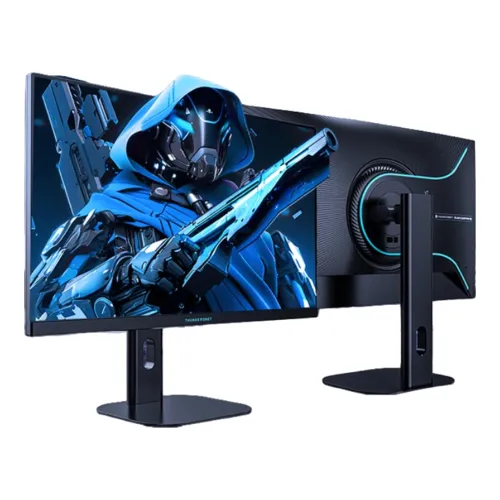
Exact model overview
ThundeRobot ZQ27F240L is a 27-inch flat Fast IPS monitor with 2560 × 1440 QHD resolution. The manufacturer’s exact-model page names a 275Hz overclocked Fast IPS display and lists 95% DCI-P3, 99% sRGB and 1300:1 contrast. This product is the ZQ27F240L suffix model; specifications for ZQ27F240, ZQ27F260 and other similarly named screens should not be substituted. The manufacturer page title also identifies hardware low-blue-light capability and a height-adjustable, rotating stand. Some detailed connector and response values in the local catalog originate from retailer listings and are identified as such below.
QHD resolution and 27-inch workspace
The manufacturer lists 2560 × 1440 pixels on a 27-inch, flat 16:9 display. QHD provides more image detail than Full HD at the same diagonal size and can support a more spacious desktop for windows, timelines and game interfaces. Select native resolution in the operating system for direct pixel mapping. If text appears too small, use scaling rather than reducing resolution where possible. Higher resolution increases the rendering workload, so graphics performance depends on the installed GPU, processor, game, settings and cooling.
Flat Fast IPS display
The exact-model manufacturer page identifies a flat Fast IPS panel. Flat geometry keeps straight lines visually consistent across the screen and may suit mixed gaming, study and desktop work. The page lists a 1300:1 contrast ratio. IPS describes the panel type but does not by itself establish factory color calibration, viewing uniformity or a specific unit’s response behavior. Position the display in front of the primary seat and adjust its stand to limit reflections. Avoid inferring features from a different ThundeRobot model merely because its model number is similar.
275Hz overclocked refresh
The official product title and specifications describe 275Hz as an overclocked refresh mode. Treat this as the manufacturer-advertised maximum mode, not a promise that every computer or connection will expose it automatically. Use a suitable direct video connection and select the supported resolution and refresh in the operating system or graphics control panel. If 275Hz is unavailable or unstable, check the monitor menu, cable, GPU output and exact timing table, then use a stable supported mode. The display refresh rate is distinct from the frame rate rendered by a game.
Gaming and computer capability
A high refresh ceiling can make motion appear smoother when a computer supplies correspondingly high frame rates. Performance at QHD varies greatly by title, graphics quality and system configuration. Competitive games may be less demanding than graphically intensive single-player games. Review performance for the actual PC and games before expecting a particular frame rate. A monitor does not increase GPU output. For consoles, confirm supported resolution and refresh modes for the console generation and the monitor input; do not assume every device can use 275Hz.
Response-time wording
The local product record and a Bangladesh retailer list a 1ms response figure, but the manufacturer page result reviewed for this exact model does not clarify the measurement method in the available specification excerpt. Retailer data should not be mistaken for independently verified laboratory performance. Response time differs from input lag and refresh rate. Pixel transitions can vary with color transition, overdrive setting and panel temperature. Use a balanced response option and check real moving images for overshoot or trailing instead of treating a single quoted number as a guarantee.
Brightness, contrast and HDR claims
The manufacturer exact-model page lists 1300:1 contrast. A Bangladesh retailer describes 500 nits typical brightness and HDR10 support; those fields are retailer-reported and have not been confirmed in the manufacturer excerpt consulted here. HDR input compatibility is not the same as strong HDR image performance or certification. For this reason, check the full manual or the seller for brightness test conditions and HDR behavior. Use a comfortable brightness for the room and evaluate familiar content. Do not interpret retailer HDR10 wording as VESA DisplayHDR certification.
Color gamut and color depth
The manufacturer page lists 95% DCI-P3 and 99% sRGB. These are published gamut figures, and the source excerpt does not state all measurement conventions or certify the calibration of an individual unit. A Bangladesh retailer also lists 10-bit color support as 8-bit plus FRC; treat this as reseller-listed unless confirmed in the exact-model manual. Gamut size is not the same as color accuracy. For professional photo, video or print work, calibrate the monitor and use color-managed applications. For ordinary games and media, choose a mode that looks natural.
Adaptive-Sync and variable refresh
A Bangladesh retailer lists Adaptive-Sync technology for this model. Availability and compatibility can depend on GPU, driver, cable, selected input and refresh range. If supported, variable refresh can align screen updates with changing frame output and may reduce tearing in compatible conditions. It does not create frames or eliminate every form of stutter. Confirm this feature against the exact-model manual or local product documentation before relying on it for a particular GPU. If flicker appears at low or changing frame rates, test a stable refresh mode and consult support.
Video inputs and connection details
The catalog and Bangladesh retailer listing describe two HDMI 2.0 inputs and one DisplayPort 1.4 input; this connector count is retailer-derived because the manufacturer page excerpt available for this audit did not expose the complete I/O table. Check the local manual or inspect the unit for final confirmation. Input bandwidth determines which resolution and refresh combinations are available. Directly connecting a compatible graphics card is a useful baseline; docks, adapters and KVMs may reduce bandwidth or disable synchronization features. An audio output is also retailer-listed.
Audio output and speakers
Retailer data lists an audio output, but neither the source excerpt nor catalog record establishes that integrated speakers are present. Plan external speakers or headphones if sound is required. When the computer sends audio over HDMI or DisplayPort, choose the monitor as the playback endpoint if available, then connect compatible external audio equipment to its output. The jack is described as audio out rather than a microphone input. Confirm included accessories with the seller; connector presence does not imply that headphones or speakers are included in the box.
Height-adjustable rotating stand
The manufacturer page title describes a height-adjustable rotating display stand, and a Bangladesh retailer also lists height adjustment and tilt. This confirms the presence of ergonomic movement at a high level, but the exact millimeter travel and angle ranges were not present in the manufacturer excerpt reviewed. Check the supplied manual for precise limits. Leave enough space for height and rotation adjustments, position the top edge comfortably, and route cables with slack so movement does not pull on the connectors. Inspect the stand and packaging when the product arrives.
VESA compatibility
The pre-existing catalog lists 75 × 75mm VESA mounting, but that value is retailer-derived and was not corroborated by the exact-model manufacturer page excerpt available for this review. Do not buy an arm or wall bracket based solely on that uncertain catalog value. Verify the rear mounting pattern, screw size and load rating using the monitor manual or the physical unit first. A bracket must support the display safely, and screw length must match the manufacturer’s permitted depth. Record verified VESA dimensions before a later catalog correction.
Anti-glare and eye-care features
The Bangladesh retailer lists an anti-glare screen, flicker-free operation and low-blue-light support. The manufacturer product title itself describes hardware low-blue-light capability. Anti-glare treatment can reduce some reflections, but does not remove strong light sources. Low-blue-light settings can shift color temperature, and eye-care options are not medical treatments. Set brightness to match the room, use readable scaling and take breaks during long sessions. Verify feature names and controls in the monitor menu because mode behavior can vary by firmware or regional variant.
Desk fit, weight and physical dimensions
A 27-inch display needs enough desk width, viewing distance and rear clearance for its stand and cables. The exact manufacturer specification excerpt reviewed here did not provide dimensions or weight, so this record avoids inventing them. Measure the available space and consult the local package label or manual if the monitor must fit a shelf, arm or narrow desk. Keep vents clear, place the base on a stable surface and leave enough room for the stand to rise or rotate. Packaging weight is different from the assembled monitor weight.
Power, setup and care
Use only the power adapter and cord specified for the delivered regional variant. The manufacturer excerpt available for this audit did not confirm adapter ratings or consumption, so check the label on the unit rather than relying on values from another model. For setup, connect power and a suitable video cable, select 2560 × 1440, and choose a refresh offered by both the display and graphics device. If the maximum mode is missing, inspect the cable, input, driver and menu setting. Clean with a soft cloth following the manual; do not spray liquid directly onto the panel.
Advantages and practical trade-offs
The verified manufacturer details include a 27-inch QHD flat Fast IPS screen, 275Hz overclocked marketing mode, 95% DCI-P3, 99% sRGB and 1300:1 contrast. The manufacturer also describes a height-adjustable rotating stand and hardware low-blue-light feature. Retail listings add details such as ports, HDR10, typical brightness and response time, but those should be confirmed in local documentation. QHD at high frame rates requires capable graphics hardware, and uncertain VESA dimensions should be checked before choosing a mounting arm.
Warranty, price and Bangladesh seller terms
The official source confirms model specifications but does not establish the warranty terms for the serial number sold in Bangladesh or current BiponiBD price, stock, delivery and return policy. A retailer listing may show different availability and terms from this catalog. Ask the seller who handles service, when coverage starts, which defects are covered, what dead-pixel policy applies and whether an invoice is required. Check the serial and package contents on delivery and retain the invoice and packaging. Verify live price and stock at checkout because commercial terms can change.
Who should consider this model
The ZQ27F240L may fit a PC gamer who wants 27-inch QHD detail, a flat Fast IPS panel and a high advertised refresh mode, as long as the computer and connection can support the intended timing. The manufacturer describes an adjustable rotating stand, which may help users who need more positioning options than basic tilt. Buyers who need confirmed HDR performance, exact response test conditions, VESA mounting dimensions or guaranteed warranty coverage should resolve those items with the seller or manual before ordering. Match the screen to the games and desk rather than relying on headline numbers alone.
Specification summary
ThundeRobot ZQ27F240L is a 27-inch flat Fast IPS monitor with 2560 × 1440 QHD resolution. The manufacturer exact-model page describes a 275Hz overclocked refresh, 95% DCI-P3, 99% sRGB, 1300:1 contrast, a height-adjustable rotating stand and hardware low-blue-light capability. Retailer listings additionally report 1ms MPRT, 500 nits typical brightness, HDR10, Adaptive-Sync, 10-bit (8-bit + FRC), two HDMI 2.0, one DisplayPort 1.4 and audio out; confirm these reseller-derived details with local documentation. VESA value and regional warranty need verification before purchase.