Model overview
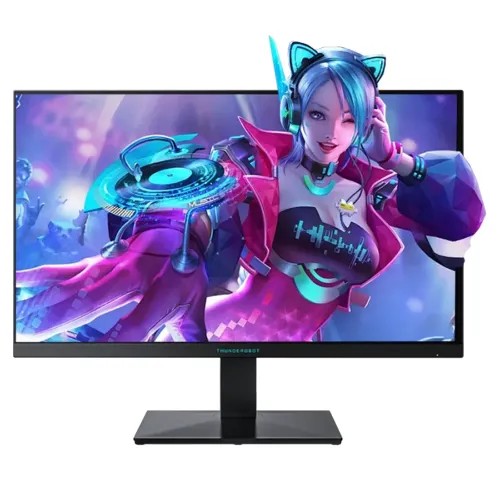
The ThundeRobot ZQ27F260 is a 27-inch flat Fast IPS gaming monitor with native 2560 × 1440 QHD resolution and a manufacturer-listed 275Hz overclocked maximum refresh rate. The manufacturer describes this as an overclocked mode, so buyers should distinguish the advertised 275Hz OC figure from an unqualified native refresh claim. The exact-model product page lists 1ms GTG response, 500 nits peak brightness, 1300:1 contrast, HDR400 support, FreeSync/Adaptive-Sync and broad color gamut figures. Its feature set is aimed at high-refresh PC gaming while retaining QHD detail for general desktop use.
Screen size, resolution and format
The screen measures 27 inches diagonally and uses a 16:9 aspect ratio with 2560 × 1440 pixels. QHD places more pixels on a 27-inch panel than Full HD, which can make fine text and game detail appear more defined at a similar viewing distance. Use native resolution for one-to-one pixel mapping, then adjust operating-system scaling if small text is uncomfortable. The higher pixel count also asks more of the graphics card than Full HD. Performance varies by game, graphics settings, processor and cooling; a 275Hz display does not guarantee that a computer will render 275 frames every second.
Fast IPS panel and viewing
ThundeRobot identifies the ZQ27F260 panel as Fast IPS, with a flat surface and 178-degree horizontal and vertical viewing angles. IPS technology is commonly selected for broad viewing positions and consistent color appearance across the screen. The manufacturer lists 1300:1 contrast, the stated static contrast ratio; real results depend on settings and room conditions. The panel is not curved. Sit centered and adjust tilt to reduce glare. Do not assume characteristics of a similarly named ZQ27 model apply to this exact suffix.
275Hz overclocked refresh
The manufacturer advertises 275Hz as an overclocked refresh mode. That is the maximum stated marketing mode, and the exact available timing can depend on graphics output, cable, selected resolution and monitor menu. Start at 2560 × 1440, connect directly to a supported DisplayPort input, and choose a refresh rate exposed by the operating system and graphics driver. If the overclocked mode is unstable or unavailable, use a lower supported rate and consult the product manual or local support. The monitor displays frames supplied by the computer; it does not raise game frame rate by itself.
Gaming performance and system matching
QHD at a high refresh rate can be useful for PC games that benefit from detail and smooth motion. Reaching very high frame rates at 2560 × 1440 depends on GPU, CPU, game engine, graphics quality and thermal limits. Competitive titles may run faster than visually demanding games. Check benchmarks for the specific computer and games rather than treating refresh rate as a performance promise. Console devices may support only a subset of display timings; verify console output modes and input compatibility before purchase.
Response time and motion
The manufacturer lists a 1ms GTG response time. Gray-to-gray is a pixel-transition measurement made under a specified test or mode and does not mean every transition takes exactly one millisecond in ordinary use. It is also not the same as input latency or frame rate. Overdrive settings can trade transition speed against overshoot or inverse ghosting; choose a balanced setting by observing real motion. Use the manual to identify the conditions for the quoted value, and do not compare it directly with MPRT figures from another model.
Brightness, contrast and HDR
The exact-model source lists 500 nits peak brightness, a 1300:1 contrast ratio and HDR400 support. Peak brightness is not a guarantee that the entire screen remains at that level in every mode. HDR quality also depends on local dimming, tone mapping, source and content; the cited specification does not establish an independent VESA certification, so this description reports manufacturer wording only. Adjust SDR brightness for room conditions and compare familiar content before selecting HDR. Avoid presenting the 500-nit peak figure as a measured sustained result.
Color gamut and color depth
ThundeRobot lists 95% DCI-P3 and 99% sRGB color-gamut figures and 10-bit color support implemented as 8-bit plus FRC. Gamut percentages can use different measurement standards and may describe coverage or area, so they should not be compared without matching methodology. The published figures do not constitute a third-party calibration report or certify unit-level Delta E accuracy. For design, photography or print workflows, calibrate the individual display and use color-managed applications. For games and video, select the color mode that looks natural with the source.
Adaptive-Sync and variable refresh
The manufacturer lists FreeSync/Adaptive-Sync technology. Compatible variable refresh can help coordinate screen updates with a supported graphics card’s changing frame output, reducing tearing in supported conditions. It does not create extra frames and does not remove all stutter or input delay. Enable the feature in the display menu and graphics software if required, and verify that selected cable, input, driver and timing support it. If flicker appears at certain frame rates, try a stable refresh range or consult device documentation.
Ports and connection planning
The published connector list includes two HDMI 2.0 inputs, two DisplayPort 1.4 inputs and one audio output. Confirm the exact maximum resolution and refresh combination for each input in the manual, since bandwidth and timing can differ by port. A suitable direct cable from a compatible graphics output is the simplest way to troubleshoot a missing refresh option. Docks, adapters and KVM switches can limit bandwidth or synchronization features. No USB-C video input or USB hub is listed in the manufacturer table reviewed for this model.
Audio and included sound equipment
The source lists an audio output, which can route audio to compatible external headphones or speakers; it does not establish that built-in speakers are included. Plan separate sound equipment if needed. When audio travels over HDMI or DisplayPort, select the monitor as the computer’s playback device, then connect external audio equipment to the monitor output if supported by the setup. The audio jack is an output, not a microphone input. Confirm local package contents with the seller because connector specifications are not a box-content list.
Stand movement and ergonomics
The manufacturer lists tilt from -5 to +20 degrees, swivel of ±25 degrees, pivot of -90 to +90 degrees and 120mm height adjustment. These movements allow more positioning flexibility than a tilt-only stand, but do not guarantee the screen suits every desk or posture. Center the display at a comfortable viewing distance and set its height so the top of the active area is around eye level. Leave room for the base and cables as the panel swivels or pivots. Check the actual supplied stand and local variant when receiving the product.
VESA mounting and installation
The official model table specifies a 100 × 100mm VESA mounting pattern. This corrects the retailer-derived 75 × 75mm value previously recorded in the catalog. Before attaching an arm or wall bracket, verify its load rating, screw length and compatibility with the monitor’s rear recess. Use supplied stand or mounting hardware according to the product manual and secure the screen safely. Cable slack should accommodate height, tilt, swivel and pivot movement without pulling on connectors.
Dimensions, weight and desk fit
ThundeRobot lists dimensions of 614.3 × 366.8 × 57.2mm without the stand and 614.3 × 513.4 × 216mm with the stand. Listed net weight is about 5.05kg and gross package weight about 6.3kg. Package and regional measurements can vary, so check the box or local documentation for delivery planning. Measure usable desk width, depth, stand footprint and wall clearance before ordering. Leave ventilation and connector space behind the display and avoid a position where a chair or adjustable desk can trap cables.
Power and consumption
The manufacturer lists a 19V, 3.42A power supply, 36W typical consumption, 63W maximum consumption, standby below 0.5W and off mode below 0.3W. Actual energy use depends on brightness, refresh, image mode and operating state. Use the correct supplied adapter and a suitable outlet; do not substitute a power supply based only on connector fit. Keep ventilation unobstructed and disconnect power before moving or cleaning the monitor. Regional packaging may affect which cable or adapter is included.
Screen surface, eye comfort and setup
The cataloged specification describes an anti-glare surface and low-blue-light/flicker-free features. These display options may help manage reflections or viewing comfort, but comfort also depends on room lighting, brightness, text scaling and viewing distance. Take regular breaks during extended sessions. A low-blue-light mode can change image color and should not be used for critical color decisions without checking the workflow. Position the flat display to avoid bright light reflecting directly toward the viewer.
Advantages and trade-offs
The ZQ27F260 combines a 27-inch QHD Fast IPS panel, a manufacturer-advertised 275Hz overclocked mode, Adaptive-Sync, 1ms GTG, listed HDR400 support and a stand with height, tilt, swivel and pivot adjustment. Two HDMI and two DisplayPort inputs provide multiple connection options. Trade-offs include the need for a capable PC to drive QHD at high frame rates, the need to confirm which inputs support the overclocked timing, and HDR claims that should be understood from manufacturer wording rather than assumed to be a specific independent certification. Confirm local service, package contents and seller terms.
Bangladesh warranty, price and availability
The official manufacturer page provides product specifications but does not confirm the warranty attached to a Bangladesh serial number or current BiponiBD selling terms. The existing catalog warranty claim must therefore be verified with the seller and authorized service channel. Ask who provides service, when coverage begins, which defects are covered, whether invoice and serial are required, and how dead-pixel claims are handled. Price, stock, delivery, payment and return terms can change; check the live product offer at purchase. Keep invoice, serial information and packaging for any claim.
Troubleshooting and care
For setup, connect the power adapter and a supported HDMI or DisplayPort cable, select 2560 × 1440, and choose a refresh rate offered by both monitor and graphics device. If 275Hz does not appear, verify the direct connection, cable capability, graphics output, driver and monitor overclock setting, then consult the exact manual. If flicker or artifacts occur at the maximum mode, use a stable lower timing and adjust response options. Clean the screen with a soft, dry cloth and follow manufacturer care instructions; avoid spraying liquid directly onto the panel.
Who this monitor suits
This monitor may suit a PC player seeking QHD detail, an IPS-type flat panel and a high advertised refresh ceiling for competitive or fast-moving games. It is a stronger fit when the computer can render desired titles at high frame rates and the user can confirm intended input timing. A buyer focused on basic office use may not need overclocked refresh, while a user seeking guaranteed HDR certification, integrated speakers or a specific regional warranty should verify those points separately. Check desk fit, GPU capability and seller-specific terms before deciding.
Product specification summary
ThundeRobot ZQ27F260 is listed as a 27-inch flat Fast IPS monitor with 2560 × 1440 QHD resolution, 16:9 aspect ratio and a 275Hz overclocked maximum refresh. The manufacturer lists 1ms GTG, 500 nits peak brightness, 1300:1 contrast, 95% DCI-P3, 99% sRGB, 10-bit (8-bit + FRC), HDR400 support and FreeSync/Adaptive-Sync. Connections are two HDMI 2.0, two DisplayPort 1.4 and audio out. The stand includes height adjustment, tilt, swivel and pivot; VESA is 100 × 100mm. Confirm regional contents, warranty and live offer with the seller.