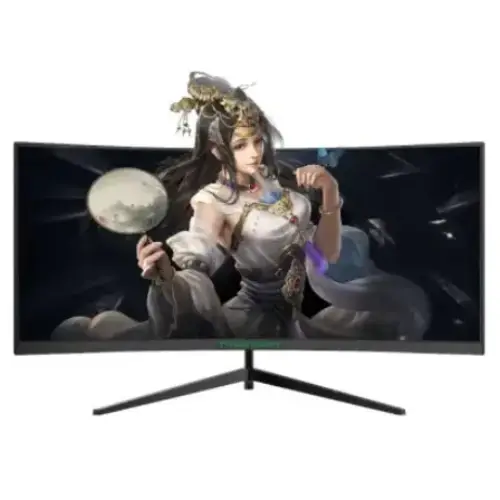
Exact model overview
Titan Army C30SK PRO is an ultrawide curved monitor with a 29.5-inch viewable panel, 21:9 aspect ratio and 2560 × 1080 WFHD resolution. Titan Army’s official product library identifies the C30SK PRO, while the available model manual lists a VA panel, 1800R curve, 200Hz maximum refresh, 3000:1 contrast, 12V/4A power and physical dimensions. Secondary specifications report 250 cd/m² brightness, 176° viewing angles and FreeSync. Sources disagree on detailed port count and warranty period, so those details are called out for verification rather than treated as final.
29.5-inch ultrawide display
The panel is marketed as a 30-inch monitor, with 29.5 inches commonly reported as the viewable diagonal. Its 21:9 aspect ratio and 2560 × 1080 resolution provide a wider desktop than standard 16:9 Full HD. The format can place two application windows side by side and expand horizontal game view where supported. Vertical resolution remains 1080 pixels, so this is WFHD rather than 1440p QHD. Check game and video compatibility with ultrawide aspect ratios before buying.
1800R curved VA panel
The C30SK PRO uses a VA panel with 1800R curvature according to the available model documentation and specification references. The curved shape brings the outer edges toward the viewer and can create a more enveloping view across a wide screen. VA panels commonly provide stronger dark-scene contrast than many IPS panels; the listed typical contrast is 3000:1. The curvature and panel can be less suitable for users who prefer a flat screen or need stable geometry for technical drawing. Sit centered to view the curve evenly.
200Hz refresh rate
The model manual lists a maximum refresh of 200Hz at 2560 × 1080. A high refresh can make motion look smoother when a compatible computer produces enough frames. Select the native WFHD resolution and choose an available refresh in the operating system. Actual input limits depend on the exact port layout and cable, and those details conflict across third-party product sheets for this model. Confirm the delivered unit’s port labels and manual before planning for 200Hz through a specific connector.
Ultrawide gaming and PC requirements
The 21:9 panel may provide a wider field of view in games that support ultrawide output, but some titles use black bars, crop the image or restrict competitive aspect ratios. The graphics card must render 2560 × 1080 frames to take advantage of the high refresh. Performance depends on GPU, CPU, game engine and detail settings. A monitor’s 200Hz capability does not mean every game will run at 200 frames per second. Check the games you play and the PC’s output compatibility before purchase.
Response time and motion claims
A secondary product sheet lists a 4ms response figure, while some Bangladesh product listings advertise 1ms without clearly identifying the test method. Those claims are not interchangeable and were not resolved by the available model manual. Response time differs from input latency and refresh rate. VA pixel transitions can vary with the transition and overdrive setting. Treat the 1ms figure as an unverified retailer claim; use the monitor’s actual OSD settings and judge moving scenes for smearing or overshoot.
Brightness, contrast and color
Available specifications list 250 cd/m² brightness, 3000:1 contrast and 16.7 million colors. These figures should be checked against the exact delivered revision because the official product page does not expose a searchable full datasheet. Some secondary listings disagree on color gamut, reporting different sRGB percentages. Therefore, this content does not state a precise gamut percentage as confirmed. Set brightness for the room and calibrate the screen for color-sensitive work. Do not treat contrast ratio or gamut as a unit calibration guarantee.
FreeSync and variable refresh
FreeSync support is reported by product specifications for the C30SK PRO. When enabled on a compatible GPU and supported input, variable refresh can coordinate display updates with changing frame output and reduce tearing in appropriate conditions. It does not raise frame rate or remove all stutter. Compatibility depends on the graphics card, driver, selected connector and refresh mode. A Bangladesh listing describes adaptive sync as DisplayPort-only; confirm this limit in the exact manual before relying on FreeSync through HDMI.
Ports and source compatibility
Port information is inconsistent across available listings: some describe two HDMI 2.0 and two DisplayPort 1.2 inputs, while another specification database reports three HDMI inputs and one DisplayPort. Do not rely on the catalog’s previous connector counts until the delivered unit or manufacturer manual confirms them. The C30SK PRO has been listed with audio output, but connector types and refresh limits can vary by revision or market. Inspect rear-panel labels, check the included manual and verify the 200Hz mode for the intended input.
Audio and speakers
A product listing reports an audio output, while available C30SK PRO specifications do not consistently confirm integrated speakers. Plan to use external speakers or headphones unless the exact delivered manual states otherwise. If audio is sent over HDMI or DisplayPort, select the monitor or source device’s correct playback endpoint and connect suitable audio equipment. An audio-out jack is not a microphone input. Confirm the physical connector and box contents with the seller before purchase.
Stand, desk placement and wall mounting
The available manual gives dimensions of approximately 706.8 × 408.9 × 188.5mm with the base and describes a standard base; a specification database reports only limited forward/back tilt. The precise ergonomic range should be checked in the delivered guide. Some retailer listings say the monitor can be wall mounted and quote 75 × 75mm, but the available manual excerpt does not independently confirm the VESA pattern. Verify mount spacing, screw size and load rating before buying an arm. Leave room for the curved screen and its cables.
Dimensions and weight
The model manual lists 706.8 × 321.2 × 93.7mm without the stand and 706.8 × 408.9 × 188.5mm with it. It gives a display weight of about 4.46kg without the stand and 6.3kg with the stand. A secondary specification database reports a different assembled weight and package weight, so use the actual carton and manual for shipping or mount planning. Measure the desk width and depth, account for the wide stand footprint, and preserve rear clearance for the curve and connectors.
Power and energy use
The C30SK PRO manual lists a 12V, 4A supply, 48W operating consumption, standby below 0.5W and off-state consumption below 0.3W. Another specification database gives different typical and maximum power figures, so verify the adapter label and regional documentation for the delivered unit. Use the supplied power equipment and a suitable grounded outlet. Keep ventilation clear and disconnect power before moving or cleaning the monitor. Do not substitute an adapter just because the connector fits.
Picture modes and backlight effects
Third-party specifications mention FreeSync, low-blue-light control, multiple scene modes, overdrive and rear red backlighting. The precise menu names and availability have not been confirmed through the official product page’s searchable text. If these controls are present, use game presets as starting points and adjust them to the title. Color or overdrive enhancements can affect image accuracy and produce artifacts. Backlight effects are decorative and do not improve the image or frame rate. Verify the delivered OSD and manual before advertising a specific mode as guaranteed.
Advantages and practical trade-offs
The C30SK PRO combines a 21:9 ultrawide layout, 1800R VA curvature, WFHD resolution, 200Hz maximum refresh and a listed 3000:1 contrast ratio. The wider workspace and curved screen can suit compatible games and multitasking. Trade-offs include only 1080 vertical pixels, possible game compatibility limits, unverified response-time claims, and conflicting port and VESA information. The 200Hz experience depends on a suitable computer and confirmed input timing. Review the exact unit details before choosing cables, a wall mount or warranty expectations.
Bangladesh warranty and seller terms
The official Titan Army product page identifies the model but does not confirm a Bangladesh serial’s warranty or BiponiBD’s current selling terms. Warranty duration differs across seller and regional references: available listings show both 24- and 36-month claims. The existing catalog says three years; verify that claim with the BiponiBD seller and authorized service channel for the actual serial. Ask who handles service, when coverage begins, what panel defects qualify and whether the invoice is required. Check live price, stock, delivery and returns at checkout.
Setup and troubleshooting
Connect the supplied power adapter and a confirmed compatible HDMI or DisplayPort cable. Select 2560 × 1080 and choose a refresh supported by the exact input; use the manual to confirm 200Hz availability. If 200Hz is missing, check the port, cable, graphics output, driver and monitor menu. For tearing, enable FreeSync only if the chosen source/input supports it. If there is no image, select the correct input and reseat the video cable. Use external audio equipment unless speakers are confirmed on the delivered model.
Who should consider this monitor
The C30SK PRO can suit a PC gamer who prefers a wide curved screen and has games and hardware that support 21:9 at 2560 × 1080. It may also help users who want extra horizontal room for side-by-side windows. Buyers needing sharper vertical detail, a verified USB hub, guaranteed integrated speakers, precise VESA compatibility or a confirmed Bangladesh warranty should compare models or resolve those details with the seller first. Check desk space and the exact connector layout before choosing.
Specification summary
Titan Army C30SK PRO is commonly specified as a marketed 30-inch (about 29.5-inch viewable), 21:9 1800R curved VA monitor with 2560 × 1080 WFHD resolution, 200Hz refresh, 250 cd/m² brightness and 3000:1 contrast. The manual lists 12V/4A power, 48W operating consumption, and 706.8 × 408.9 × 188.5mm with stand. FreeSync, audio out and 75 × 75mm wall mounting appear in reseller sources, but detailed ports and warranty conflict between references. Confirm them against the delivered unit and manual.