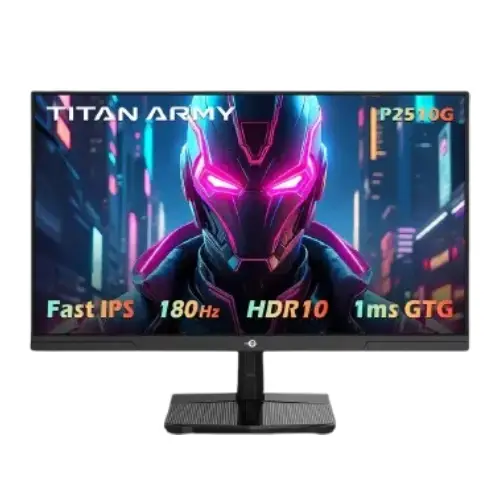
Titan Army P2510G2 24.5-inch Full HD 200Hz Fast IPS Gaming Monitor
The Titan Army P2510G2 is a 24.5-inch class flat gaming monitor built around a Full HD Fast IPS panel. It combines 1920 × 1080 resolution, a 200Hz maximum refresh rate, Adaptive-Sync and a 1ms overdrive response-time claim. The compact screen size can suit a desk where fast motion and a relatively small footprint matter. It can also serve for everyday browsing, study, office work and video, although its resolution and adjustability should be considered against the way you use a monitor.
This description is for the exact P2510G2 model. Titan Army also sells similarly named P2510G and P2510S products with different refresh rates, resolutions or feature sets. Check the model label on the box and invoice before purchase. The product name, specifications and images should all identify P2510G2; features from a similarly named model should not be assumed to apply.
24.5-inch Full HD Fast IPS display
The P2510G2 uses a 24.5-inch Fast IPS panel with a 16:9 aspect ratio and a native resolution of 1920 × 1080 pixels. Full HD is a practical fit for a 24.5-inch gaming screen: it provides a familiar desktop workspace and allows many mid-range graphics cards to target higher frame rates than they would at QHD. The trade-off is that it shows less fine detail and less workspace than a 2560 × 1440 monitor. Text, games and video are rendered at the display's native pixel grid, so this is not a 1440p or 4K screen.
Fast IPS is designed to combine broad viewing angles with faster pixel transitions than many conventional office displays. Titan Army's regional specification lists 178-degree horizontal and vertical viewing angles, a typical 1000:1 contrast ratio, 350-nit typical brightness and support for 16.7 million colours. Those figures describe the panel specification; they are not a promise of uniform brightness, measured colour accuracy or identical results on every unit. The matte display surface helps manage ordinary reflections, but strong light sources can still be visible.
Colour-gamut claims differ between regional listings. For that reason, this page does not promise a 99% sRGB result. Treat the monitor as a general-use gaming display unless independent measurement for the exact regional unit is available. If your work depends on colour matching for print, photography or video grading, look for a verified gamut measurement, factory calibration information and a suitable calibration workflow before choosing it.
200Hz refresh and motion response
The P2510G2 supports up to 200Hz over DisplayPort 1.4 and HDMI 2.0 according to the model-specific specification published by Links International. A 200Hz setting can refresh the image more often than a 60Hz display, so supported desktop movement and high-frame-rate games can look smoother. The monitor does not create extra frames: the PC, graphics card, game settings, selected resolution, cable and connection must all produce and transmit the desired signal. Set the refresh rate in the operating system or graphics control panel after connecting the display.
The quoted 1ms figure is an overdrive-mode response-time specification. The manufacturer-distributor specification also lists a typical 5.8ms GtG response without that fastest setting. Response-time figures depend on the measurement method and display mode; 1ms should not be interpreted as a guarantee that every pixel transition is instantaneous or free of overshoot. Use the on-screen overdrive setting that gives acceptable motion without distracting inverse ghosting.
Adaptive-Sync is intended to coordinate the display refresh with compatible graphics output to reduce tearing and uneven motion within the supported range. The product source does not establish that this exact unit is NVIDIA G-SYNC certified, so this listing does not claim G-SYNC certification. Compatibility and available variable-refresh range can depend on the GPU, driver, cable, port and settings. Verify the behaviour with your own computer if adaptive refresh is a purchase requirement.
HDR, picture modes and eye-comfort functions
The product specification describes HDR capability as HDR400-equivalent or HDR400-class, while another listing names HDR10 support. These labels do not establish VESA DisplayHDR certification or high-end HDR performance. The stated 350-nit typical SDR brightness and 1000:1 contrast ratio are more modest than the peak brightness and local-dimming systems used by many premium HDR screens. Consider HDR support a signal and picture-mode feature, not a promise of deep blacks or a cinematic HDR experience.
Listed functions include DC dimming, flicker-free operation, low-blue-light support, overdrive, dynamic contrast (DCR), scene modes and FPS/RTS picture presets. These are user-selectable monitor settings, not medical protection. Choose a comfortable brightness and viewing distance, and use breaks and room lighting appropriate to your work. Picture presets can change brightness, contrast and colour; review them before relying on colour-sensitive work.
Connections, audio and device compatibility
Available inputs are one HDMI 2.0 port and one DisplayPort 1.4 port. The P2510G2 also provides an audio output jack. The panel has no built-in speakers according to the model-specific specification. Connect headphones or external speakers to an appropriate audio source and confirm whether audio is passed to the monitor over your chosen connection. No USB hub, USB-C input, KVM function or integrated microphone is listed for this model.
HDMI 2.0 and DisplayPort 1.4 are not interchangeable with every computer's capabilities. Confirm that your graphics card or laptop can output 1920 × 1080 at 200Hz through the port you plan to use, and use a suitable cable. If a laptop offers only HDMI with a lower supported refresh rate, the monitor will operate at the rate negotiated by that system. A USB-C-to-video adapter must support the needed bandwidth and refresh mode as well.
Stand, mounting and desk setup
The included stand supports tilt adjustment from about -5 to +20 degrees. Height adjustment, swivel and pivot are not listed. If you need the screen at a specific eye height, you may need a riser or a compatible monitor arm. A 100 × 100mm VESA mounting pattern is listed. Check the mount's VESA pattern, load rating, screws and clearance before installation, and follow the panel's mounting instructions.
Approximate dimensions with the stand are 557.7 × 218.5 × 422.6mm (width × depth × height); dimensions without the stand are 557.7 × 58 × 330.6mm. The listed monitor weight is about 3.2kg, and package weight is about 3.8kg. Leave enough desk depth for the base and cables, and check the package contents before disposing of the packaging. The cited regional listing names the display, stand stem and base, cable tie, HDMI cable, power adapter and user manual; local bundle contents may vary.
Power and practical ownership
The product specification lists a 12V, 3A DC power input, typical consumption of 27W, maximum consumption of 42W, standby below 0.5W and off-mode below 0.3W. Use the supplied compatible adapter and confirm the electrical label on the Bangladesh unit. Do not substitute a power adapter based only on connector fit; voltage, polarity and current rating must match the product requirements.
We could verify a Bangladesh retailer listing for the P2510G2 at ৳19,800 during this review. This is an external retailer observation, not a BiponiBD offer, and price or stock may change. The reviewed local listing did not establish a Bangladesh manufacturer warranty term. Ask the seller to state the warranty provider, duration, service location, dead-pixel policy and required proof of purchase in writing before ordering. Do not assume a warranty duration from another country or another Titan Army model.
Who should consider the P2510G2?
Consider this model if you want a 24.5-inch Full HD display with a high refresh ceiling, Fast IPS viewing angles, Adaptive-Sync and both HDMI and DisplayPort connectivity. It may suit fast-paced games when the computer can provide high frame rates, while the FHD panel also serves common office and entertainment tasks. The compact format can be useful on a smaller desk or as one screen in a multi-monitor setup.
Compare alternatives if you need a higher-resolution workspace, a height-adjustable stand, integrated speakers, USB-C docking, a USB hub, independently verified colour accuracy, or a documented local warranty. A 200Hz display is most useful when the connected system can render a high frame rate. For slower hardware or primarily document-focused work, a lower-refresh QHD monitor may offer more workspace at the same desk distance.
Key features
- 24.5-inch class Fast IPS panel
- Full HD 1920 × 1080 native resolution and 16:9 aspect ratio
- Up to 200Hz over DisplayPort 1.4 and HDMI 2.0
- 1ms overdrive response claim; typical GtG also listed as 5.8ms
- Adaptive-Sync support
- 350-nit typical brightness and 1000:1 typical contrast
- 178° horizontal and vertical viewing angles
- HDR10 signal support / HDR400-class claim; certification not verified
- One HDMI 2.0, one DisplayPort 1.4 and audio out
- Flicker-free, DC dimming and low-blue-light functions listed
- Tilt stand and 100 × 100mm VESA mount
- No built-in speakers listed; local warranty must be confirmed with seller
Advantages
- 200Hz maximum refresh can provide smoother motion when the PC and connection support it.
- Fast IPS panel and wide viewing angles suit gaming and shared viewing.
- Both HDMI 2.0 and DisplayPort 1.4 are available, and each is listed for 200Hz operation.
- Adaptive-Sync support can help reduce tearing with compatible hardware and settings.
- 100 × 100mm VESA mounting provides an alternative to the included tilt-only stand.
Limitations to consider
- Full HD provides less detail and desktop space than QHD at a similar screen size.
- The stand tilts but does not list height, swivel or pivot adjustment.
- No built-in speakers, USB hub, USB-C or KVM are listed.
- HDR400-class wording does not by itself verify certification or premium HDR contrast.
- Bangladesh warranty duration, service coverage and dead-pixel policy need seller confirmation.
Frequently asked questions
What are the size and resolution?
The P2510G2 is a 24.5-inch class Fast IPS monitor with native Full HD resolution of 1920 × 1080 and a 16:9 aspect ratio.
Does it support 200Hz?
Yes. The model-specific specification lists up to 200Hz over both DisplayPort 1.4 and HDMI 2.0. Your PC, graphics output, cable and selected mode must also support that signal.
What does 1ms response time mean?
The 1ms figure refers to the overdrive response claim. A typical GtG figure of 5.8ms is also listed. Actual transitions vary with settings and measurement method, so choose an overdrive mode that avoids distracting overshoot.
Does it support G-SYNC?
Adaptive-Sync is listed. The sources reviewed do not confirm NVIDIA G-SYNC certification for this exact model. Check GPU and driver compatibility if certified G-SYNC support is essential.
Does it have speakers?
No built-in speakers are listed. The monitor has an audio output jack; use headphones or external speakers and confirm audio routing with your computer or console.
What ports are included?
One HDMI 2.0, one DisplayPort 1.4 and one audio output are listed. No USB-C or USB hub is listed.
Can it be mounted on a monitor arm?
A 100 × 100mm VESA pattern is listed. Confirm that the arm, screws and load rating match the monitor and follow the installation instructions.
What warranty applies in Bangladesh?
The reviewed sources did not confirm a Bangladesh warranty term for this exact unit. Ask the seller for the warranty provider, duration, service location and dead-pixel conditions before purchase.
What is the Bangladesh price?
A Bangladesh retailer listed it for ৳19,800 when checked. That observation is not a BiponiBD offer; confirm current price and stock with the seller.
Before ordering: confirm the exact P2510G2 model, 200Hz output support on your device and port, package contents, local warranty provider and current stock.